How the Google Guarantee Program Works for Local Businesses


Google has launched a Google Guarantee program targeted towards local businesses in the Home Services segment. This affects local businesses that offer services where they need to enter the customer’s home to render the service offering. Examples of such businesses being, plumbers, locksmiths, handymen, etc.

While this program is currently in beta and applicable only to a few cities, It’s important to be aware about how this program works since it’s something that could roll out to more verticals and locations in the future. The impact it would have on local businesses would be phenomenal.

The criteria seems to be quite strict to get accepted but once you’re in, you’re bound to get a lot more leads than anyone else who’d just be doing the regular Google Ads.

This Google Guarantee program for Home Service Businesses is still being tested out at this stage and from the signs of it so far, it seems like they’re currently looking to expand to other locations.So do keep a watch out, especially if you run a local business or manage such clients in any of the selected cities.

If you liked the video, do consider subscribing to our channel.

Transcript – 

Today, I want to talk about something interesting. Google has come up with this new advertising program which will affect a lot of local businesses. And that could change the way local businesses have to think about advertising. Now, the traditional way that you would go about advertising for your local business like a plumbing, locksmith and other businesses is you would go about AdWords.

But now, Google is coming up with something called Home Service Ads or it’s called Google Guaranteed Program. It’s currently in beta and it affects only a few cities but it’s very interesting and can change the whole dynamics of how people in the home services space, at least for now, will be affected.

So, let me walk you through some of the features and how they’re going to show the ads and may be you will get a better idea and then we can debate on what we should be thinking about if you are a local business right now.

So, as you can see this is the Google Home Service Ads page. Here they talk about okay finding customers when they need you the most, attracting you customers, built trust online, quality leads without a legwork. This is all part of the AdWords program so that’s to be noted. This is an advertising program and it’s already in beta and it’s already launched.

As you can see out here, I have searched for “locksmith San Francisco”. Now it’s interesting to note that you can see the “Google Guarantee” symbol out here. Now this is new and bound to attract a lot more clicks just by virtue of having the Google Guaranteed logo.

Now when I click on a listing out here… what happens? You come to this page saying – find the right locksmith for the job. And then now not only you get a list of all the other locksmiths you also get the “Google Guarantee”. Now, what does the Google Guarantee say? This pro is backed by the Google Guarantee which means they’re licensed, insured and pre-screened. Any job you book with them is guaranteed to be done right or your money back.

Now that’s interesting and they do background checks, whether you are insured, whether you have a license. So, essentially to be a part of this Google Guaranteed Program, you need to pass Google’s criteria. They look at your ratings, reviews, your background check… It’s super interesting.

And how it works is, you as a customer would potentially “send requests” to one or more people. And then, I am guessing Google would charge the advertiser based on the lead. And if you look through the Google Guaranteed Program, what they say is.. “You as a customer can activate the Google Guarantee and then you can submit the claim if you are not happy. And what Google does is that they will cover you with a guarantee up to $2000.

Now that’s very interesting.. How it will work, it’s still in beta so we are not sure and it’s limited to a very few categories of businesses.

Right now as you can say it’s limited to the plumber, house cleaner, locksmith, handyman, contractor, electrician, general contractors, painter, garage door pro, heating, ventilation, air conditioning and some other categories. And it’s only limited to these select few cities San Diego, Sacramento, Stockton and San Francisco Bay Area. Verticals may vary by location.

So, now what’s interesting is that Google is constantly evolving. They’re constantly looking at ways in which to make their end customers happy. Now, if you are a customer looking for locksmith or a handyman.. You are typically going to search for Google or there are other apps in various countries where you can find such handymen. But I am thinking Google wants to be a replacement in that space. And how they’re trying to build USP around it is, to not only be the source of leads but they’re also giving you a guarantee.

Now, I think that is going to attract lot more users in that space. So, as a local business, I think how you can be prepared if you fit in to one of these verticals is..In Google, if you look through their criteria they have, they will go to background checks, they will go to ratings and reviews. You need to have the appropriate licenses with appropriate authorities.

So, you need to be prepared from that end. And if you don’t have an online presence, if you don’t have good enough reviews, I think you got to start focusing on them right away. You need a web presence essentially. So, you do need to start thinking about those things.

There is not too much information available right now at this stage, so there is only so much I can hypothesize. Well all I can say is that if we have to think I think that Google will roll this out may be into more verticals and into more locations, if it works.

It’s been in beta for the last six months and apparently from the reviews that I have read, the vendors who have got a Google Guaranteed listing have got about 1800% growth in leads. As compared to other vendors who are just advertising normally. So I think it could be phenomenally impactful in terms of how much effect it will have on any one’s business.

So I think you definitely do need to research and look this up and if I do find out more information, I will post about it in future videos. So yeah just keep a watch out for “Google Guaranteed Home Service Ads segment”.

The following two tabs change content below.

Avatar

Sameer Panjwani

Sameer Panjwani is the CEO & Founder of Mondovo.com, an online marketing toolset that helps you track your rankings, monitor your site stats and research your competitors’. A man of many talents, Sameer occasionally writes about social media marketing, content marketing and SEO. In his free time, he loves reading about the latest trends in SEO as well as spending time with his two little daughters.

Avatar

Latest posts by Sameer Panjwani (see all)

Related Posts

Source

Server Management Company


Server Management Company2020-05-22T14:01:33+05:30Server Management Services Who knows Server better than ADMINZ? We keep your servers optimized and running at all times. Yes, that is what we do. And a lot more for just $25/hour!Learn MorePurchase HoursServerAdminz logoWeb Hosting Support You are in safe hands Focus on building your web hosting business while our team of Adminz handle your Helpdesk Support.Select Your PlanSelect Your TeamServerAdminz logoEnterprise Cloud Services We Know Your Cloud! Cloud computing is here. Are your cloud ready? Get started today to leverage the power of public, private and hybrid clouds.Get A QuoteInspire MeServerAdminz logoInfrastructure Management Services Smart, Secure & Stable Our infrastructure services help enterprises design, build, and manage IT infrastructure in an agile manner that allows for better integration with the existing operations.Get A QuoteInspire MeServerAdminz logoDedicated NOC Support Your Network, Our Priority. Our 24/7 NOC team monitor your servers, network and services proactively to ensure that your business is online at all times.Get A QuoteInspire MeServerAdminz logoEnterprise Security Services Get Secured with ServerAdminz! Our Enterprise Security Services is designed to deal with all types of security threats like hacking, spamming, phishing etc.Get A QuoteSelect Your PlanServerAdminz logo

A Premium Server Management Company specialized in 24/7 Outsourced Web Hosting Support, Outsourced server support, Linux, Windows, Game, cPanel Server Administration & Monitoring, Helpdesk Support, Remote Infrastructure Management, NOC support, Cloud Support and Enterprise Security Services. With over 11 years of experience in working with major Data Centers, Webhosting and IT companies with 150+ Experienced System Administrators, ServerAdminz continues to manage, monitor and provide solutions to more than 55,000 servers with 1000+ active customers from 85+ countries

web hosting support

We provide 24/7 seamless outsourced web hosting support for hosting providers across the sphere.

infrastructure-management-services

ServerAdminz’s infrastructure management services provides a 360-degree support delivering transparent and quality service.

Server Management - Security Services

ServerAdminz offer quality server management services for Unix/Linux/Windows servers at affordable prices.

server-management - cloud-services

ServerAdminz offers comprehensive cloud management and cloud support services for the growth and transformation of the clients we serve.

Server Management - NOC Services

Outsourced NOC support services from ServerAdminz offers unmatched technical support and expertise to ensure safety, security, consistency and quality.

Server Management - Application Development

Our Application Support & Maintenance Service ensures your business applications are managed and operated seamlessly to provide the secure and high-performance platform.

Server Management - Application Development

ServerAdminz, are a renowned firm offering full stack AWS management services. We cater comprehensive solutions to the multiple challenges in the business by saving your cost and accomplishing 100% security.

Server Management - Application Development

Let your servers run on any cPanel supported OS, we ServerAdminz are available 24/7 to provide you top-notch cPanel server management services.

Server Management - Application Development

ServerAdminz is a prominent game server management company offering multiple level game support services across numerous platforms.

Server Management - Application Development

By choosing ServerAdminz, you can benefit from our comprehensive outsourced Technical Support to enhance customer loyalty through meeting an assortment of client needs.

Server Management - Application Development

Considering the growing demands in the hosting industry, ServerAdminz offers simple, secure and reliable Plesk server management services for Windows/Linux systems.

0K+

Servers Handled

0M+

Tickets Resolved

0+

Customers

0+

Countries Served

0+

Years in Industry

International Awards

Pricing at a glance!

Dedicated Team

$59900monthly

  • Level 1 Technician
  • $99900monthly

  • Level 2 Technician
  • $119900monthly

  • Level 3 Technician

Semi Dedicated Team

$39900monthly

  • Level 1 Technician
  • $69900monthly

  • Level 2 Technician
  • $89900monthly

  • Level 3 Technician

Shared Team

$29900monthly

  • Level 1 Technician
  • $49900monthly

  • Level 2 Technician
  • $69900monthly

  • Level 3 Technician

Unlimited Ticket Plan

$9900monthly

  • Per Server
  • $4900monthly

  • Per VPS
  • $29900monthly

  • Per Node

Unlimited Server Plan

$400/ticket

  • 100 Ticket Pack
  • $300/ticket

  • 500 Ticket Pack
  • $200/ticket

  • 1000 Ticket Pack

Choose the best among the best

Hire your admin according to your requirements and skill sets

Know More

Get the best for your best

Get the ideal plan for your customized budget

Know More

Get a call for the best

Request a call back from ServerAdminz, the leading server management company on your convenient time

Know More

ServerAdminz’s web hosting support services can suggest you for most complicated server issues quickly and reliably over phone or chat.

Admins who are assigned for a dedicated client will have their own skype logins, and a skype room will be created to facilitate discussion and common chat.

ServerAdminz Privilege Club is our way of expressing gratitude. As a member,you’ll get exclusive privileges and special offers.

We will take care of your clients as you would and they will never know that the web hosting support is from ServerAdminz.

We will assign a dedicated online number to your team (based on your region) so that you can get in touch with your team using mobiles or landlines.

If for any reason, you are not satisfied with quality of support, simply contact us to get a complete refund. We are proud of our high quality support.

Customers will always receive speedy technical assistance from a group of highly skilled individuals.

An expertised dedicated #NOC team will be monitoring the infrastructure 24/7/365 and will respond to all alerts in no-time which are enough to meet the competency.

With the vast experience in IT and network security we have setup a highly secured infrastructure using modern hardware and software applications.

People from all over the world are loving ServerAdminz and we thrive off their feedback. Our team strive to provide quality technical support and always try to raise our performance bar.

Since I’m a serveradminz.com customer for almost 1 year now, I wanted to write this review to share with you. I initially decided to use ServerAdminz for their white label helpdesk via WHMCS and now I use them for server management, server auditing, custom development, and any other IT related needs.

If you are looking for a managed Server provider you should try this company out. I am blown away by how fast they reply to my tickets and their willingness to resolve any issues that arise. They will begin by asking for you a document with all of your settings, i.e., control panel logins, software venders, any specific details they should know on how to better help you. The call this the KB (knowledgebase). Since I already had a box setup they scanned and provided some additional server hardening changes which they implemented for me. Again, I was mainly interested in the while label helpdesk support they offer to my customers.

Shaun Sweeney, Oana Host

This will describe a bit of my past experience with other companies in order to contrast and to credit ServerAdminz for being a superb server management company. Like anyone else would say, I regret why didn’t I try them out much earlier and saved all the hassles I’ve been through with other companies.

While I have a personal server with WiredTree, I also have a server somewhere else which is meant for small web hosting business. I’ve spent more than half a year to finally settle down with ServerAdminz, the superb server management company I called, that suits my expectations and deliver what they promised. They deserved a detailed review of mine. I have somewhat high expectations towards the server management company that I will work with, I can be very fussy at times to ensure everything is as perfect as possible. The three most important features that I would like from a server management company are: determination …

Shyuan, HostPride Network

Af
ter researching a few outsourced support providers, we came to the conclusion that ServerAdminz would be the right team for us. This conclusion was ultimately proven to be correct. Not only have ServerAdminz been professional in all of their handling with us, but they have been remarkably fast and persistent in making sure that an issue in resolved. If they do not know a solution, their techs go out of their way to research and work on issues for endless hours until it is resolved. You cannot get more for your money…

Samuel Lison, E Hosting Solutions

Server Adminz is incredibly effective! It’s been few years now that we are part of web insdustry and we have never seen a customer service such as Server Adminz!

They keep you tightly informed of your ticket status and they act very quickly!

I recommend Server Adminz to all those who wish to entrust their advanced server management to an outstanding team!

Jean-Philippe Charbonneau, Versatile Consultation

Had a huge server crash on Oct 28th 2014 after kernel security, bug fix, and enhancement update.
http://rhn.redhat.com/errata/RHSA-2014-1392.html

Leased an AMD 6 core server with dual terabyte drives from 1&1 a little over 3yrs ago and it was time for a new server.
Took over 48hrs for hardware deployment at 1&1 and I was down for the count. Discovered ServerAdminz listing on cpanel.net and man were they a lifesaver…

Dave Villiings, Air America

Why wait any more? 

Signup right now to avail the best server management services from ServerAdminz!

Source

Computer Basics Basic Troubleshooting Techniques

Lesson 19: Basic Troubleshooting Techniques

/en/computerbasics/creating-a-safe-workspace/content/

Troubleshooting

Do you know what to do if your screen goes blank? What if you can’t seem to close an application, or can’t hear any sound from your speakers? Whenever you have a problem with your computer, don’t panic! There are many basic troubleshooting techniques you can use to fix issues like this. In this lesson, we’ll show you some simple things to try when troubleshooting, as well as how to solve common problems you may encounter.

General tips to keep in mind

There are many different things that could cause a problem with your computer. No matter what’s causing the issue, troubleshooting will always be a process of trial and error—in some cases, you may need to use several different approaches before you can find a solution; other problems may be easy to fix. We recommend starting by using the following tips.

  • Write down your steps: Once you start troubleshooting, you may want to write down each step you take. This way, you’ll be able to remember exactly what you’ve done and can avoid repeating the same mistakes. If you end up asking other people for help, it will be much easier if they know exactly what you’ve tried already.
  • Take notes about error messages: If your computer gives you an error message, be sure to write down as much information as possible. You may be able to use this information later to find out if other people are having the same error.
  • Always check the cables: If you’re having trouble with a specific piece of computer hardware, such as your monitor or keyboard, an easy first step is to check all related cables to make sure they’re properly connected.
  • Restart the computer: When all else fails, restarting the computer is a good thing to try. This can solve a lot of basic issues you may experience with your computer.

Using the process of elimination

If you’re having an issue with your computer, you may be able to find out what’s wrong using the process of elimination. This means you’ll make a list of things that could be causing the problem and then test them out one by one to eliminate them. Once you’ve identified the source of your computer issue, it will be easier to find a solution.

Scenario:

Let’s say you’re trying to print out invitations for a birthday party, but the printer won’t print. You have some ideas about what could be causing this, so you go through them one by one to see if you can eliminate any possible causes.

First, you check the printer to see that it’s turned on and plugged in to the surge protector. It is, so that’s not the issue. Next, you check to make sure the printer’s ink cartridge still has ink and that there is paper loaded in the paper tray. Things look good in both cases, so you know the issue has nothing to do with ink or paper.

Now you want to make sure the printer and computer are communicating correctly. If you recently downloaded an update to your operating system, it might interfere with the printer. But you know there haven’t been any recent updates and the printer was working yesterday, so you’ll have to look elsewhere.

You check the printer’s USB cord and find that it’s not plugged in. You must have unplugged it accidentally when you plugged something else into the computer earlier. Once you plug in the USB cord, the printer starts working again. It looks like this printer issue is solved!

This is just one example of an issue you might encounter while using a computer. In the rest of this lesson, we’ll talk about other common computer problems and some ways to solve them.

Simple solutions to common problems

Most of the time, problems can be fixed using simple troubleshooting techniques, like closing and reopening the program. It’s important to try these simple solutions before resorting to more extreme measures. If the problem still isn’t fixed, you can try other troubleshooting techniques.

Problem: Power button will not start computer

  • Solution 1: If your computer does not start, begin by checking the power cord to confirm that it is plugged securely into the back of the computer case and the power outlet.
  • Solution 2: If it is plugged into an outlet, make sure it is a working outlet. To check your outlet, you can plug in another electrical device, such as a lamp.
  • Solution 3: If the computer is plugged in to a surge protector, verify that it is turned on. You may have to reset the surge protector by turning it off and then back on. You can also plug a lamp or other device into the surge protector to verify that it’s working correctly. resetting a surge protector
  • Solution 4: If you are using a laptop, the battery may not be charged. Plug the AC adapter into the wall, then try to turn on the laptop. If it still doesn’t start up, you may need to wait a few minutes and try again.

Problem: An application is running slowly

  • Solution 1: Close and reopen the application.
  • Solution 2: Update the application. To do this, click the Help menu and look for an option to check for Updates. If you don’t find this option, another idea is to run an online search for application updates. Checking for updates

Problem: An application is frozen

Sometimes an application may become stuck, or frozen. When this happens, you won’t be able to close the window or click any buttons within the application.

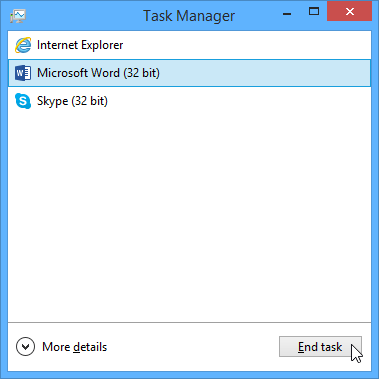
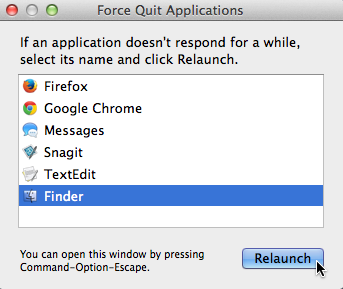
  • Solution 1: Force quit the application. On a PC, you can press (and hold) Ctrl+Alt+Delete (the Control, Alt, and Delete keys) on your keyboard to open the Task Manager. On a Mac, press and hold Command+Option+Esc. You can then select the unresponsive application and click End task (or Force Quit on a Mac) to close it. screenshot of Windows 8
  • Solution 2: Restart the computer. If you are unable to force quit an application, restarting your computer will close all open apps.

Problem: All programs on the computer run slowly

  • Solution 1: Run a virus scanner. You may have malware running in the background that is slowing things down.
  • Solution 2: Your computer may be running out of hard drive space. Try deleting any files or programs you don’t need.
  • Solution 3: If you’re using a PC, you can run Disk Defragmenter. To learn more about Disk Defragmenter, check out our lesson on Protecting Your Computer.

Problem: The computer is frozen

Sometimes your computer may become completely unresponsive, or frozen. When this happens, you won’t be able to click anywhere on the screen, open or close applications, or access shut-down options.

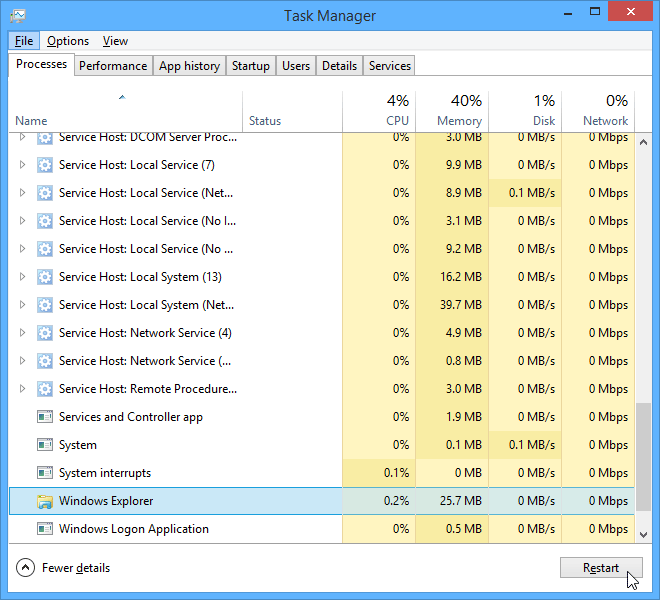
  • Solution 1 (Windows only): Restart Windows Explorer. To do this, press and hold Ctrl+Alt+Delete on your keyboard to open the Task Manager. Next, locate and select Windows Explorer from the Processes tab and click Restart. You may need to click More Details at the bottom of the window to see the Processes tab. screenshot of Windows 8
  • Solution 2 (Mac only): Restart Finder. To do this, press and hold Command+Option+Esc on your keyboard to open the Force Quit Applications dialog box. Next, locate and select Finder, then click Relaunch. screenshot of OS X
  • Solution 3: Press and hold the Power but
    ton. The Power button is usually located on the front or side of the computer, typically indicated by the power symbol. Press and hold the Power button for 5 to 10 seconds to force the computer to shut down.
  • Solution 4: If the computer still won’t shut down, you can unplug the power cable from the electrical outlet. If you’re using a laptop, you may be able to remove the battery to force the computer to turn off. Note: This solution should be your last resort after trying the other suggestions above.

Problem: The mouse or keyboard has stopped working

  • Solution 1: If you’re using a wired mouse or keyboard, make sure it’s correctly plugged into the computer.
  • Solution 2: If you’re using a wireless mouse or keyboard, make sure it’s turned on and that its batteries are charged.

Problem: The sound isn’t working

  • Solution 1: Check the volume level. Click the audio button in the top-right or bottom-right corner of the screen to make sure the sound is turned on and that the volume is up.
  • Solution 2: Check the audio player controls. Many audio and video players will have their own separate audio controls. Make sure the sound is turned on and that the volume is turned up in the player. screenshot of iTunes
  • Solution 3: Check the cables. Make sure external speakers are plugged in, turned on, and connected to the correct audio port or a USB port. If your computer has color-coded ports, the audio output port will usually be green.
  • Solution 4: Connect headphones to the computer to find out if you can hear sound through the headphones.

Problem: The screen is blank

  • Solution 1: The computer may be in Sleep mode. Click the mouse or press any key on the keyboard to wake it.
  • Solution 2: Make sure the monitor is plugged in and turned on.
  • Solution 3: Make sure the computer is plugged in and turned on.
  • Solution 4: If you’re using a desktop, make sure the monitor cable is properly connected to the computer tower and the monitor.

Solving more difficult problems

If you still haven’t found a solution to your problem, you may need to ask someone else for help. As an easy starting point, we’d recommend searching the Web. It’s possible that other users have had similar problems, and solutions to these problems are often posted online. Also, if you have a friend or family member who knows a lot about computers, they may be able to help you.

google screenshot

Keep in mind that most computer problems have simple solutions, although it may take some time to find them. For difficult problems, a more drastic solution may be required, like reformatting your hard drive or reinstalling your operating system. If you think you might need a solution like this, we recommend consulting a professional first. If you’re not a computer expert, it’s possible that attempting these solutions could make the situation worse.

/en/computerbasics/how-to-use-your-computers-builtin-help/content/

Source

Tools for Building Backlinks

WEBINAR:
On-Demand

Desktop-as-a-Service Designed for Any Cloud ? Nutanix Frame

Backlinks are links created on other sites that link to your site. As such, you don’t always know when they are created. In a previous article, “So You Want Backlinks,” guidelines were given on backlink building. When it comes time to build backlinks, you don’t have to do everything from scratch. Rather, you can analyze your site’s URLs, determine what backlinks already exist, and tap into existing best practices for link building, which improves your search engine optimization (SEO).

More importantly, a lot of bad practices were mentioned in the previous article. These were practices that can hurt your site including getting links from spammy sites, having broken links to your site, and more. Find these potential toxic backlinks on other sites can be easy if you have the right tool! In fact, there are a number of tools that can help you work with backlinks.

A Caution on Backlinks and Tools

In addition to helping you structure backlinks, they can also help you with suggestions on backlinks you should ask to be removed. Automated tools are not perfect. You should review any suggestions to remove (or even keep) backlinks. There are times when it might make sense to keep a link that is flagged as having an issue. There might also be times when a tool doesn’t catch that a link really isn’t appropriate.

There are tools that focus specifically on backlinking. There are also SEO tools that have sections focused on backlinking as part of a larger overall SEO approach. Both types of tools can be effective. The key benefit of the tools is to get a list of existing backlinks to your site or a page on your site as well as to get insights on the benefit or toxicity of each link. If the tool can help you with getting links removed, that can be a benefit as well.

You want to avoid tools that offer to build automatic backlinks for you.

The Backlinking Tools

The following are four tools that can be used to identify and manage backlinks. These are tools that have been identified as useful for backlink analysis. There is a brief description of each of these below.

  • SEMRush
  • AHrefs
  • Open Site Explorer
  • OpenLinkProfiler

Note that there are a multitude of other tools marketed for backlink analysis and building. Many of the tools suggested to me for this article included features for selling backlinks, building automated backlinks, and for tracking backlink trades. As such, they were dropped from this article. These are bad practices, and thus worth avoiding.

Backlink Tool 1: SemRush

SEMRush provides a multitude of tools including a Backlink Audit tool that will give you deep insights into the links coming to your site. You can configure it to look at backlinks in a number of ways as well see individual backlinks. In addition to providing data such as backlink types, domain distribution, top anchors, country sources, and a list of linking domains, SEMRush also provides a toxicity score for each backlink that lets you know the potential for negative impact.

Basic features of SEMRush can be used at no cost.


Figure 1: SemRush Backlink data for MSN.com

Backlink Tool 2: AHrefs

Ahrefs is another of the more popular SEO tools known for its backlink tools. Ahrefs provides competitive analysis, keyword research, backlink research. Within the backlink data, you can get information on the new and broken backlinks, referring domains, anchor tags, top referring content, and more.

Ahrefs is not a free tool, but they do provide a low-cost trial.


Figure 2: Ahref backlink data for HTMLGoodies.com

Backlink Tool 3: Open Site Explorer

Open Site Explorer is a part of the Moz Pro SEO tools. Like the previous two tools mentioned, Open Site Explorer provides tools to help you identify and optimize your backlink strategy. This includes showing backlinks to your site, providing spam scores, showing a spam score (similar to SEMRush’s toxicity score) for links, and more. Open Site Explorer helps you identify which of your pages are most valuable, which domains are best of those linking to your site, what text is being used to build the links, and more. It also provides linking opportunities and helps you to avoid penalties by showing you which links to clean up.

You can access a limited portion of Open Site Explorer’s functionality online. There is also a 30-day free trial. Otherwise, you need a subscription to Moz to continue to use the product.


Figure 3: Moz Open Site Explorer

Backlink Tool 4: OpenLinkProfiler

OpenLinkProfiler is a free online tool that can be used to do backlink analysis. You can go to the website as shown in Figure 4 and simply enter a site URL. Once you do, you’ll get a backlink analysis similar to what is shown in Figure 5.


Figure 4: OpenLinkProfiler page for entering a domain

As you can see in Figure 5, OpenLinkProfiler provides information on active links relative to the domain you entered. You can get anchor text, when the link was added as well as the industry and topic of some of the links. A Risk score similar to the toxicity and spam scores from other tools, can also be found to determine which links are potentially harmful. While SEOLink Profiler comes at no cost, to use some of the features, such as link notifications the exporting of a PDF report, you will need to set up a free account.


Figure 5: OpenLinkProfiler review of HTMLGoodies.com

Dealing with Bad Links

What do you do if you find bad backlinks on another site? There are generally two approaches that are taken. One is to ask that the link be removed. The other is to ask that the link be tagged with a ‘rel=nofollow’ tag. If a link already has a ‘rel=nofollow’ tag included, then no further action is really needed unless the site containing the link is really one you don’t want to be associated with.

Dealing with the removal of links to disavow them from your site is a process in itself that is worthy of its own article. In general, using a disavow tool should be a last resort for spammy backlinks. You can use the Google Search Console to disavow links. Additionally, most of the tools mentioned in this article not only show you how bad a backlink might be for your site, they generally include tools to help you disavow them as well. Look for an article on disavowing bad backlinks in the near future!

Source

10 of the most common computer problems with solutions

My Login Vault - Password Manager
In my line of work I get many calls about the below common problems and if I was to estimate I would say that at least 25% of them could be solved using the list below to troubleshoot the cause. Not only will this get you up and running quicker with a sense of achievement it will also save you the cost of a  technician coming out and charging you to just change a fuse for example. It could be that a cable has been accidentally pulled out or maybe your dog has chewed it all these things are worth checking before calling someone to take a look.

Just because your computer monitor won’t come on or your mouse won’t work does not mean that you have a virus or you need a new computer the solution could be much simpler. If you don’t find the solution here remember these are only very basic checks that all of us can forget to do before panicking about it been a more severe problem. It is not intended to be an advanced guide to computer problems but hopefully it will help before you decide what you need to do next.

error message common computer problems

Problem

fix common computer problemsPossible Solution/Cause

Computer will not startCheck all cables are plugged in and switches turned on.
Check monitor is turned on and plugged into the computer.
Change fuse in cable.Check extension if using one.
Try a different known working socket.
Change power lead.
Check no buttons or switches are stuck.
No sound coming from computerCheck that your speakers are on and plugged in
Check that the speaker is connected to the right port (Green to Green)
Check the volume is turned up
Check you don’t have sound muted (icon in taskbar)
Try plugging in ear phones to rule out broken speakers
Monitor screen blankCheck monitor is correctly connected
Check monitor is plugged in and turned on
Check connection to computer is not loose
Computer Boots but wont launch windowsCan you boot into safe mode? (F8 on start-up) if yes the problem is likely to be something software related rather than hardware.
Run malware, virus scans
If you can’t boot into safe mode try booting into your computers repair my computer mode to fix start-up issues
Try using system restore if you can boot to safe mode or recovery to restore to a previous date
Slow internetReboot your router and restart your computer (reboot router by unplugging and plugging back in after 5 minutes)
Check for malware and spyware infections.
Check there are no problems with your provider
Check other reasons for slow internet speeds here
Wireless connection droppingReboot both the computer and the router
Change the wireless channel
Move the router to a more central location
Extend your network using powerline adapters
Extend your wireless network with a Wireless N Range Extender
If your aerial is removable replace with a TP-Link TL-ANT2405C 2.4GHz 5dbi Indoor Omni-Directional Antenna or similar to increase range.
Mouse wont work or wont work correctlyEnsure mouse is connected correctly to the back of the computer.
If wireless change mouse batteries.
Ensure mouse is being picked up by receiver (likely a red button on bottom of mouse).
Check that receiver has not fallen out of range
Keyboard wont workCheck batteries in Keyboard
Check it is connected properly
Ensure it is being picked up by the receiver (red button on bottom)
No internet connection or Local onlyCheck all connections to router and that they are correctly plugged in
Check none of the cables are damaged
Restart router and restart computer
Check for red lights on the router (indicates there is a problem with the router)
Check all sockets have an ADSL filter connected
Change ADSL filters
Connect router to master phone socket
Check with service provider that your service is not disrupted
Try another router
Computer running very slow or sluggishCheck that no antivirus scans are running
Close some programs if running multiple programs
Malware and virus check
Low memory
Many more reasons with deeper explanations can be found at – Reasons for your computer running slow


Source

How to Get Backlinks 7 Tactics That Don’t Require New

Contents

Link building isn’t rocket science. There’s no secret club where only an elite few get taught how to build links. Anyone can do it. 

The fundamental process is as follows:

  1. Create something worthy of a link.
  2. Find people who might be interested in linking to you.
  3. Persuade those people to do precisely that.

The problem? Step #1 takes a lot of time, and skill, and knowledge of your industry.

But here’s the thing:

Most businesses, products, and services are already worthy of links.

You don’t have to spend countless hours creating an all-singing-all-dancing interactive infographic to get backlinks. You can build links using what you already have on your website and speed up the process—dramatically.

Want proof? Here’s a link we got to ahrefs.com without creating any new content:

ahrefs link

ahrefs link

In this post, you’ll learn seven link building tactics you can use without creating new content. Here are the link building tactics:

  1. Piggyback off competitors’ resource page links
  2. Get links from the companies with whom you have existing relationships
  3. Convert “unlinked mentions” to links
  4. Get listed on relevant best x in y lists
  5. Look for pages that mention multiple competitors… but not you
  6. Get forum links (yes, really)
  7. Steal links from less-deserving content (and businesses)

Here’s what a resource page looks like:

Example of a “resource page”. Note that this previously useful page no longer exists.

You can see that it does what it says on the tin—it lists and links to “resources.”

Getting links from resource pages like this is one of the oldest tactics in the book. But you can’t get resource page links unless you have a worthwhile resource to pitch, right? Right.

An important point here is that when we talk about resources in this context, we’re not necessarily talking about lengthy blog posts or interactive infographics.

Your business is a resource in itself.

To illustrate what I mean by that, take a closer look at the resource page above.

You’ll notice that it links out to a lot of useful companies homepages—printing companies, illustrators, etc. That’s because they all offer products or services that are useful for designers.

Here’s the process most SEO professionals use to find and land links from resource pages:

  1. Use Google search operators to find niche-relevant resource pages (e.g., intitle:fitness inurl:resources)
  2. Scrape them.
  3. Pursue the worthwhile ones.

This approach does work. But there are two problems:

Problem #1: Scraping Google is time-consuming and requires some degree of skill. You have to use tens or hundreds of search operators, scrape the results for all of them, then merge and dedupe your list in Excel or Google Sheets. That can take hours.

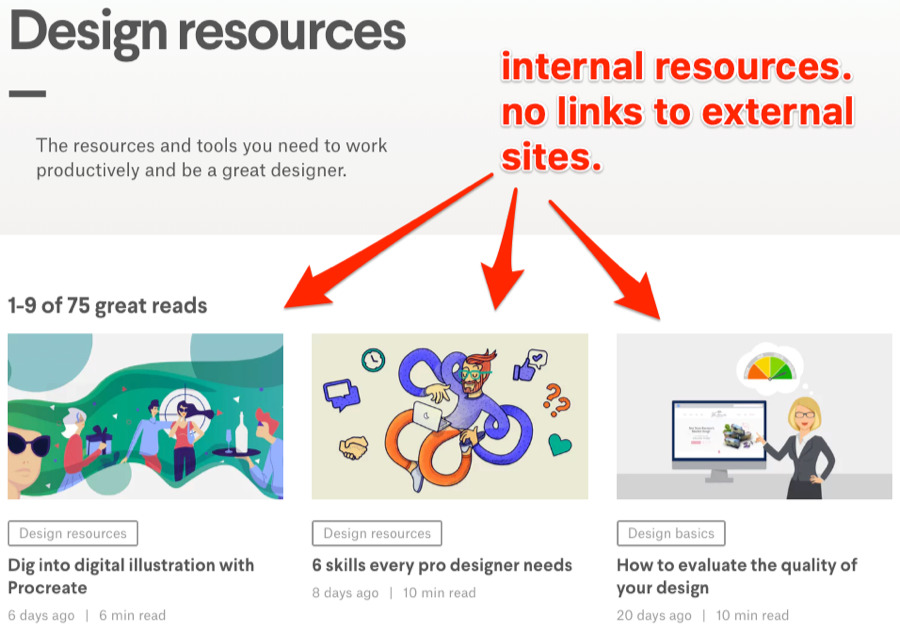
Problem #2: You almost always end up scraping a lot of irrelevant and junk pages, such as those that only link to internal resources like this one:

resources page junk

resources page junk

Those are no use to us. So what’s the solution?

Piggyback off your competitors’ resource page links. In other words, find the resource page links that your direct competitors have, then replicate them.

For example, let’s say we were trying to build links to discountstickerprinting.co.uk. One competitor might be vistaprint.co.uk.

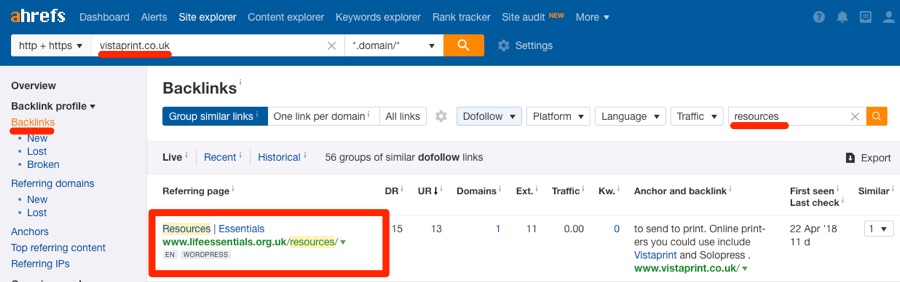
Paste that domain into Ahrefs’ Site Explorer. Then navigate to the Backlinks report and add a “Dofollow” filter.

Site Explorer > enter competing domain > Backlinks > add “dofollow” filter

Type “resources” into the search box. You should see something like this:

resources

resources

Most of the results are resource pages from which the competitor has links. So we can be sure that they’re relevant targets.

But don’t stop there.

If you find a resource page from which a competitor has a backlink, take a look at that page and see if there are any other similar businesses listed there. If there are, paste those into Site Explorer too, then rinse and repeat the process above to find even more resource pages.

Finally, reach out the owners of the resource pages and ask them to add your business.

But don’t just ask. Give them a compelling reason why they should spend time adding you to their page. Think about how having your business listed on that page would be valuable to their visitors.

Here are a few potential reasons:

  • Better than the competitor also listed on the page.
  • Local/family-run business (people love to support local businesses);
  • Specialize in a particular area (e.g., perhaps your competitor prints all manner of things, whereas you specialize in poster printing);
  • New or alternative option to a competing product or service.

Not sure how to find these folks’ email addresses or “pitch” them? Read this and this.

Learn more about resource page link building in this video:

Look at this page:

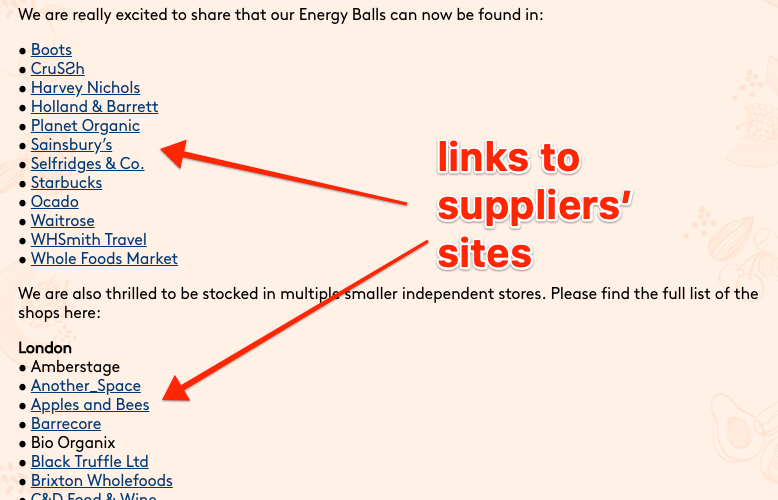
supplier links

supplier links

It’s from a vegetarians snacks brand. It lists and links to all of their stockists. These “suppliers” pages are quite common. So if you happen to stock or sell any third-party products, these are prime link targets.

But what if you don’t stock and sell other brands’ products?

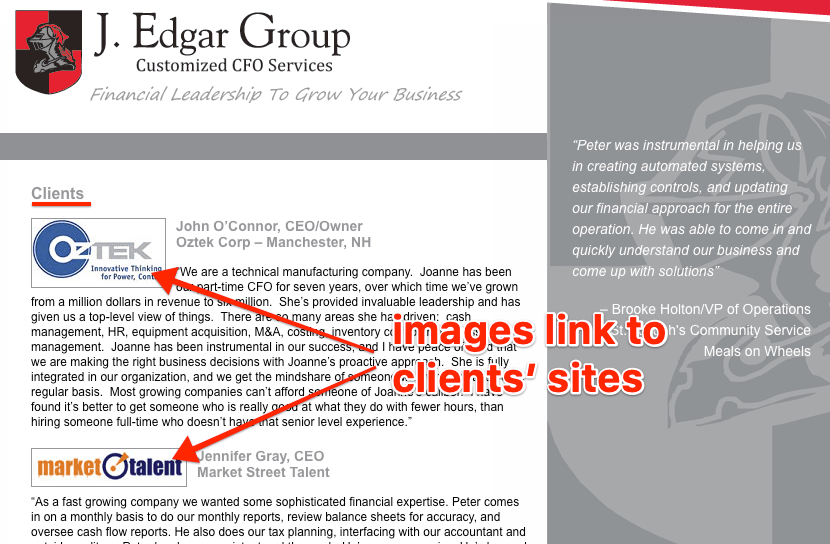
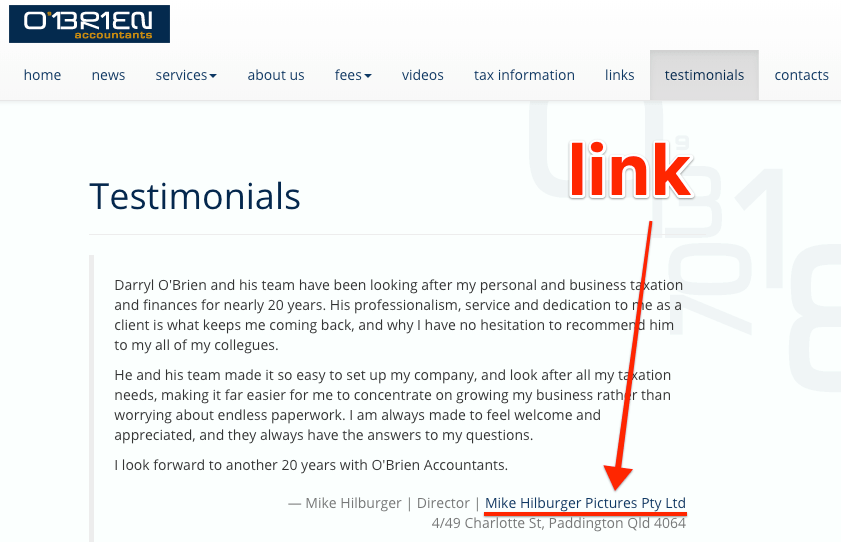
Simple. Look for similar pages from your “suppliers,” like this one that lists their clients/customers…

clients links

clients links

… or this one that features customer testimonials…

what our clients say link

what our clients say link

I’m not necessarily talking about suppliers of raw materials here. It could be any business that’s affiliated with your business: accountant, financial advisor, print or graphic design company, etc.

Sidenote.

You can find a good list of business types to considerhere.

So what’s the process for getting links from these people?

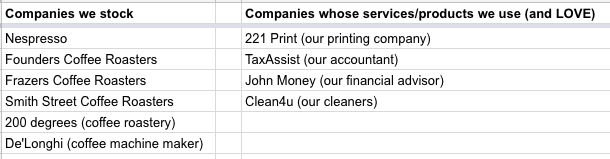
To start, you need to make two lists:

  1. Brands you stock (if applicable)
  2. Your suppliers—i.e., the businesses/services/products you use

Here’s what that would look like for a hypothetical coffee shop:
affiliated businesses

affiliated businesses

You then need to tackle each of these two lists independently.

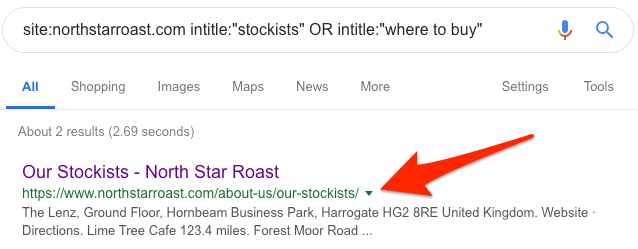
For stockists, search for them one-by-one in Google using the following operator: site:brand.com intitle:”stockists” OR intitle:”where to buy”

If they have a relevant page, you should see a result like this:
stockists

stockists

Sidenote.

It’s worth manually vetting the page before reaching out. Not all “stockists” pages link to their stockists. Some only list them.

For the businesses whose services and products you use, do the same thing but with this operator instead: site:supplier.com intitle:”our customers” OR intitle:”our clients”

Here’s an example of a relevant result:
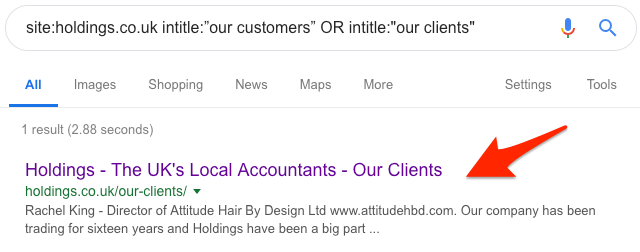
our clients

our clients

You can then reach out and request to be added to these pages.

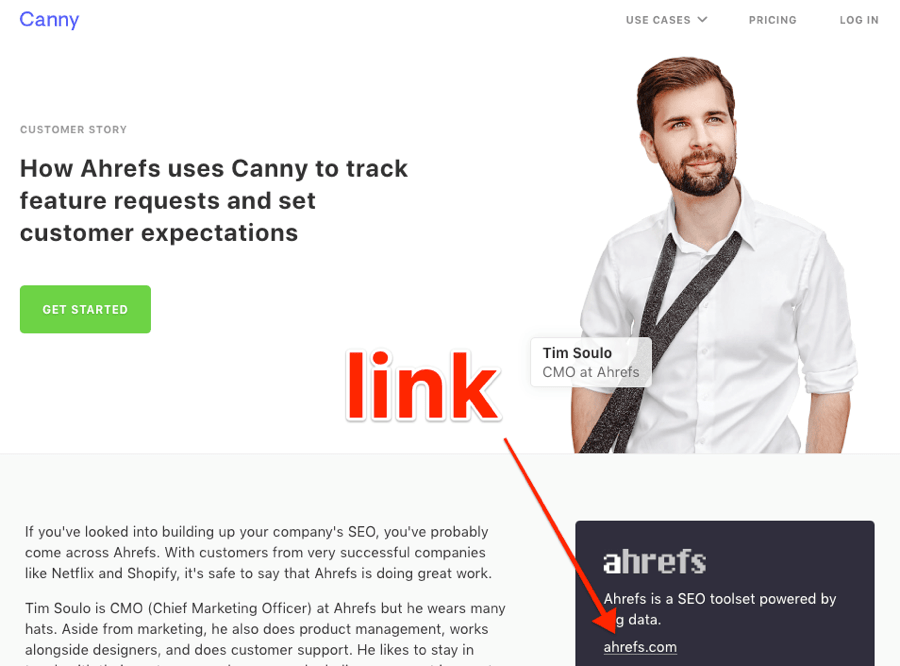
Not finding any such pages from the companies with whom you’re affiliated? Look for testimonials pages using site:supplier.com testimonial. If they have one, all you need to do is to get in touch and send them your testimonial.

Here’s one that Tim sent to Canny—the customer feedback app we use and love:

canny testimonial

canny testimonial

Not only is there a link to ahrefs.com here, but this is also a standalone page dedicated entirely to us. Our testimonial/story is also quite in-depth, which brings me to another crucial point:

Never fake testimonials to get a link. That’s shady and unethical.

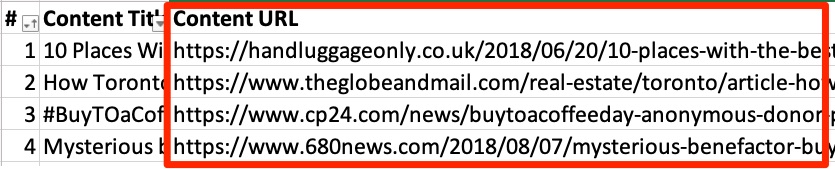
You should only supply companies with testimonials if you genuinely love what they do.

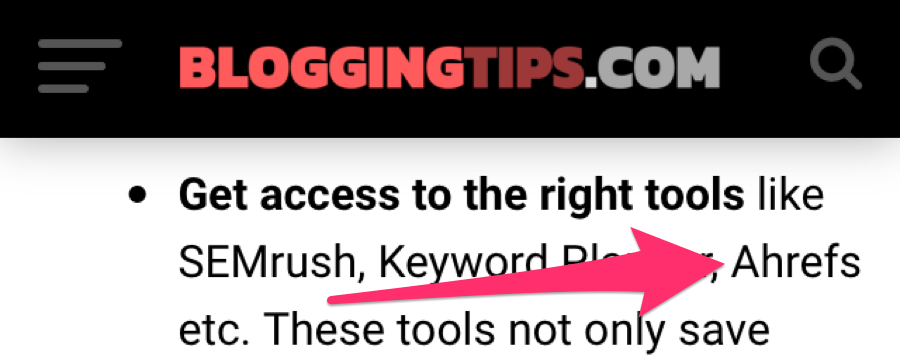
People will sometimes mention your business but fail to link to you.

This happens more often than you might think.

Here’s an example:

Unlinked mention of Ahrefs

And another one:

Unlinked mention of Ahrefs Content Explorer

But it isn’t only big companies like Ahrefs that this happens to.

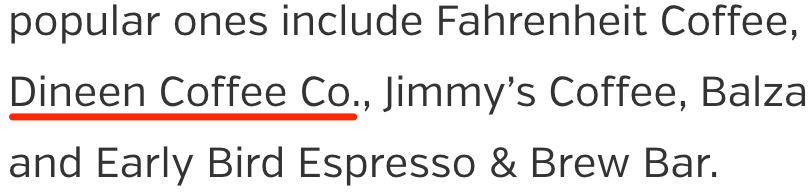
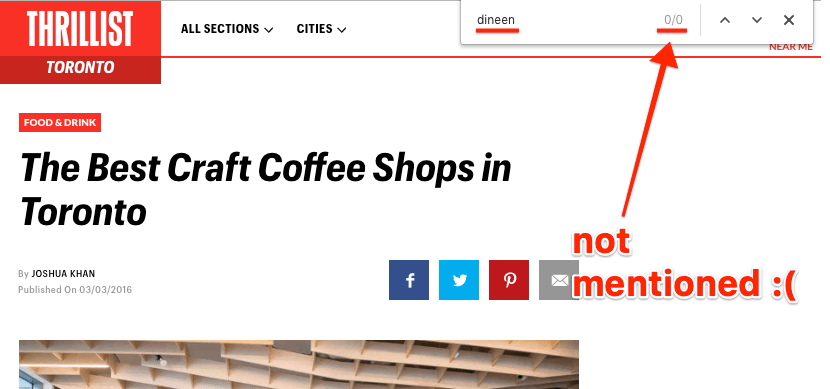
Here’s an unlinked mention for a small coffee shop in Toronto, Canada:

dineen coffee

dineen coffee

You can see that this blogger mentions Dineen Coffee. Yet there’s no link.

Disappointing? Definitely. But unlinked mentions are one of the best link building opportunities you’re likely to find.

That’s because these people are already fans of your business. They know what you do. They like what you do. They even mentioned you. So getting them to link is an easy sell.

You only have to reach out and kindly ask that they “make the mention clickable.”

The question is, how do you find unlinked mentions in the first place?

One way is to search in Google for something like: intext:[your brand name] -yourdomain.com -twitter.com -facebook.com -pinterest.com -youtube.com. This will show most of the places on the web that mention your brand.

google mentions search results

google mentions search results

You can then manually sift through the results looking for unlinked mentions.

Just view the source code for each page, hit CMD+F—CTRL+F on Windows—and search for yourdomain.com. If the search returns no results, then it’s an unlinked mention.

The issue here is that this process is extremely time-consuming. So here’s a quicker and easier way:

Content Explorer > search for your brand name
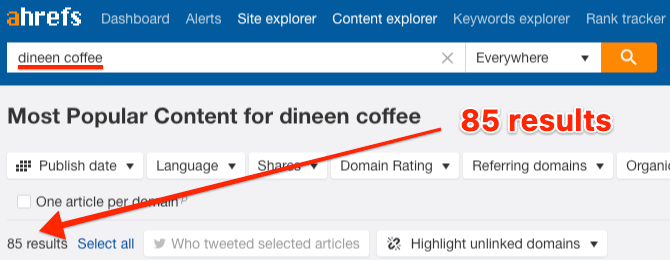
dineen coffee content explorer

dineen coffee content explorer

Think of Content Explorer as a mini search engine. It searches a database of over a billion web pages for those mentioning any keyword or phrase. In this case, that’s your brand name.

The next step is to check these pages for unlinked mentions.

To automate that process, you can export the full report from Content Explorer and use the custom search feature functionality in Screaming Frog to check whether each page links to your website. You can learn how to do that in this video (or in our full guide to unlinked mentions):

But as we’re focussing on efficiency and speed here, a shortcut is to use the “highlight unlinked domains” feature in Content Explorer to literally highlight results from websites that have never linked to you before.

highlighted unlinked domain

highlighted unlinked domain

Note that this checks for links at the domain level, not the web page level. That means it won’t highlight every page that has an unlinked mention.

But there are two reasons why this works well:

  1. It’s quick. No need to export the report and scrape data using third-party tools.
  2. It prioritizes the best opportunities. Links from new referring domains (i.e., websites that haven’t yet linked to you) and generally considered to be worth more than additional links from sites that have already linked to you. That’s what you see in Content Explorer.

Finally, export these web pages to CSV.

Export > Full export > tick the “Only highlighted unlinked domains” checkbox
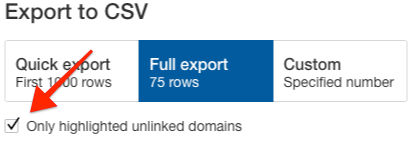
export only highlighted domains

export only highlighted domains

You now have a CSV full of unlinked mentions.

unlinked mentions

unlinked mentions

Find their email addresses. Then reach out and request the link.

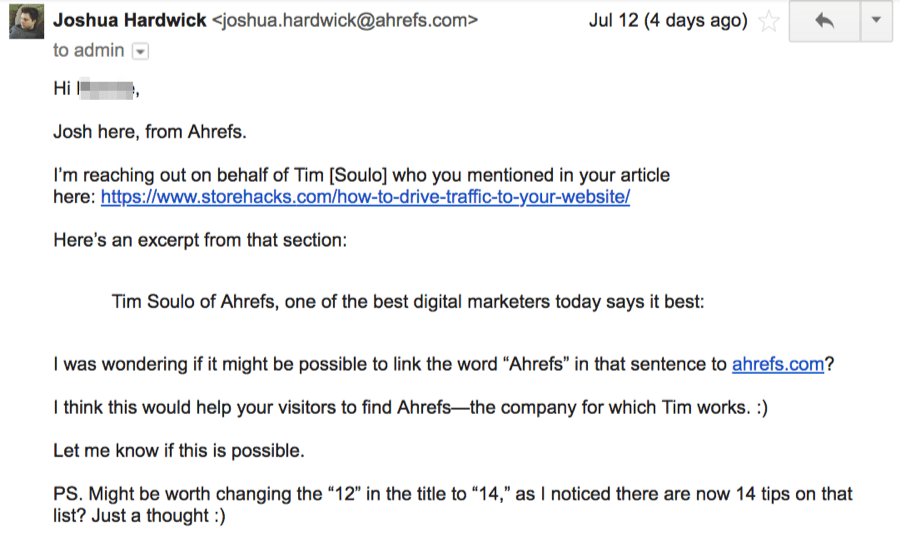
Here’s an outreach email we’ve used successfully to do this successfully in the past…

outreach email unlinked mention

outreach email unlinked mention

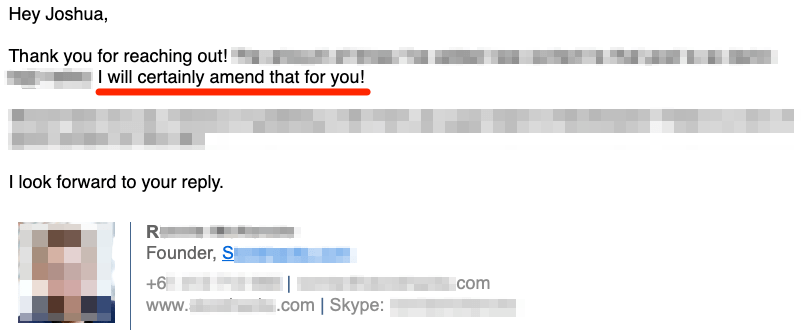
… and here’s the response to that email:

email outreach reply

email outreach reply

IMPORTANT. Don’t copy that outreach email word for word. Customize it for your particular needs.

Which brings me to an interesting point:

It’s not just unlinked mentions of your brand name that you should look out for. You can also look for unlinked mentions of:

  • Your branded products (e.g., iPhone, Apple Watch, iMac, etc.)
  • Company representatives (e.g., Tim Cook, Jony Ive, etc.)
  • Anything else related to your business (e.g., branded events such as WWDC)

Learn more: A Simple Guide to Turning (Unlinked) Brand Mentions into Links

Here’s one of the posts we found in Content Explorer using the previous tactic:

best coffee page

best coffee page

This post already m
entions Dineen Coffee. But this one doesn’t:

not mentioned

not mentioned

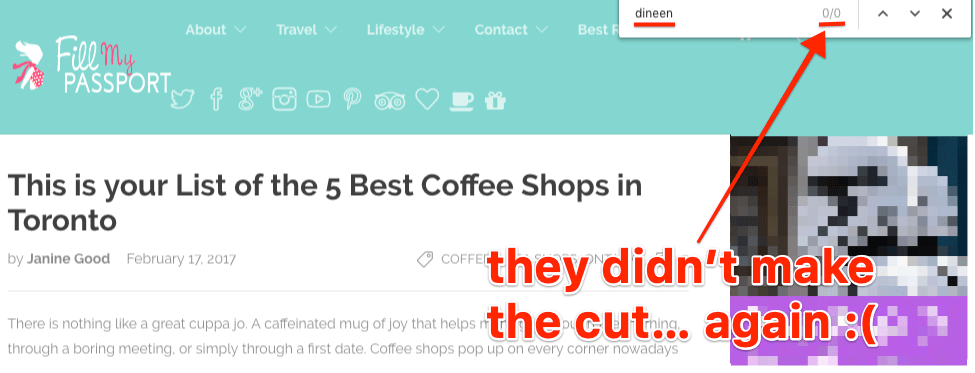
Or this one:

dineen not featured

dineen not featured

Where am I going with this?

Best x in y lists exist for all kinds of businesses in all sorts of locations. There are guaranteed to be similar lists in your niche or local area.

So if you’re not already featured, why not reach out and see if you they’ll add you?

Here’s why this makes sense:

  1. You know they’re already interested in what your business does. So much so, that they’ve written a blog post about it.
  2. You know that they either don’t know about your business or forgot about you when creating that post.

That’s what makes it an easy sell to ask for inclusion.

So go to Google and search for something like:

Best BUSINESS TYPE -“YOUR BUSINESS NAME”

This will return “best x” posts that don’t already mention you.

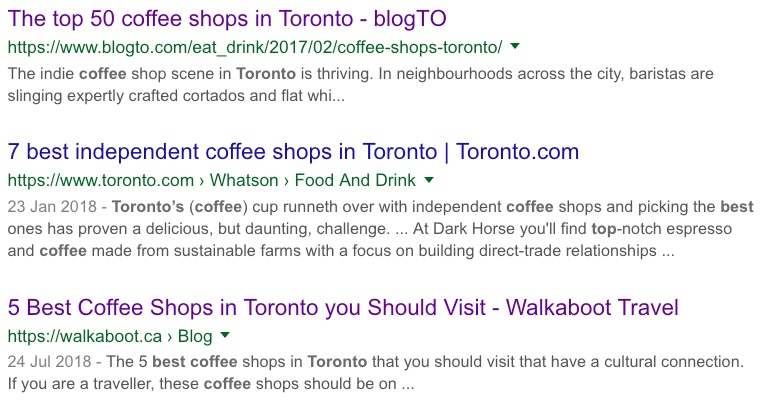
Here are the results for best coffee in toronto -dineen:

best coffee shops

best coffee shops

Look through the results and make sure you’re not already listed. Reach out to the relevant folks.

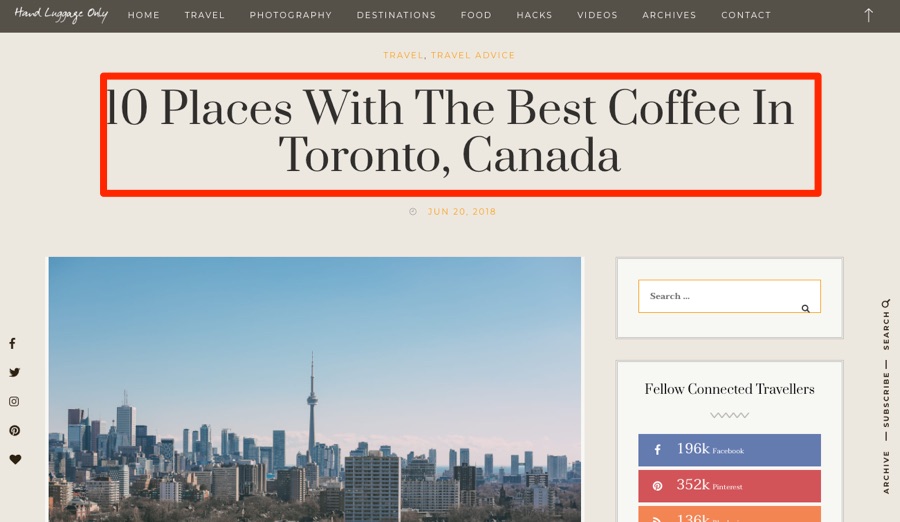
Here’s an excellent opportunity I found for Dineen Coffee in ~30 seconds:

dineen coffee opportunity

dineen coffee opportunity

You can see that the post lists 23 coffee shops, none of which are Dineen Coffee.

Furthermore, Ahrefs’ SEO Toolbar reports that this page is on a DR56 domain and that the URL gets at least some organic search traffic. Perfect.

But here’s the real icing on the cake: the list was recently-updated. It says so at the bottom of the page. And it even tells us who is responsible for updating it.

updated by

updated by

Bingo! Now we can reach out.

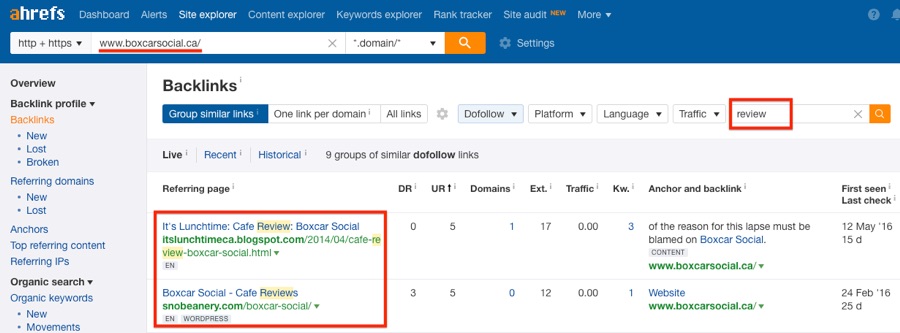
Another trick is to look for website’s that have reviewed competing businesses.

Here’s a search operator you can use for that:

COMPETING BUSINESS NAME intitle:review -”YOUR BUSINESS NAME”

Or you can paste the competing website’s domain into Ahrefs’ Site Explorer, then look for reviews in the Backlinks report.

reviews site explorer

reviews site explorer

The thinking here is that if they’ve reviewed a similar business, they may also be interested in reviewing yours. Or at least trying out your products or services.

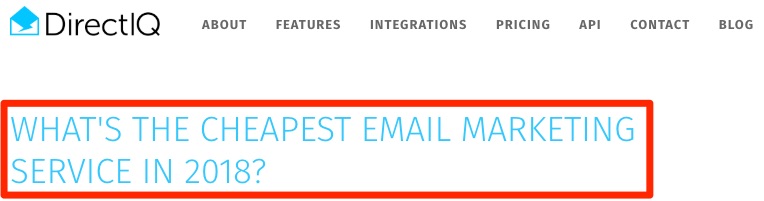
Take a look at this post:

cheapest email marketing service

cheapest email marketing service

It talks about the cheapest email marketing services in 2018.

Now I know from experience that MailChimp is quite a low-cost email marketing service. Yet MailChimp isn’t mentioned in this post. Nor is MailerLite or MoonMail—two free email marketing tools.

Here’s what I’m getting at…

If you can find websites that mention multiple competitors (but not you), it may make sense to reach out and introduce them to your brand. In doing so, you may even be able to convince them to add your business to that page.

So how do you find relevant pages?

To begin, make a list of 3–5 biggest competitors.

Here’s what that might look like for an email marketing service:

  1. ActiveCampaign
  2. ConvertKit
  3. Drip
  4. Aweber

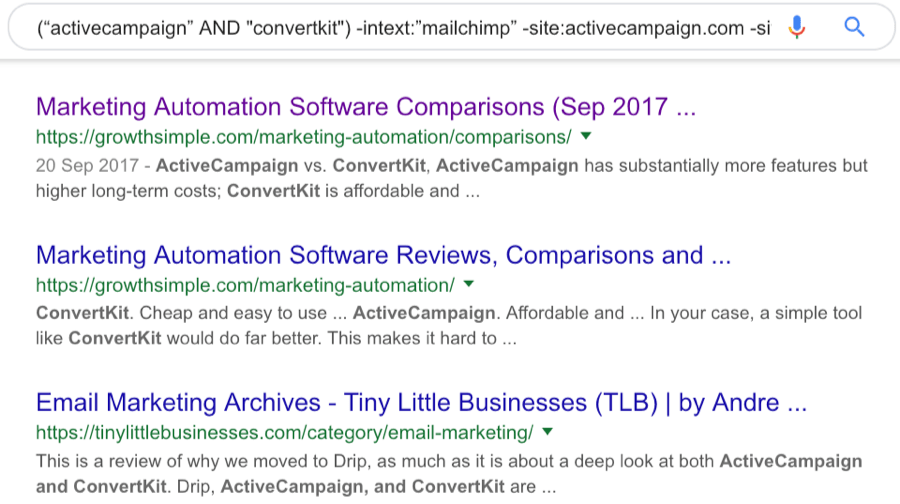
Now type this into Google:

(“COMPETITOR1” AND COMPETITOR2) -intext:”YOUR BRAND” -site:competitor1.com -site:competitor2.com -intitle:competitor1 -intitle:competitor2

You should see something like this:

google search results competitors

google search results competitors

There are hundreds of pages that mention ActiveCampaign and ConvertKit but not MailChimp.

Sidenote.

You’ll need to run multiple searches for all the various combinations of competitors. E.g., replace competitors 1+2 with competitors 3+4, etc.

You’ll need then to export the search results to CSV. For that, you can use Ahrefs’ SEO Toolbar.

export google results

export google results

That will download the results alongside Ahrefs SEO metrics like organic traffic, UR, etc. You can then easily sort and filter by those metrics to prioritize the best link opportunities.

However, the downside of using Google is that you can only export a hundred results at a time.

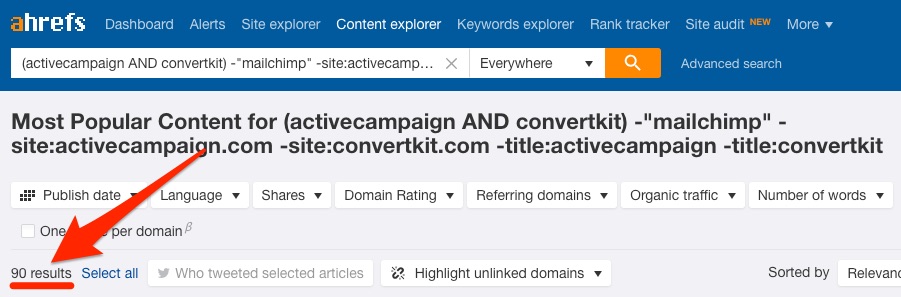
So another alternative is to use Ahrefs Content Explorer instead. Just search for:

(“COMPETITOR1” AND COMPETITOR2) -”YOUR BRAND” -site:competitor1.com -site:competitor2.com -title:competitor1 -title:competitor2

You should see something like this:

content explorer email marketing

content explorer email marketing

Here, 90 web pages mention ActiveCampaign and ConvertKit but not MailChimp.

You can sort and filter the results in Content Explorer without exporting.

Whichever tool you use, the final thing to do is to sift through the results. Try to understand why they mentioned your competitor but not you. This will usually be for one of these reasons:

  1. They’re not familiar with your business or brand.
  2. They prefer a competing product or service.
  3. They’re listing companies that do what you do (but neglected to mention your business)
  4. They’re referencing something your competitor did (e.g., newsworthy event, linkbait, etc.)

Because this guide focusses on building backlinks fast, your best bet is to look for articles where your business could be added quickly and easily, such as relevant listicles…
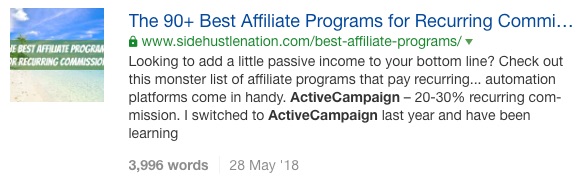
listicle

listicle

… and guides:

guides

guides

You can then reach out with something like this:

“Hey [NAME],

Josh here from Ahrefs.

Is there any reason you mention both [Competitor 1] and [Competitor 2] on your [insert post topic here] but not [your business]?

Just curious Whatever the reason, I’m actually kind of excited you didn’t list us because it gives me a chance to tell you about our awesome product/brand/company which I think you’ll love, because it’s [Why it’s good].

Any chance you could add us to that post?

Cheers,

Josh”

Don’t copy this word for word. That’s lazy. Always add your own unique spin to outreach emails.

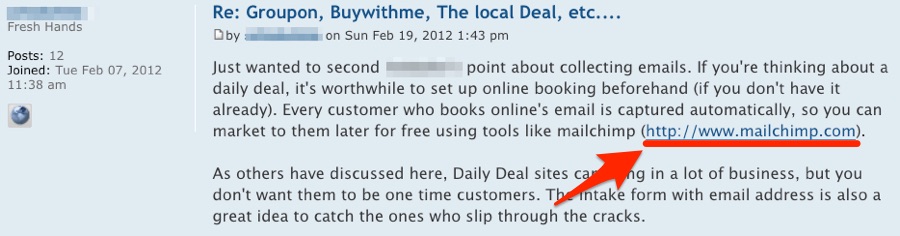
Here’s what a forum link looks like:

forum link

forum link

These are easy to get. You sign up for a forum, find relevant threads, and leave a valuable comment on the thread. It’s the same story with Q&A sites like Quora.

The problem? These are almost always “nofollow” links which don’t pass PageRank.

So let me introduce you to a quick trick:

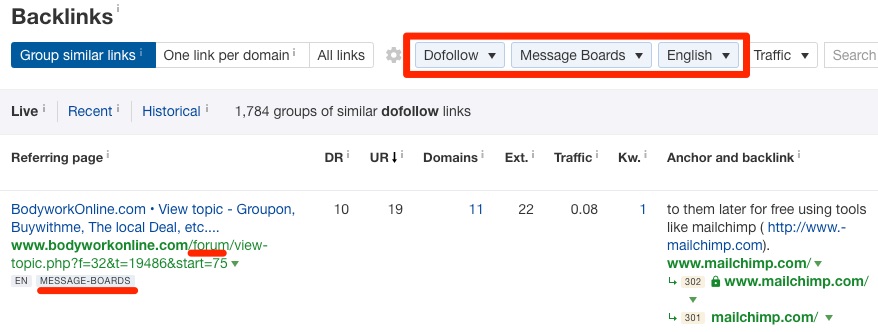
Site Explorer > enter a competing domain > Backlinks > filter for “dofollow” links > filter for links from “message boards”

This shows you all your competitors “dofollow” links from forums.

forum links site explorer

forum links site explorer

Register with those same forums. Find a relevant thread. Leave a valuable comment.

Two important things to note about this:

  1. Such links are few and far between: Most forums “nofollow” all of their links by default. Your competitors may not have many of these links for you to replicate.
  2. Such links are often spammy: Be very careful with this. Don’t replicate every one without first doing due diligence. If the forum or thread looks spammy (which is common), forget it.

Still, throw enough competitors into Site Explorer, and you should end up with at least a handful of easily replicable links that you can build today. But what about once you’ve exhausted those opportunities?

I’m afraid it’s back to the “nofollow” opportunities.

Contrary to popular belief, such links aren’t bad. If you want backlinks fast, you shouldn’t neglect them.

But here’s the thing:

It takes roughly the same amount of time to leave a thoughtful comment on any relevant thread. So why not prioritize leaving comments on threads that get high amounts of traffic?

Not only does that make logical business sense (more eyeballs = more business), but it also makes sense from a link building perspective because more eyeballs often lead to more links.

Think of it like this:

If a web page gets zero visitors per month: Nobody can link to you. Nobody even knows your page exists.

If a web page gets 1,000 visitors per month: Maybe 10 of those people have websites and may link to you.

If a web page gets 100,000 visitors per month: Even if only 0.1% of those people link to you, that’s 100 new backlinks per month.

Posting on relevant forum threads with decent traffic gets your business in front of people that may have the power to link to you from elsewhere—places like blogs that don’t ”nofollow” tags to their links.

So how do you find relevant forum threads with traffic?

Use this Google search operator to find relevant Quora threads…

site:quora.com + TOPIC

… then download the results using Ahrefs’ SEO Toolbar or the Scraper Chrome extension.

NOTE. Here’s the XPath syntax if you’re using Scraper: //div[@class=”srg”]/div/div/div/div/a/@href

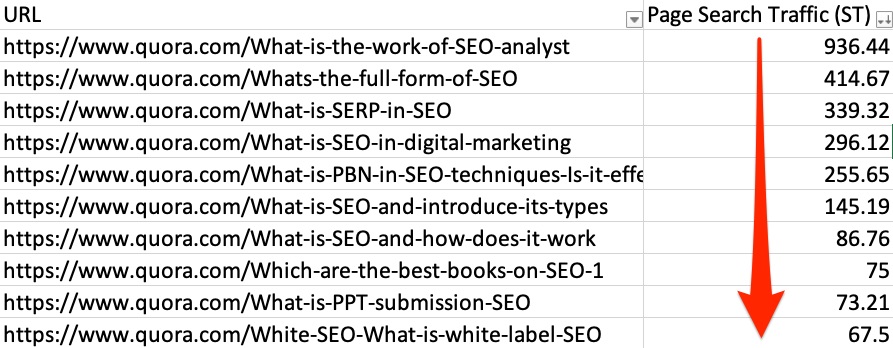
If you used Ahrefs’ SEO Toolbar to scrape the results, then the resulting CSV will include estimated organic traffic metrics for each page. Sort by this column and go after the most trafficked pages first.

quora results ahrefs traffic

quora results ahrefs traffic

Sidenote.

You can change the website in that operator from Quora to any other forum. It’ll work just as well.

This works. But it’s not particularly efficient, especially if the forum you’re interested is big. There’ll be thousands of search results, and it’ll be impossible to scrape them all.

So here’s another method:

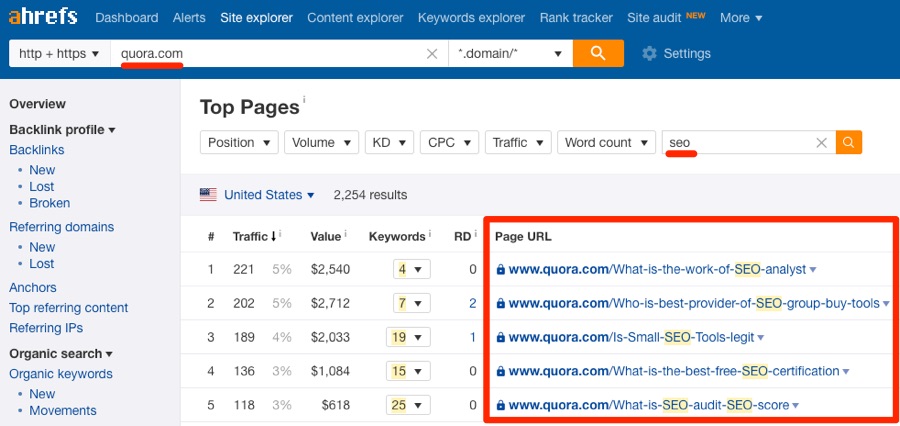
Paste a relevant forum (e.g., Quora) into Ahrefs’ Site Explorer. Go to the Top Pages report. Search for a keyword related to your niche.

quora top pages

quora top pages

You will then see all relevant pages, sorted by their estimated monthly organic search from (low to high). Sift through them. Get involved with relevant threads. Include your link (where relevant —don’t force it!)

Do this, and you’re guaranteed some fast backlinks.

You can even use this same process to find good blog comment opportunities.

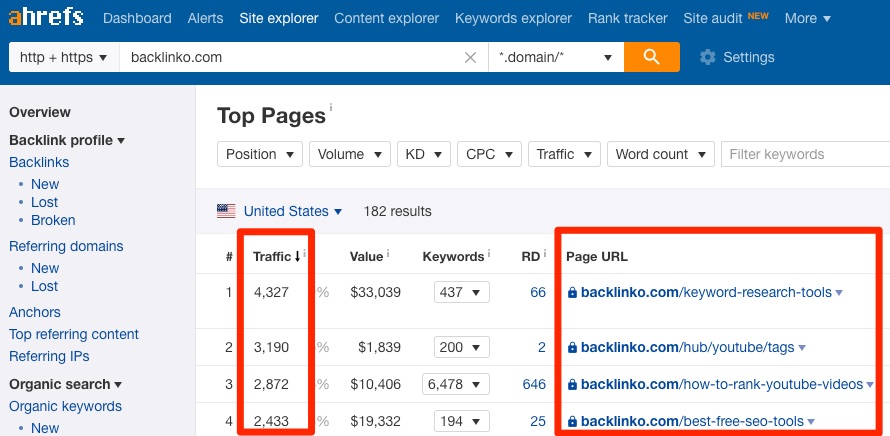
Just enter a relevant blog into Site Explorer, go to the Top Pages report. Look for relevant high-traffic pages.

top pages comments

top pages comments

If they allow comments, get involved in the conversation.

Have you heard of the “skyscraper” technique?

Here’s what it involves:

  1. Find a relevant piece of content with tons of backlinks;
  2. Create something even better;
  3. Ask those linking to the now inferior content to link to your piece instead.

Makes sense. But there’s one big problem:

Creating industry-leading 10X content takes time—a lot of time.

That makes it pretty useless if you have less time and resources than your competitors.

But what if you could cut out steps #1 + #2 and start from step #3? That would make things easier.

Here’s the simple way to do that:

Rather than creating something new, utilize what you already have.

In other words, take your best asset—be it an excellent product, an epic piece of content, some research, etc.—and hustle to promote it by piggybacking off other similar or inferior stuff.

Here’s an example:

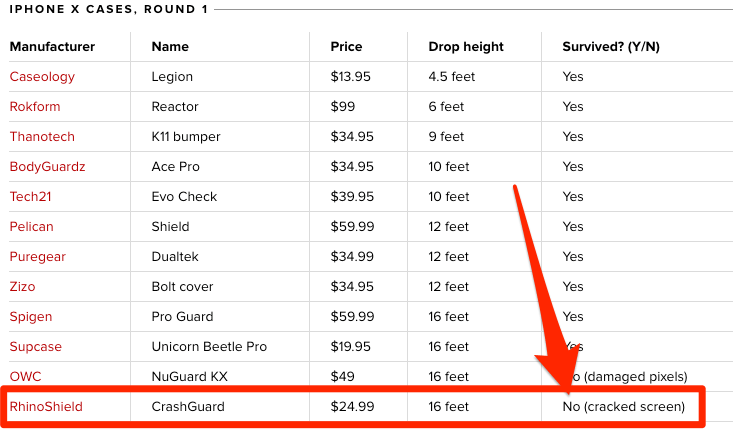
This protective iPhone X case has links from 75 referring domains. However, when CNET tested the durability of 12 such cases, this was one of the first to fail.

failed iphone case

failed iphone case

Supcase’s Unicorn Beetle Pro iPhone X case, on the other hand, fared extremely well—it was one of the few cases to survive all four rounds of testing. It was also one of the cheapest of the bunch at $19.95.

Translation: this product is better (and cheaper) than the one that has amassed many links.

So if you were the creator of this product, you could reach out to anyone linking to the “inferior” product and explain that they may instead want to recommend (and link to) your product.

Here’s what that might look like:

“Hey [NAME],

Josh here from Supcase.

I just came across your Device Case Buyer’s Guide and saw that you recommended the Rhinoshield Crashguard.

Did you know that when CNET tested 12 iPhone X cases, this was one of the first to fail?

I’m not sure if you’ve personally tried our Unicorn Beetle Pro case, but this was one of the few to survive CNET’s rigorous testing. Not only that, but it’s actually ~$5 cheaper than the Rhinoshield Crashguard—one of the cases you currently recommend.

Just thought I’d give you a heads up in case (no pun intended!) you wanted to swap out the recommendation.

Cheers,

[YOUR NAME]”

Make sense?

This does take a bit of research. You need to figure out what makes your product or service better than a competing one. Nobody will swap out a link without a compelling reason to do so.

You can also do much the same thing for other content you have—blog posts, guides, etc.

For example, let’s say you’re a graphic design company. Perhaps you’ve got a guide to color theory on your website, like this one:
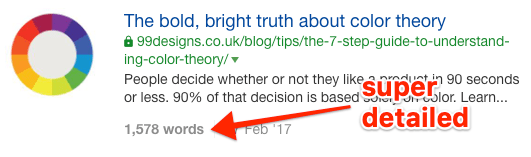
colour theory guide

colour theory guide

Is this a “10X” guide? Not really. But it’s still pretty decent—long, detailed and well-written.

Here’s another blog post about the same topic:
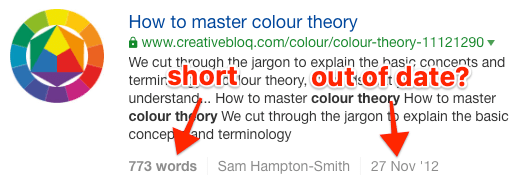
colour theory 2

colour theory 2

It doesn’t take a genius to see that this is a much lower-quality guide. It’s out of date and nowhere near as thorough.

Yet it has 756 links from 117 referring domains!
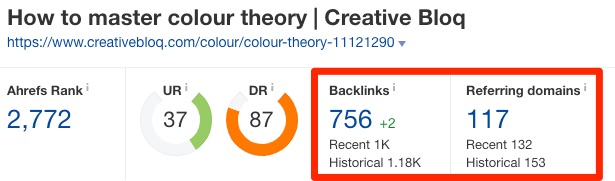
color theory links

color theory links

Translation: 117 potential link opportunities!

Here’s how you might choose to tackle this one:

“Hey [NAME],

Josh here from 99designs.

I just came across your post about some essential website planning tools and noticed you recommended this guide to color theory: [LINK]

Having read through it myself, it looks to be a bit out of date and also not particularly thorough. For instance, there’s no mention of hue, shade, tint, and tone—a concept that is paramount to understanding color theory, in my opinion.

So, a quick heads up—we recently put together what we believe to be a much more thorough and in-depth guide to color theory. You can see
that here: [LINK]

Perhaps it may be worth adding this to your list of tools? Or maybe it’d make sense to swap out Creativbloq’s out of date guide in favor of ours to keep your post up to date?

Cheers,

[YOUR NAME]”

You get the idea.

The question is: how do you find relevant opportunities like this?

Here’s the manual way:

  1. Find a decent piece of content on your site;
  2. Search in Google for other similar content;
  3. Pluck out the inferior pages.
  4. Paste them into a tool like Ahrefs’ Site Explorer to see how many backlinks they have.

That works. It’s just time-consuming. You’ll also often struggle to find similar content that has enough backlinks to make this worth your while.

So here’s a better—and smarter—way:

Use Content Explorer to find for similar pieces of content that have backlinks.

Just search for a keyword related to the content to which you wish to build links. E.g., if we wanted to build links to the color theory guide mentioned above, we could search for something like “color theory.”

Next, use the inbuilt filters to narrow down the results to weak or thin pages with lots of referring domains (I usually go for around 50). You can use the word count filter to identify weak pages.

content explorer filters

content explorer filters

Finally, check out the Backlinks report in Site Explorer for any relevant results you find. Just hit the caret on any Content Explorer result and hit “Backlinks” to do this.

Sift through these manually (note: I usually add a “dofollow” filter here) and reach out to any relevant sites.

Backlinks aren’t everything—don’t underestimate the power of internal links

Internal links point to other pages and posts on the same website, like this.

Most SEOs know about internal links. But many neglect them as they don’t believe in their ranking power. That’s a bad idea. In this case study, Ninja Outreach used internal linking to boost their traffic by 40%.

Furthermore, Google’s John Mueller noted that the anchor text of internal links provides Google with additional context as to the subject nature of linked content in this tweet.

Long story short, a smart internal linking strategy is likely to have a positive effect on rankings.

How do you do it? Simple

  1. Find a page you want to boost.
  2. Find other topically-relevant and strong pages on your site.
  3. Link from those pages to the target page.

Let me give you an example:

We have a landing page for our Site Explorer tool.

ahrefs site explorer landing

ahrefs site explorer landing

This is a page that we want to rank for the term “site explorer.”

Unfortunately, building links to landing pages and “commercial” content like this is difficult. It’s much easier to get links to blog posts and other non-commercial content.

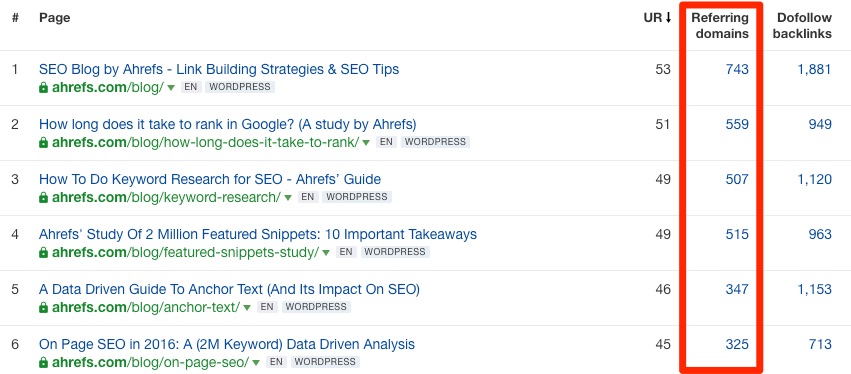
Don’t believe me? Take a look at the Ahrefs blog in Site Explorer’s Best by Links report:

ahrefs blog links

ahrefs blog links

You can see that some of our posts have backlinks from hundreds of referring domains.

In other words, they’re strong pages in Google’s eyes and hold a lot of “link equity.”

So what we can do is to add internal links from the powerful blog posts to our Site Explorer landing page. That will help to strengthen the target page and perhaps, even be enough to boost its rankings for relevant keywords.

How can you find relevant pages from which to add internal links?

Type this into Google:

site:yourdomain.com “relevant keyword”

Replace the domain with your own. Replace the “relevant keyword” with something topically-related to the page to which you want to build internal links.

Here’s what ours would look like for this example:

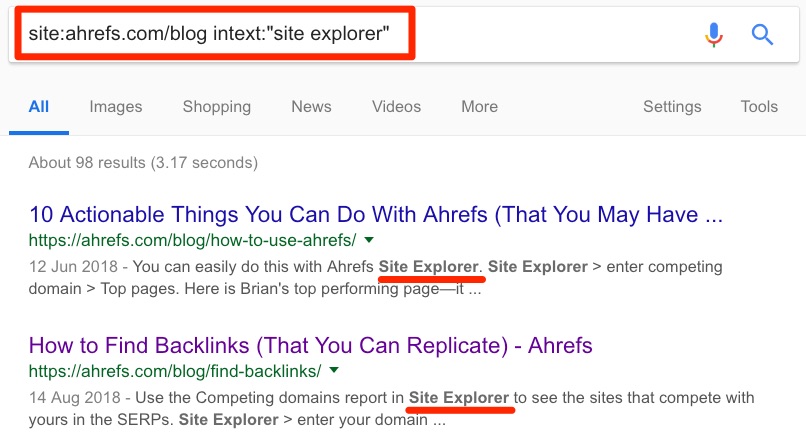
site:ahrefs.com/blog “site explorer”

That returns the pages on our blog that mention “Site Explorer.” I.e., excellent places from which to add internal links to our landing page.

site explorer mentions

site explorer mentions

Next step—download the search results with Ahrefs’ SEO Toolbar (or the Scraper extension).

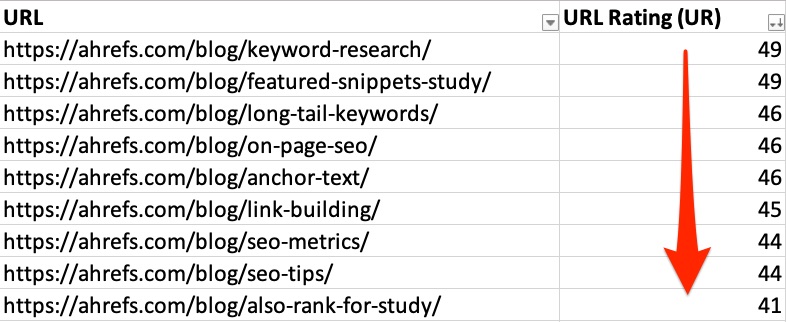
Open the results in Excel or Google Sheets and sort by URL Rating (UR) in descending order.

url rating ahrefs export

url rating ahrefs export

Paste each of these pages into your browser. View the source code (right click > view page source). Search for the URL of the page to which you want to build internal links.

source code search

source code search

If the search returns one or more results (as is the case above), then that page already links to your target page. Move on to the next page in your spreadsheet.

Should any of the pages return no re
sults, it means that your target keyword is mentioned on that page yet doesn’t link to the relevant internal page. This is your opportunity to add an internal link, like so:

internal link

internal link

Final thoughts

Link building isn’t as hard as most people think. Most businesses can build some great links without having to invest in new content.

My advice? Give these tactics a shot and see which work best for your site. Even if you only have an hour or so per day, you should still be able to make some progress and build some decent links.

Of course, you can outsource some of the workload to a VA or another member of your team if you want to move faster.

Further reading

Source

Create a WordPress Website or Blog Today

The No. 1 Site Building Tool

WordPress gives you virtually unlimited site options, with over 10,000 themes and 50,000 feature plug-ins.

Simplified Design Experience

With no coding necessary, our exclusive onboarding process gets you online in minutes.

Growth Made Easy

Increase your Google rank and site traffic with our integrated SEO tool.

WordPress Hosting Plans & Pricing

We’ve got a plan to fit your needs.

Basic

A great way to get started.

As low as
$6.99 /mo
On sale – Save 30%
$9.99/mo when you renew*

1 website

30 GB storage

Ideal for up to 25K monthly visitors

Free business email – 1st year

Website backup protection with 1-click restore

Free domain ($34.99/yr value)

Automatic daily malware scans

Deluxe

Get more visitors with an integrated SEO wizard.

As low as
$9.99 /mo
On sale – Save 33%
$14.99/mo when you renew*

1 website

75 GB storage

Ideal for up to 100K monthly visitors

Free business email – 1st year

Website backup protection with 1-click restore

Free domain ($34.99/yr value)

Automatic daily malware scans

SEO optimizer

1-click testing site

Free SSL

Ultimate

Add online marketing with more storage and security.

As low as
$12.99 /mo
On sale – Save 35%
$19.99/mo when you renew*

Free SSL Certificate for life of hosting*

1 website

Unlimited storage

Unlimited visitors

Free business email – 1st year

Website backup protection with 1-click restore

Free domain ($34.99/yr value)

Automatic daily malware scan

SEO optimizer

1-click testing site

Unlimited malware removal and hack repair

$550 marketing credit to Google, Yelp & Bing

Ecommerce

Get a full-featured online store with fast, simple setup.

As low as
$15.99 /mo
On sale – Save 36%
$24.99/mo when you renew*

Free SSL Certificate for life of hosting*

1 website

Unlimited storage

Unlimited visitors

Free business email – 1st year

Website backup protection with 1-click restore

Free domain ($34.99/yr value)

Automatic daily malware scans

SEO optimizer

1-click testing site

Unlimited malware removal and hack repair

$550 marketing credit to Google, Yelp & Bing

No transaction fees

Unlimited products

Bookings and appointment scheduling

Real-time shipping rates

Free access to $1,000 of WooCommerce extensions

For 5+ websites, check out Pro plans starting from $24.99/mo.

WordPress Hosting Benefits

CDN Boost for faster load times of up to 50%Free business email — 1styearAutomatic WordPress core software and security updatesAccess to thousands of free themes and pluginsFor beginners: Pre-built sites and drag & drop page editorSFTP access (Deluxe, Ultimate, and Ecommerce plans)Free 24/7 supportOne-click migration toolLatest version of PHP 7Temporary domain name

WordPress and WooCommerce: A perfect pairing.

Selling online with WordPress has never been easier thanks to WooCommerce. We cut 70% of the time out of the setup process, offer $1,000 in premium extensions and you pay no transaction fees to WooCommerce or GoDaddy.

Jordan M.
GoDaddy Guide

Jordan M.
GoDaddy Guide

Jordan M.
GoDaddy Guide

We love to help. Seriously.

Still not sure what you need? Give us a call. We’re happy to help, even if you’re not a customer. We’re here 24/7/365. Call anytime. 480-463-8386

Contact Us

Check out the WordPress help blog.

Watch how-to videos, read in-depth articles and helpful listicles. Fun fact: The GoDaddy Garage blog is built with WordPress. Yep, we talk the talk.

How to build a WordPress website for the first time
Why do you need WordPress for your small business website?
How to use WordPress themes to build a website
How to start selling on WordPress with WooCommerce

WordPress Websites Frequently Asked Questions

What’s WordPress?

WordPress® is a blog- and web-publishing platform that’s not only easy to use but recognized the world over as the standard in website creation. With its focus on aesthetics, web standards and usability, WordPress is an open-source platform that lets you manage everything from a small personal blog to a large commercial site with hundreds of pages.

What is a WordPress websites plan?

For an easier, automated WordPress experience, we modify our servers specifically for WordPress. We give you a level of speed and security you can’t get from a standard web hosting plan. More than just an auto-install, WordPress is seamlessly integrated. That means the moment you log in, you’re able to build, edit and manage your site. And of course, our award-winning support is available 24×7 to help with any questions you may have. There’s no easier way to build and manage a fast, secure, reliable WordPress website or blog.

How does your version of WordPress differ from other installations?

The WordPress is the same. The stuff that makes it easier and more automated is unique to GoDaddy. We start you out with the latest version of WordPress, the same one you’d download from WordPress.org. And anytime there’s an update, we install it for you automatically. You never have to hassle with installing another update or worry about running an outdated or compromised version of WordPress.

Do I need to set up my WordPress database?

No. With WordPress websites, we take care of everything, so the process is as easy as possible for you. Once you’ve purchased your plan, you can immediately create your website or start blogging.

Which versions of PHP does WordPress websites support?

GoDaddy WordPress websites supports PHP 5.6 through the latest version.

If I have a WordPress site hosted somewhere else, can I move it to GoDaddy?

Yes. You can migrate your site over to GoDaddy in just one click. Either move it to your domain name or put it on a temporary domain, the just do a quick review and you’re ready to publish.

After I purchase WordPress websites, how do I get started?

Your chosen plan is seamlessly connected to the latest version of WordPress, all you need to do is log in and you can start building a site directly from your control panel.

If you ever have questions, contact our award-winning 24/7 support team. Our in-house WordPress experts can guide you through creating, updating or even promoting your website or blog.

How do I log in to my WordPress website or blog?

Log in to My Account and choose Managed WordPress. Type in your domain name, and that will take you directly to the Admin login screen. For more help, contact us.

*Disclaimers

Third-party logos and marks are registered trademarks of their respective owners. All rights reserved.

Disclaimers

* Third-party logos and marks are registered trademarks of their respective owners. All rights reserved.

Annual discounts available on new purchases only.

Products will automatically renew until cancelled. You may turn off the auto-renewal feature by visiting your GoDaddy account.

Special introductory pr
icing valid for the initial purchase term only. Product renewal pricing subject to change. Requires annual/multi-year purchase paid in advance.

SSL certificate is included for free as part of your managed WordPress product. Annual plan purchase required. If you cancel the managed WordPress product, you will lose the associated SSL certificate as well. Find the SSL certificate(s) in your My Account dashboard.

Source

What Is WordPress Explained for Beginners

What is WordPress? At its core, WordPress is the simplest, most popular way to create your own website or blog. In fact, WordPress powers over 35.2% of all the websites on the Internet. Yes – more than one in four websites that you visit are likely powered by WordPress.

On a slightly more technical level, WordPress is an open-source content management system licensed under GPLv2, which means that anyone can use or modify the WordPress software for free. A content management system is basically a tool that makes it easy to manage important aspects of your website – like content – without needing to know anything about programming.

The end result is that WordPress makes building a website accessible to anyone – even people who aren’t developers.

What is #WordPress? Simply put, it’s the best way to build a website. Click to Tweet

What Kinds Of Websites Can WordPress Make?

Many years ago, WordPress was primarily a tool to create a blog, rather than more traditional websites. That hasn’t been true for a long time, though. Nowadays, thanks to changes to the core code, as well as WordPress’ massive ecosystem of plugins and themes, you can create any type of website with WordPress.

For example, not only does WordPress power a huge number of business sites and blogs, it’s also the most popular way to create an eCommerce store as well! With WordPress, you can create:

Here’s how to install a WordPress theme.

What’s The Difference Between WordPress.org and WordPress.com?

What is WordPress? The WordPress.org homepage

The self-hosted WordPress.org homepage

We’ve covered the difference between WordPress.org and WordPress.com in a lot more detail, but here’s the short version:

  • WordPress.org, often called self-hosted WordPress, is the free, open-source WordPress software that you can install on your own web host to create a website that’s 100% your own.
  • WordPress.com is a for-profit, paid service that is powered by the WordPress.org software. It’s simple to use, but you lose much of the flexibility of the self-hosted WordPress.

Most of the time, when people say “WordPress”, they mean the self-hosted WordPress available at WordPress.org. If you want to truly own your website, self-hosted WordPress.org is almost always the best option.

All you need to do to get started with self-hosted WordPress is purchase web hosting and a domain name.

Who Made WordPress And How Long Has It Been Around?

WordPress was created as a standalone project all the way back in 2003, originating as an offshoot of a previous project called b2/cafelog.

WordPress is open-source software, so nowadays it’s made by a huge community of contributors. But if we were to trace WordPress’ origins back to its roots, its original creation was a collaboration between Matt Mullenweg and Mike Little.

Since then, Matt Mullenweg has largely become the face of WordPress. And he’s also the founder of Automattic, which is the company behind the for-profit WordPress.com service.

We grew our traffic 1,187% with WordPress.
We’ll show you how.

Join 20,000+ others who get our weekly newsletter with insider WordPress tips!

Subscribe Now

Success! Thanks for subscribing

You will receive the next issue of the Kinsta Newsletter within a week.

Subscribe to the Kinsta newsletter

The history of WordPress between its founding as a blog platform back in 2003 and today is a long one…

But suffice it to say, WordPress has pushed forward and, thanks to its contributors and huge community, developed into the most popular solution to create any type of website.

Who Uses WordPress?

WordPress is used by individuals, big businesses, and everyone in between! On an immediate note, we use WordPress! So the very site that you’re looking at right now is powered by WordPress. Lots of other well-known entities use WordPress as well. Here are some of our favorite examples:

Whitehouse.gov

The official Whitehouse.gov website is powered by WordPress:

Whitehouse.gov is powered by WordPress

Whitehouse.gov is powered by WordPress

Microsoft

Microsoft uses WordPress to power its official blog. It also uses WordPress to power blogs for specific products like Windows and Skype:

Microsoft uses WordPress to power its official blog

The Rolling Stones

Even famous bands love WordPress! The Rolling Stones’ website is powered entirely by WordPress:

The Rolling Stones band website uses WordPress

The Rolling Stones band website uses WordPress

Why Should You Use WordPress?

Ok, so over 35.2% of all the websites on t
he Internet are using WordPress, including well-known entities like the White House and Microsoft.

But what about you? Why should you use WordPress?

Well, no matter what type of website you want to create, there are plenty of reasons to use WordPress. Here are some of the biggest:

WordPress Is Free And Open Source

One of the biggest benefits of WordPress is that it’s free, open-source software. While you will need to pay a little bit for hosting, you will never have to pay just to use the WordPress software, which isn’t the case with alternatives like Squarespace.

Beyond that, you can also find lots of open-source plugins and themes to change how your website looks and functions. Speaking of….

WordPress Is Extensible

Even if you aren’t a developer, you can easily modify your website thanks to WordPress’ huge ecosystem of themes and plugins:

  • Themes – these primarily change how your website looks.
  • Plugins – these primarily change how your website functions. Plugins can be something small, like a contact form, or huge, like creating an eCommerce store.

Currently, there are over 50,000 free WordPress plugins and 5,000 free WordPress themes, as well as tons of premium options. That to say – you have plenty of choices! Here is a hand-picked list of the best WordPress plugins.

WordPress Is Easy To Install

Think you need to be a tech genius to create your own website? Think again! If you can click a few buttons, you can install WordPress on your site.

Nowadays, most web hosts either:

  • Offer to preinstall WordPress for you so that your site is ready to go right away.
  • Give you dedicated tools that make the install process very beginner-friendly.

Add site

Add new WordPress site at Kinsta

WordPress Is Flexible

We’ve touched on this already, but WordPress is great because it lets you create pretty much any type of website. Better yet, your website can also evolve with you.
Want to add a forum to your existing WordPress site? No problem – just install the bbPress plugin! Want to add a social network? No worries! Just use the BuddyPress plugin.

You’re never locked into a specific set of functions – you can always adapt and evolve.

It’s Easy To Find WordPress Help

Because WordPress is so popular, it’s easy to find help if you ever run into any issues. There are heaps of…

  • Blogs
  • Tutorials
  • Forums
  • Facebook Groups
  • Developers

…that you can turn to for free and paid help if needed.

Need More Convincing?

Still not convinced that WordPress is the best way to build a website? Read this post for a deeper look at ten of the best reasons to use WordPress.

So What Is WordPress? It’s The Best Way To Build A Website

WordPress is the most popular way to build a website for a reason. If you want to build any type of website, from a blog to an eCommerce store, WordPress is a great option.

Just remember that self-hosted WordPress.org and WordPress.com are not the same thing. And, in most situations, self-hosted WordPress.org is what you want to build a website. Self-hosted WordPress.org gives you more ownership as well as access to all the perks and benefits of the WordPress community.

So how will you use WordPress? We can’t wait to find out!

If you enjoyed this tutorial, then you’ll love our support. All Kinsta’s hosting plans include 24/7 support from our veteran WordPress developers and engineers. Chat with the same team that backs our Fortune 500 clients. Check out our plans

Source

The 10 Best Web Design Companies in Montgomery, AL 2020

Answers to commonly asked questions from the experts on Thumbtack.

Why should you hire a web designer?

Your website is often the first thing your customers see when they’re searching for a business or service on the web. As the face of your organization, your website needs to be attractive and functional, offering the latest features that users now expect. To plan and design a site that both reflects your company’s mission and values and appeals to customers takes a professional web designer. While free online services can help people set up websites, web designers can provide a unique solution made specifically to meet customers’ personal or business needs.

Most web designers offer a wide variety of services to make your website aesthetically pleasing and easy to use. Modern web design must be mobile-friendly and scalable, capable of expanding to include a blog, social media sites, and even video streaming; web designers are experts at integrating various web technologies. They can build the site, add functionality, test it, launch it on a live server, and track and maintain its performance.

In addition to web design and graphic design, some web design providers also offer development and security services, including search engine optimization (SEO), social media marketing and management, logo design, site maintenance, domain registration and hosting, protection against malware, and digital marketing and content services.

What do you look for in a web design company?

The web design company you choose must be able to interpret your company’s mission and identity and turn it into an appealing website that connects with potential customers. They must help you reach your target audience and meet your business goals. A web design agency should have on staff both talented web designers, with fresh ideas and extensive technical and creative skills, and a marketing team that knows how to drive traffic to your site, encourage visitor engagement, and convert visitors into customers. Web designers should be able to build in search optimization and integrate your site with a content management system and e-commerce tools. Look, too, for a website design company that understands responsive design and can optimize your website for mobile devices and desktop browsers. The right web design company understand current design and website trends, has experience building sites in a variety of industries (not just yours), and has an expansive portfolio of live websites. Finally, don’t simply hire the cheapest bidder — in web design, as in all things, you get what you pay for.

How do you hire a web designer?

You’ve determined that the best way to create a professional, modern, mobile-friendly new website is to hire a professional web designer to build it. To hire the best person for the job — and to get the web design that best fits your company’s identity — it’s important to ask a few key questions:

  • What’s the scope of the work? Will the website be basic with just a few pages about your company, its services, and contact information? Or will it also have an e-commerce section for online shopping, a blog, or content for visitors to download? Before you hire a web designer, make sure you have a thorough, specific list of the components you must have the designer include in the web design.
  • What do you want your website to look like? Consider websites that are similar to the one you’d like to build, ideally in the same industry or serving similar types of customers. Build a set of examples of types of pages, design aspects, and website features that you can hand off to the web designer — the person you hire should have experience creating websites with the features you want. If they don’t have the right skill set, they’re not the right pro for you.
  • What’s the web designer’s start-to-finish process? What will the final deliverable be? Before you hire someone, make sure their availability works with your timeline and that their process meets your expectations. Most important is finding a web designer who will work collaboratively with you to create a successful online presence.

How much do web designers charge?

The average cost for hiring a web designer varies greatly depending on the scope of the work, which may range from building a site from scratch to rebranding an existing one, as well as the amount of content and graphics the designer will create. In general, the more complex the project, the more time the design agency will have to spend. Because web designers often work on an hourly basis, the longer the project, the higher the costs; you can count on the web designer spending at minimum 10 hours to create a very basic website with just a handful of pages with few elements. Prices also depend on the designer’s skill set, the process, and the company’s rates. In general, the national average cost for a basic website package starts at $500, but a customized website can cost as much as $2,000 or more. Here are typical average hourly rates, broken out by the complexity of the work:

  • Basic layout and user interface: $15-$40 per hour
  • Content management system design: $20-$50 per hour
  • Custom website design with custom code: $45-$75 per hour

What should you look for in a website designer?

A professional web designer creates the look and feel of your website, collaborating with you to choose colors, creating logos and other branding materials, establishing page layouts, and creating sample pages. An important part of web design is making sure the site is functional, meets your goals, and is easy for users to navigate. When you’re looking to hire a web designer, start by reviewing the person’s portfolio. Look for samples of work that match what you envision for your website, including experience building the types of pages or features you want. Make sure the web designer is familiar with your industry and understands both industry trends and web design trends — an old-fashioned or out-of-touch site will turn customers away rather than intrigue them.

Because web designers tend to work as freelancers on a project basis, they must be excellent communicators, willing to manage their own work, and available on your schedule. Some critical skills, such as working collaboratively and responding enthusiastically to feedback, aren’t core to good web design, but make working with a web designer much easier. Finally, look for a web designer who has cross-functional knowledge, such as understanding marketing and conversion rate optimization in addition to web design.

Source

The Ultimate Guide to SEM Search Engine Marketing

Search Engine Marketing, or SEM, is one of the most effective ways to grow your business and reach new customers.

While it’s critical you employ organic strategies to attract traffic over the long-term, sometimes, you can’t properly compete on the SERPs without putting money behind it — and that’s where SEM comes into play.

Download Now: State of Marketing Report [2020 Version]

For instance, consider what happens when I type “summer shoes” into Google:

Zappos clearly has an effective SEO strategy, since its “Summer shoes” page ranks first organically. However, their paid “Summer Shoes” ad, circled above, ranks as the first search result overall.

With 35% of product searches starting on Google, and the average Google search lasting only a minute, it’s critical your business’s product or service appear at the top of a SERP when a user is searching for it. This isn’t always possible organically, particularly when other businesses are paying to ensure their products appear above yours. When this is the case, it’s critical you invest in a SEM strategy.

What is SEM?

SEM, or search engine marketing, is using paid advertising to ensure that your business’s products or services are visible in search engine results pages (SERPs). When a user types in a certain keyword, SEM enables your business to appear as a result for that search query.

To ensure you’re able to use SEM to properly advertise your products or services on the SERPs, we’ve cultivated a list of the best SEM tools, as well as the components of a SEM Ad Auction.

Best SEM tools

  1. SEMRush
  2. Google Trends
  3. Keywordtool.Io
  4. Google Ads Keyword Planner
  5. SpyFu

1. SEMRush

SEMRush allows you to conduct extensive keyword research, keyword rank tracking, site audits, traffic analysis, and more. SEMRush is a fantastic tool for finding opportunities to rank for long-tail keywords organically, but additionally, you can use the tool for various SEM efforts. For instance, you can use SEMRush to figure out where your competitors are concentrating their marketing efforts, and analyze their regional presence, to figure out how much money you want to put behind certain keywords.

Additionally, SEMRush enables you to discover your main paid search competitors, figure out which keywords they’re bidding on, and study the composition of their ads. This is vital information when you’re cultivating your own paid strategy and are unsure how to out-rank other businesses on the SERPs.

2. Google Trends

Google Trends allows you to track search volume for a particular keyword across a specific region, language, or time frame — which can enable you to identify which search terms are trending, and which ones aren’t. Since you don’t want to put money behind a keyword that’s decreasing in popularity, this is an incredibly useful tool for your SEM efforts.

Additionally, particularly if you work for an ecommerce business, the ability to gauge interest in your product or service in a certain geographical area is undoubtedly powerful for ensuring you tailor your paid efforts to specific locations, saving you money in the long-run.

3. Keywordtool.Io

One of the most helpful features of Keywordtool.Io is its ability to tap into Google, Bing, YouTube, Amazon, Instagram, Twitter, and the App Store, so that you’re able to segment your keyword research through various channels and better target your efforts. Additionally, the tool takes your base keyword and provides you with variations of words and phrases, which allows you to cultivate a more extensive list of possible keywords you might want to include in a paid ad.

Using Google Autocomplete to provide relevant keywords for you, the free version of Keywordtool.Io lets you generate up to 750 long-tail keywords and keyword suggestions for every search term. Plus, you can use the tool to analyze search trends on Google, to ensure your desired keywords are increasing in popularity and will continue to serve you well over the long-term.

4. Google Ads Keyword Planner

Since Google is likely where you want your ads to appear, it makes sense to consider using Google Ads Keyword Planner to research relevant keywords for your business, and keep track of how searches for certain keywords change over time. The Keyword Planner will help you narrow down a list of possible keywords to ensure you’re choosing the most effective ones for your business.

Additionally, Keyword Planner will give you suggested bid estimates for each keyword, so you can determine which keywords work with your advertising budget. Best of all, once you’ve found your ideal keywords and are ready to launch an ad campaign, you can do it all from within the tool.

5. SpyFu

Ever wish you could see which keywords your competitors are buying on Google, or check out which ad tests they’ve run? With SpyFu, you’re able to do just that — simply search a domain, and you’ll see every keyword that business has bought on Adwords, every organic keyword for which they’ve ranked, and every ad variation they’ve had in the last 12 years. Plus, you can monitor your own paid and SEO rankings on Google, Bing, and Yahoo.

How an Ad Auction Works

Once you’re ready to invest in SEM, you’ll need to enter into an ad auction — for our purposes, we’ll focus on the ad auction in Google Adwords.

In simple terms, every Google ad you see goes through an ad auction before appearing in the SERPs. To enter into an ad auction, you’ll first need to identify the keywords you want to bid on, and clarify how much you’re willing to spend per click on each of those keywords.

Once Google determines the keywords you bid on are contained within a user’s search query, you’re entered into the ad auction.

Not every ad will appear on every search related to that keyword. Some keywords don’t have enough commercial intent to justify incorporating ads into the page — for instance, when I type “What is Marketing?” into Google, I don’t see any ads appear.

Additionally, even if your keyword is a good fit for an ad, it doesn’t mean you’ll “win” the bidding. The ad auction considers two main factors when determining which ads to place on the SERP — your maximum bid, and your ads Quality Score.

A Quality Score is an estimate of the quality of your ads, keywords, and landing pages. You can find your Quality Score, which is reported on a 1-10 scale, in your keywords’ “Status” column in your Google Adwords account. The more relevant your ad is to a user, as well as how likely a user is to click through and have an enjoyable landing page experience, all factor into your overall Quality Score.

Originally published Apr 4, 2019 7:00:00 AM, updated February 18 2020

Topics:

PPC

Don’t forget to share this post!

Source

Skip to content