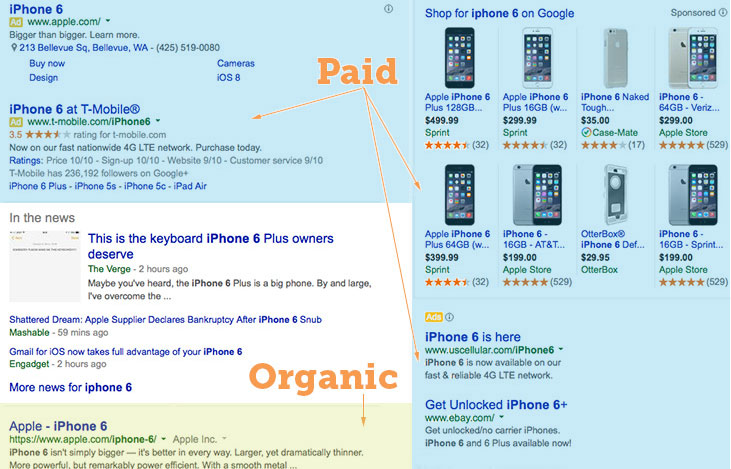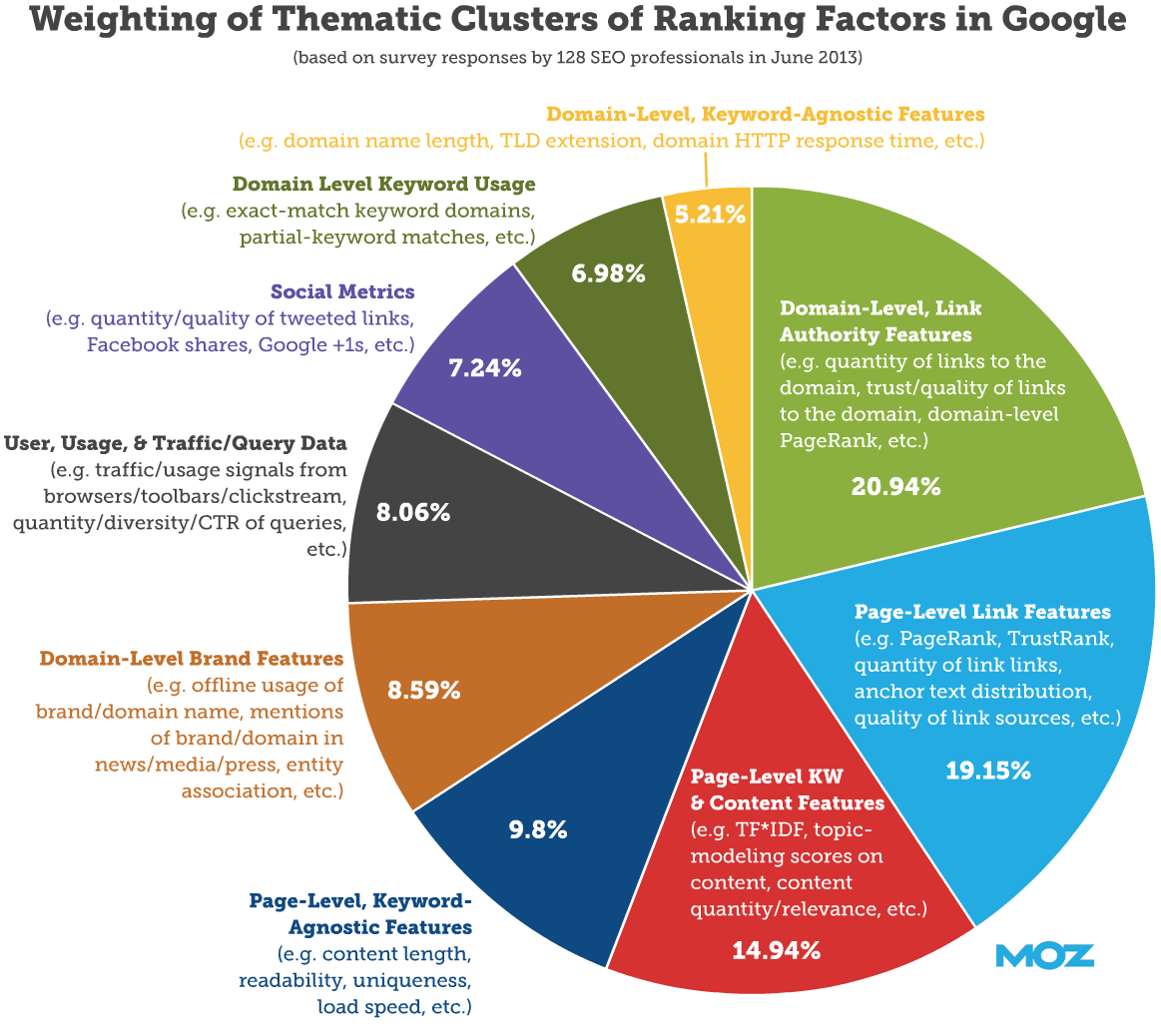
How to Improve Search Engine Optimization

How to Improve Search Engine Optimization

Search engine optimization (SEO) is one of the most powerful and cost-effective ways to grow a business online. Yet, for many companies, SEO feels confusing, slow, or inconsistent. Rankings fluctuate, traffic plateaus, and competitors seem to outrank you no matter what you do.

The truth is this: SEO works when it’s done strategically and consistently. Improving SEO isn’t about hacks or shortcuts—it’s about building relevance, authority, and trust in a way that search engines and users both value.

This guide breaks down how to improve search engine optimization step by step, using proven techniques that work in today’s competitive search landscape.


What Does It Mean to Improve SEO?

Improving SEO means increasing your website’s ability to:

  • Rank higher in search engines

  • Attract qualified organic traffic

  • Match search intent

  • Convert visitors into leads or customers

SEO improvement isn’t a single task—it’s an ongoing process that combines technical optimization, content strategy, authority building, and user experience.


1. Start With Search Intent, Not Keywords Alone

One of the biggest SEO mistakes is focusing only on keywords instead of search intent.

Types of Search Intent:

  • Informational – “What is SEO?”

  • Commercial – “Best SEO services”

  • Transactional – “SEO agency near me”

  • Navigational – “Google Analytics login”

To improve SEO, your content must match the intent behind the search, not just include the keyword.

Example:

If someone searches “how to improve search engine optimization,” they expect:

  • Step-by-step guidance

  • Practical strategies

  • Clear explanations

Not a sales page or a surface-level definition.


2. Perform a Complete SEO Audit

You can’t improve SEO without knowing what’s broken.

Key Areas to Audit:

  • Technical SEO issues

  • Content quality and gaps

  • Keyword targeting

  • Backlink profile

  • Page speed and mobile usability

  • Indexing and crawl errors

Tools to Use:

  • Google Search Console

  • Google Analytics

  • Screaming Frog

  • Ahrefs or SEMrush

Fixing existing issues often produces faster SEO gains than creating new content.


3. Improve Technical SEO Foundation

Technical SEO ensures that search engines can crawl, index, and understand your site properly.

Core Technical SEO Improvements:

Improve Page Speed

  • Compress images

  • Minimize CSS and JavaScript

  • Use fast hosting

  • Enable browser caching

Page speed is a ranking factor and a conversion factor.

Ensure Mobile Optimization

Google uses mobile-first indexing, meaning your mobile site is the primary version evaluated.

Your site should:

  • Load quickly on mobile

  • Be easy to navigate

  • Have readable text without zooming

Fix Crawl and Indexing Issues

Use Google Search Console to:

  • Identify crawl errors

  • Submit XML sitemaps

  • Fix broken links

  • Remove duplicate pages


4. Optimize On-Page SEO Properly

On-page SEO is one of the most controllable ways to improve rankings.

Essential On-Page SEO Elements:

Title Tags

  • Include your primary keyword

  • Keep under 60 characters

  • Make them compelling for clicks

Meta Descriptions

  • Encourage clicks (CTR matters)

  • Include keyword naturally

  • Stay under 160 characters

Header Tags (H1, H2, H3)

  • One H1 per page

  • Use H2s and H3s for structure

  • Include variations of keywords

URL Structure

  • Short and descriptive

  • Include keyword

  • Avoid unnecessary parameters


5. Create High-Quality, In-Depth Content

Content remains the backbone of SEO.

To improve search engine optimization, your content must be:

  • Helpful

  • Comprehensive

  • Well-structured

  • Updated regularly

What Google Rewards:

  • Depth over word count

  • Clear answers

  • Expert-level explanations

  • Strong internal linking

Long-form content often performs better because it covers a topic thoroughly—but only if it provides real value.


6. Improve Content With Topical Authority

Topical authority means becoming a trusted source on a subject.

How to Build Topical Authority:

  • Create content clusters

  • Cover related subtopics

  • Interlink related pages

  • Avoid thin, standalone posts

Example SEO Cluster:

  • Pillar: “How to Improve Search Engine Optimization”

  • Supporting posts:

    • Technical SEO checklist

    • On-page SEO best practices

    • Link building strategies

    • SEO tools comparison

This signals expertise to search engines.


7. Optimize for Keywords the Right Way

Keyword optimization is still important—but stuffing keywords hurts SEO.

Best Practices:

  • Use primary keyword naturally

  • Include semantic keywords and synonyms

  • Answer related questions

  • Write for humans first

Google understands context. Your goal is relevance, not repetition.


8. Improve Internal Linking Structure

Internal links help search engines:

  • Discover pages

  • Understand topic relationships

  • Pass authority

Internal Linking Tips:

  • Link from high-authority pages

  • Use descriptive anchor text

  • Avoid excessive linking

  • Keep links relevant

Strong internal linking improves rankings site-wide.


9. Earn High-Quality Backlinks

Backlinks remain one of the strongest ranking factors.

What Makes a Good Backlink:

  • Relevant industry source

  • High domain authority

  • Editorial placement

  • Natural anchor text

Effective Link-Building Strategies:

  • Guest posting

  • Digital PR

  • Resource page links

  • Local citations

  • Content promotion

Avoid low-quality or spammy backlinks—they can hurt rankings.


10. Improve User Experience (UX)

User behavior impacts SEO more than most realize.

UX Signals That Matter:

  • Time on page

  • Bounce rate

  • Page engagement

  • Mobile usability

UX Improvements:

  • Clear navigation

  • Readable fonts

  • Logical content flow

  • Strong calls-to-action

If users stay, scroll, and interact, rankings improve.


11. Optimize for Featured Snippets & SERP Features

Featured snippets can dramatically increase visibility.

How to Win Featured Snippets:

  • Answer questions clearly

  • Use bullet points and numbered lists

  • Include definitions

  • Use FAQ sections

This is especially effective for informational queries.


12. Improve Local SEO (If Applicable)

For businesses serving specific areas, local SEO is essential.

Local SEO Improvements:

  • Optimize Google Business Profile

  • Build local citations

  • Collect reviews

  • Create location-specific pages

Local SEO can drive high-intent traffic faster than national SEO.


13. Refresh and Update Existing Content

Updating old content is one of the fastest ways to improve SEO.

Content Refresh Strategy:

  • Update statistics

  • Add new sections

  • Improve formatting

  • Add internal links

  • Enhance CTAs

Google favors freshness for many topics.


14. Track, Measure, and Adjust

SEO improvement requires ongoing measurement.

Key Metrics to Track:

  • Organic traffic

  • Keyword rankings

  • Click-through rate (CTR)

  • Conversions

  • Engagement metrics

Use data to refine strategy—not guesswork.


15. Avoid Common SEO Mistakes

Avoiding mistakes is just as important as optimization.

Common SEO Errors:

  • Keyword stuffing

  • Duplicate content

  • Ignoring mobile users

  • Poor site structure

  • Chasing shortcuts

SEO rewards patience and consistency.


How Long Does It Take to Improve SEO?

SEO is not instant.

Typical Timelines:

  • Technical fixes: weeks

  • Content impact: 2–4 months

  • Authority growth: 6–12 months

However, results compound over time, making SEO one of the highest-ROI marketing strategies available.


The Role of AI in Modern SEO

AI tools can assist SEO—but they don’t replace strategy.

Use AI For:

  • Content outlines

  • Keyword research

  • Content optimization

  • Technical audits

Human expertise is still required for intent, strategy, and quality.


Final Thoughts: Improving SEO Is a System, Not a Tactic

If you want to improve search engine optimization, stop thinking in terms of hacks and start thinking in systems.

Effective SEO combines:

  • Technical excellence

  • High-quality content

  • Strong authority

  • User-focused experience

When these elements work together, rankings follow naturally.


Key Takeaway

SEO improves when your website becomes the best answer on the internet for your topic.

What is Search Engine Optimization


ByFull Bio

Susan Ward wrote about small businesses for The Balance Small Business for 18 years. She has run an IT consulting firm and designed and presented courses on how to promote small businesses.

Read The Balance’s editorial policies

Susan Ward

Updated December 07, 2019

What is Search Engine Optimization (also known as SEO)? A broad definition is that search engine optimization is the art and science of making web pages attractive to search engines. More narrowly, SEO seeks to tweak particular factors known to affect search engine standing to make certain pages more attractive to search engines than other web pages that are vying for the same keywords or keyword phrases.

The goal of SEO is to get a web page high search engine ranking. The better a web page’s search engine optimization, the higher a ranking it will achieve in search result listings. (Note that SEO is not the only factor that determines search engine page ranks.) This is especially critical because most people who use search engines only look at the first page or two of the search results, so for a page to get high traffic from a search engine, it has to be listed on those first two pages, and the higher the rank, the closer a page is to the number one listing, the better. And whatever your web page’s rank is, you want your website to be listed before your competitor’s websites if your business is selling products or services over the internet.

Search engine optimization has evolved greatly over the years. In the early days of SEO web designers would “stuff” keywords into web page keyword meta tags to improve search engine rankings – nowadays Google’s web search ignores the keywords meta tag.

Current search engine optimization focuses on techniques such as making sure that each web page has appropriate title tags and that the content is not “thin” or low-quality. High-quality content is original, authoritative, factual, grammatically correct, and engaging to users. Poorly edited articles with spelling and grammatical errors will be demoted by search engines.

Also important for SEO are the so-called “off-page” strategies. Rather than examining just the webpage itself, modern search engines take into account other factors such as the number of links to a page. The more inbound links to a web page the higher it will rank in the search engines. 

Guest blogging (publishing work on the sites and blogs of others) is one method of link building that is safe and effective.

Building links can also be accomplished by sharing content across social media such as Facebook, LinkedIn, Twitter, Google+, Pinterest, and YouTube. Content that has been extensively shared on social media is taken into consideration by search engines as an indication that it is of higher quality.

Do not pay for links! This kind of practice can get your site banned from Google and other search engines.

Search engines find and catalog web pages through spidering (also known as webcrawling) software. Spidering software “crawls” through the internet and grabs information from websites which is used to build search engine indexes. Unfortunately, not all search engine spidering software works the same way, so what gives a page a high ranking on one search engine may not necessarily give it a high ranking on another. Note that rather than waiting for a search engine to discover a newly created page, web designers can submit the page directly to search engines for cataloging.

One of the things that SEO specialists do is keep track of all the changes in search engine operations so they can optimize pages accordingly. They also keep up with changes in the different search engine submission policies.

When you choose a designer to create a business website, you should ask them about search engine optimization, as SEO should be built into your pages. While it’s never too late to optimize or tweak pages that have already been published, it’s a lot easier and more sensible to include search engine optimization when the page is first written.

According to NetMarketShare, Google is still by far the dominant search engine provider, with approximately 73% of the search engine market, followed by Baidu (Microsoft):

Google – 72.47%

Baidu – 13.47%

Bing – 7.64%

Yahoo! – 4.74%

Yandex – 0.86%

Ask – 0.30%

DuckDuckGo – 0.22%

Also Known As: SEO

Examples: Sales on Karen’s ecommerce site rose 210% once she had the website redone with search engine optimization in mind.

Source

What is information technology IT

Information technology (IT) is the use of any computers, storage, networking and other physical devices, infrastructure and processes to create, process, store, secure and exchange all forms of electronic data. Typically, IT is used in the context of enterprise operations as opposed to personal or entertainment technologies. The commercial use of IT encompasses both computer technology and telephony.

The term information technology was coined by the Harvard Business Review, in order to make a distinction between purpose-built machines designed to perform a limited scope of functions and general-purpose computing machines that could be programmed for various tasks. As the IT industry evolved from the mid-20th century, computing capability advanced while device cost and energy consumption fell lower, a cycle that continues today when new technologies emerge.

IT software and hardware

IT includes several layers of physical equipment (hardware), virtualization and management or automation tools, operating systems and applications (software) used to perform essential functions. User devices, peripherals and software, such as laptops, smartphones or even recording equipment, can be included in the IT domain. IT can also refer to the architectures, methodologies and regulations governing the use and storage of data.

Business applications include databases like SQL Server, transactional systems such as real-time order entry, email servers like Exchange, Web servers like Apache, customer relationship management and enterprise resource planning systems. These applications execute programmed instructions to manipulate, consolidate, disperse or otherwise affect data for a business purpose.

Computer servers run business applications. Servers interact with client users and other servers across one or more business networks. Storage is any kind of technology that holds information as data. Information can take any form including file data, multimedia, telephony data and Web data, data from sensors or future formats. Storage includes volatile random access memory (RAM) as well as non-volatile tape, hard disk and solid-state flash drives.

IT architectures have evolved to include virtualization and cloud computing, where physical resources are abstracted and pooled in different configurations to meet application requirements. Clouds may be distributed across locations and shared with other IT users, or contained within a corporate data center, or some combination of both deployments.

IT education and job functions

A team of administrators and other technical staffers deploy and manage the company’s IT infrastructure and assets. IT teams depend on a wide range of specialized information and technology skills and knowledge to support equipment, applications and activities. Third-party contractors and IT vendor support personnel augment the IT team.

The information technology profession is extremely diverse. IT workers can specialize in fields like software development, application management, hardware components such as desktop support, server or storage administrator and network architecture. Many businesses seek IT professionals with mixed or overlapping skill sets.

Common IT careers:

Chief information officer: This person is responsible for IT and computer systems that support the enterprise’s goals.

Chief technology officer: This person sets all technology goals and policies within an organization.

IT director: This person is responsible for the function of all of the business’s technology tools and processes. This role is commonly called IT manager or IT leader.

Systems administrator: This person configures, manages, supports and troubleshoots a multi-user computing environment. Within an enterprise, this role can be segmented by technology, requiring an administrator or team dedicated to server, desktop, network, virtualization or other components.

Application manager: This person’s role centers on the provisioning and management of a high-value business application, such as Exchange.

Developer: This person or team writes, updates and tests code for programs to meet business objectives internally or facing customers.

Architect: This person examines and changes IT functions to best support the business.

Continue Reading About information technology (IT)

Dig Deeper on Enterprise data storage strategies

Source

What is Web Design

Changing careers isn’t as hard as it’s often made out to be, especially if you’ve got the right resources to help you make the change. For many web designers, now is the perfect time to make the switch into UX design. To start with, there’s the monetary boost that comes with the change in career. According to PayScale, web designers in the US earn an average of $46,000 annually(1), while UX designers on the other hand earn a sizeable $74,000(2). Secondly, job opportunities for UX designers are booming: CNN reports that a total of 3,426,000 UX design jobs will be created in the US alone within the next 10 years(3). Furthermore, UX design is a meaningful job, not only because you get to work on a product from the inside out, but also because—as DMI has shown—UX design makes a significant impact on businesses, with UX design-driven businesses outperforming the S&P index by 228%(4). So, where do you find the right resources to help you make your career change? Why, you’re reading one right now.

To start with, let’s have a brief introduction to what we mean by “User Experience”. Products have users, and the user experience (UX) is simply the experience a user has from using that particular product. So far, so good?

UX design is the art of designing products so that they provide the optimum possible user experience. If this description sounds broad, it’s because the nature of UX design is pretty broad. Building the optimum UX encompasses an understanding of psychology, interaction design, user research, and many other disciplines, but on top of it all is an iterative problem solving process (but more on that later).

Broadly speaking, user experience can be broken down into 3 components: the look, feel, and usability.
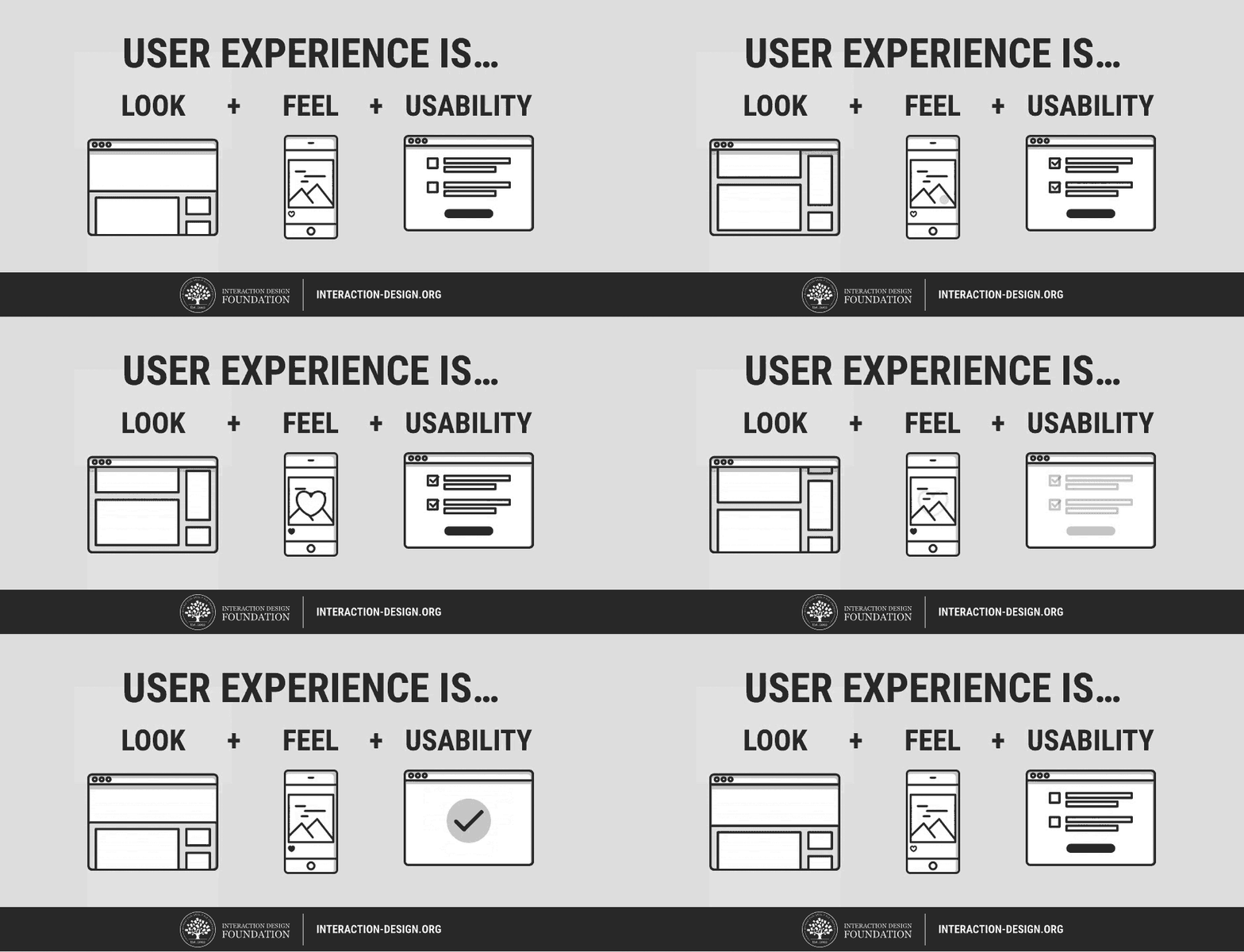
The look of a product is about using visuals to create a sense of harmony with the user’s values, and that creates credibility and trust with the user. It’s about creating a product that not only looks nice, but looks right too.

The feel, then, involves making the experience of using a product as pleasant and enjoyable as possible. It’s built by crafting the interactions between the user and the product, as well as the reactions they have when (and after) using the product.

Lastly, usability underpins the user experience. Quite simply, if a product isn’t usable, no amount of good looks can salvage it, and the only feeling users are going to have is anger and frustration. Ideally, products should be personalized to user’s needs, and deliver functionality in a predictable way.

If you’re still not sure whether UX design appeals to you, we’ve got some articles that help introduce some of the important parts of UX as a career:

An Introduction to Usability

Usability vs Desirability

What is Interaction Design?

What Do Web Design and UX Design Have in Common?

The job title “Web Designer” has many definitions, and indeed, what a web designer does is largely dependent on what the client or project requires. Some web designers simply create visual designs and/or high fidelity interactive prototypes of the website, and leave the coding of the website to front-end and back-end developers. The majority of web designers, however, do get involved with both the designing and (front-end) development of the website. Some web designers even regularly do user research and testing as part of their jobs (and if you’re one of them, you’re already almost ready for a job in UX design).

But no matter what your job as a web designer entails, here are some aspects of web design that can also be found in UX design.

Problem solving

Web designers look to solve problems for their clients; UX designers look to solve problems for their users. Web designers work with a problem solving process: first, they find out the problems their clients have, then design a web solution for them, and then proceed to develop and test the website before releasing it. And after a website is launched, web designers often are involved with further testing the site, collecting feedback from users, and then reiterating on the design.

This iterative problem solving process is similar to the UX design process (shown in the image below). UX designers begin with user research; it’s essential to get to know the potential users of a product and find out what their problems are, how to solve them and how to make users want and/or need that solution. User research is often done via user interviews, observations, demographic studies, drafting user stories and personas, etc. Thereafter, UX designers would create a design solution that solves the user’s key needs, and often bring the prototype back to users to test its validity or usability. After the product is launched, UX designers collect more user feedback, which feeds into a new round of user research, thereby starting the process again.

If you’ve done user research before as part of your web designer job, you will find it a great advantage when making the switch to UX design. If not, don’t worry—you’ll have many opportunities to learn the best ways to conduct user research (read on to find out more).

Emotional design

When designing websites, web designers often make use of typography, color and layout to shape the emotions of users. A sense of credibility could be established, for instance, by using darker colors and serif fonts; similarly, a sense of fun could be created using colorful imagery and playful typography. Web designers are familiar with emotional design; that is, creating designs that elicit emotions from users. UX designers are also concerned with emotional design, but on a larger scale—they are concerned with eliciting emotions from users throughout their entire experience of using a product.

To do that, UX designers work with not only typography and color, but also psychology, motion design, content curation and information architecture. Web designers making the change would innately understand what emotional design in UX entails; they simply need to pick up new knowledge in other areas to augment their ability to do so on a bigger picture.

Multi-disciplinary

Web design is a multi-disciplinary job, where you’d need not only knowledge in design (typography, color theory) but also skills in developing a website (HTML, CSS, JavaScript). Some web designers are also involved in interaction design when they code for animations and interactions using CSS and/or JavaScript. UX design is also a multi-disciplinary field, but perhaps supercharged in that sense. UX designers need to make use of knowledge from the areas of psychology, user research, visual design, and even business to create the best UX for their products.

The Differences between Web Design and UX Design

User-focused vs technology-focused

A large part of your job as a web designer is spent on catching up on the latest developments in HTML, CSS and other coding languages—all of which change and improve at a dizzying pace. Which browsers support what versions of CSS? Would CSS animations work in Safari on a Mac? Don’t even get me started on Internet Explorer! These might be a few questions (and frustrations) that are constantly on your mind as a web designer.But UX design isn’t concerned with technology. Instead, its focus is centered squarely on users—technology is only a means for users to get what they need. Only by focusing on users can UX designers create solutions that cater to the specific needs they have, and ultimately, that users will be willing to pay for. UX designers do extensive user res
earch to find out the most they can about their users, most of which the majority of web designers wouldn’t have had the chance to perform.

UX is more than the web

UX design is platform independent. Its principles and processes are applied to many diverse areas outside of web browsers: on mobile apps, desktop software, and even hardware products and retail spaces. On the other hand, the domain of web design is strictly tied to web browsers. This means that UX designers are able to find job opportunities not only in up-and-rising fields like tech startups, but also in mature and stable industries like car manufacturers. As long as there’s a product, there’s a need for UX—and this really opens up your world of opportunities.

The Big Benefit of Web Design Experience when Moving to UX Design

Relevance of web design background

The biggest benefit of moving from web design to UX design is the amount of overlap between the two fields of design. While it’s true that UX design covers more platforms than the web browser, a sizeable portion of UX design work is still done on products that are at least partially web-based (think of social media websites like Facebook and Twitter, web apps like Dropbox, and services like Google). The overlap between web design and UX design is greater if you’ve done some form of user research or iterative process of continually improving a website with user data.

Being fluent in design and website coding terminologies will also give you a boost that cannot be ignored; after all, UX design is a collaborative process where communication is crucial. Being able to use industry terms while talking to your colleagues will definitely put you in a better place than someone who came from a non-design background.

Aesthetics

Your ability to create beautiful aesthetics as a web designer will also come in handy when making the switch to UX design. Firstly, aesthetics is a great tool to augment your communications with internal stakeholders. As a UX designer, you have to constantly present your findings and recommendations to internal stakeholders (such as the CEO or product manager), and your ability to create visually pleasing reports and presentations will maximize the absorption of your key points.

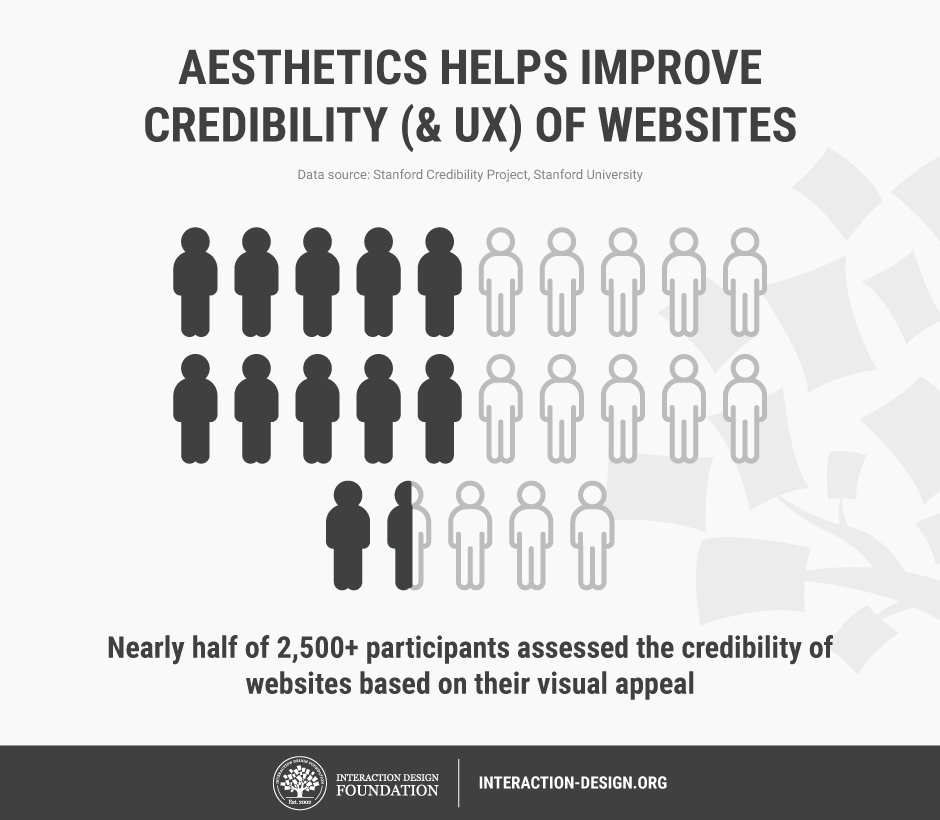
Secondly, aesthetics plays a vital role in UX design. A common myth of UX design is that great usability trumps aesthetics—but that is far from true. In fact, a study of more than 2,500 participants by the Stanford Credibility Project showed that nearly half of them assessed the credibility of websites based on their visual appeal(5). This goes to show how aesthetics works hand in hand with other factors like usability to bring about the optimum user experience of using a product.
Moving from web design to UX design can sometimes be quite straightforward, especially if you’ve done some aspects of user research in your job as a web designer. For other web designers, however, there is no cause for concern. You’ll be able to make the leap if you’ve spent some time studying UX, practicing some UX skills during your web design work, and constructing a CV which shows your understanding of UX design. If you’re wondering where to learn, there are plenty of options available to you, and we’ve highlighted some of the best below.

Online Courses

Interaction Design Foundation

Don Norman, the cognitive scientist who coined the term “User Experience”, called the Interaction Design Foundation (yes, that’s us) a “goldmine of information on interaction design.” Forbes Magazine says that we offer “Ivy League level education in UX, Product Design or Human Computer Interaction.” Fortunately, that education isn’t at an Ivy League level of pricing. As a non-profit organization, we charge a low annual fee and you get access not just to all of our online learning, but also to the largest specialist design community in the world. We also offer a free library of academic texts from the design industry’s top researchers.

We have three courses (among our current offering of 32) that are specifically designed to help people enter the world of UX design. You’ll learn all areas of UX work and basic skills to practice UX work in Become a UX Designer from Scratch. In Get Your First Job as a UX (or Interaction) Designer, you’ll be able to learn what kinds of experience in UX do employers seek the most, as well as craft a winning cover letter, CV and portfolio that will help you get an interview for a UX design job. Finally, in User Research – Methods and Best Practices, learn the industry best practices of how to conduct proper user research and turn the results of your research into useful action on your product.

You can find all of our other UX courses here.

Coursera

You might also want to check out Coursera which is a great source of online learning. Their courses, like ours, are developed by leading experts in their field. Unlike us, however, they don’t specialize in UX and their courses aren’t always available, but when they are, they can either be accessed usually for a fee (on a per course basis).

Udemy

Udemy offers a huge selection of courses in nearly every subject area you can imagine. Udemy isn’t really a training provider, but rather a broker of training created by people from around the world. As such, there’s not much in the way of quality control applied to their courses—while some are absolutely brilliant, many are not.

Classroom Courses

Nielsen Norman Group

If you want to examine classroom courses; we recommend sticking with the “big names” of the industry who provide reliable and high-quality learning experiences. One of those big names is the Nielsen Norman Group who are also one of the best known UX consultancies; they offer a range of classroom based training at various locations around the world. They’re not inexpensive, but if you prefer not to have online training, they’re a good alternative.

You can find the Nielsen Norman Group’s training here.

Cooper

Cooper, a highly respected classroom-based training provider, also provides classroom courses on UX design. They’re also not cheap, but if you’re going to do classroom learning, it’s never going to be as cost-effective as online learning. They do, however, offer a nice range of locations to learn in as part of their service.

You can find more about Cooper’s training here.

University Courses

If you’ve got plenty of money and time, you could go ahead and get a Bachelor’s degree or a Master’s degree at a university. There isn’t, as of yet, a “UX-only” degree course, and the majority of related degrees tend to focus on Human Computer Interaction.

Two examples of this kind of program are:

Carnegie Mellon – HCI Programs

York University – MSc in HCI Technologies

University is not a low cost option, both in the sense of your time and money you’ll be spending on it. You’ll want to weigh up the pros and cons of a university course very carefully before you decide to go this route.

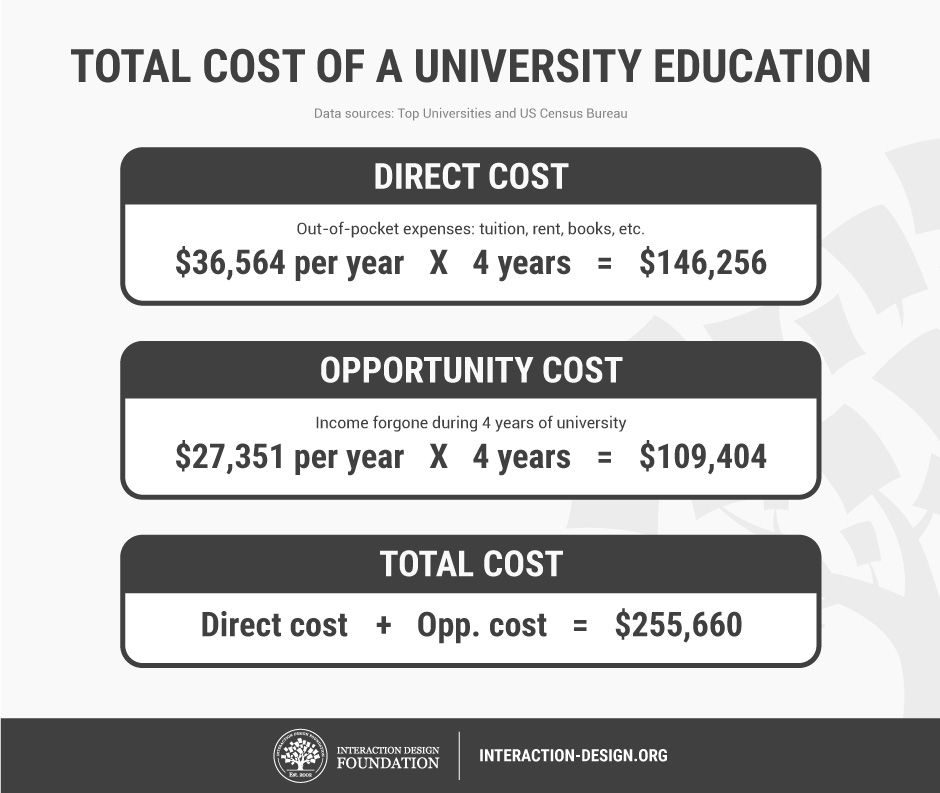
For instance, here’s how we break down the total costs of a 4-year un
iversity degree:

HSBC, as reported by Top Universities, found that the average US-based university education costs $36,564 a year(6). That includes tuition fees as well as living expenses. For a 4-year degree, this adds up to $146,256—and that’s not counting the costs (such as interest) of getting a loan for your studies.

Then there’s the opportunity cost of quitting work and spending four years at university. That is, the income you’ll forgo when studying full-time at a university. According to the United States Census, a non-graduate earns an average of $27,351 per year(7). Over 4 years, that amounts to $109,404 that could have been earned if you had been working.

Summing up the actual cost and opportunity cost gives you the total cost: a whopping $255,660!
If you think that all the options are confusing, you might want start by examining the return on investment from each type of learning. We’ve got an article here that examines the return on investment from each of the learning types mentioned above.

Networking

The best way to find work in any field is to use a little inside knowledge and get some help from those people already doing what you want to do. This used to be hard work, but today you can simply get online and get networking.

We’d recommend LinkedIn to anyone looking to do some professional networking; join UX groups and join the conversation. Don’t just jump in and ask for work—demonstrate your value first and help people, and look for work only after you’ve built relationships.

The Interaction Design Foundation also offers networking opportunities to both members and non-members. Our members are able to carry out highly specific networking through pre-designed forums that allow for collaboration between large groups of designers. Both members and non-members can also attend our local groups’ community events, which are completely free to attend. You can find out more about the local groups here.

You could also think about getting involved with the design community’s leadership by interacting with them on social media. We’ve provided a list of twenty great designers here that you can interact with online; you can expand that list as much as you like with a little Google work.

Mentoring and Feedback

We’ve found that you can make a career change more easily if you can find someone to mentor you and provide feedback on your efforts. You can, of course, source a mentor from your existing professional network if you know someone who is happy to take the role on. If you think that’s not going to work for you, members of the Interaction Design Foundation’s Design League have access our network of UX design experts and see a mentor from that network.

The Take Away

It isn’t difficult to move from web design to UX design. You can build on your existing skills through a process of education and choose the kind of education that suits you best. Thereafter, you can put that learning into practice as a web designer. The good news is you already speak the language of design so once you have a little practice in UX, you’re going to be ready to transition your career into UX design and join the fastest growing part of the design profession in the world today.

References & Where to Learn More

  1. Course: Web Design for Usability:
    https://www.interaction-design.org/courses/web-design-for-usability
  2. Payscale’s research on Web Design salaries – http://www.payscale.com/research/US/Job=Web_Designer/Salary
  3. Payscale’s research on UX Design salaries – http://www.payscale.com/research/US/Job=UX_Designer/Salary
  4. CNN reports 3.4 million UX designer job growth in the next 10 years – http://money.cnn.com/pf/best-jobs/2012/snapshots/43.html
  5. DMI’s analysis of design investment – http://www.dmi.org/blogpost/1093220/182956/Design-Driven-Companies-Outperform-S-P-by-228-Over-Ten-Years–The-DMI-Design-Value-Index
  6. UX Myths: Aesthetics are not important if you have good usability – http://uxmyths.com/post/1161244116/myth-25-aesthetics-are-not-important-if-you-have-good-us
  7. How much does it cost to study in the US – http://www.topuniversities.com/student-info/student-finance/how-much-does-it-cost-study-us
  8. Earnings by education: US Census Bureau – https://www.census.gov/hhes/www/income/data/earnings/call1usboth.html

Changing careers isn’t as hard as it’s often made out to be, especially if you’ve got the right resources to help you make the change. For many web designers, now is the perfect time to make the switch into UX design. To start with, there’s the monetary boost that comes with the change in career. According to PayScale, web designers in the US earn an average of $46,000 annually(1), while UX designers on the other hand earn a sizeable $74,000(2). Secondly, job opportunities for UX designers are booming: CNN reports that a total of 3,426,000 UX design jobs will be created in the US alone within the next 10 years(3). Furthermore, UX design is a meaningful job, not only because you get to work on a product from the inside out, but also because—as DMI has shown—UX design makes a significant impact on businesses, with UX design-driven businesses outperforming the S&P index by 228%(4). So, where do you find the right resources to help you make your career change? Why, you’re reading one right now.

To start with, let’s have a brief introduction to what we mean by “User Experience”. Products have users, and the user experience (UX) is simply the experience a user has from using that particular product. So far, so good?

UX design is the art of designing products so that they provide the optimum possible user experience. If this description sounds broad, it’s because the nature of UX design is pretty broad. Building the optimum UX encompasses an understanding of psychology, interaction design, user research, and many other disciplines, but on top of it all is an iterative problem solving process (but more on that later).

Broadly speaking, user experience can be broken down into 3 components: the look, feel, and usability.

The look of a product is about using visuals to create a sense of harmony with the user’s values, and that creates credibility and trust with the user. It’s about creating a product that not only looks nice, but looks right too.

The feel, then, involves making the experience of using a product as pleasant and enjoyable as possible. It’s built by crafting the interactions between the user and the product, as well as the reactions they have when (and after
) using the product.

Lastly, usability underpins the user experience. Quite simply, if a product isn’t usable, no amount of good looks can salvage it, and the only feeling users are going to have is anger and frustration. Ideally, products should be personalized to user’s needs, and deliver functionality in a predictable way.

If you’re still not sure whether UX design appeals to you, we’ve got some articles that help introduce some of the important parts of UX as a career:

An Introduction to Usability

Usability vs Desirability

What is Interaction Design?

What Do Web Design and UX Design Have in Common?

The job title “Web Designer” has many definitions, and indeed, what a web designer does is largely dependent on what the client or project requires. Some web designers simply create visual designs and/or high fidelity interactive prototypes of the website, and leave the coding of the website to front-end and back-end developers. The majority of web designers, however, do get involved with both the designing and (front-end) development of the website. Some web designers even regularly do user research and testing as part of their jobs (and if you’re one of them, you’re already almost ready for a job in UX design).

But no matter what your job as a web designer entails, here are some aspects of web design that can also be found in UX design.

Problem solving

Web designers look to solve problems for their clients; UX designers look to solve problems for their users. Web designers work with a problem solving process: first, they find out the problems their clients have, then design a web solution for them, and then proceed to develop and test the website before releasing it. And after a website is launched, web designers often are involved with further testing the site, collecting feedback from users, and then reiterating on the design.

This iterative problem solving process is similar to the UX design process (shown in the image below). UX designers begin with user research; it’s essential to get to know the potential users of a product and find out what their problems are, how to solve them and how to make users want and/or need that solution. User research is often done via user interviews, observations, demographic studies, drafting user stories and personas, etc. Thereafter, UX designers would create a design solution that solves the user’s key needs, and often bring the prototype back to users to test its validity or usability. After the product is launched, UX designers collect more user feedback, which feeds into a new round of user research, thereby starting the process again.

If you’ve done user research before as part of your web designer job, you will find it a great advantage when making the switch to UX design. If not, don’t worry—you’ll have many opportunities to learn the best ways to conduct user research (read on to find out more).

Emotional design

When designing websites, web designers often make use of typography, color and layout to shape the emotions of users. A sense of credibility could be established, for instance, by using darker colors and serif fonts; similarly, a sense of fun could be created using colorful imagery and playful typography. Web designers are familiar with emotional design; that is, creating designs that elicit emotions from users. UX designers are also concerned with emotional design, but on a larger scale—they are concerned with eliciting emotions from users throughout their entire experience of using a product.

To do that, UX designers work with not only typography and color, but also psychology, motion design, content curation and information architecture. Web designers making the change would innately understand what emotional design in UX entails; they simply need to pick up new knowledge in other areas to augment their ability to do so on a bigger picture.

Multi-disciplinary

Web design is a multi-disciplinary job, where you’d need not only knowledge in design (typography, color theory) but also skills in developing a website (HTML, CSS, JavaScript). Some web designers are also involved in interaction design when they code for animations and interactions using CSS and/or JavaScript. UX design is also a multi-disciplinary field, but perhaps supercharged in that sense. UX designers need to make use of knowledge from the areas of psychology, user research, visual design, and even business to create the best UX for their products.

The Differences between Web Design and UX Design

User-focused vs technology-focused

A large part of your job as a web designer is spent on catching up on the latest developments in HTML, CSS and other coding languages—all of which change and improve at a dizzying pace. Which browsers support what versions of CSS? Would CSS animations work in Safari on a Mac? Don’t even get me started on Internet Explorer! These might be a few questions (and frustrations) that are constantly on your mind as a web designer.But UX design isn’t concerned with technology. Instead, its focus is centered squarely on users—technology is only a means for users to get what they need. Only by focusing on users can UX designers create solutions that cater to the specific needs they have, and ultimately, that users will be willing to pay for. UX designers do extensive user research to find out the most they can about their users, most of which the majority of web designers wouldn’t have had the chance to perform.

UX is more than the web

UX design is platform independent. Its principles and processes are applied to many diverse areas outside of web browsers: on mobile apps, desktop software, and even hardware products and retail spaces. On the other hand, the domain of web design is strictly tied to web browsers. This means that UX designers are able to find job opportunities not only in up-and-rising fields like tech startups, but also in mature and stable industries like car manufacturers. As long as there’s a product, there’s a need for UX—and this really opens up your world of opportunities.

The Big Benefit of Web Design Experience when Moving to UX Design

Relevance of web design background

The biggest benefit of moving from web design to UX design is the amount of overlap between the two fields of design. While it’s true that UX design covers more platforms than the web browser, a sizeable portion of UX design work is still done on products that are at least partially web-based (think of social media websites like Facebook and Twitter, web apps like Dropbox, and services like Google). The overlap between web design and UX design is greater if you’ve done some form of user research or iterative process of continually improving a website with user data.

Being fluent in design and website coding terminologies will also give you a boost that cannot be ignored; after all, UX design is a collaborative process where communication is crucial. Being able to use industry terms while talking to your colleagues will definitely put you in a better place than someone who came from a non-design background.

Aesthetics

Your ability to create beautiful aesthetics as a web designer will also come in handy when making the switch to UX design. Firstly, aesthetics is a great tool to augment your communications with internal stakeholders. As a UX designer, you have to constantly present your findings and recommendations to internal stakeholders (such as the CEO or product manager), and your ability to create visually pleasing reports and presentations will maximize the absorption of your key points.

Secondly, aesthetics plays a vital role in UX design.
A common myth of UX design is that great usability trumps aesthetics—but that is far from true. In fact, a study of more than 2,500 participants by the Stanford Credibility Project showed that nearly half of them assessed the credibility of websites based on their visual appeal(5). This goes to show how aesthetics works hand in hand with other factors like usability to bring about the optimum user experience of using a product.

Moving from web design to UX design can sometimes be quite straightforward, especially if you’ve done some aspects of user research in your job as a web designer. For other web designers, however, there is no cause for concern. You’ll be able to make the leap if you’ve spent some time studying UX, practicing some UX skills during your web design work, and constructing a CV which shows your understanding of UX design. If you’re wondering where to learn, there are plenty of options available to you, and we’ve highlighted some of the best below.

Online Courses

Interaction Design Foundation

Don Norman, the cognitive scientist who coined the term “User Experience”, called the Interaction Design Foundation (yes, that’s us) a “goldmine of information on interaction design.” Forbes Magazine says that we offer “Ivy League level education in UX, Product Design or Human Computer Interaction.” Fortunately, that education isn’t at an Ivy League level of pricing. As a non-profit organization, we charge a low annual fee and you get access not just to all of our online learning, but also to the largest specialist design community in the world. We also offer a free library of academic texts from the design industry’s top researchers.

We have three courses (among our current offering of 32) that are specifically designed to help people enter the world of UX design. You’ll learn all areas of UX work and basic skills to practice UX work in Become a UX Designer from Scratch. In Get Your First Job as a UX (or Interaction) Designer, you’ll be able to learn what kinds of experience in UX do employers seek the most, as well as craft a winning cover letter, CV and portfolio that will help you get an interview for a UX design job. Finally, in User Research – Methods and Best Practices, learn the industry best practices of how to conduct proper user research and turn the results of your research into useful action on your product.

You can find all of our other UX courses here.

Coursera

You might also want to check out Coursera which is a great source of online learning. Their courses, like ours, are developed by leading experts in their field. Unlike us, however, they don’t specialize in UX and their courses aren’t always available, but when they are, they can either be accessed usually for a fee (on a per course basis).

Udemy

Udemy offers a huge selection of courses in nearly every subject area you can imagine. Udemy isn’t really a training provider, but rather a broker of training created by people from around the world. As such, there’s not much in the way of quality control applied to their courses—while some are absolutely brilliant, many are not.

Classroom Courses

Nielsen Norman Group

If you want to examine classroom courses; we recommend sticking with the “big names” of the industry who provide reliable and high-quality learning experiences. One of those big names is the Nielsen Norman Group who are also one of the best known UX consultancies; they offer a range of classroom based training at various locations around the world. They’re not inexpensive, but if you prefer not to have online training, they’re a good alternative.

You can find the Nielsen Norman Group’s training here.

Cooper

Cooper, a highly respected classroom-based training provider, also provides classroom courses on UX design. They’re also not cheap, but if you’re going to do classroom learning, it’s never going to be as cost-effective as online learning. They do, however, offer a nice range of locations to learn in as part of their service.

You can find more about Cooper’s training here.

University Courses

If you’ve got plenty of money and time, you could go ahead and get a Bachelor’s degree or a Master’s degree at a university. There isn’t, as of yet, a “UX-only” degree course, and the majority of related degrees tend to focus on Human Computer Interaction.

Two examples of this kind of program are:

Carnegie Mellon – HCI Programs

York University – MSc in HCI Technologies

University is not a low cost option, both in the sense of your time and money you’ll be spending on it. You’ll want to weigh up the pros and cons of a university course very carefully before you decide to go this route.

For instance, here’s how we break down the total costs of a 4-year university degree:

HSBC, as reported by Top Universities, found that the average US-based university education costs $36,564 a year(6). That includes tuition fees as well as living expenses. For a 4-year degree, this adds up to $146,256—and that’s not counting the costs (such as interest) of getting a loan for your studies.

Then there’s the opportunity cost of quitting work and spending four years at university. That is, the income you’ll forgo when studying full-time at a university. According to the United States Census, a non-graduate earns an average of $27,351 per year(7). Over 4 years, that amounts to $109,404 that could have been earned if you had been working.

Summing up the actual cost and opportunity cost gives you the total cost: a whopping $255,660!

If you think that all the options are confusing, you might want start by examining the return on investment from each type of learning. We’ve got an article here that examines the return on investment from each of the learning types mentioned above.

Networking

The best way to find work in any field is to use a little inside knowledge and get some help from those people already doing what you want to do. This used to be hard work, but today you can simply get online and get networking.

We’d recommend LinkedIn to anyone looking to do some professional networking; join UX groups and join the conversation. Don’t just jump in and ask for work—demonstrate your value first and help people, and look for work only after you’ve built relationships.

The Interaction Design Foundation also offers networking opportunities to both members and non-members. Our members are able to carry out highly specific networking through pre-designed forums that allow for collaboration between large groups of designers. Both members and non-members can also attend our local groups’ community events, which are completely free to attend. You can find out more about the local groups here.

You could also think about getting involved with the design community’s leadership by interacting with them on social media. We’ve provided a list of twenty great designers here that you can interact with online; you can expand that list as much as you like with a little Google work.

Mentoring and Feedback

We’ve found that you can make a career change more easily if you can find someone to mentor you and provide feedback on your efforts. You can, of course, source a mentor from your existing professional network if you know someone who is happy to take the role on. If you think that’s not going to work for you, members of the Interaction Design Foundation’s Design League have access our network of UX design experts and see a mentor from that network.

The Take Away

It isn’t difficult to move from web design to UX design. You can build on your existing skills through a process of education and choose the kind of education that suits you best. Thereafter, you can put that learning into practice as a web designer. The good news is you already speak the language of design so once you have a little practice in UX, you’re going to be ready to transition your career into UX design and join the fastest growing part of the design profession in the world today.

References & Where to Learn More

  1. Course: Web Design for Usability:
    https://www.interaction-design.org/courses/web-design-for-usability
  2. Payscale’s research on Web Design salaries – http://www.payscale.com/research/US/Job=Web_Designer/Salary
  3. Payscale’s research on UX Design salaries – http://www.payscale.com/research/US/Job=UX_Designer/Salary
  4. CNN reports 3.4 million UX designer job growth in the next 10 years – http://money.cnn.com/pf/best-jobs/2012/snapshots/43.html
  5. DMI’s analysis of design investment – http://www.dmi.org/blogpost/1093220/182956/Design-Driven-Companies-Outperform-S-P-by-228-Over-Ten-Years–The-DMI-Design-Value-Index
  6. UX Myths: Aesthetics are not important if you have good usability – http://uxmyths.com/post/1161244116/myth-25-aesthetics-are-not-important-if-you-have-good-us
  7. How much does it cost to study in the US – http://www.topuniversities.com/student-info/student-finance/how-much-does-it-cost-study-us
  8. Earnings by education: US Census Bureau – https://www.census.gov/hhes/www/income/data/earnings/call1usboth.html

Source

What Is Google AdWords How Does Google Ads Work


What Is Google Adwords


This Infographic is Property of WordStream, Inc.

WordStream is a provider of PPC management software, PPC tools, and a FREE keyword research tool.

What is Google Ads (Formerly Known as Google AdWords)?

What is Google Ads? Google Ads, AKA Google AdWords, is Google’s advertising system in which advertisers bid on certain keywords in order for their clickable ads to appear in Google’s search results. Since advertisers have to pay for these clicks, this is how Google makes money from search. This infographic will help you understand how Google Ads works, detailing the Google Ads auction, bidding process and explaining important factors like Quality Score and cost-per-click. If you’re asking “How does AdWords Work?” this page is for you.

Does AdWords (Google Ads) work?

Does Google AdWords work? Depending on the competitiveness of the keywords you’re bidding for and the relevancy of that keyword to real conversions for your company, AdWords may or may not work for your business. For the most part, we’ve found that Google AdWords is extremely effective for many kinds of businesses, as long as they don’t waste their money on the wrong keywords, or write weak, low CTR ads.

How much does Google AdWords cost?

Many factors can affect the costs of AdWords advertising for your business. Learn all about these costs, how bidding works, and the average cost per click for advertisers in our guide to “How Much Does AdWords Cost?”

How to advertise with Google Ads

Businesses can advertise on Google by opening a Google AdWords account. Learn more about how to make the most of Google AdWords here. Or follow the proven path to AdWords success in our “How to Use Google AdWords” infographic.

How does Google Ads or AdWords bidding work?

The actual position of your ad is determined by your ad rank (Maximum Bid times Quality Score). The highest ad rank gets the 1st ad position. Your actual CPC will be determined by the ad rank of the next highest ad below you divided by your Quality Score. The only exception of this rule is when you are the only bidder or the lowest bid in the Google Ads auction; then you pay your maximum bid per click! AdWords bidding heavily penalizes advertisers who bid with low quality scores. Conversely, those with high Quality Scores get higher ad ranks and lower CPC.

How many times does a Google auction run?

The auction gets run billions of times each month. The results are such that users find ads that are relevant to what they’re looking for, advertisers connect with potential customers at the lowest possible prices and Google rakes in billions of dollars in revenue.

How does the Google auction work?

Once a query is made on Google, the search engine processes the request and runs the auction which will then determine the ad positions and each advertiser’s CPC.

How do you enter a Google auction?

Your Google ads are eligible to be entered into an auction whenever you’re bidding on keywords relevant to the user’s search query. Your bids, Quality Score, and relevance will come into play in determining whether your ad qualifies to display on the SERP.

What gets entered into a Google auction?

Once advertisers identity keywords they want to bid on, Google then enters the keyword from your account that it deems most relevant into the auction with the maximum bid you’ve specified as well as the associated ad.

What is CPC?

CPC, or cost per click, is the amount an advertiser pays each time someone clicks on their AdWords ad.

How does CPC work?

Your CPC is determined by the competitiveness of your keywords, your maximum bids, and your Quality Scores. Learn the most expensive keywords in Google AdWords.

What is the average cost per click for Google Ads?

The average cost per click on AdWords varies by keyword and industry, but is roughly $2.32 on the search network and $0.58 on the display network. Get more average AdWords metrics here.

What is Google Quality Score?

This is a metric Google uses to determine how relevant and useful your ad is to the user, based primarily on your ad’s CTR, keyword relevance, and the quality of your landing page. The higher your Quality Score, the better: high Quality Score keywords will save you money and earn you better ad rankings.

How does Google determine what you pay?

Costs are determined by your maximum bid, your Quality Score, and the competitiveness of your keyword.

What is Google ad rank?

Google ad rank is the position of the company’s advertisement on the search engine page based on a combination of the company’s maximum bid and quality score.

Ad rank vs. Quality Score

The ad rank is how high on the page the advertisement will be displayed. Quality Score on the other hand is determined by the relevance and usefulness to the searcher and is only a portion of the advertisement positioning process. As of 2013, Google’s Quality score has become more and more valuable as the average quality score has changed from a 7 to 5.

What is ad position in AdWords?

Ad position is the position on the search engine page results where the advertisement appears in relation to all of the other advertisements.

What is Actual CPC?

Actual CPC is the amount an advertiser pays each time a searcher clicks on their advertisement; this number varies depending on the other advertisers in the auction and is always lower than the maximum bidding price.

How does Google calculate Actual CPC?

Actual CPC is determined by dividing the ad rank of the competitor below them (ad rank to hit) by quality score plus $.01.

What are alternative bidding methods?

Alternative bidding methods include CPM and CPA.

What is CPM bidding?

CPM bidding is based on impressions and can be used alongside CPC bidding.

CPC vs. CPM

CPC is the cost for an advertisement based on how many clicks it receives whereas CPM is the cost for an advertisement based on how many impressions it picks u
p. Both methods can be used simultaneously.

What are Google Ads keywords?

Keywords in AdWords are the words and phrases that advertisers bid on, in hopes that their advertisements will appear on the search engine results page (SERP) when people are searching for those products or services. For example, if you sell shoes online, you might bid on keywords like “Nike sneakers” and “penny loafers.” Keyword research is the process of using tools and data to determine which keywords are most likely to drive relevant traffic to your ads and your site.

What is search engine optimization?

Search engine optimization is the act of improving the visibility of your site or page within a search engine results page through organic methods. This can be done by using search keywords within your content so that a search engine can find and display your site faster and with more accuracy. Site authority and your link profile also play a role in your search engine rankings.

How does the Google display network work?

The Google Display Network or GDN is a very large network of sites that allow Google to place display advertisements, which reach over 90% of all Internet users! Advertisers generally find that Display Network clicks are less costly than those on the search network. And depending on your targeting methods, the CTR’s can be high and the CPA’s low. Try our entirely free, easy to use Smart Ads Creator if you’re looking to get up and running on the display network in a hurry. 

What is an ad group in Google AdWords? How do ad groups work?

An ad group is a container for your AdWords advertisements, keywords, and landing pages. Google tends to reward advertisers who create AdWords campaigns with tightly structured ad groups. It’s important not to dump all your keywords into the same ad group, but to organize your keywords into themes.

What is ad relevance in AdWords?

Ad relevance is a measure of how related the keyword you’re bidding on is to your advertisements as well as how much your keywords match the message of your ads and landing pages. Higher ad and keyword relevance can improve your click-through rates and Quality Scores.

How does Conversion Optimizer work?

Conversion Optimizer in Google AdWords is a bid manipulation tool that manages bids at the keyword-level with the goal of trying to drive as many conversions at or below an advertiser-specified cost per conversion (also known as Cost per Action, or CPA).

I advertise on Google. How am I doing?

At WordStream, we’ve analyzed tens of thousands of Google AdWords accounts from all over the world, in all sorts of industries. The easiest way to see how you’re doing at Google PPC is to benchmark your PPC performance against similar advertisers in your industry and spend range. Thankfully, WordStream’s got a free tool for that. Click below to give our Google AdWords Grader a free run!

AdWords Grader Bottom Rail


Source

What is search engine marketing

New to search engine marketing?

Billions of people search the web every day. Search engine marketing (SEM for short) is how you can get your ads in front of these future customers where it counts: in premium spots on the first page of search results. You set your own budget and are charged only when your ad is clicked. This makes SEM an affordable way to reach more customers for businesses of all sizes — including yours.

Since you are busy running your business, Microsoft Advertising helps you efficiently create, launch and manage your SEM ad campaign on the Bing Network. With Microsoft Advertising, you can reach 124 million unique desktop searchers in the U.S., who spend 37% more online than the average internet searcher.

What is search engine marketing?

If you’ve seen ads appear at the top or right of search engines, then you already know what SEM is. When your ads display in these optimal, highly visible positions, your business can have an edge over your competition. Plus, most searchers only click on the first few results, which gives these premium ad spots a visual advantage to catch the attention of your future customers.

Here’s how it works:

  1. People search online for a product or service
    They enter search terms (called keywords) into search engines like Bing.
  2. These searchers then find your ad
    If the keywords in your ad match a search, your ad appears next to or above search results on Bing.
  3. Customers reach out to you
    You can configure your ad so that people have the option to call you, visit your website, or go right to your door.

Check out the SEM glossary to learn some of the most commonly used terms in search engine marketing.

What is the cost of SEM?

Illustration of monitors displaying a pie chart and data graph.

You control the cost of search engine marketing and pay nothing for your ad to simply appear on the search engine. You are charged only if someone clicks on your ad, and only up to the amount that you agreed to for that click. That’s why SEM is also known as pay per click (PPC), because you only get charged for each click that your ad generates. No click? No charge.

With Microsoft Advertising, your accounts are free to set up and billing is flexible. You choose between a prepay or postpay option, as well as various payment methods. If you are uncertain about anything, there is free help to answer your questions before activating your campaigns. You can also pause campaigns at any time. Remember, you’re not billed until someone clicks your ad.

You can control costs even further with strategies in bidding and targeting.

Effective advertising strategies

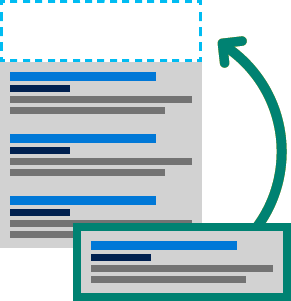
Illustration of a search ad moving to the top position.Control costs by choosing your keyword bids
Remember that users enter search words into search engines based on their interest. The matching keywords and phrases you choose for your campaigns help determine if your ad will display when users search online. But be aware, other advertisers may also be using the same keywords. That creates competition with your ad campaign. What can you do to win? One solution is keyword bidding.

The amount you bid on your keywords helps to elevate your ad above others. So, choose a bid that you feel best represents the value of that customer to your business.

You can also control costs by focusing on your most relevant customers with targeting.

Illustration of a location pin on a map.Target customers relevant to your business

You know who and where your best customers are — Microsoft Advertising lets you choose when and how to reach them. Control where your ads appear by city, state, country and worldwide. Fine-tune your targeting even further by setting the time of day to display your ads and on which devices. By targeting only your most relevant customers, you can reduce unnecessary spending.

After your campaigns build some history, use reporting tools to learn which strategies work the best, then refine your targeting and other tactics accordingly. This is called optimizing your campaigns.

Start advertising


Sign up

Signing up is free and only takes a few minutes.


Get free coaching

Free coaching helps set up your first ads quickly.

Source

What are Backlinks And How to Build Them in 2020

What Are Backlinks?

Backlinks (also known as “inbound links”, “incoming links” or “one way links”) are links from one website to a page on another website. Google and other major search engines consider backlinks “votes” for a specific page. Pages with a high number of backlinks tend to have high organic search engine rankings.

What are backlinks?

For example, here is a link from Forbes to my website.

Forbes backlink

Because that link points directly to a page on my website, it’s a “backlink”.

Why Are Backlinks Important?

Backlinks are basically votes from other websites. Each of these votes tells search engines: “This content is valuable, credible and useful”.

So the more of these “votes” you have, the higher your site will rank in Google and other search engines.

Number of backlinks

Using links in a search engine algorithm is nothing new. In fact, backlinks formed the foundation of Google’s original algorithm (known as “PageRank”).

PageRank citation

Even though Google has made thousands of changes to its algorithm since then, backlinks remain a key ranking signal.

For example, an industry study that we conducted found that links remain Google’s key ranking signal.

Total external backlinks

And Google has confirmed that backlinks remain one of their three most important search engine ranking factors.

Search ranking factors

What Types of Backlinks are Valuable?

Not all backlinks are created equal.

In other words, if you want to rank higher in the SERPs, focus on quality backlinks.

Put another way:

A single quality backlink can be more powerful than 1,000 low-quality backlinks.

As it turns out, high-quality backlinks tend to share the same key traits.

Trait #1: They Come From Trusted, Authoritative Websites

Would you rather get a backlink from Harvard… or a random guy’s website?

As it turns out, Google feels the same way.

This concept is known as “Domain Authority”. Essentially, the more authority a site has, the more authority it can pass on to your site (via a link).

Domain authority

For examp
le, here’s a link that I got from TechCrunch.

Techcrunch backlink

According to Ahrefs, TechCrunch is an extremely authoritative domain.

Because that link comes from an authority site, Google puts lots of weight on it. In fact, I noticed a boost in my organic search engine traffic right after TechCrunch linked to me.

Are these links hard to get? Definitely.

Are they worth it? Absolutely.

Trait #2: They Include Your Target Keyword In The Link’s Anchor Text

As a reminder, anchor text is the visible text part of a link.

What are anchor links?

In general, you want your links to have anchor text that includes your target keyword.

In fact, a recent industry study found a correlation between keyword-rich anchor text and higher rankings for that keyword.

Keyword rich anchor text

Now, a quick word of warning:

You don’t want to go overboard with keyword-rich anchor text. In fact, Google has a filter in their algorithm called “Google Penguin”.

Google Penguin filters out websites that use black hat link building strategies. And it specifically focuses on sites that build backlinks with exact match anchor text.

Trait #3: The Site (and Page) Linking to You Is Topically Related To Your Site

When a website links to another website, Google wants to see that the two sites are related.

This makes sense if you think about it:

Imagine you just published an article about running a marathon.

In that case, Google will put MUCH more weight on links from sites about marathons, running, fitness vs. sites about fishing, unicycles, and digital marketing.

Contextual backlinks

Trait #4: The Link Is a “Dofollow” Link

Google and other search engines ignore links with the “nofollow” tag attached to it.

Nofollow links

(In other words, nofollow links don’t count search engine ranking algorithms).

Fortunately, the vast majority of links on the web are “dofollow” links.

And most of the links that have the nofollow tag aren’t that valuable to begin with. For example, links from these sources tend to be nofollow:

These links aren’t super helpful for SEO anyway, so it’s not a big deal that they’re nofollow.

Trait #5: The Link Is From a Domain That Hasn’t Linked to You Before

Let’s say you get a link from Website A.

Great.

Well, let’s say Website A links to you again. And again. And again.

Are the 2nd, 3rd and 4th links as powerful as the first one?

No.

As it turns out, links from the same website have diminishing returns.

Ranking power

Or put another way:

It’s usually better to get 100 links from 100 different websites than 1,000 links from the same website.

In fact, our search engine ranking correlation study found that the number of sites linking to you (not the total number of backlinks) correlated with Google rankings more than any other factor.

Number of referring domains

Now that you’ve seen what types of backlinks are the most helpful for your Google rankings, it’s time for me to show you how to start building them.

Best Practices

Create a Linkable Assets

If you want people to link to your website, you need something on your site worth linking to.

(Also known as “Linkable Assets”).

A Linkable Asset can be a blog post, a video, a piece of software, a quiz, a survey… basically anything that people will want to link to.

In most cases, your linkable asset will be an amazing piece of content (which is why search engine optimization and content marketing are so closely tied together).

For example, when I first started my blog, I published this list of 200+ Google ranking factors.

Google Ranking Factors

One day I read that Google uses 200 ranking signals. Which made me curious: “What are these 200 signals?”.

Of course, Google wasn’t about to announce them to the world. So I started compiling statements from Google and patents that I found online.

Compiling these 200 factors was extremely time-consuming (it took me over 2 weeks). But in the end, I FINALLY compiled a list of 200 ranking factors that Google might use in their algorithm.

To date, this single piece of content has generated over 25,000 backlinks from 4,450 domains.

Google Ranking Factors data in Ahrefs

How about another example?

One of my most successful posts to date (in terms of backlinks and organic traffic) is my ultimate guide to YouTube SEO.

How to Rank YouTube Videos post

When I started writing this post I was starting to have some success with YouTube marketing. So I decided to compile and share what I learned in the form of an ultimate guide.

I also decided to include a lot of examples in my guide:

How to Rank YouTube Videos post – Strategies and techniques

(Something that most of the other content on this topic lacked)

Even though this post hasn’t generated nearly the same amount of links as my Google Ranking Factors post, it’s still racked up quite a few backlinks.

How to Rank YouTube Videos – Ahrefs data

Build Backlinks from Link Roundups

Imagine if people published blog posts with the sole purpose of linking out to quality content.

(The type of quality content that you publish on your site already)

It’d be pretty great, right?

Fortunately, that’s a real thing. And they’re called link roundups.

Here’s an example:

Link roundups

Link roundups are dail
y, weekly or monthly blog posts that link to outstanding content.

Here’s an example of a backlink that I recently built from a roundup:

Roundup

Here’s the step-by-step process.

  1. Find Link Roundups In Your Niche: Use search strings in Google search, like ““Keyword” + “link roundup”.
  2. Pitch Your Resource: (Gently) suggest that they include your linkable asset to the roundup.

And if your post is a good fit for that person’s roundup, you’ll get a high-quality link.

Backlink email

(They may also share your content on social media)

Use The Moving Man Method

Here is the 3-step process:

  1. First, you find web pages, resources or businesses that are outdated, rebranded or recently changed names.
  2. Then, find the sites that are still linking to these outdated resources.
  3. Finally, you email people to let them know that they’re linking to something that’s out of date.

Let me show you how this works with a real-life example…

A while back I read that a website for a big SEO agency website suddenly shut down.

Moving man method

This meant that they had lots of pages on their site that weren’t working anymore…

…pages that lots of people were still linking to.

Specifically, I noticed that an infographic about SEO on their site wasn’t working anymore. Which was perfect , because I had just published my own SEO-focused infographic.

So that was the first step.

Next, I had to see who actually linked to that infographic.

So I fired up Ahrefs and pulled all of their links:

Ahrefs

Finally, I emailed everyone that linked to the infographic to let them know the image wasn’t working anymore. I also let them know that my infographic would make a great replacement for the BlueGlass one.

Here’s the script I used:

As you can see, people were more than happy to link to me:

Backlink email

Broken Link Building

This strategy is similar to the Moving Man Method you just learned about.

The difference is that with broken link building, you’re only looking for pages that have 404 errors.

To find these 404 links, you want to focus on resource pages in your niche. So if you’re in the fitness niche you’d search in Google using these search strings:

  • “fitness” + “resource page”
  • “fitness” + “resources”
  • “fitness” + “recommended sites”
  • “fitness” + “links”

And you’d find pages like this.

Broken link building

Now you could email the site owner and ask for a link. But I’ve found that begging doesn’t work very well.

Instead, let the site owner know about any broken links that you find.

You can easily find broken links on any page. Just use the nifty Check My Links Chrome Extension.

This program quickly finds any broken links the page happens to have. It also highlights them in red to make them easy to find:

Broken links

The last thing you need to do is email the site owner about their dead link.

Guest Posting

Is guest posting dead?

Not really.

In fact, when you’re first starting out, guest blogging is one of the BEST ways to get links to your site.

In fact, when I first started Backlinko, I wrote over 50 guest posts and interviews in 12 months!

Guest posts

And the links I got from guest posting definitely gave my organic traffic a boost.

That said, I was very strategic about things. I made sure to only write guest posts for quality sites in my niche.

So if you run a site about the Paleo Diet, and write a guest post on a site about iPhones, that’s going to look spammy to Google.

But when you write mind-blowing guest posts for quality websites in your industry, those links DO help.

The thing is, finding places to guest post can be a HUGE pain.

But there’s an easier way…

Here’s how it works:

First, find someone in your industry that writes a lot of guest posts.

Next, go to one of their published guest posts. And grab the headshot they use in their author bio:

Larry Kim guest posting on Inc.

Finally, pop the URL of that screenshot into Google reverse image search.

And you’ll get a list of places that published guest posts on.

Larry Kim – Reverse image search

Infographics and Other Visual Assets

Do infographics work as well as they used to? Probably not.

But they’re still an effective link building strategy.

In fact, when we looked at what types of content generate the most links, infographics came out near the top.

For example, one of the first infographics I ever made took only took a few hours to put together (I also hired a professional designer to make it look professional).

On page SEO

Even though this infographic didn’t go viral, it led to some solid backlinks:

Infographic backlink

To be clear: I didn’t just publish my infographic and hope for the best.

Like any piece of content that you publish, you need to strategically promote your infographic. And to do that, I recommend using a strategy called “Guestographics”.

I outline exactly how Guestographics work in this post.

Submit Testimonials

Companies big and small love to show off customer testimonials.

And you’re using a product or service that you love (or at least like), consider sending them a testimonial.

To show that you’re a real person they’ll often add a link to your website… without you even having to ask.

Here’s an example:

DA89

Blogger Reviews

If you have a piece of
software, physical product, consulting service or ANYTHING of value that you sell, you can easily turn that into dozens of high-quality backlinks.

How?

By offering your product to bloggers for free.

Here’s how:

  1. Find bloggers in your niche that might be interested in what you have to offer. If you sell an information product that teaches people how to make their own soaps, you’d Google things like “soap making”, “make soap at home” etc.
  2. Your results will be a mixed bag of blogs, news websites and “how to” websites like eHow. Filter out how-to sites or news sites. You’ll be left with a solid list bloggers that might be interested in your offer, like this one: Blogger reviews
  3. Reach out to them with this email script:

One word of warning: You want to be VERY careful about the language you use for this strategy.

Note how you don’t offer your product in exchange for a link or review… which would violate Google’s Webmaster Guidelines.

Instead, send them the product and let them decide if it’s worth a mention on their blog.

Link Reclamation

Link reclamation is simple:

First, find mentions of your company that don’t link to your site.

Here’s an example:

Backlinko link reclamation example

See how the author of that article above mentioned my website… but didn’t link to it?

That’s where link reclamation comes into play.

Instead of saying “I wish they linked to me”, you proactively reach out and ask them to link.

In my experience, a friendly reminder is usually enough to get most people to log into WordPress and add your link.

Here’s the step-by-step process:

  1. Use a tool like BuzzSumo and Mention.com to find mentions of your brand online.

    When you do, you’ll get a heads up whenever someone writes about you:

    Unlinked mentions

  2. Check to see whether or not the person that mentioned you also linked back to your site (either your homepage or internal page). If they linked to your site, you’re set.

    If not, move onto step #3…

  3. Send them this friendly email.

Use HARO

HARO (short for Help a Reporter Out) is one of the best ways to get high authority backlinks from news sites.

Here’s how HARO works:

  1. Sign Up To HARO as a source here.
  2. You’ll get three emails per day from reporters looking for sources, like this one: Using HARO
  3. Respond with your credentials and some helpful tips.

Easy right? You give a reporter a quote and they’ll hook you up with a backlink.

That’s all there is to it.

For example, recently got a sweet link from Entrepreneur.com by replying to a HARO request:

HARO request

Reverse Engineer Your Competitor’s Backlinks

Every industry has its own set of link building opportunities.

So I recommend setting aside some time to reverse engineer your competition. That way, you can find link opportunities that only exist in your niche.

How about an example?

Let’s say you run a health and fitness blog.

And one of your competitors is Nerd Fitness.

Well, when I check out that site’s link profile in a backlink checker, I notice that A LOT of their links come from podcasts:

Podcasts

Specifically, people from that company (especially the founder, Steve Kamb) appear on other people’s podcasts as guests.

Just like that you have a nice list of places that you can go to get links.

(Obviously, you need to reach out to the people that run those podcasts and pitch yourself as a
guest. Which takes work. But at least you know where to start).

Stick to Content Formats That Generate Links

Like I mentioned earlier, infographics are one content format that’s ideal for building backlinks.

But it’s one of many.

We also found that, even though they didn’t generate lots of social media shares, “Why posts” and “What posts” tended to get linked-to fairly often.

Referring domains .vs. Average social shares

Learn More

Link Building: How to Get Powerful Backlinks: Video tutorial that shows you how to build backlinks to your site using white hat SEO techniques.

How to Get High Quality Backlinks (7 New Strategies): This is an updated list of link building strategies that focus on building new backlinks from authority websites.

15 Awesome Link Building Tools: If you’re serious about link building, you’ll need tools to help you do the job. Here’s a list of the best of the bunch.

How to Do a Basic Backlink Analysis on Your Competitors: Learn how to evaluate your competitors backlinks.

Source

5 common computer problems you can fix yourself

  • 4d33b882-

    next

  • 5877e8ca-

    prev

Computers always act up at the worst times. You’re in the middle of a major report or playing your best game ever and — pffft.

Often, users get so frustrated that they needlessly go out and buy a new computer or pay for a computer repair. With a cool head and a little know-how, however, it’s easy to fix the most common computer problems. In fact, the solutions I recommend below are free.

1. Speed up a sluggish PC

Computers slow down over time — that’s normal.

If your PC is fairly new and it’s slow, remove the pre-installed programs, or bloatware, that came with it. PC Decrapifier will remove trial programs and other junk in a snap.

To give an older PC a speed boost, break out the CCleaner. This tool looks through Windows, Web browsers and other third-party programs for unwanted clutter and gets rid of it. CCleaner can also scan and fix errors in Windows’ registry. Just make sure you allow it to backup the registry before making changes.

Grab Duplicate Cleaner to remove duplicate files that might be clogging up the system. But, limit your file hunt to the Documents area of your computer. You don’t want to accidentally delete important system files.

In your cleaning process, you might find programs you no longer need. Windows’ built-in uninstaller has a tendency to leave fragments scattered around your hard drive. You can remove those fragments efficiently with Revo Uninstaller.

2. The Blue Screen of Death

Thankfully, Windows’ dreaded “Blue Screen of Death” is getting to be a rare event, but it still occurs. When it does, it isn’t very helpful in helping you hunt down the problem.

The problem can often be traced to bad memory modules. Memory is cheap and buying extra RAM capacity is usually worth it for the performance boost. You can find out what kind of memory your computer takes with this scanner.

It’s not difficult to remove and install memory modules. You’ll find video tutorials at all the major online memory stores.

Just remember to ground yourself when you open your computer. You don’t want to fry sensitive electronics with static electricity.

3. The zombie spyware plague

A message pops up on your screen repeatedly, telling you to buy a security program. It happens so often that you can’t get any work done.

Your gut tells you that this is a rip-off, and your gut is correct. The message is adware that found its way on to your system, probably through an online ad for a “free” security scan you clicked on.

If you do download – and often pay for – the security program, you’ll end up with fraudware. No matter how many times you run the program it will always find the same problems and keep trying to get more money out of you.

Before you buy any security software, make sure it’s real. Use this site to stay current on fake antivirus programs.

Once you have fraudware, running a real antivirus program probably won’t help. To stop the pop-ups, you must run an anti-spyware program. There are a number of good ones — I’d start with Ad-Aware. You can find that and more legitimate free security software in my Security Center.

4. SD card stuck in CD/DVD slot

This is one for the Mac people. If you’re distracted or pre-occupied, it’s annoyingly easy to shove an SD camera card into an iMac’s superdrive. The two slots are right next to each other on the right side of the computer.

You don’t have to take the machine apart or ship it to a service center. The fix is easy. Cut an L-shape out of cardboard to use as a fishing hook. Slide it in and pull out the SD card. Watch this video to see how it’s done.

5. Network issues

If your wireless network is dead, your router, cable or DSL modem probably crashed. It happens. Reboot the gadgets by unplugging them for 30 seconds, then plugging them back in. That usually solves the problem.

If your signal is weak or the connection is slow or drops out, there are a few tricks you can try to improve your home Wi-Fi, such as the beer-can antenna booster. I made a fun video to show you exactly how to make your own. Watch it now.

Copyright 2013, WestStar Multimedia Entertainment. All rights reserved.

Kim Komando hosts the nation’s largest talk radio show about consumer electronics, computers and the Internet. To get the podcast, watch the show or find the station nearest you, visit: http://www.komando.com/listen. To subscribe to Kim’s free email newsletters, sign-up at: http://www.komando.com/newsletters.

Source

What is SEO Search Engine Optimization 2020

SEO stands for Search Engine Optimization, which is the practice of increasing the quantity and quality of traffic to your website through organic search engine results.

What goes into SEO?

To understand the true meaning of SEO, let’s break that definition down and look at the parts:

  • Quality of traffic. You can attract all the visitors in the world, but if they’re coming to your site because Google tells them you’re a resource for Apple computers when really you’re a farmer selling apples, that is not quality traffic. Instead you want to attract visitors who are genuinely interested in products that you offer.
  • Quantity of traffic. Once you have the right people clicking through from those search engine results pages (SERPs), more traffic is better.
  • Organic results. Ads make up a significant portion of many SERPs. Organic traffic is any traffic that you don’t have to pay for.

Organic search traffic is specifically any unpaid traffic that comes from SERPs.

How SEO works

You might think of a search engine as a website you visit to type (or speak) a question into a box and Google, Yahoo!, Bing, or whatever search engine you’re using magically replies with a long list of links to webpages that could potentially answer your question.

That’s true. But have you ever stopped to consider what’s behind those magical lists of links?

Here’s how it works: Google (or any search engine you’re using) has a crawler that goes out and gathers information about all the content they can find on the Internet. The crawlers bring all those 1s and 0s back to the search engine to build an index. That index is then fed through an algorithm that tries to match all that data with your query.

There are a lot of factors that go into a search engine’s algorithm, and here’s how a group of experts ranked their importance:

rank-factors-pie-2013-lrg.gif?mtime=20170104131408#asset:2285:url

That’s all the SE (search engine) of SEO.

The O part of SEO—optimization—is where the people who write all that content and put it on their sites are gussying that content and those sites up so search engines will be able to understand what they’re seeing, and the users who arrive via search will like what they see.

Optimization can take many forms. It’s everything from making sure the title tags and meta descriptions are both informative and the right length to pointing internal links at pages you’re proud of.

Learning SEO

This section of our site is here to help you learn anything you want about SEO. If you’re completely new to the topic, start at the very beginning and read the Beginner’s Guide to SEO. If you need advice on a specific topic, dig in wherever suits you.

Here’s a general overview:

Building an SEO-friendly site

Once you’re ready to start walking that SEO walk, it’s time to apply those SEO techniques to a site, whether it’s brand new or an old one you’re improving.

These pages will help you get started with everything from selecting an SEO-friendly domain name to best practices for internal links.

Content and related markup

A site isn’t really a site until you have content. But SEO for content has enough specific variables that we’ve given it its own section. Start here if you’re curious about keyword research, how to write SEO-friendly copy, and the kind of markup that helps search engines understand just what your content is really about.

On-site topics

You’ve already learned a lot about on-site topics by delving into content and related markup. Now it’s time to get technical with information about robots.txt.

Link-related topics

Dig deep into everything you ever needed to know about links from anchor text to redirection. Read this series of pages to understand how and when to use nofollow and whether guest blogging is actually dead. If you’re more into the link building side of things (working to improve the rankings on your site by earning links), go straight to the Beginner’s Guide to Link Building.

Other optimization

Congratulations! You’ve mastered the ins and outs of daily SEO and are now ready for some advanced topics. Make sure all that traffic has the easiest time possible converting with conversion rate optimization (CRO), then go micro level with local SEO or take that site global with international SEO.

The evolution of SEO

Search engine algorithms change frequently and SEO tactics evolve in response to those changes. So if someone is offering you SEO advice that doesn’t feel quite right, check in with the specific topic page.

For a more technical look at SEO, check out this short video from Rand Fishkin.

Go forth and SEO…

Keep learning

Put your skills to work

Gauge a Site’s Influence with Link Explorer

Link Explorer is a link popularity and backlink analysis tool that lets you research and compare any site on the web.

Source

Free Website Builder Create a Free Website

Discover the platform that gives you the freedom to create, design, manage and develop your web presence exactly the way you want.

Get Started

The Freedom to Create the Websites You Want

Design and build your own high-quality websites. Whether you’re promoting your business, showcasing your work, opening your store or starting a blog—you can do it all with the Wix website builder.

Build Your Unique Online Presence

To create your own website, follow these steps:

Customize your site

Pick a template and customize anything, or answer a few questions and get a free website designed just for you.

Add advanced features

Start your own blog, add an online store and accept bookings online. You can always add more features as you grow.

Edit your mobile view

Check out the mobile-optimized version of your site. Switch to the Mobile Editor to personalize it even more.

Optimize for search engines

Answer a few questions about your website, location and keywords and get a personalized SEO plan to get found online.

Wix Editor
Total Design Freedom

Start from scratch or choose from over 500 designer-made templates to make your own website. With the world’s most innovative drag and drop website builder, you can customize or change anything. Make your site come to life with video backgrounds, scroll effects and animation. With the Wix Editor, you can create your own professional website that looks stunning.

Wix ADI
Get Online Fast

Answer a few simple questions and Wix ADI (Artificial Design Intelligence) will instantly build a personalized website just for you, complete with custom text and images. Choose your style, change the layout and add any features you need for your business, like an online store or booking system. When you’re ready, go live in a click.

Corvid by Wix
Open Dev Platform

Build professional web applications with serverless computing and hassle-free coding. Manage all your content from integrated databases, add your own code in the built-in IDE or work in your own environment, and connect to 100s of APIs. Plus, you get total design freedom from the Wix Editor and optimized business applications.

Get Professional Features for Your Website

You can make your own website exactly the way you want, whether it’s your first time creating a site or you’re a long time pro.

Beautiful Blog

Create a stunning blog, grow your community and share your ideas.

Create a Free Blog

Learn How

Logo Maker

Design your own professional logo and build your brand online.

Try Wix Logo Maker

Mobile Optimized

Look amazing on every screen with a mobile version of your site.

Online Store

Build your online business with a powerful ecommerce platform.

Create an Online Store

The Best SEO

Get found on search engines like Google with advanced SEO tools.

Find Out More

Custom Domains

Get a professional domain name that matches your business and brand.

Get Custom Domain Names

Manage and Grow Your Business Online

The Wix website builder makes it possible for anyone to create a website and manage their business—all in one place. Effortlessly capture leads, build customer relationships and accept payments right from your website.

Why the Wix Website Builder Is the Best Choice for You

You can create a free and professional website all on your own. With Wix, you can start with a stunning template and customize it, or get a personalized website made just for you. When you choose Wix, you don’t just get a drag and drop website builder. You get the whole package. Free reliable web hosting, top security, the best SEO and a dedicated support team to help you along the way.

Over 160 million people worldwide choose Wix to create a free website. And you can do it, too.

Follow these 6 simple steps to create a website today.

  1. Sign up for a free website builder. Choose what kind of website you want to create.

  2. Customize a template or get a website made for you. Choose your starting point.

  3. Drag and drop 100s of design features. Add text, galleries, videos, vector art and more.

  4. Get ready for business. Add an online store, booking system, members area and blog.

  5. Publish your website and go live. Start building your professional online presence.

  6. Drive traffic to your site. Use advanced SEO tools and integrated marketing solutions.

Stunning Templates

Start with free HTML website templates and bring your vision to life.

Health & Wellness

Health & Wellness 

Psychologist

Events

Events

One Day Festival

Group 23.pngDesign

Design

Architect Company

Business

Business

Home Organizer

Portfolio & CV

Portfolio & CV

Art Director

Video

Music Video Director

FAQ

Is it easy to build a website?

Yes. Wix offers a few different ways to create your own free website, so you can choose the creation process that works best for you. Need to get online fast? Answer a few simple questions and Wix ADI (Artificial Design Intelligence) will build a professional website for you in under 10 minutes. If you want 100% design freedom, start from scratch and drag and drop the website design features you need in the Wix Editor.

Can I create a website without knowing how to code?

Absolutely. Wix is user-friendly and makes it possible to build a professional website without knowing how to code. In the Wix Editor, you can drag and drop any feature you want and customize it to match the look and feel of your site. Of course, if you do know how to code, you can add advanced functionality to your site with Corvid.

How do I make my site mobile friendly?

Your Wix website automatically comes with a mobile-optimized version that looks great on smaller screens. The Wix Mobile Editor makes it easy to customize your mobile site even more.

How do I create a free website with a custom domain?

You can create a free website with Wix that comes with a Wix domain. To instantly look more professional online, get a custom domain name. It adds credibility to your brand and helps visitors find you online. You can start building your brand by using your domain in a custom email address ([email protected]), your social channels, email marketing campaigns and more.

Should I use a website builder or hire a web developer?

The free Wix website builder is intuitive to use. Looking for a specific web service? Explore the Wix Marketplace to find a certified freelancer or agency at a price that fits your budget.

How do I build and host my site for free?

When you create a free website with Wix, you get reliable, scalable and free web hosting. All your web content will be stored on secure servers located around the world. So no matter where your visitors come from, your site will load fast. 

Can I use a website builder to create a landing page?

Absolutely! You can create any kind of website with Wix. Explore beautiful HTML landing page templates to get started today. 

How do I get my website found on Google? 

Wix makes it simple to get your website found on Google. With Wix SEO Wiz, answer a few questions about your site, location and keywords and get a personalized SEO plan to get found online.

This website was designed with Wix.

Source

Skip to content