A server is a computer designed to process requests and deliver data to another computer over the internet or a local network. A well-known type of server is a web server where web pages can be accessed over the internet through a client like a web browser. However, there are several types of servers, including local ones like file servers that store data within an intranet network.
Although any computer running the necessary software can function as a server, the most typical use of the word references the enormous, high-powered machines that push and pull data from the internet.
Most computer networks support one or more servers that handle specialized tasks. As a rule, the larger the network in terms of clients that connect to it or the amount of data that it moves, the more likely it is that several servers play a role, each dedicated to a specific purpose.
The server is the software that handles a specific task. However, the powerful hardware that supports this software is also called a server. This is because the server software that coordinates a network of hundreds or thousands of clients requires hardware that’s more robust than computers for consumer use.
While some dedicated servers focus on one function, such as a print server or database server, some implementations use one server for multiple purposes.
A large, general-purpose network that supports a medium-sized company likely deploys several types of servers, including:
Web server: A web server show pages and runs apps through web browsers. The server your browser is connected to now is a web server that delivers this page and the images on it. The client program, in this case, is a browser like Internet Explorer, Chrome, Firefox, Opera, or Safari. Web servers are used for many tasks in addition to delivering simple text and images, such as uploading and backing up files online through a cloud storage service or online backup service.
Email server: Email servers send and receive email messages. If you have an email client on your computer, the software connects to an IMAP or POP server to download your messages to your computer, and an SMTP server to send messages back through the email server.
FTP server: FTP servers move files through File Transfer Protocol tools. FTP servers are accessible remotely using FTP client programs, which connect to the file share on the server, either through the server’s built-in FTP capabilities or with a dedicated FTP server program.
Identity Server: Identity servers support logins and security roles for authorized users.
Hundreds of specialized server types support computer networks. Apart from the common corporate types, home users often interface with online game servers, chat servers, and audio and video streaming servers, among others.
Some servers exist for a specific purpose but aren’t necessarily interacted with in any meaningful way. DNS servers and proxy servers are some examples.
Many networks on the internet employ a client-server networking model that integrates websites and communication services.
An alternative model, called peer-to-peer networking, allows all the devices on a network to function as either a server or client on an as-needed basis. Peer networks offer a greater degree of privacy because communication between computers is narrowly targeted. However, due in part to bandwidth limitations, most implementations of peer-to-peer networking aren’t robust enough to support large traffic spikes.
The word cluster is used broadly in computer networking to refer to an implementation of shared computing resources. Typically, a cluster integrates the resources of two or more computing devices that could otherwise function separately for some common purpose (often a workstation or server device).
Lifewire
A web server farm is a collection of networked web servers, each with access to content on the same site. These servers function as a cluster conceptually. However, purists debate the technical classification of a server farm as a cluster, depending on the details of the hardware and software configuration.
Because servers are software, people can run servers at home, accessible either to devices attached to their home network or devices outside the network. For example, some network-aware hard drives use the Network Attached Storage server protocol to allow different PCs on a home network to access a shared set of files.
Lifewire
Plex media server software helps users view digital media on TVs and entertainment devices regardless of whether the data exists in the cloud or on a local PC.
If your network is set up to allow port forwards, you can accept incoming requests from outside your network to make your home server act as a server from a big company like Facebook or Google (where anyone can access your resources).
However, not all home computers and internet connections are suitable for lots of tra
ffic. Bandwidth, storage, RAM, and other system resources are factors that affect how large of a home server you can support. Most home operating systems are also void of server-related features.
Since uptime is critically important for most servers, servers aren’t designed to shut down but instead run 24/7. However, servers sometimes go down intentionally for scheduled maintenance, which is why some websites and services notify users of scheduled downtime or scheduled maintenance. Servers might also go down unintentionally during something like a DDoS attack.
A web server that reports an error due to downtime—whether intentional or not—might do so using a standard HTTP status code.
When a web server takes down information permanently, or even temporarily, you might still be able to access those files if a third-party service archived it. Wayback Machine is one example of a web archiver that stores snapshots of web pages and files stored on web servers.
Large businesses that have multiple servers don’t typically access these servers locally, like with a keyboard and mouse, but instead by remote access. These servers are also sometimes virtual machines, meaning that one storage device can host multiple servers, which saves physical space and money.
The explosion of “computer-to-computer” communication in the twenty-first century is triggering a growth phase for IT consultants. Harvard Business School professor Richard Nolan and HBS Interactive Senior Vice President Larry Bennigson trace the evolution of IT management consulting.
Johnston: Your research refers to the PC in the 80’s and the Internet in the 90’s as triggers of explosive growth for the IT consulting industry. Have you identified a third trigger for this decade?
Nolan and Bennigson: The trigger in this decade underlying autonomous computing is “computer-to-computer” communication. By the end of the decade, more than 60 percent of the computer communications will be computer-to-computer. Computer-to-computer vastly speeds up the pace of business. For example, end-to-end supply chains can be automatically adjusted by point-of-sale computers directly communicating with warehouse computers, which in turn directly communicate with manufacturer computers, and, again in the chain, manufacturers’ computers directly communicate with their supplier computers. In addition, computer-to-computer communications can track demand and adjust logistic systems to automatically direct product to geographical points of demand.
Q: Can you describe some of the enablers and drivers behind the growth of the IT consulting industry? How has globalization impacted this growth?
A: The enablers and drivers of growth of the IT (see working paper) consulting industry have been several. First, innovation in frameworks and methodologies along with trained professionals have provided value-added services uniquely available from the consulting firm. For example, the Boston Consulting Group and McKinsey innovated unique conceptual frameworks for assisting management in sorting out action plans for their various lines of business.
By the end of the decade, more than 60 percent of the computer communications will be computer-to-computer. — Nolan and Bennigson
Newness and complexity have been a second driver. Andersen Consulting, now Accenture, has provided expertise in designing and coding complex computer applications. SAP and Seibel have developed unique package software, and have provided specialized consulting services to assist in the implementation of the package software.
A third driver has been the building to critical mass high levels of expertise not economical to maintain in a particular company. For example, computer security consulting requires a high level of expertise, which few firms can economically maintain in-house. By providing these kinds of services to many firms, critical mass can be maintained in the practice group, as well as ensure that the group stays on the leading edge of the subject matter.
Related to this third driver is the focus that a separate consulting firm can maintain in managing a highly talented group of knowledge workers. The management and incentive systems are quite different in a consulting firm than in, say, a product firm. Consequently, a product firm may not be attractive to various knowledge workers who prefer to work in the consulting environment.
A fourth driver is the demand for process and behavior change that IT implementation puts on most organizations. IT was not just a new technology. To capture the value IT represented, organizations had to address change in structure, culture, people, process, and leadership. Many organizations turned to the consulting industry for help in understanding and managing these significant changes.
Finally, the IT consulting industry enjoyed an unprecedented frenzy of convergence of 1) adoption of systems such as ERP and CRM; 2) management improvements such as BPRE; 3) problems to solve such as Y2K; and 4) new territory to pioneer such as e-business.
Q: Who are the current players who have successfully adapted to the changing IT environment? What is the key to their success?
A: In our working paper, we state that more than 50 percent of today’s capital budgeting expenditures involve computing in one form or another. As a result of the pervasiveness of IT, literally all consulting firms have had to integrate IT expertise. Indeed, with the hyper growth during the 1990’s, consulting is still in restructure mode.
A high degree of industry adaptation in the IT consulting industry will be required in the future. — Nolan and Bennigson
Within this context, Accenture has continued to broaden their consulting service scope. Accenture has built an impressive education and training facility called St. Charles, outside of Chicago, which focuses on maintaining currency in the skill levels of their professionals, as well as providing a leading tool for equipping their professionals with the new skill required with emerging IT.
Another type of example is the IT product firms that incorporate certification and training for their own consultants, independent consultants, and customer professionals. Microsoft, Sun, and Novell are examples of these kinds of companies.
Q: What are your predictions for the future of IT management consulting?
A: We believe that the recent restructuring in the IT management consulting industry is a point of industry transition. That transition coincides with the emergence of new drivers of IT management consulting growth. While the transition is still being played out, we can see some of these new drivers taking shape.
Until recently, there had been an IBM de facto industry standard for the operating system, and a de facto standard in the use of COBOL for applications development. By the late 1990’s, new applications development had become almost exclusively supplanted by package implementation. In addition, networking and the Internet moved the IT infrastructure for the IBM standard to an emerging environment characterized by open standards.
Accordingly, the IT infrastructure became simpler and more complex at the same time through the innovation of layers and API’s (Application Programming Interfaces). The implication for IT management consulting is a rather complex demand to provide both strategic perspective along with implementation savvy on managing the considerable risks of not being able to realize the strategic competitive advantages of computing because of failures to effectively manage implementation challenges.
Further, within the context of the management challenges of balancing strategic opportunities with implementation capabilities, there are dampening forces on industry growth. For example, the wave of ERP installations and BPRE projects is now beyond its peak. While outsourcing is still an established practice, companies have gained experience and can now do much more for themselves that they have looked to outsiders to do in the past. Managers know more about IT, more about the business and organizational potential and implications of IT and more about designing their own backbone and architecture.
We think it is important that it is tempting but risky to completely turn over IT initiatives to IT consulting firms. — Nolan and Bennigson
And, there are forces that will drive new demand. Security is fast becoming a ubiquitous issue. The Internet will experience dramatic growth in Asia and Europe. New applications such as bioinformatics and telematics create new consulting segments. And the adoption of Internet2 will eventually have broad impact.
IT consulting, as much as any product or service, creates its own demand. A high degree of industry adaptation in the IT consulting industry will be required in the future. By introducing innovations and educating the market about the competitive benefits of those innovations, IT consulting
invents and “earns” its opportunities for growth. This ability of IT consulting to lead and to adapt is a key to its robust development.
Q: What lessons can operations managers take away from your research?
A: There are a number of lessons we think are important for operations managers:
Many functional and business leaders have become conversant about IT and many IT specialists have become knowledgeable about the strategic and business benefits of IT. Companies that encourage and incorporate this integrated and more sophisticated capability within their organizations will have an edge over those that have to rely on outsiders for the integrated view.
The rate of change in IT capabilities is a companion to the rate of change most companies experience in other technologies, markets, and initiatives of competitors. We have noted that the successful IT consulting firm must be able to anticipate, sense, and nimbly respond to change. This is equally true for operations. Operations managers face the daunting task of implementing new IT capabilities while ensuring they are also prepared for the next version or generation.
The emerging IT environment is at a level of complexity such that efforts to build IT infrastructure and integrated applications require specialized expertise that is often available only in IT consulting firms. Good operations managers will ensure that their organizations have the ability to work effectively with and integrate the value from networks of service providers with a variety of special capabilities.
Finally, we think it is important that it is tempting but risky to completely turn over IT initiatives to IT consulting firms. A significant number of your own IT professionals and users should be included in integrated IT initiatives.
Here we’ll take a look at the basic things you need to know in regards to search engine optimisation, a discipline that everyone in your organisation should at least be aware of, if not have a decent technical understanding.
One of our most popular articles of all time is a post entitled SEO Basics: 8 Essentials When Optimizing Your Site. It still does the business for us in terms of traffic, however it was first published in April 2013, so you can treat this as its long overdue and expanded update.
What is SEO?
Quite simply, SEO is the umbrella term for all the methods you can use to ensure the visibility of your website and its content on search engine results pages (SERPs).
The methods vary from technical practices you can achieve behind the scenes on your website (we tend to refer to this as ‘on-page SEO’) to all the promotional ’off-page’ approaches you can use to raise your site’s visibility (link-building, social media marketing).
For the purpose of this article, when we talk about visibility, we mean how high up the SERP your website appears for certain search terms in the ‘organic’ results. Organic results refer to those that appear naturally on the page, rather than in the paid-for sections…
Building a strong site architecture and providing clear navigation will help search engines index your site quickly and easily. This will also, more importantly, provide visitors with a good experience of using your site and encourage repeat visits. It’s worth considering that Google is increasingly paying attention to user experience.
When it comes to how much traffic is driven by search engines to your website, the percentage is substantial, and perhaps the clearest indicator of the importance of SEO.
In 2014, Conductor suggested 64% of all web traffic comes from organic search, compared to 2% from social, 6% from paid search, 12% direct and 15% from other referral sources.
This tallies with our own data, with approximately 70-75% of SEW traffic coming from organic.
Resources
Of all organic traffic, in 2015 it was found that Google accounts for more than 90% of global organic search traffic. So obviously you need a strong presence on Google SERPs, but how strong?
Well, according to this study from Advanced Web Ranking (which I’ve trotted out before when discussing how to dominate Google) shows that on the first SERP, the top five results account for 67.60% of all clicks and the results from six to 10 account for only 3.73%.
It’s therefore vital that your site appears in the top five results.
How are you going to achieve this? With the following tips, which I’ve split into two categories: what search engines are looking for and… drum roll… what they’re not looking for.
What are search engines looking for?
1) Relevancy
Search engines try to provide the most relevant results to a searcher’s query, whether it’s a simple answer to the question “how old is Ryan Gosling?” (the answer of which Google will likely provide without you having to leave the SERP) to more complicated queries such as “what is the best steak restaurant nearest to me?”
How search engines provide these results is down to their own internal algorithms, which we’ll probably never truly determine, but there are factors that you can be certain will influence these results and they’re all based around relevancy… For instance: a searcher’s location, their search history, time of day/year, etc.
2) The quality of your content
Do you regularly publish helpful, useful articles, videos or other types of media that are popular and well produced? Do you write for actual human beings rather than the search engine itself? Well, you should. Latest research from Searchmetrics on ranking factors indicates that Google is moving further towards longer-form content that understands a visitor’s intention as a whole, instead of using keywords based on popular search queries to create content.
Basically, stop worrying about keywords and focus on the user experience.
How quickly your webpages load is increasingly becoming a differentiator for search engines. Google may soon start labelling results that are hosted on Accelerated Mobile Page (AMP) so this may possibly be the ‘mobilegeddon’ of 2016. Speaking of which…
5) Cross-device compatibility
Is your website and its content equally optimised for any given screen size or device? Bear in mind that Google has stated that responsive design is its preferred method of mobile optimisation.
6) Internal linking
We’ve talked about the benefits of ensuring your site has clear and easy-to-use navigation, but there’s also a practice that editors and writers can carry out when publishing articles to help push traffic around the site and that may lead to higher trust signal
s for Google: internal linking. (See what we did there.)
Internal linking has many advantages:
It provides your audience with further reading options. As long as they’re relevant and you use clear anchor text (the clickable highlighted words in any give link). This can help reduce your bounce rates.
It helps to improve your ranking for certain keywords. If we want this article to rank for the term ’SEO basics’ then we can begin linking to it from other posts using variations of similar anchor text. This tells Google that this post is relevant to people searching for ‘SEO basics’. Some experts recommend varying your anchor text pointing to the same page as Google may see multiple identical uses as ‘suspicious’.
It helps Google crawl and index your site. Those little Googlebots that are sent out to fetch new information on your site will have a better idea of how useful and trustworthy your content is, the more they crawl your internal links.
7) Authority
An authority website is a site that is trusted by its users, the industry it operates in, other websites and search engines. Traditionally a link from an authority website is very valuable, as it’s seen as a vote of confidence. The more of these you have, and the higher quality content you produce, the more likely your own site will become an authority too.
However as the aforementioned Searchmetrics research suggests, year-on-year correlations between backlinks and rankings are decreasing, so perhaps over time ‘links’ may not be as important to SEO as we once thought.
There’s a good argument raging in the comments to this recent piece on links as a marketing KPI, which offers some diverse views on the subject.
8) Meta descriptions and title tags
Having a meta description won’t necessarily improve your ranking on the SERP, but it is something you should definitely use before publishing an article as it can help increase your chances of a searcher clicking on your result.
The meta description is the short paragraph of text that appears under your page’s URL in the search results, it’s also something you should have complete control of in your CMS.
Here it is in WordPress:
Write succinctly (under 156 characters is good), clearly and make sure it’s relevant to your headline and the content of the article itself.
Title tags are used to tell search engines and visitors what your site is about in the most concise and accurate way possible. The keywords in your title tag show up highlighted in search engine results (if the query uses those keywords), as well as in your browser tab and when sharing your site externally.
You can write your own title tag inside the
area of your site’s HTML:
Example Title
You should use a few accurate keywords describing the page as well as your own brand name. Only use relevant keywords though, and the most important thing to consider is that although you are formatting for search engines, you should write for humans.
You can make your search results appear more attractive by adding Schema markup to the HTML of your pages. This can help turn your search results into a rich media playground, adding star-ratings, customer ratings, images, and various other bits of helpful info…
Schema is also the preferred method of markup by most search engines including Google, and it’s fairly straightforward to use. For more information, check out our handy guide to Schema.
10) Properly tagged images
Many people forget to include the alt attribute when they upload images to their content, but this is definitely something you shouldn’t overlook because Google cannot ‘see’ your images, but can ‘read’ the alt text.
By describing your image in the alt text as accurately as possible it will increase the chances of your images appearing in Google Image search.
It will also improve the accessibility of your site for people using ‘screen reader’ software.
11) Evergreen content
Instead of peppering the internet with a rash of ‘quick win’ news stories with little insight, why not publish more evergreen content.
More thoughtful, helpful and practical-advice based articles can lead to huge long-term wins in terms of driving traffic and occupying highly visible positions in the SERPs.
You should use sub-directory root domains (searchenginewatch.com/category/seo) instead of sub-domains (searchenginewatch.category.seo.com) as this is better for your overall site architecture.
You should also stay away from hyphens (search-engine-watch.com) and alternative Top-level domain names (.biz .name .info) as these are considered spammy.
Having a ‘keyword rich’ domain name may lead to closer scrutiny from Google. According to Moz, Google has “de-prioritized sites with keyword-rich domains that aren’t otherwise high-quality. Having a keyword in your domain can still be beneficial, but it can also lead to closer scrutiny and a possible negative ranking effect from
search engines—so tread carefully.”
Also you should make sure that if you operate a site without the www. prefix, someone who types in www.example.com will still be redirected to your site. If this isn’t happening, Google may assume these are two different sites and your visibility could be compromised.
13) Headlines and permalinks
The headlines for your articles should be under 55 characters to ensure their complete visibility in SERPs. Make sure they’re snappy, attractive and as descriptive as possible (this is often an impossible balance). Just stay away from clickbait headlines, do not promise something that the content doesn’t deliver.
The permalink (or URL), which you can normally alter in your CMS even after it’s been set automatically, doesn’t necessarily have to match the headline exactly. Google has stated that you can use three to four key words that you should put the most important keywords first.
14) Comments
Do not turn off your comments system. Having a thriving community of regular commenters engaging in dialogue under your posts shows that visitors care enough about your content to either make their own relevant points or to praise it or to ruthlessly eviscerate it. Either way, at least people are reading it.
Just be super-mindful about filtering out spam comments, or immediately removing any that slip through. It’s also worth adding the nofollow value to your comments section so Google ignores any erroneous links that may appear.
Increasingly Google is serving results to users based on their location. This is particularly important to businesses out there in the real world who ned to catch a searcher’s attention just at the right moment, i.e. while walking down the street, on their mobile and looking for somewhere to eat.
You should register with Google My Business and ensure that all of your information is accurate and up-to-date, such as opening times, contact information, customer reviews and that your categorised correctly.
16) Social
The most obvious way that you can raise your site’s visibility through non-technical SEO means is of course through social media marketing.
You need to make sure you’re present on all relevant social channels (wherever your audience may be), and not just broadcasting your content in a faceless manner, but by using it as a customer service channel and genuinely interacting with people in a friendly, helpful and entertaining manner.
The actual correlation between social signals and search rankings is a much argued over subject, but here’s a good overview of the subject.
What are search engines NOT looking for?
There are many ‘black hat’ practices that can bring the full weight of a Google penalty down on your site, so it’s best to avoid doing the following, even if it looks like a brilliant easy win at the time.
17) Keyword stuffing
Overusing keywords on your pages, especially when they obviously affect the readability of your site. It’s debatable whether Google even still uses keywords as a ranking factor anymore.
18) Link buying or excessive link exchanging
Thinking of approaching a link farm? Just don’t do it. It’s not even worth it. The most valuable links to your site are the ones that come from authority sites within your own niche.
19) Annoying ads
Anything overly intrusive that destroys the pleasure of reading your content and slows down your site speed.
20) Mobile app interstitials
If you present mobile visitors with a full-screen advert to download your app, Google will consider you no longer mobile friendly.
21) Duplicated content
If Google finds two identical pieces of content, whether on your own site, or on another you’re not even aware of, it will only index one of those pages. You should be aware of scraper sites, stealing your content automatically and republishing as your own. Here’s Graham Charlton’s thorough investigation on what to if your content ends up working better for somebody else.
22) Hidden text and links
There are a ways to manipulate rankings that a user may not ever see, but Google will probably find and punish you for.
Stay away from using white text on a white background, positioning text off-screen, setting font size to zero or hiding a link in a single character like a comma or a full-stop.
The temptation to put a link in that last full stop was incredibly high.
Right, on that note, I’ll finish up. Clearly this isn’t everything that you can do to help your initial SEO efforts, but it’s a good grounding at least
Please let me know if I’ve missed anything vital or just got something plain wrong…
Here in this blog, you will read about how to fix hardware problems of your pc at home before you need to call an expert. Follow these steps to fix you pc’s hardware issues:
TEST YOUR MALFUNCTIONING DEVICES ON ANOTHER COMPUTER
Sometimes it happens that your pc’s devices are malfunctioning and not your pc. So, you should check you pc first. Use another computer to test your malfunctioning mouse/camera/printer, or just another USB port, to help you work out where the fault lies. If the problem vanishes,it’s not the device itself that’s to blame.
NEW DRIVERS
Head to the manufacturer’s website and hunt down the latest drivers and/or firmware for your device — installing these driver updates will replace damaged files, add the latest bug fixes and improve compatibility with other hardware and software.
OLD DRIVERS
Windows and devices themselves sometimes install new drivers without asking and these occasionally cause problems. To roll back to a previous version, find the hardware in question in Device Manager, right-click and choose Properties and open the Driver tab.
UNINSTALL DRIVERS
Staying in Device Manager — there’s an Uninstall option that will remove all traces of the hardware in question from your system. Reboot and reattach the device to launch the installation process from scratch, which may resolve your issue.
Update, roll back and uninstall drivers from Device Manager.
TEST THE MEMORY
It’s not easy to tell when your memory is failing you and it doesn’t happen often — intermittent system instability and software crashes are the usual signs. A decent memory diagnostics tester like MemTest86+ can help by scanning the installed modules and alerting you to any potential issues.
TEST THE HARD DRIVE
Modern hard drives have something known as SMART (Self Monitoring And Reporting Technology) built into them. It’s a standardised technology the disks use to report their status and general health back to Windows. Plenty of free applications can read and report this SMART data — HDD Health is one example, which also supports SSD drives — and they will display warning signs if you need to buy a replacement drive in the near future.
WINDOWS DISK CHECKING
Windows has its own disk-checking tool that looks for problems on your installed hard drives — right-click on a drive in Windows Explorer, choose Properties and then the Tools tab to find it.
SCREEN ISSUES
Problems with the display can be caused by the graphics card, the monitor itself or the connecting cable (if you’re not using a laptop). Using a spare cable (if available) or switching to on-board graphics (again, if available) can help you work out exactly which link in the chain is the one going wrong. If your monitor or screen is found to be faulty, there’s not much you can do except dig out the warranty or pay a visit to the local repair shop.
OPEN HER UP
You don’t have to be a PC-building expert to take a peek under the case — just make sure you ground yourself to remove any static electricity first, and unplug the computer from the mains. Check for loose connections and screws or an excessive build-up of dust (a can of compressed air can help here). Laptops are less easy to poke around in, but some do allow access to the memory and hard drive, so you can check these connections. You may find more guidance from the manufacturer’s website or the supplied documentation.
BACKUP Unfortunately, there are times when there’s just nothing you can do, and you have to accept that your hard drive or power supply unit is kaput. It’s vital that you have backups of your important files and folders, and there’s no shortage of services willing to help out — Google Drive, SkyDrive, Dropbox and Backblaze, to name just a few.
Software problems
26. Updates
Has the program you’re struggling with made an update available? Perhaps to support new hardware or operating system features? It’s worth checking via the developer’s website or the built-in update tool that most software has, though the majority of updates now install automatically.
27. Re-install
If problems persist, strip out all traces of the program in question using a third-party uninstaller — Revo Uninstaller will do the job for free — then start the installation process again from scratch with a fresh download or the original discs. Why? It ensures any corrupt or damaged files are replaced and all of the software’s settings are reset.
28. Plug-ins
Bear in mind that the problem may not lie with the software itself but with one of the program’s plug-ins or extensions — try disabling these add-ons one by one to see if the issue is resolved.
Plug-ins and add-ons are at the root of a lot of software problems.
29. Clean up
Many applications will create caches of temporary files that can occasionally interfere with program behaviour — look for an option that will wipe these files. CCleaner is a handy third-party freeware utility that cleans up temporary files for many different applications.
30. Conflicting programs
Is the troublesome application having problems because of another program on the system? This can be particularly common with security tools that try and do the same thing at the same time. Try temporarily disabling other programs that might be causing interference.
Internet problems
31. Find the fault
First step: find where the problem is. Check if you can connect to the web on other computers and devices. Ideally plug a laptop into the router directly and run the router’s built-in testing diagnostics — your ISP may be experiencing issues. If there’s only one PC that can’t get online, there’s likely to be a problem with its network adaptor or settings.
32. Adaptor problems
If you suspect the adaptor is to blame (a wireless USB dongle, for example), check the hardware tips above. Try updating the adaptor’s driver, uninstalling and reinstalling, or simply plugging it in another USB port.
33. Update firmware
It’s possible there’s a firmware update for the router that you’re using, though some ISPs frown on users taking this much control over their network setup. The best place to start looking is the customer forums for your ISP, where you should find details of which free router you’ve been lumbered with and how you can update its firmware.
34. Reboots all round
The reboot process is something of a troubleshooting cliche, but that’s because it often
works — turn the router off for 30-60 seconds to re-establish the connection and reset the router. Reboot your PC for good measure to attempt to connect again.
35. Change channels
Routers typically share the same frequency as other devices, like microwaves and baby monitors, which can slow down your connection — either move other wireless devices away, or change the channel used by your router (see the router settings for help with doing this).
Switching to a different router channel could fix slow broadband speeds.
36. Is it down?
If you’re having issues with a particular site, look it up on www.downforeveryoneorjustme.com — the problem may not be at your end. Note that if something large scale suffers a failure — like Amazon’s S3 storage — it can affect many different sites and services at once.
37. Network management
Delve into the Network and Sharing Centre in Windows to make sure there aren’t multiple programs trying to manage your wireless connection. Laptop manufacturers will often bundle their own network management software with their machines, which is fine as long as these applications aren’t trying to work concurrently with Windows’ own utilities.
38. Browser woes
Switching to an alternative browser is a simple way to test if your Internet-related problems are being caused by your favourite browser. If the browser is to blame, try some of the software tips I mentioned earlier, and take a long hard look at the plug-ins and extensions.
39. Firewall settings
Firewalls can be temperamental and might be blocking the site, service or program you’re trying to use. Consult the incoming and outgoing settings when you’ve found them (if you’re using the Windows Firewall, head to Control Panel). If you’re struggling to get online with a particular game or networking tool, you might find instructions for allowing firewall access in the supplied documentation.
Some networking tools and games will need special firewall permissions.
40. View connections
Head into the Network and Sharing Centre to make sure your PC is trying to connect using the right connection (wireless versus wired, for example). While all of this should configure itself automatically, rogue programs or security tools can make changes they shouldn’t. There are also some troubleshooters built into the Network and Sharing Centre, which are surprisingly useful.
My daughter just graduated college with a degree in Computer Science and landed a job with an insurance company in their IT department. What makes an IT person successful?
I was at a networking meeting the other evening and was asked the typical question “What do you do?” I answered with my normal turn of phrase “I teach leadership and soft skills to IT people. How about you, what do you do?” The returned reply was not what I expected. Instead of the person launching off on a description of his chosen profession, he replied by saying “Wow, my daughter just graduated college with a degree in Computer Science and landed a job with an insurance company in their IT department. What makes an IT person successful?” I answered with the expected list of characteristics such as having a deep understanding of the technology, business acumen, being a team player, etc.
Upon returning home two hours and a glass of wine later, his question still resonated with me. Upon deeper thought, I settled on these twelve attributes.
1. Loves technology When a person is doing something that he/she truly enjoys, it’s infectious. People can feel it and want to be involved and get swept up in the experience. From an IT perspective, this can be your boss, peers, clients, or staff. Equally, if not more important, is that when you do something you love, you do it better. This shows in the quality of your work, your commitment to the task, and your willingness to take on challenging assignments.
2. Understands data Data is the life blood of an IT organization and the business it serves. Having a deep understanding of a company’s data provides insights into how all the major software applications are connected. Additionally, from a business perspective, if you understand a company’s data flow, you will understand its internal processes and business model.
3. Understands the business A major trend in IT is its closer and closer alignment with the business it serves. Even at the CIO level, you can’t just be the head techie, you must be a strong business professional who happens to know quite a bit about IT. This business understanding allows you to better serve the business community and be more innovative on their behalf.
4. Can speak both techie and non-techie Do you want to watch a non-technical person’s eyes glaze over? Talk to them using technical acronyms and/or start describing a technology’s features instead of its business benefits. The problem with this scenario is that the business users are the people you are trying to support and, as a result, may have input into your next performance report.
5. Is a mile deep in primary expertise If your primary expertise is business analysis, then you should be the best Business Analyst you can possibly be. If you specialize in data communications, you should know everything there is to know about Cisco routers and other data communications hardware and software in your data center. If you are a Project Manager or IT Manager, know how to lead projects and lead people. It doesn’t matter what expertise you choose, IT professionals respect competence. Unless there are mitigating circumstances, such as organizational fit, your ability to perform will be noticed.
6. Has a working knowledge of related technical areas The complexity of today’s business processes multiplied by the complexity of today’s technology doesn’t allow you to be a one trick pony. While, of course, being proficient at your primary technology, you must also be knowledgeable in the technologies that touch it. For example, if you are a Java programmer, you should also have an understanding of database design and database stored procedures. On the less technical side, if you are a Project Manager, you should have a general knowledge of software development, software testing, and the other professional disciplines needed to make your project a success.
7. Shares technical knowledge with others Part of being a team player is a willingness to share your knowledge with others. Helping others helps your manager grow his/her staff, enhances your professional reputation, builds loyalty toward you in those you help, and positions you for higher levels within the company. Also, teaching others actually enhances your understanding of the topic because it makes you look at things from other people’s perspective.
8. Loves to learn One thing about technology is that it keeps changing. Hardware and software vendors continually upgrade their products. New IT megatrends miraculously appear, become the primary industry workhorse, and eventually fade away as an out-of-date legacy. You must love to learn because the tools of your profession are continually changing.
9. Is a team player There is an old African proverb that to go fast, travel alone to travel far, journey with others. A profession spans many years and is a marathon, not a sprint. Being a team player and an ethical employee, in the long term, far outweighs the short term advances gained by unsportsmanlike conduct. It eventually catches up with you. As the expression goes, friends in your life come and go, enemies accumulate.
10. Thinks outside-the-box Creative thinking facilitates innovative ways to solve problems, reuse old technologies in new ways, create new processes, and define new approaches. These types of activities can enhance your professional brand as both a thought leader and indispensable company resource.
11. Sees problems as learning opportunities It is a wonderful feeling when technology and business processes run smoothly. While everyone, of course, does their utmost to reach this state, there is great value in viewing issues as opportunities to learn more about technology and how to use it effectively. Over time, your willingness and ability to fix production problems combined with the deep insights they bring can truly make you a “techie’s techie” and go-to person when issues arise.
12. Loves a technical challenge The willingness and ability to define and architect solutions to seemingly undoable technical challenges can broaden your technical knowledge, increase your understanding of specific technologies, deepen your problem solving ability and gain you the notice and praise of your peers, business users, and management. A love for technical challenge causes you to theorize potential solutions while standing in the shower at home, walking the dog down the street, and sitting in front of the TV with pencil and paper in hand. This may sound extreme, but for anyone who has done it, you understand that your most creative thoughts and innovations most often come when you are relaxed and doing other things. It’s the love of the challenge that keeps it in mind.
If you have any questions about your career in IT, please email me at [email protected] or find me on Twitter at @EricPBloom and @MgrMechanics or at www.ManagerMechanics.com.
Until next time, work hard, work smart, and continue to build your professional brand.
30+ Global experts have compiled a list of the best courses, training programs and certifications for IT Support and Helpdesk to help you launch a career in this fast growing industry. These are updated monthly for 2020 and are suitable for beginners, intermediate learners as well as experts. The list includes both free and paid learning resources.
Available exclusively on Coursera, this Google certification will help students learn fundamental concepts of IT support like networking, operating systems, system administration, troubleshooting and customer service, IT automation and network security. This 64 hour long video lecture series is spread across multiple weeks and is open to everyone, regardless of your previous experience (technical or otherwise).
Courses that comprise the Program –
1) Technical Support Fundamentals Course
– Learn how the binary system works.
– Learn to assemble a computer
– Learn to install an OS on a computer.
2) The Bits and Bytes of Computer Networking Course
– Demystify computer networks
– Learn all about TCP/IP communications.
– Understand troubleshooting tools and techniques.
3) Operating Systems and You: Becoming a Power User Course
– Learn to navigate Linux and Windows
– configure disk partitions and filesystems.
– understand how system processes work and how to manage them.
4) System Administration and IT Infrastructure Services Course
– Learn best practices for choosing hardware and vendors.
– manage computers and users using the directory services
– Learn to backup your organization’s data
5) IT Automation Course
– Learn the fundamentals of programming
– Use automation to perform system administration tasks.
6) IT Security Course
– Learn encryption techniques
– Find out about various authentication systems and types.
Google IT Support Professional Certificate Cost
The Google IT Support Professional Certificate Cost will be $49/month and the course usually goes on for about eight to 12 months for the certification. You can also take up individual programs that are part of the course as mentioned above.
Participant Review – I can truly say that all the class that I have taken here is worth and I learned a lot. In the past, it was a matter of just going through the motions, but the way this course was run and the way the video presentation and materials were provided above and beyond just reading the book, made things clearer and easier for me to understand. I feel like I “know” something with IT support. Thank you again.
Google IT Automation with Python is a 6-course certification program offered by Google on Coursera. You can complete the course in six months to master your Python coding skills, along with polishing your version control and problem-solving skills through the best practices illustrated in the course. It is a beginner-level course with flexible assignment deadlines that eases the task of learning. Once you complete the course, you can apply for a job in the top-most IT companies as an IT specialist or System Administrator. Anyone who wants to develop a career in the lucrative IT field can register and learn to develop the necessary skills and apply it in the IT industry.
Key USPs –
– Learn and write Python scripts that can automate repetitive programming tasks
– Understand the usage of Git and GitHub to manage version controlling of your codes
– Take hold of the IT resources in physical as well as virtual systems in the organization
– Learn configuration management to monitor clusters in companies seamlessly
– Understand troubleshooting and debugging in programming to deliver optimized codes
Learn to address help-desk requests and run an IT help desk from. This IT help desk course will help you perform IT support, and solve problems promptly. Some of the courses included there are –
– Help Desk Handbook for End Users: PC Basics, Hardware, Operating Systems, and Applications Preview by Scott Jernigan (2h 18m)
– IT Service Desk: Management Fundamentals Preview Course by Fancy Mills (2h 38m)
– macOS Sierra for IT Administrators Preview Course by Sean Colins (3h 18m)
– CompTIA A+ (220-901) Cert Prep: 5 Networking Preview Course by Mike M
eyers (5h 9m)
– Windows 10: Administration Preview Course by Martin Guidry (1h 58m)
– G Suite Administration Preview Course by Julio Appling (1h 44m)
In this program, you will prepare for the role of an entry-level IT Support Specialist. Get introduced to the world of information technology and learn about the various components such as computer hardware, the Internet, computer software, troubleshooting, and customer service. Understand what a technical interview might look like and get tips on how to prepare for one.
Key USPs-
– No prior experience is required to enroll in the certification.
– Assemble a computer from scratch and understand how a binary system and internet works and its impact in the modern world.
– Choose and install an operating system on a computer.
– Gain best practices and advice from the instructor.
– Learn how applications are created and how they work under the hood of a computer.
– Utilize common problem-solving methodologies and soft skills in an Information Technology setting.
– The flexible deadline allows you to learn as per your convenience.
This course has been created by Paul Hill and Omar Dabbas. Paul has over 9 years of experience in the IT industry, and actively works with the Federal Agencies in the United States for their network requirements. Omar has a bachelor degree in Computer Science, and several certificates from Cisco (CCNA, CCNA-Voice, CCNA-Wireless, CCNP) & Microsoft (MCSA & MCP). Together this course will empower you to become an IT Help Desk professional.
Details of the IT Helpdesk course –
– Learn how a computer works from both a hardware and software standpoint
– Learn about networking, DNS & DHCP
– Get extra tips and hints all through the course
– Ideal for fresh graduates who want to pursue a career in IT
– Learn about useful tools to help you in the job
– The cost so low, it is practically a free IT help desk training course
Review : Have been applying for many IT Help Desk jobs, and this course perfectly explains some of the essential daily tasks perfectly. This course gives me the confidence I need to go into a job interview and know what I’m talking about! – Edmund Wright
Jonathan Edwards has worked in IT and technology since he was 17 years old! He started his career for a large UK bank and has worked for multiple technical departments globally ever since. He’s also a Microsoft Certified Professional since 2000 and is himself committed to changing and learning as times and technology evolves. This course by him is quite highly recommended by students and is quite a good fit for people wanting to learn how to run their IT support company.
Details of the course –
– Learn the different IT support services that can be offered
– Know about the different cloud services
– Figure out different IT support pricing models so you can price your services better
Review : Very straight to the point and concise. The instructor is very experienced. This is a beautiful course.Thanks Jonathan for this course and resources. I am getting right to it and starting my own IT support company.Although my location and country might be different with cost and pricing .I have no doubt this will be an added advantage
This Microsoft course is taught by Tony Frink, Senior Content Development Manager, Microsoft; Mike Orlowicz, Business & Financial Consultant / IT Course Development & Delivery, Lawrence Associates LLC and Bernie Lawrence, CEO Lawrence Associates LL
This program will help you –
– Understand the key responsibilities of a support executive
– Demystify customer behavior in correlation with customer behaviour
– Understand the basic stages of IT Support case management
This Microsoft Course is taught by Martin Coetzer, Senior Content Developer, Learning eXperiences, Team Microsoft Corporation; Pam Glazier, Content Specialist, Microsoft; James Seymour, Principal Content Publishing Manager, Microsoft and Tony Frink, Senior Content Development Manager Microsoft. Also, check out our compilation of Best Microsoft Exchange Server Courses.
So those were the best IT Support Courses, Certifications, Training and Tutorials to help you get an IT Support role job and enter the industry. We hope you found what you were looking for. Wish you the best in your career! Happy Learning!
100 years ago, it used to be enough to take out an ad in a daily newspaper.
50 years ago, it used to be enough to publish a crappy television commercial.
10 years ago, it used to be enough for companies to buy a cheap website, sprinkle in a few keywords, and call it good.
Well, marketing has changed more in the past 10 years than it did in the previous 100—launching us out of the age of TV spots and print ads into the age of VR, apps, social media, and Google.
This, my friends, is the age of digital.
We are in a time of 24/7 connectivity—where 81% of Americans own a smartphone and spend on average 8.8 hours online per day. As a result, it’s a must to have a digital marketing strategy that meets consumers in the digital realm and follows them through their online sales cycle.
What you’ll find below are the basics of digital marketing, with the goal that you’ll be able to walk away with a clear understanding of your options and an actionable way forward.
What Is Digital Marketing?
What is the actual definition of digital marketing? In a nutshell, digital marketing—also known as online marketing—is an umbrella term for all marketing and engagement activities done through online media channels. The role of digital marketing is to help you get found, get noticed, get leads, and then turn those leads into returning customers.
Today, we can catalog digital marketing activities into a few general buckets:
Your website
Search engine marketing (SEM)
Search Engine Optimization (SEO)
Pay per click advertising (PPC)
Remarketing
Marketing automation (including email marketing and messenger marketing)
Social media marketing
Video marketing
Granted, it gets more granular than this, but we’ll stick with the basics.
Why Is Digital Marketing Important?
The reason digital marketing is so important to your business—no matter which type of business you own—is because today’s consumers are connected to the web 24/7 thanks to mobile devices like smartphones and tablets. Electronic devices like these are the first thing most adults use in the morning, and they’re the last thing 95% of them see before they go to sleep. Consider the following statistics:
The average U.S. consumer is exposed to 10,000 brand messages a day
92% of consumers look at a company’s website when choosing a service provider or product
At any given time, 84% of Americans are shopping for something
97% of people go online to find products and services
93% of online experiences begin with a search engine
88% of consumers trust online reviews as much as they trust personal recommendations
86% of people look up the location of a business on Google Maps
One of the fundamentals of marketing and advertising is: Be where your target audience is. As of now—really, as of 20 years ago—your target audience is online.
How Did We Get Here? A (Very) Brief History of Digital Marketing
How did we get here?
Marketing is nothing new. It can be traced back 4,000 years to when Egyptian merchants used papyrus to make sales posters. Over the millennia it changed—but not by much. The business owners that could afford it used print advertisements to broadcast their goods and services.
It was the 1940s before marketing really began to resemble what we know it as today. As competition in the business world became more intense, marketing and advertising started heating up as businesses tried to one-up each other to gain a competitive advantage.
Digital marketing made its first appearance in the 1990s, as access to digital media became easier. The ’90s gave birth to giants like Google, Yahoo!, and the first web banner ads, which would pave the way for digital growth in the new millennium.
Now, pay attention—this bit is important.
Along with the new millennium came The Web 2.0, which basically blew up marketing as we knew it. In the 90s and the early days of digital marketing, it was still fundamentally about advertising TO people. The development of Web 2.0 changed the way people used the internet, which caused marketers to change how they market—it became less about overtly advertising to someone and became more about creating an experience people wanted to be a part of.
What Is the Web 2.0?
“Web 2.0 is the name used to the describe the second generation of the world wide web, where it moved static HTML pages to a more interactive and dynamic web experience. Web 2.0 is focused on the ability for people to collaborate and share information online via social media, blogging and Web-based communities.
Web 2.0 signaled a change in which the world wide web became an interactive experience between users and Web publishers, rather than the one-way conversation that had previously existed. It also represents a more populist version of the Web, where new tools made it possible for nearly anyone to contribute, regardless of their technical knowledge.” – Techopedia
That’s because, with the Web 2.0, people stopped being passive users of the internet and became active participants. This wave of user-generated content (on sites like YouTube and blogs), social networking sites, and greater accessibility put companies in the backseat as consumers took control of the media they consumed.
Why was that bit above so important? Because digital marketing as we know it evolved specifically because of the Web 2.0. It changed the entire marketing funnel as we knew it and triggered the establishment of the types of digital marketing channels below.
Digital Marketing Basics: Types of Digital Channels (And How to Use Them)
Before we get into the nitty-gritty, you should understand some digital marketing basics. There are a core group of digital marketing practices that most businesses use. We listed them above, and we’ll dive a li
ttle further into each one below.
Your Website
Your website is the mother of all online real estate, and arguably your best marketing asset. If the web were a shopping mall, it would be your storefront. Having a website for the purpose of driving leads and sales is also known as inbound marketing—a strategy focused on bringing customers to you via company-created content on your website.
So, first, you need a website. Second, your website needs to be five things to be successful:
It needs to be fast – Your website needs to be fast. While website speed is largely subjective, every single visitor needs to see SOMETHING happen on your website within three seconds. After three seconds, 53% of mobile consumers will click the “back” button.
It needs to be secure – Your website needs to be HTTPS instead of HTTP. The modern consumer is informed. One side effect of this is that they’re much more aware of the dangers of visiting an unsecured website. Hacks are all too common—and your website visitors know this. If your website has any place where users can fill in personal information (even if it’s just a phone number and email address) it needs to be secure. Heck, even if it’s just a blog with no contact form it should be secure because website security is a search ranking factor.
It needs to be mobile-friendly – Mobile website traffic (website traffic that happens on either a tablet or a smartphone) now outpaces desktop web traffic, and experts predict that at least 30% of searches will happen without a screen by 2020.
It needs to have a clean, easy-to-use design featuring your contact info – Your design needs to look good and add value. Key components are: Having contact into in the upper-right corner, clear calls-to-action, clear navigation that can be easily tapped on a mobile device, and an easy way to contact you. This is called having a good user experience (UX).
It needs to be optimized for SEO – People need to be able to find your website, and most of the time, they find it with a search engine. Learn more about search engine optimization (SEO) below.
Search Engine Marketing (SEM)
People need to be able to find your website. How do they do that?
Well, 93% of the time, they find you via search engines like Google. Take a look at the anatomy of a search engine result page below:
Search engine marketing (SEM) is a combination of techniques and marketing methods that aim to make your company dominate the search engine results page for a particular set of phrases, questions, and keywords. This is done in two ways: Search engine optimization (SEO) and with paid search ads (PPC).
Search Engine Optimization (SEO)
That first organic position on Google mobile search has a 31.35% clickthrough rate—which means it’s incredibly valuable. So, how do you get your website to be in that top-ranking Google position?
With SEO.
SEO is one branch of SEM, and is the process of tweaking and updating your website code and content to get your web pages to rank higher in the search results organically.
Here’s how search engines (like Google, Bing, and Yahoo!) work: They use search crawlers to scan web pages and decipher what they’re about. That way, they can spit out the web pages that are most relevant to your search query.
But, here’s the problem: Search engine crawlers speak a different language than we do—HTML. They can’t just read the words on a page, and they can’t “see” an image. What we do with SEO is write clues for crawlers in a language they understand. It’s like adding subtitles.
How SEO Works
Here’s how SEO actually works: Google and other search engines crawl pages on the web, indexing and categorizing them in what would be the universe’s biggest library. When you search for something online, you’re putting in a request to the library. Google uses machine learning and artificial intelligence to decipher your search term and produce web pages with the information you’re looking for.
Here’s where SEO comes in. Search crawlers speak a different language than we do—HTML. So, they need some extra help to determine what a web page is about so they can correctly index it.
Think of it like this: You’ve gone to the world’s biggest library, but the librarian speaks Russian, and all the books are in English. By optimizing your website for search, you’re using specific tactics—like adding in extra bits of code and structuring your website a specific way—that act like subtitles and make it easier for crawlers to understand, categorize, and index each web page.
SEO is arguably the most reliable and profitable digital marketing tactic. But, before you ditch all your other advertising methods, understand that SEO is a lot like the stock market. You pick stocks—your keywords—based on information available at the time. Then, you wait for the returns, occasionally tweaking your strategy. Depending on ho
w well-optimized your presence is, it can take anywhere from three months to a year to gather steam.
Like the stock market, results fluctuate—often due to factors like seasonal or yearly consumer behavior, Google algorithm tweaks, and advances in digital technology. Also like the stock market, one thing is certain: If you play your cards right with SEO, you’ll get accelerated returns as time goes on.
There are more than 200 signals these crawlers use to determine what a page is about, but here’s a basic breakdown of what search engines look for:
SEO is one of the best digital marketing channels you can invest in—leads have a 14.6% close rate, compared to only 1.7% for outbound leads like print ads.
Enter your website to see if you could benefit from SEO.
http://www.*
Try it – it’s FREE!
Pay Per Click Advertising (PPC)
Pay per click advertising is an umbrella term for online paid ads where you only pay teach time someone clicks on your ad, hence the name “pay per click.”
Paid search ads are the ones you’re probably most familiar with—they’re the ones that show up in the search results. Most of the time (except for some home services queries) those ads are search ads, meaning they are triggered when someone searches for a particular set of keywords. On average, 41% of clicks go to the top three paid ads on the search results page, and 75% of people say paid search ads make it easier to find the information they need
You’re not limited to paid search ads if you want PPC ads. Within “pay per click” there are a few different types of ad strategies:
So, how effective are PPC ads? Well, businesses make an average of $2 in income for every $1 they spend in Google Ads.
Enter your website to see how to improve your PPC performance.
http://www.*
Try it – it’s FREE!
Remarketing
Ever feel like websites you’ve visited are following you with their ads? You’re not crazy—that’s called remarketing.
Here’s how remarketing works: When someone visits your website from any device, a few lines of code from your retargeting partner (like Google AdWords) drops an anonymous cookie in the user’s browser. This cookie is a small file that stores various bits of information and tracks the site visit without storing any sensitive personal info. Then, when this cookied user leaves your website, the cookie tells your ad platform when they land on another one. Then—POOF—your ad appears. It works, too—visitors retargeted with ads are 70% more likely to convert on your website.
You can retarget and remarket on hundreds of websites and platforms, including social media like Twitter, LinkedIn, and Facebook.
Email Marketing and Marketing Automation
Email marketing is pretty much what it sounds like—marketing sent through email. It has a wildly high ROI when compared to other types of digital marketing, and is one that can skyrocket your leads for pennies.
Consider this:
The first thing 66% of business leaders do in the morning is check their email
61% of consumers enjoy receiving promotional emails weekly, and 28% would like emails to come even more frequently
Email marketing has a 4,400% ROI, with a return of $44 for every $1 spent
Email marketing is not the same thing as marketing automation. Marketing automation is an umbrella term that can include any form of messaging that is triggered automatically. This can include everything from email marketing to automated texts and messenger marketing on Facebook and LinkedIn.
Here’s an example: Someone visits your website, and enters their email address or phone number to download something. That email address or phone number then goes into an automated system that automatically sends pre-determined emails and messages. We highly recommend incorporating marketing automation into your digital marketing strategy.
Social media marketing refers to any marketing activity done via social media profiles and platforms. Currently, seven out of ten consumers expect a business to have a well-maintained social media presence, and 17% of consumers actively use social networks when looking for infor
mation about a business. The top platforms for social media marketing are:
Facebook
LinkedIn
Twitter
Pinterest
Instagram
However, not all platforms are created equal, and picking the wrong ones can tank your social media strategy. At most, you should be on four social media platforms (unless you have a dedicated team devoted to social media marketing). Find out which social platforms are best for your business here.
That being said, organic reach on social media is at an all-time low, thanks to a combination of social media feed algorithms and the rising popularity of using the platforms for business. What that means is you can’t get by with only posting organically. You need to supplement your social media campaign with paid social media ads, or else your message will die on the wind.
Enter your website to see if you could benefit from SEO.
http://www.*
Try it – it’s FREE!
Video Marketing
Video marketing is exactly what it sounds like—marketing that takes the shape of a video. It’s incredibly effective—take a look at these video marketing statistics:
A video is 50 times more likely to get organic page ranks in Google than plain text
Half of the consumers who watch online product videos say it helps them make more confident purchasing decisions.
People who watch videos stay on a site two minutes longer on average and are 64% more likely to make a purchase.
U.S. consumers now watch up to six hours of digital video per day
Studies show that web pages with videos have a significantly higher average time on site than those without videos.
Next to Google, YouTube is the second largest search engine out there.
Videos allow you to drive branding and build trust. They’re like a TV commercial—for a fraction of the price.
The best marketing videos are under 60 seconds—in fact, they should be under 10 seconds for maximum impact. Because consumers prefer short videos, they are more likely to watch yours if they know you provide quick, succinct details. To get started, we recommend making the following videos into your marketing plan:
How-to videos of your products and services
Customer testimonials
Company culture videos
Videos that highlight the benefits of using your products or services
Tracking and Analytics: The Metrics and KPIs that Matter
None of this matters unless you’re tracking your campaigns and tweaking them based on metrics that affect your bottom line. However, thanks to the massive proliferation of data analytics capabilities, most companies are drowning in it. The key here is to identify which metrics matter, and to do that, you need to understand the difference between a metric and a Key Performance Indicator (KPI).
Metric: A metric is a number
KPI: A KPI is a metric that is most closely tied to the overall business success
While metrics are helpful in forming specific strategies, only certain ones can help you refine and tailor your business strategy.
Bounce rates, page views, time on page, new visitors, and search rankings are all metrics.
These are the KPIs that really matter to your digital marketing strategy:
Total sales
Leads
Revenue
Return on marketing investment (ROMI)
Lead-to-sale conversion rate
Booking rate (from calls)
Cost per lead (CPL)
How to Develop Killer Digital Marketing Strategy
Where you’ll go with digital marketing depends on the data of where you’ve been, your digital strengths, and your company’s weaknesses. The number one way to start your digital marketing strategy is to have a digital competitive analysis done.
A competitive analysis will pit your online presence against your top competitors to see where you stand. You’ll also find out what opportunities they are taking that you aren’t and what’s necessary to beat them in the search engines and grow your company. With the best digital competitive analyses, you’ll also get a roadmap of the marketing channels that are the most important for your business.
FREE Competitor Analysis
want to outrank your competitors?
Enter your website to see how you compare to your competition.
Here’s a cliche among digital marketers: Search engine optimization (SEO) isn’t what it used to be.
Here’s a true statement you don’t hear as often: Your SEO strategy for 2019 shouldn’t focus on keywords.
These days, most businesses understand the basic concepts of SEO and why it’s important.
However, when it comes to developing and executing a sound SEO strategy for your business, just creating content for the keywords your customers are searching for is both arduous and, well, wrong.
What is SEO strategy?
SEO strategy is the process of organizing a website’s content by topic, which helps search engines like Google understand a user’s intent when searching. By optimizing a web page around topics, then keywords within that topic, you can increase your expertise in the eyes of a search engine and rank well for long-tail keywords related to that topic.
What is an SEO?
Search engine optimizers (SEOs) are people who optimize websites to help them show up higher on search engines and gain more “organic traffic.” In essence, an SEO is a highly specialized content strategist, and helps a business discover opportunities to answer questions people have about the industry via search engines.
Here are three types of SEO that an SEO strategist can focus on:
On-page SEO: This SEO focuses on the content that’s “on the page,” and how to optimize that content to help boost the website’s ranking for specific keywords.
Off-page SEO: This SEO focuses on the links that are directing to the website from elsewhere on the internet. The number of “backlinks,” and the publishers carrying those links, that link to your website help you build trust in the eyes of a search engine. This causes your website to rank higher as a result.
Technical SEO: This SEO focuses on a website’s architecture, examining the backend of that website to see how each webpage is “technically” set up. Google cares as much about the code of a website as it does its content, making this speciality quite important to a website’s search engine ranking.
Bear in mind that not every business can optimize their website for search the same way, and therefore not every SEO will have the same optimization process. It’s an SEO’s job to examine his or her industry, find out what’s important to their audience, and develop an SEO strategy that puts the right content in front of that audience.
With that in mind, here are nine steps you can take to make sure all of your SEO bases are covered in 2019. Then, at the bottom of this blog post, you can grab your free planning template to master on-page SEO.
SEO Content Strategy
Make a list of topics.
Make a list of long-tail keywords based on these topics.
Build pages for each topic.
Set up a blog.
Blog every week to develop page authority.
Create a link-building plan.
Compress all media before putting it on your website.
Stay current on SEO news & practices.
Measure and track your content’s success.
1. Make a list of topics.
Keywords are at the heart of SEO, but they’re actually not your first step to an organic growth play anymore. Your first step is to make a list of topics you’d like to cover from one month to the next.
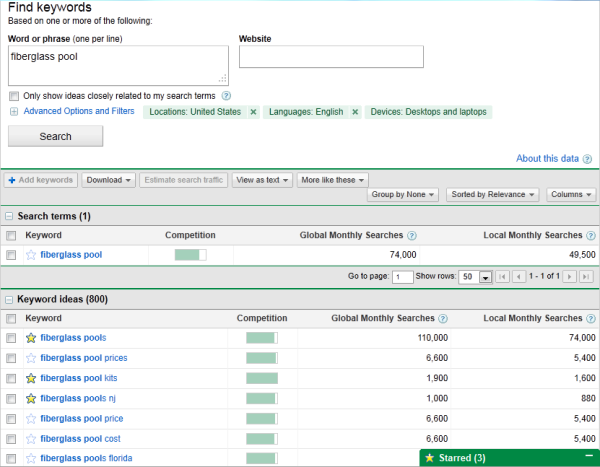
To start, compile a list of about 10 short words and terms associated with your product or service. Use an SEO tool (Google’s Keyword Tool, Ahrefs, SEMRush or GrowthBar just to name a few) to identify their search volume and come up with variations that make sense for your business.
You are associating these topics with popular short-tail keywords, as you can tell, but you’re not dedicating individual blog posts to these keywords. These keywords are simply too competitive to rank highly for on Google if you’re just starting to optimize your website for search. We’ll go over how to use these topics in just a minute.
Using search volume and competition as your measure, narrow down your list to 10-15 short-tail keywords that are important to you, and that people within your audience are searching for. Then rank this list in order of priority, based on its monthly search volume and its relevance to your business.
For example, if a swimming pool business is trying to rank for “fiberglass pools” — which is receiving 110,000 searches per month — this short-tail keyword can be the one that represents the overarching topic on which they want to create content. The business would then identify a series of long-tail keywords that relate to this short-tail keyword, have reasonable monthly search volume, and help to elaborate on the topic of fiberglass pools. We’ll talk more about these long-tails in the next step of this process.
Each of these keywords is called a “pillar,” and it serves as the primary support for a larger “cluster” of long-tail keywords, which is what brings us to our next Step …
2. Make a list of long-tail keywords based on these topics.
Here’s where you’ll start optimizing your pages for specific keywords. For each pillar you’ve identified, use your keyword tool to identify five to 10 long-tail keywords that dig deeper into the original topic keyword.
For example, we regularly create content on the topic of “SEO,” but it’s still very difficult to rank well on Google for such a popular topic on this acronym alone. We also risk competing with our own content by creating multiple pages that are all targeting the exact same keyword — and potentially the same search engine results page (SERP). Therefore, we also create content on conducting keyword research, optimizing images for search engines, creating an SEO strategy (which you’re reading right now), and other subtopics within SEO.
This allows a business to attract people who have varying interests in and concerns about owning their product — and ultimately create more entry points for people who are interested in buying something.
Use subtopics to come up with blog post or webpage ideas that explain a specific concept within each larger topic you identified in Step 1. Plug these subtopics into your keyword research tool to identify long-tail keywords on which to base each blog post.
Together, these subtopics create a cluster. So, if you have 10 pillar topics, they should each be prepared to support one cluster of five to 10 subtopics. This SEO model is called a “topic cluster,” and modern search engine algorithms depend on them to connect users with the information they’re looking for.
Here’s a short video on this concept:
Think of it this way: The more specific your content, the more specific the needs of your audience are — and the more likely you’ll convert this traffic into leads. This is how Google finds value in the websites it crawls; the pages that dig into the interworkings of a general topic are seen as the best answer to a person’s query, and will rank higher.
3. Build pages for each topic.
When it comes to websites and ranking in search engines, trying to get one page to rank for a handful of keywords can be next to impossible. But here’s where the rubber meets the road:
Take the 10 pillar topics you came up with in Step 1 and create a web page for each one that outlines the topic at a high level — using the long-tail keywords you came up with for each cluster in Step 2. A pillar page on SEO, for example, can describe SEO in brief sections that introduce keyword research, image optimization, SEO strategy, and other subtopics as they are identified. Think of each pillar page as a table of contents, where you’re briefing your readers on subtopics you’ll elaborate on in blog posts.
Use your keyword list to determine how many different pillar pages you should create. Ultimately, the number of topics for which you create pillar pages should coincide with how many different products, offerings, and locations your business has. This will make it much easier for your prospects and customers to find you in search engines no matter what keywords they use.
Each web page needs to include relevant content for your prospects and customers and should include pictures and links to pages on your site to enhance the user experience. We’ll talk about those links in Step 4.
4. Set up a blog.
Blogging can be an incredible way to rank for keywords and engage your website’s users. After all, every blog post is a new web page that gives you another chance to rank in search engines. If your business does not already have a blog, set one up. This is where you’ll elaborate on each subtopic and actually start showing up on Google.
As you write each blog post and fill up your clusters, you should do three things:
First, don’t include your long-tail keyword more than three or four times throughout the page. Google doesn’t consider exact keyword matches as often as it used to. In fact, too many instances of your keyword can be a red flag to search engines that you’re “keyword stuffing.” This can penalize your website and drop your rank.
Second, link out to the pillar page you created on this topic. You can do this in the form of tags in your content management system (CMS), or as basic anchor text in the body of the article.
Once you publish each blog post, link into it from the pillar page that supports this subtopic. Find the point in your pillar page that introduces this blog’s subtopic, and link it here.
By connecting both the pillar and the cluster in this way, you’re telling Google there’s a relationship between the long-tail keyword and the overarching topic you’re trying to rank for.
5. Blog every week to develop page authority.
Not every blog post or web page you write needs to belong to a topic cluster. There’s also value in writing about tangential topics your customers care about in order to give your website authority in the eyes of Google. This will cue Google to pay extra attention your domain as you add content to your primary topics.
With that in mind, make a point to blog at least once a week. Remember, you are blogging primarily for your audience, not the search engines. Write about things your audience and/or prospects are interested in, make sure you’re including relevant keywords where appropriate, and your audience will slowly start to notice and click.
Keep in mind that each topic won’t be equal in importance, and as your clusters get off the ground, you’ll need to prioritize based on your company’s needs. So, create a list of all the different web pages you would like to create and rank them. Then, develop a schedule and devise a plan of attack to get those pages built.
Keep your list updated and prioritized by what web pages will help you to best achieve your business goals.
6. Create a link-building plan.
The topic cluster model is your way forward in SEO this year, but it’s not the only way to get your website content to rank higher once it’s been created.
Our first five steps were dedicated to on-page SEO tactics. Link-building is the primary objective of off-page SEO, and is also a huge factor in how search engines rank your web pages. What is link-building? Glad you asked.
Link-building is the process of attracting inbound links (also called “backlinks”) to your website from elsewhere on the web. As a general rule, the more page authority the origin website has, the bigger affect it will have on the rank of the web page to which it is linking.
Dedicate some time to brainstorm all the different ways you can attract inbound links to your website. Start small –- maybe share your links with other local businesses in exchange for links to their sites. Write a few blog posts and share them on Twitter, Facebook, Google+, and LinkedIn. Consider approaching other bloggers for guest blogging opportunities through which you can link back to your website.
Another great way to attract inbound links is to use your blog to post articles related to current events or news. That way, you have shot of getting linked to from an industry influencer or other bloggers in your industry.
7. Compress all media before putting it on your website.
This is a small but important step in the SEO process. As your blog or website grows, you’ll undoubtedly have more images, videos, and related media to host there. These visual assets can help retain your visitors’ attention, but it’s easy to forget these assets are still technically computer files — and computer files have file sizes.
As a general rule, the bigger the file size, the harder it is for an internet browser to render your website. And it just so happens that page speed is one of the most important ranking factors when search engines decide where to place your content in its index.
So, the smaller the file size, the faster your website will load, and the higher you can rank on Google as a result. But how do you shrink a file size once it’s on your computer?
If you’re looking to upload an image to a blog post, for example, examine the file for its file size first. If it’s anywhere in megabyte (MB) territory, even just 1 MB, it’s a good idea to use an image compression tool to reduce the file size before uploading it to your blog. Sites like TinyPNG make it easy to compress images in bulk, while Google’s very own Squoosh has been known to shrink image file sizes to microscopic levels.
Ultimately, keeping your files in the kilobytes (KB) can sufficiently protect your website’s page speed.
Be careful when compressing your images, and check the file’s actual size once you export it back to your computer. While some tools might not be true to the size it shows you, others can sacrifice some image quality when compressing the artwork.
8. Stay current on SEO news & practices.
Like the overall marketing landscape, the search engine space is ever-evolving. Staying on top of current trends and best practices is a difficult task, but there are multiple online resources that can make it easy for you to stay on top of SEO news and changes that may impact your website and your SEO strategy.
SEO can take a lot of time and effort. What good is spending all this time and effort if you can’t see the fruits of your labor? There are many metrics you can track on a daily, weekly, or monthly basis to keep your SEO plan on track and measure your success.
Because the metric you care about is organic traffic (traffic that comes from a given search engine), seek out a tool that allows you to track both your overall organic traffic number and how your pages are ranking under each long-tail keyword your pages are targeting. SEMrush is a great reporting tool for just this purpose.
Create a monthly dashboard using Excel, Google Sheets, or a web analytics package so you can monitor how much traffic comes to your website from organic search.
Also, tracking indexed pages, leads, ROI, inbound links, keywords, and your actual ranking on SERPs (search engine results pages) can help you recognize your success as well as identify areas of opportunity.
SEO Process
Once you create your monthly SEO plan, you should also build a process to continue to optimizing it to fit new intent and keywords. Here are a few steps you can take.
1. Historically optimize your content.
Devote some time each month to updating old blog posts with new and up to date information so it continues to rank in SERPs. You can also use this time to add any SEO optimization that wasn’t in the original post, such as missing alt text.
2. Look out for changing keywords and new search intent.
After a few months, track where your blog posts are ranking and which keywords they’re ranking for. This can help you adjust subheads or text to leverage that new keyword ranking.
3. Add more editorial value to your old content.
Sometimes, you’ll find that a post is completely out of date. In this scenario, you should go beyond the average SEO update and give it a full refresher. You can do this by updating out of date information or stats, adding new sections that add depth to the post, or adding quotes or original data that can make the post gain more referral traffic.
4. Note new content and updates aimed at SEO in a monthly content plan.
To keep up with your SEO strategy, it can be helpful to create and refine a monthly content strategy. Then put your content plan into a spreadsheet or document that your team can monitor and track easily.
Below is an example of a content monthly content planning process that takes the steps above into account.
SEO Monthly Plan
Devote time to keyword research related to your industry.
List blog post ideas that leverage opportunistic keywords.
List blog posts that you can update.
Identify other SEO opportunities, such as holidays.
List all of your content ideas on a Search Insights Report.
Assign content to your team.
Take time at the end of each month to track your progress.
With a monthly SEO plan like the one above, plus a tracking document like a search insights report, you can build out and execute on an efficient SEO strategy. You can also identify and leverage low-hanging-fruit topics to discuss related to your industry.
Free Book Preview No BS Guide to Direct Response Social Media Marketing
The ultimate guide to – producing measurable, monetizable results with social media marketing.
February 4, 2014 5 min read
Opinions expressed by Entrepreneur contributors are their own.
In his bookUltimate Guide to Optimizing Your Website, SEO and online marketing expert Jon Rognerud shows you how to build a high-performance website and get top ranking on all search engines. In this edited excerpt, the author outlines a broad strategy for successfully optimizing your website.
The goal of search engine optimization is to have the search engine spiders not only find your site and pages but also specifically rank the page relevance so that it appears at the top of the search engine results. The process of optimization is not a one-time process but requires maintenance, tuning, and continuous testing and monitoring.
Below is a broad four-step process for a strategy for search engine optimization. Use this as your top-level checklist.
Step 1: Target Market Business Analysis
Website analysis. Analysis of meta sets/keywords, visible text and code to determine how well you’re positioned for search engines. For example, how much code do you have on a page compared to text?
Competitive analysis. Examination of content keywords and present engine rankings of competitive websites to determine an effective engine positioning strategy. Pick the top five results in the Google listing results to begin this process. Expand as necessary. Use tools such as Semrush.com and Keywordspy.com.
Initial keyword nomination. Development of a prioritized list of targeted search terms related to your customer base and market segment. Begin with this: What would you type into a search engine to find your business website or page? Then, ask your customers!
Step 2: Keyword Research and Development
Keyword analysis. From nomination, further identify a targeted list of keywords and phrases. Review competitive lists and other pertinent industry sources. Use your preliminary list to determine an indicative number of recent search engine queries and how many websites are competing for each keyword. Prioritize keywords and phrases, plurals, singulars and misspellings. (If search users commonly misspell a keyword, you should identify and use it). Please note that Google will try to correct the term when searching, so use this with care.
Baseline ranking assessment. You need to understand where you are now in order to accurately assess your future rankings. Keep a simple Excel sheet to start the process. Check weekly to begin. As you get more comfortable, check every 30 to 45 days. You should see improvements in website traffic, a key indicator of progress for your keywords. Some optimizers will say that rankings are dead. Yes, traffic and conversions are more important, but we use rankings as an indicator.
Goals and Objectives. Clearly define your objectives in advance so you can truly measure your ROI from any programs you implement. Start simple, but don’t skip this step. Example: You may decide to increase website traffic from a current baseline of 100 visitors a day to 200 visitors over the next 30 days. Or you may want to improve your current conversion rate of one percent to two in a specified period. You may begin with top-level, aggregate numbers, but you must drill down into specific pages that can improve products, services, and business sales.
Step 3: Content Optimization and Submission
Create page titles. Keyword-based titles help establish page theme and direction for your keywords.
Create meta tags. Meta description tags can influence click-throughs but aren’t directly used for rankings. (Google doesn’t use the keywords tag anymore.)
Place strategic search phrases on pages. Integrate selected keywords into your website source code and existing content on designated pages. Make sure to apply a suggested guideline of one to three keywords/phrases per content page and add more pages to complete the list. Ensure that related words are used as a natural inclusion of your keywords. It helps the search engines quickly determine what the page is about. A natural approach to this works best. In the past, 100 to 300 words on a page was recommended. Many tests show that pages with 800 to 2,000 words can outperform shorter ones. In the end, the users, the marketplace, content and links will determine the popularity and ranking numbers.
Develop new sitemaps for Google and Bing. Make it easier for search engines to index your website. Create both XML and HTML versions. An HTML version is the first step. XML sitemaps can easily be submitted via Google and Bing webmaster tools.
Submit website to directories (limited use). Professional search marketers don’t submit the URL to the major search engines, but it’s possible to do so. A better and faster way is to get links back to your site naturally. Links get your site indexed by the search engines. However, you should submit your URL to directories such as Yahoo! (paid), Business.com (paid) and DMOZ (free). Some may choose to include AdSense (google.com/adsense) scripts on a new site to get their Google Media bot to visit. It will likely get your pages indexed quickly.
Step 4: Continuous Testing and Measuring
Test and measure. Analyze search engine rankings and web traffic to determine the effectiveness of the programs you’ve implemented, including assessment of individual keyword performance. Test the results of changes, and keep changes tracked in an Excel spreadsheet, or whatever you’re comfortable with.
Maintenance. Ongoing addition and modification of keywords and website content are necessary to continually improve search engine rankings so growth doesn’t stall or decline from neglect. You also want to review your link strategy and ensure that your inbound and outbound links are relevant to your business. A blog can provide you the necessary structure and ease of content addition that you need. Your hosting company can typically help you with the setup/installation of a blog.
Are you looking for top software development trends in 2020? Well, you are in the right place! Here you will read various best software trends that will rule the year 2020.
Do you have an idea about how much the global market is spending on technology in 2019? Well, the answer is a whopping $3360 billion! This is a big number and, considering the current dominance of the IT sector, it is only fair. In this blog, we will look at some top software development trends that will dominate 2020.
Be it the marketing of a business or learning a new programming language, people follow market inclinations to get an edge over others in that field. Every industry in today’s market is swarming with new businesses and to stand out in the herd, you should inculcate the top software trends in your company before anyone else.
61.60%of software development companies agree that the average time of software development is4-6 months. The question is: what can you as a developer or a business owner do in this time period to make sure that your software is the best in the market?
The term “IT” is a vast field comprising different categories. From the use of the latest marketing tools to creating interactive websites and apps for your business, every little modification you do falls in one or the other category of the IT industry.
Most of the trends in this list were also a trend in 2019 or 2018. For instance, the Internet of Things. The net worth of the IoT market was expected to be 1.7 trillion dollars in 2019. The IoT industry is only going to expand in 2020 and you should leverage it, along with other trends, for software development in your industry.
Software development is a significant part of the IT industry. You need to start using a futuristic approach and use top software development trends in the mainstream of your business operations. In this article, we discuss the top 9 software development trends you should follow in 2020 to stay ahead over your competitors.
Software Trend 1: The Blockchain Technology – Beyond Bitcoin
It doesn’t matter if you follow Bitcoin or not, you must have heard the sudden rise and fall in the value of Bitcoin in December of 2018. Well, we won’t be talking about Bitcoin or Ethereum here but the technology behind cryptocurrencies – Blockchain.
Initially, Blockchain was limited to the finance industry but it is now moving to other sectors as well, such as healthcare, logistics, public administration software development, and more. The blockchain technology is one of the software development trends that can help your business reach new heights.
== What Is Blockchain and Why Should You Care?
To begin with, Blockchain is a series of non-changeable data records that are stored and managed by a bunch of computers and not just by a single entity. This accounts for the transparency of all the stored data but, at the same time, can’t be changed unless certain credentials are met.
The market of blockchain technology is increasing by each day and it is foreseen to impact the software development industry in a significant manner. The technology is still afresh and developers have already begun to implement it and build secure and decentralized solutions to real-world problems of different industries.
Stay ahead of your competitors by leveraging the power of blockchain technology for software development in your business.
Software Trend 2: Cross-Platform Development: Tools and Languages
The era of native apps is going down and cross-platform development is taking over because of its obvious benefits. Developers and business owners are investing in cross-platform development using the newest frameworks and programming languages for it.
Software developers are inclining towards programming languages that integrate features of two or more. One of the finest examples of this is: Kotlin and Scala taking over the good old JAVA in android app development. While JAVA is an object-oriented programming language, Kotlin and Scala offer object-oriented programming and functional programming at the same time.
Cross-Platform software development not only helps you save from your budget but it also is logical. Why would anyone invest their resources in two different apps for iOS and Android when they can do with one? The concept of cross-platform development or hybrid apps has been existent for long but with development environments like Flutter and Xamarin, it has now become feasible to efficiently implement it in real-life.
The software industry is shifting towards cross-platform development and it is expected to dominate the market by 2020. Invest your business resources in cross-platform development, for instance – creating hybrid apps over native apps. Hire developers in India for quality software and mobile app development.
Software Trend 3: Progressive Web Apps (PWA) – Are They Still In Trend?
Yes. They are. Progressive Web Apps offer the most up-to-date and seamless user experience. Besides, they come with a long list of benefits. For instance, the PWA ofStarbucksis99.84% (233kB) smaller than the native app.
The bounce rate of a poorly designed website or a buggy app can give a serious blow to the conversion rates of your business. Your website cannot leverage a device’s hardware specifications to give its best performance. Similarly, the capability of your mobile app to use a device’s software and hardware specifications is limited.
What if I told you that you can combine the good bits of your website and your app to offer your visitors a great experience? Yes, you heard it right! Progressive Web Applications are a result of the perfect combination of a website and a mobile app. PWAs have cut the bounce rates and boosted the conversion rates of many brands in the market such as AliExpress.
== What are Progressive Web Apps?
In simple words, Progressive Web Apps are designed to offer application-like experience in a browser for your customers. PWA Apps essentially lower the chances of bad user experience and thus, have a long list of advantages over a
hybrid or native apps.
One of the major benefits of PWA Apps is that it cuts the development and distribution costs of your business to a large extent. Besides this, other advantages such as no updates required, less data usage, and better SEO, yield in better visitor or customer experience and hence, higher conversion rates.
PWAs are one of the most important software development trends you should use in 2020. Business leaders like Adobe and Google are already benefiting from PWAs. Hire PWAs developers and step into the future of software development.
Software Trend 4: The Internet of Things – Connecting Devices, Enhancing Accessibility
IoT has been a part of top software trends for long now and considering its dominance, it will continue being a topic of interest in the next decade as well. This technology has already reached people’s homes, such as Alexa, but is yet to reach its limits.
Internet of Things is a group of physical objects (things) such as smart wearable devices that are connected and can transfer data over the Internet. IoT in software development opens a way to reliable, user-friendly, and secure solutions. It creates multiple possibilities for both developers as well as business owners. They can this trend to get an edge over their competitors in the market.
The IoT market is reaching new heights. The number of devices that are connected and are communicating through the Internet is increasing by each day. Gartner predicts the number of connected devices to reach 20.4 billion by 2020. Use the power of IoT to create secure and reliable software for your business today!
Software Trend 5: Cybersecurity – Secure Internet
The concept of cybersecurity i.e. security over the Internet is not new. As the entire population is gradually shifting on the Internet, the need to keep it secure becomes more urgent. If you think about it, you rely on the Internet for numerous things such as bank transactions, cloud storage, communication, and whatnot!
Cybersecurity makes sure that your personal and professional data is secured from cyber attacks. Following the ongoing software trend, by 2020, the need to use cybersecurity for the safety of applications and software will increase significantly. This can only be implemented by hiring developers who can design custom applications and software for your business.
Software Trend 6: Use of Scanners and Sensors
Lately, mobile apps that use sensors and scanners to fulfill their purpose are coming into play, especially with the increasing market of IoT devices. The entire market is still innovating and sensors increase the chances of new applications. For instance, there are mobile apps that let you control your TV using your mobile phone.
Besides, there are sensors attached to your computers and mobile devices such as GPS, fan speed, temperature, and more. Using scanners and sensors for software development can push your business way ahead of your market competitors.
Developers are using third-party platforms APIs, operating system support, and different tools to create compatible software and applications. Hire PHP developer with experience in a particular field to create futuristic apps for your business.
Software Trend 7: AI-Driven Software Development
The term “Artificial Intelligence” is used a lot nowadays and you might be wondering how is this a part of software development trends for 2020? The artificial intelligence industry is here but it is far from reaching its peak. The entire world is moving towards automation and software has a major role to play in it.
The revenue generated from AI is increasing and is predicted to generate trillions soon. Our software development technologies have now reached a level where they can be used for the real-life implementation of artificial intelligence. Be it machine learning, deep learning or anything else, businesses are using artificial intelligence to optimize their operations and create a better user experience.
Given its popularity, AI will remain in the top software trends for at least next few years. Companies are using artificial intelligence for better performance and decreased operation costs. To make your mark in the digital world in 2020, practice artificial intelligence-driven software development in your business.
Software Trend 8: Increasing Popularity of Cloud Services
Cloud has been in the market for a long time now. Even technologies in this list such as IoT and Blockchain function as a cloud service. The problem of data storage is real and cloud offers a reliable and secure alternative to that. The market is shifting from using physical data servers to cloud and your business should become a part of it at the earliest.
By the use of cloud computing in software development, you can not only speed up the entire process but also increase transparency and decrease the overall project costs. This not only offers new opportunities for developers but also allows businesses to innovate. The reach of cloud services is increasing and it already has penetrated sectors like logistics, health care, finance, and more.
Types of cloud computing such as Platform-as-a-Service (PaaS), Infrastructure-as-a-Service (IaaS), and Software-as-a-Service (SaaS) are already being used by businesses to boost the overall efficiency of the development process. For instance, PaaS helps to develop and run applications without actually building them. The use of cloud services in software development will only increase and you should start leveraging its power for your business at the earliest.
Software Trend 9: AR/VR/MR – The Use of Immersive Technologies
Augmented Reality (AR), Virtual Reality (VR), and Mixed Reality (MR) are terms that are commonly used in the current business world. The entire market of immersive technologies, no matter how popular it is right now, is in its budding phase. Immersive technologies provide a bagful of software development opportunities and you should jump in at the earliest.
Statistica has projected the AR/VR market to reach 209.2 billion dollars by 2022. While AR is being used for training purposes while VR has found its way in the gaming and video industry. Immersive technologies ar
e bound to reach new market heights and it only makes sense to use it for the growth of your business.
We have access to powerful development tools and we can use to realize the power of immersive technologies. You can not only offer it as a service for your clients but also can use it for in-house operation. For instance, you can use these immersive technologies (AR/VR/MR) to apply different designs on furniture or to allow your customers to try clothes by dressing mannequins. As a software developer, these technologies offer opportunities to explore new and creative fields in the development world.
Here is one more Software Trend: Low/No-Code Development – Development Using GUIs
Low-code development is one of the less-acknowledged but an important part of software development trends of 2020. The first thing that usually crosses our mind when software development is talked about is complex programming languages. Well, the low-code development market is thriving. Well, what is low code development?
Low code development is building software or an app with the use of graphical user interfaces and without using any programming language. With coding an application or software in parts, you can visualize it without having developers to program it. There are different platforms available for easy low code software development and the entire market is projected to increase by 2020.
Final Words
These top software development trends show where the entire industry is headed. As a developer, you can learn new technologies and build futuristic apps. As a business owner, you can use these top software trends to take your business ahead of your competitors by cutting operation costs, create awesome user experience, and boost your sales. You can also hire Indian developers to build software and applications using technologies like IoT, Blockchain, AR, VR, MR, and others.
To provide the best experiences, we use technologies like cookies to store and/or access device information. Consenting to these technologies will allow us to process data such as browsing behavior or unique IDs on this site. Not consenting or withdrawing consent, may adversely affect certain features and functions.
Functional
Always active
The technical storage or access is strictly necessary for the legitimate purpose of enabling the use of a specific service explicitly requested by the subscriber or user, or for the sole purpose of carrying out the transmission of a communication over an electronic communications network.
Preferences
The technical storage or access is necessary for the legitimate purpose of storing preferences that are not requested by the subscriber or user.
Statistics
The technical storage or access that is used exclusively for statistical purposes.The technical storage or access that is used exclusively for anonymous statistical purposes. Without a subpoena, voluntary compliance on the part of your Internet Service Provider, or additional records from a third party, information stored or retrieved for this purpose alone cannot usually be used to identify you.
Marketing
The technical storage or access is required to create user profiles to send advertising, or to track the user on a website or across several websites for similar marketing purposes.


/illuminated-server-room-panel-660495303-5a24933d4e46ba001a771cd1.jpg)
:max_bytes(150000):strip_icc()/servers-in-computer-networking-817380-part1-v2-5c1041db46e0fb0001b5d447.png) Lifewire
Lifewire:max_bytes(150000):strip_icc()/servers-in-computer-networking-817380-part2-v2-5c1041fa46e0fb00014248d0.png) Lifewire
Lifewire