
If you’re considering spending any amount of money on ads to reach your target audience, then you’d better spend it in the right place. That is, somewhere with over 246 million unique visitors, 3.5 billion daily interactions, and an estimated 700% return on investment.
Somewhere like… Google Ads.
Google Ads was launched just two years after what has become the most popular website in the world: Google.com. The advertising platform came on the scene in October 2000 as Google Adwords, but after some rebranding in 2018, it was renamed Google Ads. Given Google’s expansive reach, chances are you’ve seen (and probably clicked on) a Google ad … and so have your potential customers.
In this guide you’ll discover what Google Ads is and what you need to know to begin advertising on Google. We’ll cover features specific to the platform and teach you how to optimize your campaigns to achieve the best results with your ads.
What is Google Ads?
Why Advertise on Google?
Google Ads Terms to Know
How Does Google Ads Work?
How to Set Up Google Ads
Google Ads Bidding Strategies
What is Google Ads?
It’s no secret that, these days, the stronger and more focused your paid campaigns are, the more clicks you generate — leading to a greater probability of obtaining new customers. This is why Google Ads has become increasingly popular among businesses across all industries.
Google Ads is a paid advertising platform that falls under a marketing channel known as pay-per-click (PPC), where you (the advertiser) pays per click or per impression (CPM) on an ad.

Google Ads is an effective way to drive qualified traffic, or good-fit customers, to your business while they’re searching for products and services like the ones you offer. With Google Ads, you can boost your website traffic, receive more phone calls, and increase your in-store visits.
Google Ads allows you to create and share well-timed ads (via both mobile and desktop) among your target audience. This means your business will show up on the search engine results page (SERP) at the moment your ideal customers are looking for products and services like yours via Google Search or Google Maps. This way, you reach your target audience when it makes sense for them to come across your ad.
Note: Ads from the platform can span across other channels too, including YouTube, Blogger, and Google Display Network.
Over time, Google Ads will also help you analyze and improve those ads to reach more people so your business can hit all of your paid campaign goals.
Additionally, no matter the size of your business or your available resources, you can tailor your ads to suit your budget. The Google Ads tool gives you the opportunity to stay within your monthly cap and even pause or stop your ad spending at any point in time.
Discover how HubSpot can help you better manage your Google ads.
Now, onto another important question: Is Google Ads really effective?
Does Google Ads work?
To answer this, let’s consider a few statistics. Google Ads have a click-through rate of nearly 8 percent. Display ads yield 180 million impressions each month. For users who are ready to buy, paid ads on Google get 65% of the clicks. 43% of customers buy something they’ve seen on a YouTube ad. So, yes, Google Ads works. With an optimized ad campaign and lead flow, you can create a high-ROI marketing campaign.
Why advertise on Google?
Google is the most used search engine, receiving 3.5 billion search queries a day. Not to mention, the Google Ads platform has been around for nearly two decades, giving it some seniority in the area of paid advertising. Google is a resource used by people around the world to ask questions that are answered with a combination of paid advertisements and organic results.
And, according to Google, advertisers make $8 for every $1 they spend on Google Ads. So, there are a few reasons why you’d want to consider advertising on Google.
Need another reason? Your competitors are using Google Ads (and they might even be bidding on your branded terms). Thousands of companies use Google Ads to promote their businesses, which means that even if you’re ranking organically for a search term, your results are being pushed down the page, beneath your competitors.
If you’re using PPC to advertise your product or services, Google Ads should be a part of your paid strategy — there’s no way around it (except maybe Facebook Ads, but that’s another article).
Reasons Why Your Google Ads Aren’t Working
If you’ve tried unsuccessfully to advertise on Google, don’t give up. There are many reasons why your Google Ads could be underperforming. Let’s cover some common offenders.
- Broad Keyword Terms. You really need to nail it when it comes to your keywords, which is why testing and tweaking should be a part of your strategy. If your keywords are too broad, Google will be placing your ad in front of the wrong audience which means fewer clicks and a higher ad spend. Review what’s working (i.e. which keywords are generating clicks) and adjust them to best match your ads with your target audience. You likely won’t get the mix right the first time but you should keep adding, removing, and tweaking keywords until you do.
How to fix it: Review the keyword strategies that we cover below.
- Irrelevant Ads. If your ad doesn’t match the searcher’s intent, you won’t get enough clicks to justify your ad spend. Your headline and ad copy need to match the keywords you’re bidding on, and the solution your ad is marketing needs to solve whatever pain point that searcher is experiencing. It’s a combination that will yield the results you’re looking for, and it may just be a few tweaks away. You have the option to create multiple ads per campaign — use this feature to split test which ads work best. Or, better yet, us
e Google’s Responsive Search Ads feature.
How to fix it: Read our best practices for ad copy. - Low Quality Score. Your Quality Score (QS) is how Google determines how your ad should rank. The higher your rank, the better your placements. If your quality score is low, you’ll have fewer eyeballs on your ad and fewer chances to convert. Google will tell you your Quality Score, but improving it is up to you.
How to fix it: Keep reading to learn how to improve your QS.
- Poor Landing Page. Your efforts shouldn’t stop with your ad — the user experience after a click is equally important. What does your user see once they click your ad? Is your landing page optimized for conversions, meaning does it use the same keywords? Does the page solve your user’s pain point or answer their question? Your user should experience a seamless transition through to the conversion.
How to fix it: Review landing page best practices and implement them to increase your conversion rate.
Google Ads Terms to Know
- AdRank
- Bidding
- Campaign Type
- Click-Through Rate
- CPC
- CPM
- Conversion Rate
- Display Network
- Ad Extensions
- Keywords
- PPC
- Quality Score
These common terms will help you set up, manage, and optimize your Google Ads. Some of these are specific to Google Ads, while others are related to PPC in general. Either way, you’ll need to know these to run an effective ad campaign.
AdRank
Your AdRank determines your ad placement. The higher the value, the better you’ll rank, the more eyes will fall on your ad, and the higher the probability that users will click your ad. Your AdRank is determined by your maximum bid multiplied by your Quality Score.
Bidding
Google Ads is based on a bidding system, where you as the advertiser selects a maximum bid amount you’re willing to pay for a click on your ad. The higher your bid, the better your placement. You have three options for bidding: CPC, CPM, or CPE.
- CPC, or cost-per-click, is the amount you pay for each click on your ad.
- CPM, or cost per mille, is the amount you pay for one thousand ad impressions, that is when your ad is shown to a thousand people.
- CPE, or cost per engagement, is the amount you pay when someone takes a predetermined action with your ad.
And, yes, we’ll review bidding strategies below.
Campaign Type
Before you begin a paid campaign on Google Ads, you’ll select between one of three campaign types: search, display, or video.
- Search ads are text ads that are displayed among search results on a Google results page.
- Display ads are typically image-based and are shown on web pages within the Google Display Network.
- Video ads are between six and 15 seconds and appear on YouTube.
Click-Through Rate (CTR)
Your CTR is the number of clicks you get on your ad as a proportion of the number of views your ad gets. A higher CTR indicates a quality ad that matches search intent and targets relevant keywords.
Conversion Rate (CVR)
CVR is a measure of form submissions as a proportion of total visits to your landing page. Simplistically speaking, a high CVR means that your landing page presents a seamless user experience that matches the promise of the ad.
Display Network
Google ads can be displayed on either search results pages or a web page within Google’s Display Network (GDN). GDN is a network of websites that allow space on their webpages for Google Ads — these ads can be text-based or image ads and are displayed alongside content relevant to your target keywords. The most popular Display Ad options are Google Shopping and app campaigns.
Extensions
Ad Extensions allow you to supplement your ad with additional information at no additional cost. These extensions fall under one of five categories: Sitelink, Call, Location, Offer, or App; we’ll cover each of these ad extensions below.
Keywords
When a Google user types a query into the search field, Google returns a range of results that match the searcher’s intent. Keywords are words or phrases that align with what a searcher wants and will satisfy their query. You select keywords based on which queries you want to display your ad alongside. For example, a searcher that types “how to clean gum off shoes” will see results for advertisers that targeted keywords like “gum on shoes” and “clean shoes.”
- Negative Keywords are a list of keyword terms that you do not want to rank for. Google will pull you from the bid on these keywords. Typically, these are semi-related to your intended search terms but fall outside of the realm of what you offer or want to rank for.
PPC
Pay-per-click, or PPC, is a type of advertising where the advertiser pays per click on an ad. PPC is not specific to Google Ads, but it is the most common type of paid campaign. It’s important to understand the ins and outs of PPC before launching your first Google Ads campaign.
Quality Score (QS)
Your Quality Score measures the quality of your ad by your click-through rate (CTR), the relevance of your keywords, the quality of your landing page, and your past performance on the SERP. QS is a determining factor in your AdRank.
Click to get our free guide on how to use Google Ads.
How does Google Ads work?
Google Ads displays your ad to potential leads or customers who are interested in your product or service. Advertisers bid on search terms, or keywords, and the winners of that bid are placed at the top of search results pages, on YouTube videos, or on relevant websites, depending on the type of ad campaign selected.
Many factors impact your ability to create effective and high-performing Google Ads. Let’s cover them below.
AdRank and Quality Score
AdRank determines the placement of your ads, and Quality Score is one of the two factors (the other being bid amount) that determines your AdRank. Remember, your Quality Score is based on the quality and relevance of your ad, and Google measures that by how many people click on your ad when it’s displayed — i.e. your CTR. You CTR depends on the how well your ad matches searcher intent, which you can deduce from three areas:
- The relevance of your keywords
- If your ad copy and CTA deliver what the searcher expects based on their search
- The user experience of your landing page
Your QS is where you should focus most of your attention when you first set up your Google Ad campaign — even before you increase your bid amount. The higher your QS, the lower your acquisition costs will be and the better placement you’ll get.
Ad Campaign Types: Search, Display, and Video
You can select from one of three campaign types on Google Ads: search, display, or video. Let’s cover the optimal uses for each and why you might choose one over the other.
Search Ads
Search ads are text ads that are displayed on Google results pages. As an example, a search for “pocket squares” returns sponsored results, or ads, like these:
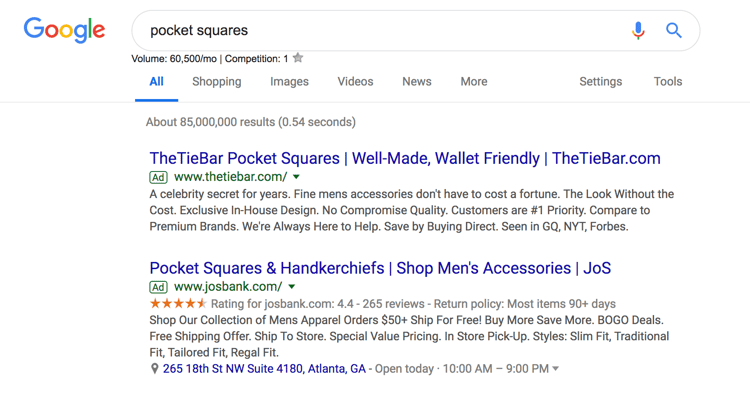
The benefit of search ads is that you’re displaying your ad in the place where most searchers look for information first — on Google. And Google shows your ad in the same format as other results (except for denoting it as an “Ad”) so users are accustomed to seeing and clicking on results.
Responsive Search Ads
Responsive search ads allow you to enter multiple versions of headlines and ad copy (15 and four variations, respectively) for Google to select the best performers to display to users. With traditional ads, create one static version of your ad, using the same headline and description each time. Responsive ads allow for a dynamic ad that is auto-tested until you arrive at the version that is best suited for your target audience — for Google, that means until you get the most clicks.
Display Ads
Google has a network of websites in various industries and with an array of audiences that opt in to display Google Ads, known as the Google Display Network. The benefit to the website owner is that they’re paid per click or impression on the ads. The benefit to advertisers is that they can get their content in front of audiences that are aligned with their personas. These are typically image ads that draw users attention away from the content on the webpage.
 Source
Additional options for Display Ads include shopping campaigns and app campaigns, which are displayed on search engine results pages.
Video Ads
Video ads are displayed before or after (and sometimes in the middle of) YouTube videos. Remember, YouTube is a search engine, too. The right keywords will place you in front of a video, disrupting the user’s behavior just enough to grab their attention.
Location
When you first set up your Google Ad, you’ll select a geographical area where your ad will be shown. If you have a storefront, this should be in a reasonable radius around your physical location. If you have an ecommerce store and a physical product, your location should be set in the places where you ship. If you provide a service or product that is accessible worldwide, then the sky’s the limit.
Your location settings will play a role in placement. For instance, if you own a yoga studio in San Francisco, someone in New York that enters “yoga studio” will not see your result, no matter your AdRank. That’s because Google’s main objective is to display the most relevant results to searchers, even when you’re paying.
Keywords
Keyword research is just as important for paid ads as it is for organic search. Your keywords need to match searcher intent as much as possible. That’s because Google matches your ad with search queries based on the keywords you selected. Each ad group that you create within your campaign will target a small set of keywords (one to five keywords is optimal) and Google will display your ad based on those selections.
Match Types
Match Types give you a little wiggle room when it comes to your keyword selections — they tell Google whether you want to match a search query exactly or if your ad should be shown to anyone with a search query that’s semi-related. There are four match types to choose from:
- Broad Match is the default setting that uses any word within your keyword phrase in any order. For example, “goat yoga in Oakland” will match “goat yoga” or “yoga Oakland.”
- Modified Broad Match allows you to lock in certain words within a keyword phrase by denoting them with a “+” sign. Your matches will include that locked-in word at the very least. For example, “+goats yoga in Oakland” could yield “goats,” “goats like food,” or “goats and yoga.”
- Phrase Match will match with queries that include your keyword phrase in the exact order but may include additional words before or after it. For example, “goat yoga” can yield “spotted goat yoga” or “goat yoga with puppies.”
- Exact Match maintains your keyword phrase as it is written in the exact order. For example, “goat yoga” will not show up if someone types “goats yoga” or “goat yoga class.”
If you’re just starting out and don’t know exactly how your persona will be searching, move from a broad match to a more narrow approach so you can test which queries yield the best results. However, since your ad will be ranking for many queries (some unrelated) you should keep a close eye on your ads and modify them as you can gain new information.
Headline and Description
Your ad copy can be the difference between a click on your ad and a click on your competitor’s ad. It’s important that your ad copy matches the searcher’s intent, is aligned with your target keywords, and addresses the personas pain point with a clear solution.
To illustrate what we mean, let’s review an example.

A search for “baby swim lessons” yielded this result. The copy is concise and uses the limited space wisely to convey their message and connect with their target audience.
The Swim Revolution knew to put the keyword in their headline so we instantly know that this ad matches what we’re looking for. The description tells us why this is the best option for swim lessons because it addresses the concerns of their persona — a parent looking to enroll their baby in a swim class.
They use words like “skills,” “fun,” “confidence,” and “comfort in the water” to ease our nerves about putting a baby in a pool and to prove to us that we will get what we want out of this class — an infant that can swim.
This kind of ad copy will get you clicks, but conversions will result from carrying this level of intention into your landing page copy.
Ad Extensions
If you’re running Google Ads, you should be using Ad Extensions for two reasons: they’re free, and they give users additional information and another reason to interact with your ad. These extensions fall within one of these five categories:
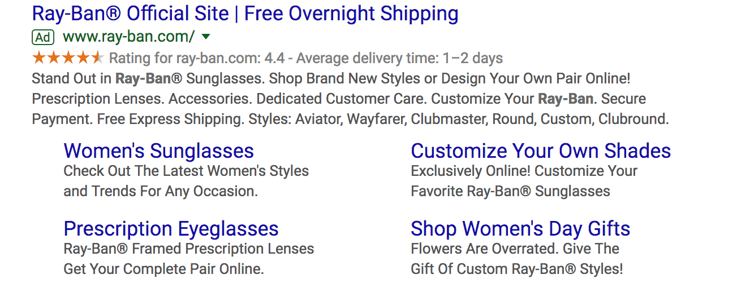
- Sitelink Extensions extend your add — helping you stand out — and provide additional links to your site that offer users more enticing reasons to click.
- Call Extensions allow you to incorporate your phone number in your ad so users have an additional (and instant) way to reach out to you. If you have a customer service team that is ready to engage and convert your audience, then include your phone number.

- Location Extensions include your location and phone number within your ad so Google can offer searchers a map to easily find you. This option is great for businesses with a storefront and it works well for the search query “…near me.”

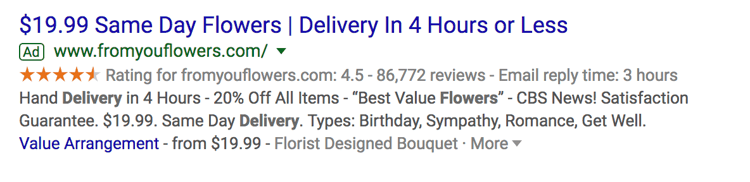
- Offer Extensions work if you’re running a current promotion. It can entice users to click your ad over others if they see that your options are discounted compared to your competitors.
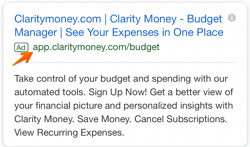
- App Extensions provide a link to an app download for mobile users. This reduces the friction from having to perform a new search to find and download the app in an AppStore.
Google Ads Retargeting
Retargeting, a.k.a. remarketing, in Google Ads is a way to advertise to users who have previously interacted with you onlin
e but have not yet converted. Tracking cookies will follow users around the web and target these users with your ads. Remarketing is effective since prospects need to see your marketing at least seven times before they become a customer.
How to Set Up Your Google Ads
Setting up your paid campaigns on Google is relatively easy (and quick), mostly because the platform takes you through the setup and provides helpful hints along the way. Once you visit the Google Ads site and click “Start Now,” you’ll be taken through a series of steps to get your ads up and running. If you have your ad copy and/or images created, set up should take you no more than 10 minutes.
What may be less obvious are all the additional things you need to do to make sure your ads are optimally set up and easily trackable. Let’s cover these together. These are the steps you’ll take once your ads are submitted for review.
Link Google Analytics
You likely have Google Analytics set up on your website so you can track traffic, conversions, goals, and any unique metrics. You also need to link your Analytics account to Google Ads. Linking these accounts will make tracking, analyzing, and reporting between channels and campaigns much easier because you can view these events in one place.
Add UTM Codes
Urchin Tracking Module (UTM) codes are used by Google to track any activity associated with a specific link. You’ve probably seen them before — it’s the part of a URL that follows a question mark (“?”). UTM codes will tell you which offer or ad led to a conversion so you can track the most effective parts of your campaign. UTM codes make it easier to optimize your Google Ads since you know exactly what’s working.
The trick, though, is to add your UTM codes at the campaign level when you set up your Google Ads so you don’t have to do so manually for each ad URL. Otherwise, you can add them manually with Google’s UTM builder.
Set Up Conversion Tracking
Conversion tracking tells you exactly how many customers or leads you’ve acquired from your ad campaigns. It’s not mandatory to set up but, without it, you’ll be guessing the ROI of your ads. Conversion tracking allows you to track sales (or other activities) on your website, app installs, or calls from your ads.
Manage and organize your ads with our free Google Ads Kit and Templates.
Integrate Your Google Ads With Your CRM
There is something to be said about keeping all of your data in one place where you can track, analyze, and report on it. You already use your CRM to track contact data and lead flows. Integrating Google Ads with your CRM gives you the ability to track which ad campaigns are working for your audience so you can continue marketing to them with offers that are relevant.
Google Ads Bidding Strategies
Once you’ve set up your ad campaigns and have tracking in place, it’s time to start bidding. Remember, your ability to rank in Google Ads depends on how you bid. While your bid amount will depend on your budget and goals, there are a few strategies and bid settings you should be aware of when launching your paid campaign.
Automated vs. Manual Bidding
You have two options when it comes to bidding on your keywords — automated and manual. Here’s how they work:
- Automated Bidding puts Google in the driver’s seat and allows the platform to adjust your bid based on your competitors. You can still set a maximum budget, and Google will work within a range to give you the best chance at winning the bid within those constraints.
- Manual Bidding let’s you set the bid amounts for your ad groups and keywords, giving you the chance to reduce spending on low-performing ads.
Bidding on Branded Search Terms
Branded terms are those with your company or unique product name in them, like “HubSpot CRM.” There is much debate on whether to bid on your branded terms or not. On one side of the debate, bidding on terms that will likely yield organic results could be seen as a waste of money.
On the other side, bidding on these terms gives you domain over these search results pages and helps you convert prospects that are further along the flywheel. For instance, if I’ve been doing research on live chat tools and am heavily considering HubSpot’s Live Chat, then a simple search for “HubSpot live chat software” will yield exactly the result I’m looking for without the effort of scrolling.
The other argument in favor of bidding on your branded terms is that competitors may bid on them if you don’t, thereby taking up valuable real estate that should belong to you.
Cost Per Acquisition (CPA)
If the idea of spending money to convert prospects into leads makes you uneasy, then you can set a CPA instead and only pay when a user converts into a customer. While this bidding strategy could cost more, you can take comfort in knowing that you only pay when you acquire a paying customer. This strategy makes it easy to track and justify your ad spend.
Additional Resources to Optimize Your Google Ads
Your ad copy and headline is not the only component that will make your paid campaign successful. Getting a user to click is only the beginning … they should arrive on a landing page that’s optimized for conversion and then be taken to a Thank You page that tells them what to do next.
If you want your Google Ads to produce qualified leads and customers, then check out these additional resources and use them as guidelines as you set up your Google Ads campaign.
Start Your Campaign
Given its reach and authority, Google Ads should be a part of your paid strategy. Use the tips we covered to get started, and remember to refine and iterate as you go. There’s no such thing as a Google Ads campaign that doesn’t work — there are only ones that need a bit more work. Using the strategy and information provided above, you have what you need to create a successful Google Ad campaign that drives clicks and converts leads.
Originally published Sep 27, 2019 1:29:00 PM, updated April 27 2020
Topics:
Google Ads
Don’t forget to share this post!
Source





 Course DetailreorderModules: 26access_timeHours: 40
 Beginner
 Free
Free


/arc-anglerfish-tgam-prod-tgam.s3.amazonaws.com/public/2EJM5YR2AVH3RGPZOPSIESPJYU.jpg)



 At VOX, we believe that through creating committed partnerships, engaging in our communities and empowering individuals to have a stake in the process, we create a collaborative prosperity that positively affects people, businesses and the world.