Web Design Explained: Key Elements & Best Practices

savvy brands know that a well-designed website helps build trust with their target audience
what is web designWeb design graphic illustrating overlapping shapes with labels for "Fernanda," "Keith," and "Amahle," set against a vibrant yellow background, representing user experience and interface elements.

Savvy brands know that a well-designed website helps build trust with their target audience. But what does it take to actually make a good web design? Visual appeal is important, but making your website easy to understand is key to user-centric design.

Read on to learn more about:

  • What good web design is—and how it benefits your organization
  • The fundamentals of website design
  • Web design best practices you can apply with Figma

Web design involves creating attractive, user-friendly web pages and web-based apps. User experience design, user interface design, and visual design all play key roles in the web design process. Web design teams take both form and functionality into account, balancing strong visuals with sound usability.

When users land on a web page, it takes them just 50 milliseconds to form an opinion about it. That’s why good web design matters. Not only does it help you make a great first impression, but it can also:

  1. Build your brand identity. Compelling, cohesive web design makes your brand memorable, helping your business stand out and connect with users.
  2. Improve user experience. Simple, intuitive website design makes it easy for users to understand and find what they’re looking for.
  3. Increase visibility among your target audience. Good web design helps drive search engine optimization and better search rankings.

Web design vs. web development: What’s the difference?

Web design leans on visual, UX, and UI design to shape a website or app’s look and feel. This covers design elements such as your brand’s color palette, fonts, and typography. It also includes UX design for page templates, wireframes, and prototyping.

Meanwhile, web development applies coding languages such as hypertext markup language (HTML), cascading style sheets (CSS), and JavaScript (for dynamic content). Web developers turn wireframes and prototypes into working web pages, bringing back-end functionality to front-end design.

Want your web design to make a positive impact on your company’s bottom line? Start by addressing five key components of web design:

Content

Before you jump into design mode, consider what content users need. On-page elements such as headers, text, images, and CTA buttons can support user goals and needs.

Layout

Arrange web page content for an easy-to-use, accessible user experience. Use wireframes to structure page information with basic headings and UI elements, then build prototypes to create and test interaction flows.

Navigation

Most websites use menus, bars, breadcrumbs, or sliders for navigation. Design and validate nav elements to get users where they need to go quickly and easily.

Visual style

Use your brand style guide to build visual elements with a consistent color scheme, imagery, and typeface. Apply graphic design principles to build in visual hierarchy, balance, movement, and white space.

Function

Good web design factors in metrics like page loading time and mobile device usage. Fun fact: An ecommerce site that loads in just one second has a conversion rate that’s 2.5 times higher than a site that takes five seconds to load.

To plan and design high-quality web pages that resonate with your users, keep the following web design best practices in mind:

  • Design for your users. User research helps you understand your target audience—it’s a generative first step in human-centered design.
  • Opt for mobile first. On average, more than half of website traffic comes through mobile devices. If your target audience spends more time on mobile, prioritize designing for smartphone browsers and mobile apps.
  • Apply responsive web design. Organize your website content on a flexible grid system, so that your pages dynamically adjust to fit different screen sizes.
  • Grab your users’ attention. Add interactive elements such as animations and videos to engage and guide users.
  • Design for readability. Set visual hierarchy with different font sizes, weights, and typeface combinations to make web pages easy to scan and read.
  • Boost SEO by designing a mobile-friendly, responsive website. Include accessible, user-centric content that’s easy to share across social media platforms.
  • Test and refine. Perform user testing to rev your web designs before translating the designs into HTML, CSS, and JavaScript.

Looking for inspiration to help you kick off your web design process? Visit the Figma community, where design pros share their know-how — including expertly crafted web design templates and examples. For more on web design, consults these resources:

Ready to create engaging, user-friendly web pages?

Source

How to learn web design in 9 steps (+ best

3D color cube diagrams illustrating RGB color model variations on a purple background, relevant to web design fundamentals and visual design principles.

Start with a solid foundation by learning the basics of UI, UX, HTML, CSS, and visual design.

Learning how to design a website is an effort-intensive process. Starting with the fundamentals will save you time fixing errors later.

This guide covers everything you need to better understand web design so you can start the creation process with a big-picture perspective. As you read through, bookmark the more in-depth guides along the way. 

What’s web design, and what elements make it work?

Crafting a website is part artistry, part science. Designers turn concepts into aesthetically pleasing sites that enable an audience to take the site owner’s intended actions, whether it’s making a purchase or signing up for a service.

Web design involves several subdisciplines, like user experience (UX), user interface (UI), and search engine optimization (SEO). Good designers should know the fundamentals of these subdisciplines.

To create an effective (i.e., engaging and user-friendly) site, web designers need the following skills: 

  • Attention to detail — A great designer notices granular details, styling each element carefully while never losing sight of how they’ll all come together.
  • Adaptability — Designers must be skilled in various software and techniques to pivot strategies to reach multiple audience types.
  • Organization — The arrangement of text and visuals on each page must intuitively direct users through the site. A skilled designer creates sites that deliver users to their destination in the fewest clicks.
  • Innovation — The best sites are both unique (to keep the viewer engaged) and follow the user’s navigation expectations (so they can take their intended action).

Web designs are powered by the backend

The backend is everything that runs behind the scenes when displaying a website — back-end developers are the people who make it work.

Websites reside on servers. When a user navigates to a specific section of a site, the server shows them a file filled with HTML and CSS that determines how the browser displays the content. It’s this back-end file that developers work on to ensure the site loads correctly and is search engine-optimized.

Back-end developers are often programmers who work in coding languages such as PHP. They also might use a Python framework like Django, write Java code, manage SQL databases, or use other programming languages or frameworks to ensure that servers, applications, and databases work together correctly.

The front end relates to what site visitors see

If the back end is the server side, the front end is the client side. The front end is where HTML and CSS — along with JavaScript and other coding languages — work together to display a website. Front-end development focuses on the parts of a web design that people engage with. It’s all about organizing information and presenting it in a way that’s visually appealing and usable.

Good visual design makes websites stand out

3D color cube diagrams illustrating RGB color model variations on a purple background, relevant to web design fundamentals and visual design principles.

Though the best web designs look effortless in execution, they’re all based on the guiding principles of visual design. Some rare web designers have an innate eye for visual design, but most must learn and practice the rules of composition. Over time, you’ll understand how elements like shapes, space, color, and geometry come together to form sound web design.

How to become a web designer: 9 steps

Building websites is more accessible than ever, thanks to online courses and thorough design software documentation like that on Webflow University. That said, some fundamental principles make for a solid foundation to build on. The following nine steps are an ordered approach to learning these principles so you can fast-track your education.

1. Understand the key concepts of visual design

Effective web design requires you to understand the basic artistic principles you can leverage to make your designs more appealing. If you’ve ever taken an art class, the following fundamentals might look familiar, though applying them to web design is slightly different.

Line

Every letter, border, and division in a web page layout is made up of lines that form the larger structure. As you learn web design, you’ll learn how to use lines to create order and balance. For example, you might create borders to separate elements on a page or horizontal lines to bookend paragraphs.

Shapes

The three basic shapes in visual design are squares, circles, and triangles. Squares and rectangles work well for blocks of content, circles for buttons, and triangles for icons that accompany important messages or calls-to-action (CTAs). 

Shapes also evoke specific associations — squares with strength, circles with harmony and comfort, and triangles with importance and action.

Texture

Texture replicates something in the real world. Through texture, we understand whether something is rough or smooth. 

You’ll notice textures throughout popular web designs, from paperlike backgrounds to the colorful wisps of a Gaussian blur. Thoughtfully using texture can make your designs more interesting and give them a sense of physicality.

Color

To create sites that aren’t an eye strain, educate yourself on color theory. Understanding the color wheel, complementary colors, contrasting tones, and the emotions that different ones evoke means you can more strategically design your site. 

A huge part of learning front-end web design is knowing what color combinations look good together — generate ideas by creating a few palettes with a tool like Coolors.

2. Learn HTML basics

HTML determines how a website’s content, images, navigation, and other elements display in a browser. Though you don’t need to be an expert in HTML to become a web developer, it helps to be familiar with how it works, even if you’re using a visual-based design platform like Webflow. 

HTML tags are the instructions a browser uses to generate a website. These tags control headings, paragraphs, links, and images. You’ll especially want to know how header tags like H1s, H2s, and H3s create content hierarchy. In addition to affecting layout structure, header tags help web crawlers classify a site, which affects where your site lands in organic search rankings.

3. Understand CSS

CSS provides styling instructions for HTML elements. Applying fonts, adding padding, setting alignment, and choosing colors are all possible through CSS. Knowing how this styling works gives you the skills to create unique-looking websites and customize existing templates.

A CSS class is a list of attributes that come together to style elements. For example, 

p {

  color:red;

}

The “p” at the beginning refers to the

HTML tag used to create paragraphs. When you give them the “color: red” attribute, every letter in every paragraph on your pages will appear red. You can style any complete HTML element this way, or you can create classes that you apply to specific elements, like:

.red-text {

color:red;

}

With this class in your CSS file, you can style specific HTML elements to use red text, such as:

This is red text

The above text would appear red in this example, but other paragraphs on your site would remain unaffected.

4. Learn the foundations of UX design

Beginners in web development often confuse UI and UX. In short, UX covers how users experience your site — whether they find it straightforward to navigate, if the visuals are intriguing, how they feel as they journey through it. UI focuses on a site’s interactivity, complementing the UX designer’s user-focused goals to ensure the site “hits.”

Here are a few fundamental UX principles you’ll need to consider.

User personas

Web design means understanding end users. You’ll conduct target audience research, create user personas, and figure out how to use this information to optimize a design for an audience’s needs.

Information architecture

Without clear organization, people will get confused and leave your site. Information architecture and content mapping provide a blueprint for how each section of the website works together to give a straightforward customer journey.

User flows

User flows plot how people move through a design. They help you prioritize the most critical sections and ensure people can access them seamlessly.

Wireframes

Wireframes show where headings, text, visuals, forms, and other elements will be located on a web page. Even if you’re building a simple one-page web design, mapping out a wireframe gives you a solid guide to work from. Wireframes are essential to creating a consistent experience and structuring layouts as you move on to more complex UX designs. 

Prototyping

Prototypes represent a functioning web design. Images, interactions, content, and other essential elements replicate the real-world design. Then, these mockups are sent to a test group of users who give feedback on the UX.

5. Familiarize yourself with UI design

UI work includes all the mechanisms that put a piece of technology into action. A doorknob is a user interface, as is the volume control on your car radio. Just as buttons and knobs enable users to interact with machines, user interface elements on a website allow people to put actions into motion.

Interacting and engaging with a website should be consistent and follow repeatable patterns. Users landing on a site should immediately understand how to navigate it, so the controls must appear obvious in their functionality. 

Whether minimizing the number of navigational options, making the checkout process quicker, or integrating interactive elements that increase accessibility, understanding UI best practices streamlines how people interact with your website.

6. Understand the basics of layouts

People latch onto familiar design patterns, making for an accessible route through a site. You likely intuitively know where to look because you’ve seen these patterns before. So, understanding common web design patterns helps you create websites that flow smoothly. 

Z-patterns and F-patterns are the most common reading paths on sites.

Z-pattern and F-pattern diagrams illustrating common web design layouts for effective navigation and user engagement.

Z-pattern

For layouts with generous amounts of negative space, such as landing pages, the Z-pattern is an efficient way to cruise through a website. When you start paying attention to where your eyes are going through a design, you’ll immediately recognize when a Z-pattern is in place.

F-pattern

Designs heavy on text, like for an online publication or blog, often follow a distinct F-pattern. On the left side is a list of articles or posts, and the relevant information is in the main body of the page. Optimize this pattern to give people all information they need, even at a glance.

Understand responsive web design

Along with understanding layout patterns, it’s also essential to know the fundamentals behind responsive web design. A responsive web design has a consistent look no matter what device users display it on.

7. Learn about typography

Typography serves several purposes in web design. It makes content legible, but it can also evoke emotions. The tasteful use of stylized typography adds to the overall aesthetic of a site.

Here are the three basic typographic types:

  • Serif typefaces have minuscule lines (known as serifs) that decorate each letter
  • Sans serif typefaces lack the identifying lines of serif typefaces
  • Display typefaces are often used for headlines and can be either large and impactful or made of sharp, thin lines. They usually have sophisticated letterforms and are meant to grab attention

8. Put your knowledge into action and build something

You can watch tutorials, read blog posts, enroll in free web design courses, and absorb all the theory and information you want about web design, but the best way to become a web designer is to begin designing.

Start with a simple project like a blog. Creating one gives you practical design experience as you learn how to use a content management system. Plus, blogs are popular with clients looking to increase their website rankings in search results, so you can use this initial design to practice crafting something you’ll likely do often.

Scandinavian architecture blog layout featuring minimalist design elements, showcasing articles on interior design and architecture.Source: Webflow Templates

It’s crucial to select the right design tools from the start to avoid having to relearn a new tool later. Webflow offers beginners and experts the tools to create visually stunning sites — with or without writing code. It’s a great platform to start on and stick with long term.

9. Find a mentor

Mentors are valuable because they’ve been where you are — at the very beginning — and want to help you through the hard-earned lessons they’ve learned. They have a deep well of expertise and knowledge and are an excellent resource for getting feedback on your work, identifying your strengths and weaknesses. 

Try contacting friends or checking social media for mentors open to new students. When searching, consider finding someone who does the type of design you admire and specializes in what you want to learn.

A platform to design websites like a pro

Learning the fundamentals behind visual design, the basics of UI and UX, and how the front end and back end function sets you off on the right foot to becoming a well-rounded designer. 

When you’re ready to start practicing, Webflow empowers beginners and experts alike to build, manage, and grow professional-grade websites. 

Webflow offers fully customizable page structures, components, and beginner-to-advanced styling options so you can move at your own speed. And the Webflow CMS helps you make content-rich pages and collaborate with mentors and teammates as you learn this new craft.

Source

What Is VoIP? Voice Over IP Calling Explained

voip technology promises cheaper and more versatile calls than traditional phone solutions, woman child voice chat tablet laptop

VoIP technology promises cheaper and more versatile calls than traditional phone solutions. But how does it work, and can you call anyone over VoIP? Here is all you need to know about Voice over IP calling.

Calling Over the Internet

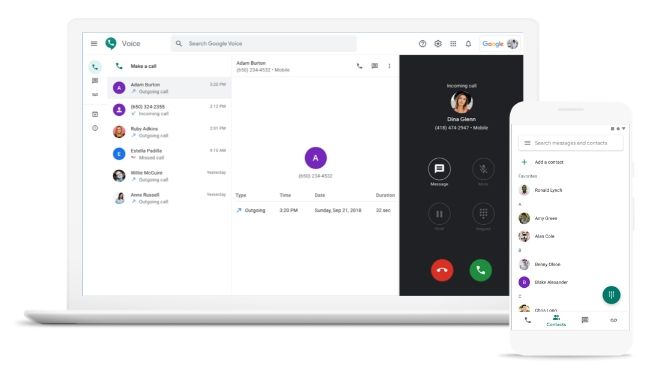
Google Voice interface displayed on a laptop and smartphone, showcasing VoIP functionalities like incoming calls, contact list, and call details, illustrating modern communication technology.Google

VoIP, or Voice over Internet Protocol, is a technology that allows you to make calls over the internet instead of traditional phone lines or cellular connections. Although its name suggests that it only enables voice calls, modern VoIP services are far more capable and can offer video calls, file transfer, group calls, and much more. It’s also referred to as IP telephony or internet telephony.

VoIP calls can be made using computers, smartphones, tablets, special VoIP phones, traditional phones connected to an adapter, and other internet-connected devices.

Some of the most popular implementations of VoIP technology are found in consumer-grade applications like FaceTime, Google Voice, Skype, and WhatsApp. However, it’s also used by businesses for their communication needs.

How Does VoIP Work?

In VoIP calling, your analog voice signal is converted into a digital signal and transmitted over the internet using data packets. It first reaches your VoIP service provider, who then routes it to the receiver, where it’s converted back to a voice signal.

The receiver can be anyone: a user of the same VoIP service, a mobile phone, or someone with a landline, as long as the VoIP supports calling them. Depending on the service, they may not be required on the same service as you or have a VoIP phone.

What Do You Need for VoIP Calling?

There are three main requirements for making a VoIP call: an internet connection, a VoIP service, and the necessary hardware.

Related: How to Make Voice and Video Calls on Skype

For most people, VoIP calling typically means opening up a VoIP app on their internet-connected smartphone and calling a contact. It’s called software-based VoIP and is available via dozens of apps on all popular platforms, including Android, iOS, macOS, and Windows. Some of the most popular VoIP apps for non-business users are Facebook Messenger, FaceTime, Google Duo, Signal, Telegram, and WhatsApp Messenger.

Hardware-based VoIP services require a special VoIP phone or analog telephone adapters (ATA) connected to a regular landline phone. Both connect to your router to access the internet and provide the calling functionality. In the case of hardware-based VoIP services, you are typically allotted a virtual phone number, or you can port an existing number.

Who Can You Call Over VoIP?

Depending on your VoIP service, you can either call other people on the same service or anyone with a phone number. The charges for VoIP calls also differ based on which service you are using and whether you are calling a person on the same service, a local number, a long-distance number, a mobile number, or an international number. Most consumer-grade VoIP services available via an app on your phone or computer are free but only allow you to call other members of the same service.

Related: How to Make a Facetime Audio Call

What Are the Benefits?

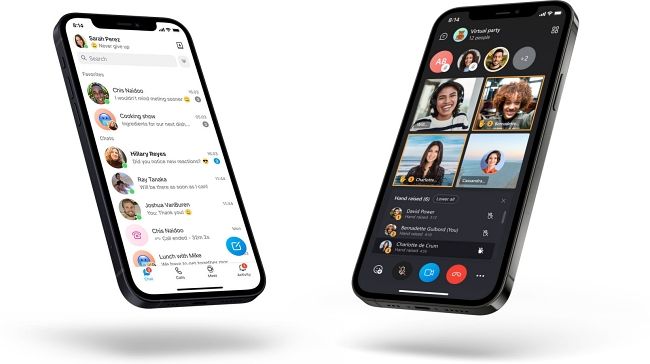
Smartphones displaying VoIP app interfaces, showcasing contact lists and video call features, highlighting the functionality of VoIP technology for personal and business communication.Microsoft

VoIP services have several advantages. One of the key reasons why people gravitate towards VoIP calling is its cost-effective nature. You either get to make free calls, or when you are paying for it, its overall cost is lower than traditional landline or cellular calls.

Related: How to Make Audio Calls with Google Duo

Beyond that, VoIP offers far more features than regular voice calls. Depending on which device or service you use to make a VoIP call, you can access group calls, video calls, call recording, customizable caller ID, and much more. Of course, standard call features like call waiting, call forwarding, regular caller ID, and more are also available.

Additionally, if you have sufficient bandwidth, VoIP calls typically offer better audio quality. Plus, you are not restricted by your location; you can use VoIP services anywhere you have an internet connection.

Another significant advantage of VoIP is the consolidation of communication technologies in one system. You typically get the voice, video, and text-based communication methods in one place. This is very helpful for both individual users and businesses.

Are There Any Drawbacks?

VoIP services offer many benefits, but there are a few downsides as well. Most importantly, not all VoIP providers support calling emergency services by dialing 911.

Additionally, as internet connectivity is a vital part of the VoIP service, you won’t be able to make a call or receive it in case of an internet outage. Power outages can also impact VoIP calling, depending on your service or hardware. That said, some VoIP services allow users to forward calls to regular landlines or cellphones in case of an outage.

Also, as the call quality depends on internet bandwidth availability and connection quality, you may experience dropped calls and other artifacts if the connection speed drops or there is limited bandwidth availability.

Related: What Is End-to-End Encryption, and Why Does It Matter?

Directory assistance is another feature that may or may not be available with every VoIP service. Lastly, VoIP services are also at risk of eavesdropping and cyberattacks unless your service provider has put proper safeguards in place, including encryption. Even if they do use encryption, though, there can be different levels to it. For example, Signal voice calls are end-to-end encrypted by default (meaning even the Signal Foundation can’t listen in), but Telegram calls are not.

Should You Transition to VoIP?

There is a good chance you are already using VoIP as a part of the apps like FaceTime, Skype, Telegram, or WhatsApp. But if you aren’t, these smartphones and computer VoIP apps are a great starting point for using internet telephony.

Beyond these apps, you can also choose VoIP for your residence or business. But that is typically more complex and expensive. Most of the complexity, though, is limited to the initial setup. Once you are all set, it’s cheaper and feature-rich.

That said, it’s a good idea to weigh your options and consider the benefits and drawbacks before making the jump.

Related: How to Switch to VoIP and Ditch Your Home Phone Bill Forever


Source

What is cloud computing: Its uses and benefits

group of white spheres on light blue background, what is cloud computing thumb
White spheres representing cloud computing concepts on a light blue background, symbolizing cloud services and digital solutions.

Group of white spheres on light blue background

With cloud computing, organizations essentially buy a range of services offered by cloud service providers (CSPs). The CSP’s servers host all the client’s applications. Organizations can enhance their computing power more quickly and cheaply via the cloud than by purchasing, installing, and maintaining their own servers.

The cloud-computing model is helping organizations to scale new digital solutions with greater speed and agility—and to create value more quickly. Developers use cloud services to build and run custom applications and to maintain infrastructure and networks for companies of virtually all sizes—especially large global ones. CSPs offer services, such as analytics, to handle and manipulate vast amounts of data. Time to market accelerates, speeding innovation to deliver better products and services across the world.

What are examples of cloud computing’s uses?

Cloud computing came on the scene well before the global pandemic hit, in 2020, but the ensuing digital dash helped demonstrate its power and utility. Here are some examples of how businesses and other organizations employ the cloud:

  • A fast-casual restaurant chain’s online orders multiplied exponentially during the 2020 pandemic lockdowns, climbing to 400,000 a day, from 50,000. One pleasant surprise? The company’s online-ordering system could handle the volume—because it had already migrated to the cloud. Thanks to this success, the organization’s leadership decided to accelerate its five-year migration plan to less than one year.
  • A biotech company harnessed cloud computing to deliver the first clinical batch of a COVID-19 vaccine candidate for Phase I trials in just 42 days—thanks in part to breakthrough innovations using scalable cloud data storage and computing to facilitate processes ensuring the drug’s safety and efficacy.
  • Banks use the cloud for several aspects of customer-service management. They automate transaction calls using voice recognition algorithms and cognitive agents (AI-based online self-service assistants directing customers to helpful information or to a human representative when necessary). In fraud and debt analytics, cloud solutions enhance the predictive power of traditional early-warning systems. To reduce churn, they encourage customer loyalty through holistic retention programs managed entirely in the cloud.
  • Automakers are also along for the cloud ride. One company uses a common cloud platform that serves 124 plants, 500 warehouses, and 1,500 suppliers to consolidate real-time data from machines and systems and to track logistics and offer insights on shop floor processes. Use of the cloud could shave 30 percent off factory costs by 2025—and spark innovation at the same time.

That’s not to mention experiences we all take for granted: using apps on a smartphone, streaming shows and movies, participating in videoconferences. All of these things can happen in the cloud.

Learn more about our Cloud by McKinsey, Digital McKinsey, and Technology, Media, & Telecommunications practices.

How has cloud computing evolved?

Going back a few years, legacy infrastructure dominated IT-hosting budgets. Enterprises planned to move a mere 45 percent of their IT-hosting expenditures to the cloud by 2021. Enter COVID-19, and 65 percent of the decision makers surveyed by McKinsey increased their cloud budgets. An additional 55 percent ended up moving more workloads than initially planned. Having witnessed the cloud’s benefits firsthand, 40 percent of companies expect to pick up the pace of implementation.

The cloud revolution has actually been going on for years—more than 20, if you think the takeoff point was the founding of Salesforce, widely seen as the first software as a service (SaaS) company. Today, the next generation of cloud, including capabilities such as serverless computing, makes it easier for software developers to tweak software functions independently, accelerating the pace of release, and to do so more efficiently. Businesses can therefore serve customers and launch products in a more agile fashion. And the cloud continues to evolve.

Abstract circular design symbolizing cloud computing innovation and technology advancements.

Cost savings are commonly seen as the primary reason for moving to the cloud but managing those costs requires a different and more dynamic approach focused on OpEx rather than CapEx. Financial-operations (or FinOps) capabilities can indeed enable the continuous management and optimization of cloud costs. But CSPs have developed their offerings so that the cloud’s greatest value opportunity is primarily through business innovation and optimization. In 2020, the top-three CSPs reached $100 billion in combined revenues—a minor share of the global $2.4 trillion market for enterprise IT services—leaving huge value to be captured. To go beyond merely realizing cost savings, companies must activate three symbiotic rings of cloud value creation: strategy and management, business domain adoption, and foundational capabilities.

What’s the main reason to move to the cloud?

The pandemic demonstrated that the digital transformation can no longer be delayed—and can happen much more quickly than previously imagined. Nothing is more critical to a corporate digital transformation than becoming a cloud-first business. The benefits are faster time to market, simplified innovation and scalability, and reduced risk when effectively managed. The cloud lets companies provide customers with novel digital experiences—in days, not months—and delivers analytics absent on legacy platforms. But to transition to a cloud-first operating model, organizations must make a collective effort that starts at the top. Here are three actions CEOs can take to increase the value their companies get from cloud computing:

  1. Establish a sustainable funding model.
  2. Develop a new business technology operating model.
  3. Set up policies to attract and retain the right engineering talent.

How much value will the cloud create?

Fortune 500 companies adopting the cloud could realize more than $1 trillion in value by 2030, and not from IT cost reductions alone, according to McKinsey’s analysis of 700 use cases.

For example, the cloud speeds up design, build, and ramp-up, shortening time to market when companies have strong DevOps (the combination of development and operations) processes in place; groups of software developers customize and deploy software for operations that support the business. The cloud’s global infrastructure lets companies scale products almost instantly to reach new customers, geographies, and channels. Finally, digital-first companies use the cloud to adopt emerging technologies and innovate aggressively, using digital capabilities as a competitive differentiator to launch and build businesses.

If companies pursue the cloud’s vast potential in the right ways, they will realize huge value. Companies across diverse industries have implemented the public cloud and seen promising results. The successful ones defined a value-oriented strategy across IT and the business, acquired hands-on experience operating in the cloud, adopted a technology-first approach, and developed a cloud-literate workforce.

Learn more about our Cloud by McKinsey and Digital McKinsey practices.

What is the cloud cost/procurement model?

Some cloud services, such as server space, are leased. Leasing requires much less capital up front than buying, offers greater flexibility to switch and expand the use of services, cuts the basic cost of buying hardware and software upfront, and reduces the difficulties of upkeep and ownership. Organizations pay only for the infrastructure and computing services that meet their evolving needs. But an outsourcing model is more apt than other analogies: the computing business issues of cloud customers are addressed by third-party providers that deliver innovative computing services on demand to a wide variety of customers, adapt those services to fit specific needs, and work to constantly improve the offering.

What are cloud risks?

The cloud offers huge cost savings and potential for innovation. However, when companies migrate to the cloud, the simple lift-and-shift approach doesn’t reduce costs, so companies must remediate their existing applications to take advantage of cloud services.

For instance, a major financial-services organization wanted to move more than 50 percent of its applications to the public cloud within five years. Its goals were to improve resiliency, time to market, and productivity. But not all its business units needed to transition at the same pace. The IT leadership therefore defined varying adoption archetypes to meet each unit’s technical, risk, and operating-model needs.

Legacy cybersecurity architectures and operating models can also pose problems when companies shift to the cloud. The resulting problems, however, involve misconfigurations rather than inherent cloud security vulnerabilities. One powerful solution? Securing cloud workloads for speed and agility: automated security architectures and processes enable workloads to be processed at a much faster tempo.

Learn more about our Cloud by McKinsey and Digital McKinsey practices.

What kind of cloud talent is needed?

The talent demands of the cloud differ from those of legacy IT. While cloud computing can improve the productivity of your technology, it requires specialized and sometimes hard-to-find talent—including full-stack developers, data engineers, cloud-security engineers, identity- and access-management specialists, and cloud engineers. The cloud talent model should thus be revisited as you move forward.

Six practical actions can help your organization build the cloud talent you need:

  1. Find engineering talent with broad experience and skills.
  2. Balance talent maturity levels and the composition of teams.
  3. Build an extensive and mandatory upskilling program focused on need.
  4. Build an engineering culture that optimizes the developer experience.
  5. Consider using partners to accelerate development and assign your best cloud leaders as owners.
  6. Retain top talent by focusing on what motivates them.

How do different industries use the cloud?

Different industries are expected to see dramatically different benefits from the cloud. High-tech, retail, and healthcare organizations occupy the top end of the value capture continuum. Electronics and semiconductors, consumer-packaged-goods, and media companies make up the middle. Materials, chemicals, and infrastructure organizations cluster at the lower end.

Nevertheless, myriad use cases provide opportunities to unlock value across industries, as the following examples show:

  • a retailer enhancing omnichannel fulfillment, using AI to optimize inventory across channels and to provide a seamless customer experience
  • a healthcare organization implementing remote heath monitoring to conduct virtual trials and improve adherence
  • a high-tech company using chatbots to provide premier-level support combining phone, email, and chat
  • an oil and gas company employing automated forecasting to automate supply-and-demand modeling and reduce the need for manual analysis
  • a financial-services organization implementing customer call optimization using real-time voice recognition algorithms to direct customers in distress to experienced representatives for retention offers
  • a financial-services provider moving applications in customer-facing business domains to the public cloud to penetrate promising markets more quickly and at minimal cost
  • a health insurance carrier accelerating the capture of billions of dollars in new revenues by moving systems to the cloud to interact with providers through easier onboarding

The cloud is evolving to meet the industry-specific needs of companies. From 2021 to 2024, public-cloud spending on vertical applications (such as warehouse management in retailing and enterprise risk management in banking) is expected to grow by more than 40 percent annually. Spending on horizontal workloads (such as customer relationship management) is expected to grow by 25 percent. Healthcare and manufacturing organizations, for instance, plan to spend around twice as much on vertical applications as on horizontal ones.

Learn more about our Cloud by McKinsey, Digital McKinsey, Financial Services, Healthcare Systems & Services, Retail, and Technology, Media, & Telecommunications practices.

What are the biggest cloud myths?

Views on cloud computing can be clouded by misconceptions. Here are seven common myths about the cloud—all of which can be debunked:

  1. The cloud’s value lies primarily in reducing costs.
  2. Cloud computing costs more than in-house computing.
  3. On-premises data centers are more secure than the cloud.
  4. Applications run more slowly in the cloud.
  5. The cloud eliminates the need for infrastructure.
  6. The best way to move to the cloud is to focus on applications or data centers.
  7. You must lift and shift applications as-is or totally refactor them.

How large must my organization be to benefit from the cloud?

Here’s one more huge misconception: the cloud is just for big multinational companies. In fact, cloud can help make small local companies become multinational. A company’s benefits from implementing the cloud are not constrained by its size. In fact, the cloud shifts barrier to entry skill rather than scale, making it possible for a company of any size to compete if it has people with the right skills. With cloud, highly skilled small companies can take on established competitors. To realize the cloud’s immense potential value fully, organizations must take a thoughtful approach, with IT and the businesses working together.

For more in-depth exploration of these topics, see McKinsey’s Cloud Insights collection. Learn more about Cloud by McKinsey—and check out cloud-related job opportunities if you’re interested in working at McKinsey.

Articles referenced include:

  • “Six practical actions for building the cloud talent you need,” January 19, 2022, Brant Carson, Dorian Gärtner, Keerthi Iyengar, Anand Swaminathan, and Wayne Vest
  • “Cloud-migration opportunity: Business value grows, but missteps abound,” October 12, 2021, Tara Balakrishnan, Chandra Gnanasambandam, Leandro Santos, and Bhargs Srivathsan
  • “Cloud’s trillion-dollar prize is up for grabs,” February 26, 2021, Will Forrest, Mark Gu, James Kaplan, Michael Liebow, Raghav Sharma, Kate Smaje, and Steve Van Kuiken
  • “Unlocking value: Four lessons in cloud sourcing and consumption,” November 2, 2020, Abhi Bhatnagar, Will Forrest, Naufal Khan, and Abdallah Salami
  • “Three actions CEOs can take to get value from cloud computing,” July 21, 2020, Chhavi Arora, Tanguy Catlin, Will Forrest, James Kaplan, and Lars Vinter

Abstract cloud formation with clusters of white spheres against a light blue background, symbolizing cloud computing concepts and digital storage solutions.

Source

Best Digital Marketing Online Bootcamps

if you want to become a digital marketer, there are other means of pursuing this career besides earning a bachelor’s degree in digital marketing, forbes

If you want to become a digital marketer, there are other means of pursuing this career besides earning a bachelor’s degree in digital marketing. Digital marketing bootcamps offer a fast-tracked way to gain the knowledge and skills required to excel in vast field of online, app-based, streaming and social media marketing.

How to Find the Right Digital Marketing Bootcamp for You

With so many bootcamp providers available, finding one that fits your unique needs and goals can take time and effort. Below are some factors to consider when narrowing your options.

Know Your Time Commitment

Before enrolling in a bootcamp, you should consider how much time you are able and willing to commit to your studies. Some full-time programs recommend upward of 60 to 90 hours per week, whereas part-time programs may suggest between 15 and 30 hours per week. Full-time programs can take as little as 12 to 14 weeks to complete, whereas part-time bootcamps may take six to 10 months.

While some bootcamps may allow for entirely flexible study hours and deadlines, note that many require synchronous attendance and collaboration in a cohort.

Look at Job Placement Offerings

Just as with a traditional marketing college degree, graduating from a digital marketing bootcamp does not guarantee you any particular job. However, all of the bootcamps on our list offer access to job placement services. Many also feature major hiring partners such as ABC, IBM and Amazon, among others. Consider whether a prospective bootcamp’s hiring partners align with your career goals and interests.

Some bootcamps offer job guarantees, meaning they may refund tuition to students who are unable to land a qualifying job within a set time period after graduation. Many job guarantees stipulate that graduates apply to a certain number of jobs per month, and turning down an offer from a qualifying job may invalidate the job guarantee. Terms vary among bootcamps, so make sure to read through the terms of a prospective bootcamp’s job guarantee.

Consider Your Future Goals

Your future goals should impact which digital marketing bootcamps you consider. If you want to enter the job market as quickly as possible, for example, you might seek a full-time, immersive bootcamp with a job guarantee. If you want to continue working while attending your bootcamp, you may prefer a part-time, self-paced option.

Likewise, if you aim to work for a particular company, seek out bootcamps that partner with that company for hiring.

Cost of an Online Digital Marketing Bootcamp

Completing an online digital marketing bootcamp can be a relatively quick and cost-effective way to land a high-paying job. The cost of online digital marketing bootcamps varies depending on program length, enrollment status, services provided and other factors.

Of the bootcamps we assessed for our rankings, the average tuition cost per bootcamp was $10,762. This cost is comparable to just one year of tuition and fees at an average public, four-year, in-state university in the United States, according to the National Center for Education Statistics.

FAQs About Digital Marketing Bootcamps

Are digital marketing bootcamps still worth it?

For many students, yes. Digital marketing bootcamps can be great options for those looking to start or change careers and enter the growing field of online and app-based marketing.

What digital marketing bootcamp is best for beginners?

For beginners with no or limited knowledge of digital marketing, the best bootcamps offer digital marketing basics or fundamentals courses. These introductory sections may add more time to the program, but they help students feel more prepared and confident. They also expose students to the many facets of digital marketing and help identify areas of interest to pursue in later bootcamp sessions.

Can I get a job with just a digital marketing bootcamp?

Yes, it is possible to get a job with just a digital marketing bootcamp. According to student outcomes reports provided by the bootcamps on our list, up to 93% of students were hired within the first 180 days of graduation, depending on the program.

Source

Digital Marketing Tips to Boost Your Mini Golf Business

the miniature golf business is an incredibly lucrative industry, photo9

Mini golf course at night featuring a decorative fountain, lush greenery, and illuminated pathways, enhancing the vibrant atmosphere for visitors.

The miniature golf business  is an incredibly lucrative industry. With so much opportunity to succeed, however, competition can be stiff. That is why using digital marketing to boost your mini golf business will be your secret to success. Draw more visitors into the grounds, generate more ticket sales, and cross-sell other secondary products and services to complement mini golf with the low-cost, high-reward strategy that digital marketing offers. Find out more about how to boost your mini golf business with digital marketing.

Invest in A Great Website for Your Business

Websites are a must-have for any business. As the digital face of a company, websites represent businesses and enterprises in the online space. With so many options for how to build a website, it can be difficult to choose the right one. Instead of going for the least expensive option or splurging on the most expensive website with high-tech features, take a step back and consider how you need your website to perform for the business you are actually running. Will your mini golf business’ website be purely informational, or do you want people to be able to book tee times on the website? Think about whether or not you want to sell merchandise on the website or include a calendar of events. By investing in a quality website, you will be able to design a mobile-friendly, visually appealing digital place for customers to find pricing information, location details, photographs, and more.

Digital Advertising for Mini Golf Businesses

The internet is full of advertisers, which can make promoting a business online quite competitive. There are many ways to approach online advertising; social media companies such as Facebook can help narrow down your reach to specific demographics; pay per click advertising and Google AdWords can also help business owners hyper target their clientele. That said, consider the fact that targeting potential customers may be a moot point if the ads themselves are not equally inviting.

Search Engine Optimization for Miniature Golf

SEO (or search engine optimization) helps clients find the website you have worked so hard to create. Investing in SEO is the long-term solution for ensuring that your website will show up when potential clients search for your services (mini golf, in this case). Search engine optimization involves many different components, including tweaking your website’s content and media so Google ranks your website high on the results page. Through technical keyword optimization and strategic backlinking, it is possible to improve your website’s SEO yourself. Still, working with a professional digital marketing agency that has experience generating proven results may be the smarter path.

Social Media for Mini Golf Courses

Almost everyone uses some form of social media nowadays. Whether it is Facebook, Instagram, TikTok, or LinkedIn, social media can be a strategic approach to reaching your target audience for your mini golf course. In addition to the paid advertising on social media that we previously mentioned, social media can also be a useful tool for linking back to your mini golf course website. In fact, some social media platforms allow clients to make direct purchases right from the social media platform. This enables clients to book sessions at your mini golf course without ever having to leave the site.

Why Choose Harris Miniature Golf Courses, Inc.?

Clients choose to work with Harris Miniature Golf Courses, Inc. to set up their mini-golf courses because we offer over 60 years of professional experience designing, developing, and constructing beautiful mini golf courses. Not only do we build structures that last, but we also help business owners avoid some of the most common mistakes that mini golf course owners make when setting their courses on their own.

If you are interested in learning more about mini golf and the mini golf course business industry, feel free to contact us today!

Source

Maximize Your Marketing Reach

Icon representing job changes, symbolizing marketing reach and lead generation strategies for businesses using Seamless.AI.
Maximize Your Marketing Reach | Seamless.AI

Skip Navigation

{ if (menuClick == 0) { disableScroll(); document.getElementById(‘w-nav-overlay-0’).remove(); hamburgerMenu.style.color = varColorCta; menuClick = 1; } else { enableScroll(); resetNavLinks(); hamburgerMenu.style.color = varColorBodyCopy; menuClick = 0; let navOverlay = document.createElement(“div”); navOverlay.id = ‘w-nav-overlay-0’; navOverlay.classList.add(‘w-nav-overlay’); document.querySelector(‘.navbar’).append(navOverlay); } }); ]]>

{ if (window.innerWidth { if (window.innerWidth { if (window.innerWidth

Always Keep Your CRM Up-to-Date

Get Fresh B2B Data to Fuel Prospecting Efforts

Bad data has an adverse effect on marketing, from falling into spam traps to launching failed campaigns that harm brand reputation. Seamless.AI solves the bad data dilemma with real-time verified B2B data so you can build lists that take your business to new heights.

Icon of a briefcase.

Job Changes

Reduce churn by cleansing lists whenever a contact changes positions, companies, or industries. Make sure clients take your brand to every new job.

Icon of a clipboard.

Data Enrichment

Improve data integrity with Data Enrichment. Add critical sales intel, and check against validated data to capture more leads and increase conversion rates.

Stay Ahead of the Crowd

Never Miss A Marketing Opportunity

As a marketer, it’s crucial to have a trusted resource for new leads. By utilizing Seamless.AI, gain access to the world’s largest contact dataset AND save time with automated list-building. Never miss out on another game-changing opportunity again.

Maximize Your Paid Media ROI

Build Dynamic Campaigns With AI-Verified Emails

Over 48% of marketers believe email is the best way to generate leads online. Whether you’re an email marketing manager or a coordinator, get up-to-date emails, avoid the spam folder, and build your email reputation.

Man holding his glasses and laptop with a styled website showing ad placement in the background.3 contacts found with Seamless.AI

Target Accounts With Laser Precision

Build High Converting Campaigns

When you have deep sales enablement insights and up-to-date lists, retargeting is effortless. Use Seamless.AI to create successful campaigns that generate more opportunities for your sales team!

Icon of a list.

Account-Based Marketing

Use our robust company search to build lists of high-value target companies. Then go after decision-makers using our sales insights.

icon of an arrow hitting the center of a target.

Retargeting

From paid search advertising to social, any retargeting strategy is only as good as the data. Get real-time B2B data to create custom audiences that DRIVE inbound leads.

4.8 out of 5 stars

Revolutionizing Lead Generation with Seamless.AI

Lorem ipsum dolor sit amet, consectetur adipiscing elit. Suspendisse varius enim in eros elementum tristique. Duis cursus, mi quis viverra ornare, eros dolor interdum nulla, ut commodo diam libero vitae erat. Aenean faucibus nibh et justo cursus id rutrum lorem imperdiet. Nunc ut sem vitae risus tristique posuere.

customer Mathew H. next to his review about Seamless.AI

Mathew H

Opportunity Creator

A group of marketers meeting around a computer.5 start rating from G2

Effective & Economical

We do email marketing and Seamless helps us reach the right people within a company. Our bounce rate was down almost 20 percentage points.

Photo of Ankita B.

Ankita B.

VP – Marketing

Verified G2 Review

5 start rating from G2

Really Happy with the Ease of Use

It’s helping our team find phone numbers and emails of potential clients. We estimated an additional $500k of revenue by using Seamless.AI last year.

Photo of Jonathan H.

Jonathan H.

Strategic Account Executive

Verified G2 Review

5 start rating from G2

The ONLY Prospecting Tool You’ll Ever Need

It cut my prospecting time in half with the ability of Salesforce Integration! I can import new accounts and contacts within 10-15 seconds, and start outreach!

Photo of Justyn R.

Justyn R.

Social Media Influencer

Verified G2 Review

5 start rating from G2

The Best Data-Enrichment Service I’ve Used

The enrichment data is huge, as well as being able to make searches in areas where my current data sources are lacking.

Photo of Aaron G.

Aaron G.

Project Manager

Verified G2 Review

5 start rating from G2

Functional Tool

Most of the marketing campaigns for the B2B sector require specialized information, and with Seamless.AI we have obtained it in a very simple way, we have saved staff time in getting the data.

Photo of Misael G.

Misael G.

COO

Verified G2 Review

5 start rating from G2

BubbleUPs Favorite Prospecting Tool

The ability to find 100 prospects in less than an hour is phenomenal. Seamless.AI saves us about 20 hours of manual task entry into our CRM.

Photo of Mathew H.

Mathew H.

Opportunity Creator

Verified G2 Review

Don’t Miss Out on Valuable Sales Opportunities

Get a Demo 0) { //Get the params from the current url let currentURL = window.location.href, url = new URL(currentURL), utm_source = url.searchParams.get(“utm_source”), utm_medium = url.searchParams.get(“utm_medium”), utm_content = url.searchParams.get(“utm_content”), utm_campaign = url.searchParams.get(“utm_campaign”), utm_term = url.searchParams.get(“utm_term”), referral = url.searchParams.get(“referral”); if (!utm_source && !utm_medium && !utm_content && !utm_campaign && !utm_term) { let cookieString = document.cookie.split(‘; ‘).find((row) => row.startsWith(‘gtm-utms’)).split(‘=’)[1]; if (cookieString) { let cookieObj = JSON.parse(cookieString); utm_source = cookieObj.utm_source; utm_medium = cookieObj.utm_medium; utm_content = cookieObj.utm_content; utm_campaign = cookieObj.utm_campaign; utm_term = cookieObj.utm_term; referral = cookieObj.referral; } } // Map UTMs to form for (let i = 0; i 767 ) { // determine which section to control if (clickedTab === tabsArray[0].tab || clickedTab === tabsArray[1].tab || clickedTab === tabsArray[2].tab) { tabList = tabMenuDiv1.querySelectorAll(‘.tabmenu__tablink–vertical’); imgList = tabImgDiv1.querySelectorAll(‘.position–relative’); } else { tabList = tabMenuDiv2.querySelectorAll(‘.tabmenu__tablink–vertical’); imgList = tabImgDiv2.querySelectorAll(‘.position–relative’); } // remove ‘current’ class from all tabs for(let i = 0; i < tabList.length; i++) { if (tabList[i].classList.contains('current') == true) { tabList[i].classList.remove('current'); } } // hide all tab images for(let i = 0; i < imgList.length; i++) { if (imgList[i].classList.contains('display--none') == false) { imgList[i].classList.add('display--none'); } } // make clicked tab 'current' and show its image clickedTab.classList.add('current'); tabImg.classList.remove('display--none'); } } // listen for when tabs a clicked and change the tab for(let i = 0; i { switchTab(tabsArray[i].tab, tabsArray[i].img); tabsArray[i].img.click(); }); } // tablet size only change the current tab on scroll window.addEventListener('scroll', () => { if (window.innerWidth > 767 && window.innerWidth < 992) { // set the postion of the tab in the array for(let i = 0; i < tabsArray.length; i++) { tabsArray[i].position = tabsArray[i].tab.getBoundingClientRect().top; } // switch the tab when it hits a certain position for(let i = 0; i < tabsArray.length; i++) { if (tabsArray[i].position -60) { tabsArray[i].tab.click(); } } } }); ]]>

Source

Best Sales Lead Software


Seamless.AI – Best AI Sales Software & Business Leads Platform

Skip Navigation

{ if (menuClick == 0) { disableScroll(); document.getElementById(‘w-nav-overlay-0’).remove(); hamburgerMenu.style.color = varColorCta; menuClick = 1; } else { enableScroll(); resetNavLinks(); hamburgerMenu.style.color = varColorBodyCopy; menuClick = 0; let navOverlay = document.createElement(“div”); navOverlay.id = ‘w-nav-overlay-0’; navOverlay.classList.add(‘w-nav-overlay’); document.querySelector(‘.navbar’).append(navOverlay); } }); ]]>

{ if (window.innerWidth { if (window.innerWidth { if (window.innerWidth

The First and Only Real-Time Search Engine for B2B Sales Leads

Seamless.AI’s search engine helps you connect directly with your ideal customers so you can build pipeline, shorten your sales cycle, and close more deals at scale. Leverage our real-time people search engine to build a massive list of decision-makers.

1.9B+

Contact and Company Records Verified in 2023

350%

Increase in Opportunities on Average

Sign Up Free

Sales Prospecting Solution

Get in Front of the Right Sales Prospects

Spend more time selling, and less time building sales prospecting lists. Use our sales software to build accurate leads lists, find the right people to contact, and crush quota!

Sign Up Freecustomer Mathew H. next to his review about Seamless.AI

“The connectivity with my CRM and Linkedin Navigator makes the tool easy to use.“

Mathew H, Opportunity Creator

customer Mathew H. next to his review about Seamless.AI

“The connectivity with my CRM and Linkedin Navigator makes the tool easy to use.“

Mathew H, Opportunity Creator

Chrome Extension

Prospect Less, Close More

Batman has his Utility Belt. And salespeople have the Seamless.AI Chrome Extension. Use it to find phone numbers and emails and turn your Chrome browser into the ultimate sales utility belt.

Add to Chrome – It’s Freecustomer Eric A. next to his review about Seamless.AI

“The Chrome extension is the hero of the product itself.”

Eric A, Sales Consultant

customer Eric A. next to his review about Seamless.AI

“The Chrome extension is the hero of the product itself.”

Eric A, Sales Consultant

Zach D, Business Development Representative

Verified G2 Review

G2 company logo

Writer

Solve Writer’s Block For Good

In a world of generic copywriting tools, Writer by Seamless.AI is specially designed to help you confidently execute sales and marketing messaging, from value propositions to upsell emails.

Explore Writercustomer Judy C. next to her review about Seamless.AI

“Seamless.AI puts the best of all worlds together in one easy-to-use platform.”

Judy C, Sales Leader

customer Judy C. next to her review about Seamless.AI

“Seamless puts the best of all worlds together in 1 easy to use platform.”

Judy C, Sales Leader

Integrations

Integrate Your Favorite Tools

Integrate directly into your favorite platforms, including Salesforce, Hubspot, Outreach, LinkedIn Sales Navigator, and Salesloft, along with other top CRMs and engagement platforms. Increase effectiveness and productivity by eliminating manual data entry forever.

Find an Integrationcustomer Zach D. next to his review about Seamless.AI

“Seamless.AI makes it easy to integrate into our current tool stack of LI Sales Nav and Outreach.”

Zach D, Business Development Representative

customer Zach D. next to his review about Seamless.AI

“Seamless makes it easy to integrate into our current tool stack of LI Sales Nav and Outreach.”

Zach D, Business Development Representative

The Leader In Sales Intelligence

G2 consistently ranks our sales intelligence software as a top 100 sales platform. In fact, out of 100,000+ software products reviewed on G2, Seamless.AI was named a Top 100 Highest Satisfaction Software Product for 2022.

Quality Data Creates Profitable Business

Nexvoo company logo

$0-5M in 3 months is not only possible, I can now say that $5-20M is staring us in the face.

Steve Schmidt, Chief Revenue Officer

$100K

Generated in 60 Days

Get the Full Story

How About 50 Free Credits?

Don’t wait until you run out of sales leads. Try Seamless.AI for free today and find your next big opportunity.

Thank you! Your submission has been received!

Oops! Something went wrong while submitting the form.

a collage of a salesman on the phone with a potential customer and other bubbles of people he will contact

Thank you! Your submission has been received!

Oops! Something went wrong while submitting the form.

FAQ

Frequently Asked Questions

Seamless.AI is a real-time search engine that helps B2B companies find accurate sales leads so they can get in front of the right prospects, close more deals, and grow revenue at scale.

How does Seamless.AI work?

Seamless.AI uses multiple data points that run on artificial intelligence to crawl through the web in real time and find, verify, and validate people’s contact information. Every time you search with Seamless.AI, our sales software scours the public web in real-time to pull the freshest, most up-to-date contact data for your sales list-building efforts.

How much does Seamless.AI cost?

Seamless.AI is free for up to 50 credits. After that, we offer many pricing options to best fit your team’s needs. Click here to see full features and pricing.

What does Seamless.AI do?

Seamless.AI is a sales intelligence software that helps salespeople find the best leads.

Here are a few use cases:

  • You Need Sales Leads: You have a great product or service but need sales leads. Seamless.AI will help you identify your ideal prospect, figure out your total addressable market, and pull accurate contact information for those specific prospects.
  • You Have an Incomplete Sales List: You have a sales leads list, but it is missing information. Use our sales software to enrich your list and fill in missing contact information for your prospects.
  • You Have Companies You Want to Contact: You know which companies you want to contact but don’t have the contact information of the decision-makers. Use our sales software to find up-to-date contact information and build a quality sales leads list. Then email or call the prospect, qualify them, and close the deal!

How does Seamless.AI compare to ZoomInfo?

Seamless.AI is different from ZoomInfo because we are a real-time search engine, not a database. When you look up a prospect’s contact information on our platform, we search in real time to pull up-to-date and accurate information. By contrast, companies like ZoomInfo store information in databases that can quickly get stale and outdated. Our real-time searches, powered by artificial intelligence, are a defining feature that makes us different from anything else on the market.

Is Seamless.AI safe as an add-on?

Yes, Seamless.AI is a safe add-on to your browser. You can also use our secure Chrome Extension as an add-on and turn your Chrome browser into the ultimate prospecting tool.

{ row.querySelector(‘h3’).style.color = ‘var(–color–black)’; }); } dropdownList.forEach((item) => { item.addEventListener(‘mouseover’, () => { if (item.getAttribute(‘aria-expanded’) == ‘false’) { item.querySelector(‘h3’).style.color = ‘var(–link–color-main)’; } }); item.addEventListener(‘mouseout’, () => { item.querySelector(‘h3’).style.color = ‘var(–color–black)’; }); }); ]]>

0) { //Get the params from the current url let currentURL = window.location.href, url = new URL(currentURL), utm_source = url.searchParams.get(“utm_source”), utm_medium = url.searchParams.get(“utm_medium”), utm_content = url.searchParams.get(“utm_content”), utm_campaign = url.searchParams.get(“utm_campaign”), utm_term = url.searchParams.get(“utm_term”), referral = url.searchParams.get(“referral”); if (!utm_source && !utm_medium && !utm_content && !utm_campaign && !utm_term) { let cookieString = document.cookie.split(‘; ‘).find((row) => row.startsWith(‘gtm-utms’)).split(‘=’)[1]; if (cookieString) { let cookieObj = JSON.parse(cookieString); utm_source = cookieObj.utm_source; utm_medium = cookieObj.utm_medium; utm_content = cookieObj.utm_content; utm_campaign = cookieObj.utm_campaign; utm_term = cookieObj.utm_term; referral = cookieObj.referral; } } // Map UTMs to form for (let i = 0; i
Source

Turn More Website Visitors Into B2C & B2B Leads

Driving traffic to your website is only half the battle. The real challenge—and the real opportunity—is turning those website visitors into qualified B2C and B2B leads. Businesses invest heavily in SEO, paid ads, and social media, yet many struggle with low conversion rates, wasted traffic, and poor lead quality.

If your website attracts visitors but doesn’t consistently generate inquiries, phone calls, demo requests, or sales, the issue isn’t traffic—it’s conversion optimization and lead strategy.

In this guide, we’ll break down how to turn more website visitors into high-quality B2C and B2B leads, using proven SEO, UX, content, and conversion tactics that work across industries.


Why Website Traffic Alone Doesn’t Generate Leads

Many businesses assume that more traffic automatically equals more leads. In reality, unqualified or poorly guided traffic rarely converts.

Common reasons websites fail to convert visitors into leads include:

  • Unclear value propositions

  • Weak or generic calls-to-action (CTAs)

  • Poor user experience (UX)

  • Slow page load times

  • No trust signals

  • Content that educates but doesn’t convert

  • Lack of intent-based funnel strategy

Whether you’re targeting B2C consumers or B2B decision-makers, your website must guide visitors toward a clear next step.


B2C vs. B2B Lead Generation: Key Differences

Before optimizing your website, it’s critical to understand how B2C and B2B lead generation differ.

B2C Lead Generation

  • Shorter buying cycle

  • Emotion-driven decisions

  • Focus on convenience, price, urgency

  • Mobile-first behavior

  • Strong local SEO influence

Examples: roofing companies, healthcare, home services, eCommerce, local businesses.

B2B Lead Generation

  • Longer sales cycle

  • Logic-driven decisions

  • Multiple decision-makers

  • Requires education and trust-building

  • Content-heavy funnel

Examples: IT services, SaaS, marketing agencies, consultants, professional services.

Despite these differences, the core principles of conversion optimization apply to both.


Optimize Your Website for Lead Generation First, Traffic Second

A high-converting website is designed backward from the conversion, not built around aesthetics alone.

Clarify Your Value Proposition Above the Fold

Your headline must instantly answer:

  • What do you do?

  • Who is it for?

  • Why should they choose you?

Bad example:
“We Provide Innovative Solutions”

Optimized example:
“Managed IT Services That Reduce Downtime and Improve Security for Growing Businesses”

This applies equally to B2C and B2B websites.


Use Intent-Based Landing Pages (Critical for SEO)

One of the biggest SEO mistakes businesses make is sending all traffic to a homepage.

Instead, create pages based on:

  • Service type

  • Industry

  • Location

  • Buyer intent

Examples:

  • “Roof Replacement in Houston, TX”

  • “Managed IT Services for Law Firms”

  • “Cybersecurity Solutions for Small Businesses”

  • “Digital Marketing Services for Local Businesses”

Why this works:
Google ranks intent-specific pages higher, and users convert better when the page directly matches their search intent.


Turn SEO Traffic Into Leads With Conversion-Focused Content

SEO content should do more than rank—it should convert.

Use High-Intent Keywords

Target keywords like:

  • “services near me”

  • “cost of”

  • “best [service]”

  • “company”

  • “provider”

  • “consultation”

  • “pricing”

  • “quote”

  • “demo”

These keywords attract visitors who are ready to take action, not just browse.


Create Clear, Compelling Calls-to-Action (CTAs)

Every page should have one primary CTA and one secondary CTA.

High-Converting CTAs for B2C:

  • Get a Free Estimate

  • Schedule a Free Inspection

  • Call Now for Same-Day Service

  • Book an Appointment

High-Converting CTAs for B2B:

  • Schedule a Free Consultation

  • Request a Demo

  • Download the Guide

  • Talk to an Expert

Avoid weak CTAs like:

  • “Learn More”

  • “Click Here”

Your CTA should clearly communicate value and outcome.


Optimize Forms for Higher Conversions

Forms are one of the biggest friction points in lead generation.

Best Practices:

  • Ask only for essential information

  • Use multi-step forms for B2B

  • Clearly state what happens after submission

  • Add trust signals near the form

Example:

“Submit the form below and one of our specialists will contact you within 24 hours.”

For B2C, shorter forms convert better.
For B2B, progressive forms allow deeper qualification over time.


Build Trust to Convert More Website Visitors

Trust is the difference between a visitor and a lead.

Trust Signals That Increase Conversions:

  • Customer testimonials

  • Google reviews

  • Case studies

  • Certifications and badges

  • Industry affiliations

  • Before-and-after photos (B2C)

  • Client logos (B2B)

Position trust signals near:

  • CTAs

  • Forms

  • Pricing sections


Improve Website Speed and Mobile Experience

Google prioritizes page experience, and users abandon slow sites.

Key optimization areas:

  • Mobile-first design

  • Page load under 3 seconds

  • Click-to-call buttons for mobile

  • Easy navigation

  • Clear typography

For B2C, mobile optimization is essential.
For B2B, mobile still matters—especially for research and follow-ups.


Use Lead Magnets to Capture Early-Stage Visitors

Not every visitor is ready to convert immediately.

Effective Lead Magnets:

  • Free guides

  • Checklists

  • Industry reports

  • Cost calculators

  • Case studies

  • Email courses

This is especially powerful for B2B lead generation, where buyers need education before committing.


Implement Conversion Tracking and Analytics

You can’t improve what you don’t measure.

Track:

  • Form submissions

  • Phone calls

  • Button clicks

  • Chat interactions

  • Scroll depth

Tools to use:

  • Google Analytics

  • Google Tag Manager

  • Call tracking software

  • CRM integration

This data helps identify which pages generate the most leads—and which need optimization.


Use Retargeting to Convert Returning Visitors

Most visitors don’t convert on the first visit.

Retargeting works because:

  • It keeps your brand top of mind

  • It targets high-intent users

  • It lowers cost per lead

Use retargeting ads for:

  • Visitors who viewed service pages

  • Users who started but didn’t complete forms

  • Blog readers

This strategy works exceptionally well for both B2C services and B2B sales funnels.


Align Sales and Marketing for Better Lead Quality

Generating leads is only half the equation—quality matters.

Improve lead quality by:

  • Using qualifying questions

  • Segmenting traffic sources

  • Creating different funnels for B2C and B2B

  • Aligning CTAs with buyer stage

A well-aligned funnel produces fewer leads—but better ones.


Content Updates: The Hidden SEO Conversion Booster

Older blog posts and pages are often underutilized assets.

Updating content can:

  • Improve rankings

  • Increase dwell time

  • Boost conversions

Add:

  • Updated CTAs

  • Internal links to service pages

  • New statistics

  • Conversion-focused sections

Refreshing content is often faster and more profitable than creating new pages.


Turn Your Website Into a Lead Generation Machine

A website should not function as a digital brochure—it should work as a 24/7 lead generation system.

When you combine:

  • SEO-driven traffic

  • Intent-based content

  • Strong CTAs

  • Trust signals

  • Conversion optimization

You create a system that consistently turns website visitors into B2C and B2B leads.


Final Thoughts

If your website isn’t generating leads, the solution isn’t more traffic—it’s better strategy.

By focusing on:

  • Search intent

  • Conversion optimization

  • UX and trust

  • Funnel alignment

You can dramatically increase both lead volume and lead quality—without increasing ad spend.

Make your website with Shopify


Make your website with Shopify – Shopify { if (props && props.hasConsentedAll) { loadGtm(); loadTealium(); } } cmp().updateOnChangeCallback(onConsentChanged); onConsentChanged(cmp()); } else { setTimeout(waitForCmpApi, 50); } }; if (activeConsentNotice) { waitForCmpApi(); } else { loadGtm(); loadTealium(); } ]]>

Build your dream business for $1/month

Start your free trial, then enjoy 3 months of Shopify for $1/month when you sign up for a monthly Basic or Starter plan.

  • Sign up for a free trial
  • Select a monthly Basic or Starter plan
  • $1/month pricing will be applied at checkout
  • Add products, launch your store, and start selling!

Start a free trial and enjoy 3 months of Shopify for $1/month on select plans. Sign up now

Opens in a new windowOpens an external siteOpens an external site in a new window

All the tools, apps, integrations and themes you need to get started

Try Shopify free for 3 days, no credit card required. By entering your email, you agree to receive marketing emails from Shopify.

Get started with ShopifyGet started with Shopify

Do even more with Shopify apps

Add features and functionality to your online store. From dropshipping to social media marketing, the Shopify App Store has over 6,000 apps to help you start, manage, and grow your business.

Your website, your way

Host your entire website on Shopify. You have complete control over the look and feel. From its layout, to content and colors. Choose from templates and themes in the Shopify theme store, or build it from scratch with full access to the HTML and CSS of your store.

Expand your reach

All Shopify websites include social media integration, such as Pinterest, Instagram, Facebook, Twitter, and Tumblr, and integrations with marketplaces such as Google, eBay and Walmart.

“We started with a simple site on Shopify ten years ago and have been able to expand since then. The customer service is friendly, simple and accessible for small businesses that want to grow.”

Jose Urrutia, Founder | La Portegna

FAQs

  • A website builder is a platform that allows you to set up a website with ease. Websites are built on platforms like Shopify. You can add images, graphics, copy, and other pieces of content to build a website. Shopify specializes in commerce, allowing you to also buy and sell products with a secure checkout.

  • Shopify is an excellent website builder to use. With drag-and-drop functionality, you can easily customize your website. No coding skills are required. Shopify specializes in commerce so there are a multitude of features such as a secure checkout, a point of sale system, and unlimited products to help you grow your brick-and-mortar or online store with ease. Shopify has over 6,000 apps, countless tools, themes, and various free features that allow you to maximize your website’s potential.

  • You can use tools, Chrome extensions, and apps found in search engines to determine which website builder was used for a particular website. Currently, there are millions of websites built using Shopify.

  • Shopify offers a multitude of features for small businesses, such as free apps, tools, and features that allow small businesses to get their businesses up-and-running on a tighter budget. As you scale your business, Shopify scales with you offering the services and features you need to meet your complex needs. On Shopify, you can keep your business small and manageable or grow your business to an enterprise level and still get the support you need as you grow.

  • You can build a website without a website builder by hiring a developer to build a custom website. You can hire a Shopify Expert that specializes in building websites to help you create a unique website. Enterprise businesses typically hire developers to build custom websites, though this option is less common for small businesses. Still, even with a custom website, you can use Shopify so you can access amazing features like a secure checkout, advanced reporting, and many other amazing features.

  • Shopify is a popular website builder for ecommerce. Shopify’s online store builder allows you to safely and securely run financial transactions on your website. Shopify also offers SEO features that allow websites built on Shopify to rank in search engines. There are numerous sales channels so you can sell your products on platforms outside of Shopify as well with ease. You can add an unlimited number of products to your website. Shopify also includes the cost of hosting in your monthly subscription so you can count on a reliable uptime.

  • Shopify’s website creator uses a simple drag-and-drop functionality that allows you to easily customize and build your website. Anyone can build a website on Shopify without needing any additional skills.

  • Shopify includes website hosting, domain registration and unlimited bandwidth and storage on all plans.


Source

Skip to content