What Is SEM PPC Paid Search Marketing Explained

What Is SEM PPC Paid Search Marketing Explained

Search engines are where buying decisions begin. Whether someone is looking for a local service, enterprise software, or a solution to a pressing problem, the first step is often a search query. This is where SEM, PPC, and paid search marketing come into play.

However, these terms are often misunderstood, misused interchangeably, or explained in overly technical ways. Business owners frequently ask:

  • What is SEM?

  • What does PPC mean?

  • Is paid search the same as SEO?

  • How does paid search marketing actually work?

  • Is it worth the investment?

This guide explains SEM, PPC, and paid search marketing in plain language, while also diving deep enough to help business owners and marketers use it effectively.


What Is SEM (Search Engine Marketing)?

SEM stands for Search Engine Marketing, a digital marketing strategy designed to increase visibility in search engine results pages (SERPs).

At its highest level, SEM refers to marketing through search engines, where businesses target users who are actively searching for products, services, or information.

Historically, SEM included:

  • Search Engine Optimization (SEO)

  • Paid search advertising (PPC)

In modern usage, however, SEM most commonly refers to paid search marketing, especially Google Ads and Microsoft Ads.


What Is PPC (Pay-Per-Click)?

PPC stands for Pay-Per-Click, a pricing model used in paid search marketing.

With PPC:

  • You only pay when someone clicks your ad

  • You are not charged for impressions alone

  • Costs vary based on keyword competition

PPC is not a platform—it’s a payment model used in SEM campaigns.


What Is Paid Search Marketing?

Paid search marketing is the practice of running paid advertisements within search engines to appear for specific keywords.

These ads typically appear:

  • At the top of Google search results

  • At the bottom of search results

  • On partner networks (depending on settings)

Paid search marketing allows businesses to buy visibility for high-intent searches instead of waiting to rank organically.


SEM vs PPC vs Paid Search: How They Relate

To clarify:

  • SEM = The strategy of marketing through search engines (modern usage = paid search)

  • PPC = The pricing model used in paid search campaigns

  • Paid Search = The execution of running ads in search engines

In practice, most marketers use these terms interchangeably—but understanding the distinction helps you build better campaigns.


Why Paid Search Marketing Is So Powerful

Paid search marketing works because it targets intent, not interruption.

Unlike social ads or display advertising, paid search reaches people who are:

  • Actively searching

  • Aware of their problem

  • Often ready to take action

This makes paid search one of the highest-converting digital marketing channels available.


How Paid Search Marketing Works Step by Step

1. Keyword Research

Everything in SEM starts with keywords.

Advertisers choose keywords that:

  • Match user intent

  • Align with their services or products

  • Have commercial or transactional value

Examples:

  • “IT support company near me”

  • “SEO agency in Texas”

  • “Roof replacement cost”

These keywords signal readiness to buy.


2. Keyword Bidding

Once keywords are selected, advertisers bid on them.

  • Bids represent the maximum you’re willing to pay per click

  • Higher bids don’t guarantee placement

  • Google uses an auction system, not simple bidding

This ensures ad quality matters as much as budget.


3. Ad Creation

Advertisers write search ads that appear in results.

Search ads typically include:

  • Headlines

  • Descriptions

  • Display URLs

  • Extensions (phone, location, links)

Ad copy must:

  • Match search intent

  • Communicate value clearly

  • Encourage action

Strong ad copy directly impacts cost and performance.


4. Quality Score (Critical Factor)

Google assigns a Quality Score to each keyword.

Quality Score is based on:

  • Expected click-through rate (CTR)

  • Ad relevance

  • Landing page experience

A higher Quality Score:

  • Lowers cost per click

  • Improves ad position

  • Increases return on ad spend

This is why strategy beats budget.


5. Ad Auction & Placement

Every search triggers an auction.

Google determines:

  • Which ads appear

  • In what order

  • At what cost

Factors include:

  • Bid amount

  • Quality Score

  • Ad relevance

  • User context (location, device, time)

You don’t automatically pay your max bid—you pay what’s required to beat the next competitor.


6. Landing Pages & Conversions

When users click an ad, they land on a page designed to convert.

Effective landing pages:

  • Match the keyword intent

  • Load quickly

  • Have clear calls-to-action

  • Build trust

  • Remove distractions

Paid search success depends as much on landing pages as ads.


Types of Paid Search Campaigns

Search Campaigns

  • Text ads triggered by keywords

  • Highest intent and conversion rates

  • Core of most SEM strategies

Display Campaigns

  • Visual ads across partner websites

  • Lower intent, higher reach

  • Often used for retargeting

Shopping Campaigns

  • Product-based ads

  • Ideal for eCommerce

  • Include pricing and images

Performance Max

  • Automated, multi-channel campaigns

  • Uses AI and machine learning

  • Requires strong conversion tracking


Match Types in PPC Campaigns

Keyword match types control how closely searches must match your keywords.

Broad Match

  • Reaches the widest audience

  • Higher volume, less control

Phrase Match

  • Matches searches with similar meaning

  • Balanced reach and control

Exact Match

  • Tightest targeting

  • Highest relevance

  • Lower volume, higher quality

Successful campaigns use a mix of match types.


Negative Keywords: The Hidden Profit Lever

Negative keywords prevent ads from showing for irrelevant searches.

Examples:

  • “free”

  • “jobs”

  • “DIY”

  • “cheap”

Using negative keywords:

  • Reduces wasted spend

  • Improves conversion rates

  • Increases ROI

Negatives are essential to profitable SEM.


How SEM Differs From SEO

Feature Paid Search (SEM) SEO
Cost Pay per click No per-click cost
Speed Immediate results Long-term
Control High Limited
Longevity Stops when budget stops Compounds over time
Trust Lower Higher

The best strategies use both together.


When Businesses Should Use Paid Search Marketing

Paid search is ideal when:

  • You need leads quickly

  • You’re entering a competitive market

  • SEO results are still developing

  • You’re launching a new service

  • You want predictable traffic

It’s especially effective for:

  • Local service businesses

  • B2B lead generation

  • High-margin services

  • Emergency or urgent needs


Common PPC Mistakes That Waste Money

Sending Traffic to the Homepage

Ads should point to dedicated landing pages.

Ignoring Conversion Tracking

If you don’t track conversions, you can’t optimize.

Using Broad Keywords Only

This leads to irrelevant clicks.

Poor Ad Copy

Weak ads increase cost and lower performance.

No Ongoing Optimization

SEM is not “set it and forget it.”


Conversion Tracking in Paid Search

Tracking is the backbone of optimization.

Track:

  • Form submissions

  • Phone calls

  • Appointments

  • Purchases

  • Chats

Without tracking, SEM becomes guesswork.


Cost of SEM PPC Paid Search Marketing

Costs vary widely based on:

  • Industry

  • Competition

  • Location

  • Keyword intent

Typical CPC Ranges:

  • Local services: $2–$10

  • Professional services: $5–$30

  • Legal & insurance: $20–$100+

The goal isn’t cheap clicks—it’s profitable conversions.


SEM for Local Businesses

Local SEM targets:

  • “near me” searches

  • City-based keywords

  • Service-area searches

Combined with call tracking and location extensions, local SEM can generate immediate leads.


SEM for B2B Companies

B2B SEM focuses on:

  • High-intent keywords

  • Longer sales cycles

  • Lead quality over volume

Landing pages often include:

  • Consultations

  • Demos

  • Whitepapers

  • Case studies


How SEM and SEO Work Best Together

SEO builds:

  • Authority

  • Long-term traffic

  • Brand trust

SEM delivers:

  • Immediate leads

  • Keyword testing

  • Funnel acceleration

Data from SEM improves SEO, and SEO improves SEM performance.


The Role of AI in Paid Search Marketing

AI now influences:

  • Bidding strategies

  • Ad rotation

  • Audience targeting

  • Performance Max campaigns

AI enhances efficiency—but still requires human strategy.


Is Paid Search Marketing Worth It?

Paid search is worth it when:

  • Campaigns are properly structured

  • Landing pages convert

  • Tracking is accurate

  • Optimization is ongoing

Poorly managed SEM loses money.
Well-managed SEM becomes a growth engine.


How Long Does It Take to See Results?

Unlike SEO:

  • Results can appear the same day

  • Optimization improves over weeks

  • Peak performance often occurs after 60–90 days

SEM rewards testing and refinement.


SEM Myths to Ignore

  • “Higher bids always win” (false)

  • “Paid ads hurt SEO” (false)

  • “SEM replaces SEO” (false)

  • “Automation means no management” (false)

Understanding SEM correctly protects your budget.


Final Thoughts: SEM PPC Paid Search Marketing Explained

SEM, PPC, and paid search marketing are not mysterious or risky when done right. They are precision tools designed to connect businesses with customers at the exact moment of intent.

When properly executed, paid search:

  • Delivers immediate results

  • Complements SEO

  • Scales predictably

  • Generates qualified leads

The key is strategy, structure, and continuous optimization.


Key Takeaway

Paid search doesn’t buy success—it buys opportunity. Strategy turns that opportunity into profit.

Fundamentals of digital marketing

Learn the fundamentals of digital marketing to help your business or career.

Start course

Get certified in the Fundamentals of Digital MarketingCourse DetailreorderModules: 26access_timeHours: 40BeginnerFree

Why get certified

Why get certified

Accordion aria label closed

Getting certified shows employers that you have a clear understanding of the core concepts of digital marketing. You can also add the qualification to your CV, and easily upload it to your LinkedIn profile.

Accordion aria label closed

Becoming certified shows you have strong digital skills and that you’re motivated to learn: two essential qualities in the workplace. Demonstrating these qualities can help improve your chances of finding the job you want.

Accordion aria label closed

Improving your digital knowledge can help you find a job, get promoted, or start a whole new career.

How it works

Complete all 26 modules

Learn new skills with our bite-sized video tutorials, then test your knowledge with a quick quiz.

Take the final exam

Pass the final 40-question exam and get certified.

Share your certificate

Download and showcase your new qualification on LinkedIn and your CV.

Skills you’ll learn

insert_chart_outlined

Analytics and data insights

In this introduction to Analytics, we’ll show you how to collect and analyse user data and turn it into actionable insights.

timeline

Business strategy

Learn how to define and track clear goals, segment audiences and analyse data to help improve your online marketing efforts.

chrome_reader_mode

Content marketing

Learn how to grow brand awareness and get more conversions by creating and distributing high-value content to potential customers.

picture_in_picture

Display advertising

Get noticed online by identifying the right audiences, ad networks and strategies for your display ads.

shopping_basket

E-commerce

All the strategies and tools you need to build an online store, sell effectively online and optimise the user experience.

mail_outline

Email marketing

Master the basics of email marketing, including how to track responses, create simple landing pages and use A/B testing.

person_pin_circle

Local marketing

Reach and engage potential customers nearby, using local directories, mobile marketing and by building a local search presence.

phone_android

Mobile

Learn the differences between mobile sites and apps and develop the most effective mobile SEO and advertising strategies.

find_in_page

SEM

In this introduction to Google Ads, learn about the different research tools available, plus how to choose keywords and optimise campaigns for a better return.

pageview

SEO

Understand the differences between organic and paid search, learn how to develop the most effective SEO plan and optimise web pages so that users can find content easier.

textsms

Social media

Find out how to identify the right social network sites, create great content users will love and measure your success.

play_circle_outline

Video

Discover how to integrate video into an online strategy, create video ads on a budget and make sure they’re seen by the right people.

important_devices

Web optimisation

Identify the right digital channels that will help you achieve your business goals and create better online user experiences.

Success stories

Over 300,000 people have already gained this qualification, and are using it to develop and improve their careers.

FAQs

Accordion aria label closed

You will be able to download your digital marketing certificate from the Google Fundamentals of Digital Marketing course landing page when you’ve completed the course. A progress indicator on the certification course page will show you how far you’ve come, and what modules you need to complete to earn your certificate.

Accordion aria label closed

You’ll earn an authentic Digital Marketing certification from Google, by completing all modules in The Digital Garage.

Accordion aria label closed

You’ll be able to download a PDF copy of the digital marketing certificate from the Fundamentals of Digital Marketing course page once you’ve passed the final test.

See all FAQs

Start today and get certified in Fundamentals of digital marketing Start course

Source

Guided HTML, CSS, Design Courses

Source

Managed IT Services Outsourcing for Companies of All Sizes

IT Support and Security

Just about any area of your business can be hectic and prone to stress, but there’s a special kind of pressure that accompanies IT security. This pressure is consistent across all types and sizes of businesses. When a server goes down in the middle of a workday, it means instant losses in productivity and eventually sales. Plus, fixing a down server can be disruptive and confusing; it can even leave your data vulnerable.

Besides keeping your technology up and running, IT professionals face constant pressure to stay one step ahead when it comes to new technology, industry best practices and security. And don’t forget about the end-users. They need help and guidance as they learn how to use your business technology while keeping sensitive data secure. With all that, it’s no surprise there’s a growing number of businesses choosing to work with Managed IT service providers. Marco has the resources to keep your business secure, you have more than enough on your plate.

Learn More

IT Outsourcing Without the Stress

Marco’s Managed IT Services can provide stressed-out IT staff with real-time relief. We offer high-end expertise to help you manage your infrastructure while providing a friendly voice at the end of the line. By helping manage day-to-day maintenance and support responsibilities, organizations are able to run their businesses safely and effectively.

With Managed IT Services, organizations stay up-to-date with the latest business technologies without adding expenses. Managed IT clients receive enterprise-scale IT support and regular maintenance upgrades to their IT infrastructure.

Since Managed IT allows businesses to hand over the responsibility of infrastructure issues, connection problems and software downtime to a Managed Services provider they’re no longer tasked with patching together solutions or crossing their fingers to hope this next fix is the right one. With the burden of office support taken off the shoulders of your internal tech department, your IT team is able to focus on efforts that move your business forward, like building a technology roadmap and implementing vital initiatives to reach your intended goals.


Stay Ahead Of Cyber Criminals

Security is a hot topic when it comes to business technology, but did you know it isn’t just giant corporate companies at risk? Small to medium-sized companies are prime targets too because many lack security practices employed by big business.

With Marco’s Managed IT, you can rest easy knowing Marco security experts have your back. We are always on call monitoring suspicious activity – hackers might be smart, but we work tirelessly to stay a step ahead of the cyber criminals. We also educate and test end users to correctly utilize your business technology and keep your network protected.

Managed IT will also give your organization a game plan to meet the National Institute of Standards and Technology cyber security framework. An important protocol to help you identify risks, protect your environment and respond to suspicious activity.

If needed, our experts can help you recover after an attack. You will have access to our 10+ years of MIT experience offered in house at Marco.

Enterprise-Level and Small Business Security Support

Marco’s Managed IT Services are developed to fit the needs of businesses of all sizes. We work with enterprise-level organizations that want to eliminate the time-consuming, day-to-day tasks for their internal staff. On the other end of the spectrum, small businesses that don’t have an information technology department can outsource IT help through Managed Services. Talk about efficient.

Any business, regardless of size, has probably struggled to recruit and hire internal IT staff who have the right capabilities and qualifications for the organization. Managed IT Services is a cost-effective, long-term solution for businesses experiencing staffing issues. From small business support to enterprise-level organizations, Managed IT can be as comprehensive as you need it to be. 

IT Expertise with a Proactive Approach

With over 750 factory-trained, certified systems engineers and technical representatives on staff, we don’t outsource our services. Our network of professionals is certified at the highest level for all areas of expertise. Because we put in the effort to know your technology inside and out, we’re qualified to fix problems on the spot instead of running through checklists.  

Many of our clients wonder about the comparison of break/fix versus Managed IT Services. Break/fix is a model where solutions to IT problems are figured out after a problem has already occurred. If you’ve ever encountered a broken piece of business technology and worked to solve it, you’ve experienced break/fix. In other words, break/fix is a reactive way of managing IT needs. This automatically puts your business at risk.

The Managed IT model, on the other hand, is a proactive approach to business IT. With the use of 24/7 monitoring, Managed IT makes it possible to find small issues before they become big problems. Instead of waiting for something to break, we figure out which areas are vulnerable and fix them before a large problem occurs. Managed IT is anything but break/fix.

No Worries, You’re Covered

Most providers only support certain components in their Managed IT plan. They’ll cover these desktops and those servers, but not this router or that switch. Marco is not most providers. We’re different. It doesn’t matter what hardware or software you’re using; we’ll provide support. This means you never have to worry about which vendor is maintaining what technology. We’ve got you covered.

Managed IT Services makes it possible to outsource the day-to-day technical management of a business. As a proven, strategic method for advancing operations and cutting expenses, businesses of all sizes find value in outsourcing IT. Take a look at the individual components that make up our Managed IT Services offering.


Source

SEM Tips, Benefits, How It Relates to SEO

Search engine optimization and search engine marketing can be a confusing concept to grasp. Is there even a difference between them?

Both terms are often used interchangeably, which makes matters even worse.

Access Now: 20 SEO Myths to Leave Behind in 2020

It is important to understand the difference between the two terms and that they are different.

In this post, I will help clear up this issue with some frequently asked questions that I have heard from others.

What is SEM?

SEM, or search engine marketing, is a marketing tactic where a marketer optimizes and advertises their website in order to appear higher in search results.

According to a deeper Wikipedia definition, “Search engine marketing is a form of Internet marketing that involved the promotion of websites by increasing their visibility in search engine results pages (SERPS) through optimization and advertising.”

SEO is increasing the amount of website visitors by getting the site to appear high on results returned by a search engine. SEM is considered internet marketing that increases a site’s visibility through organic search engines results and advertising. SEM includes SEO as well as other search marketing tactics.

What is the benefit of SEM?

While SEO allows you to optimize your website for a greater chance in appearing higher in search results, and online advertising allows you to send promotional content to the target audience of your choosing, SEM combines both benefits as your content is both optimized for higher search rankings and is placed primarily in front of audiences who are most likely to convert when they click on your ads.

Is paid search the same as SEM?

At this point, you might be asking, “If I can pay for my website to appear higher in search results, how is SEM different from paid search?” Well, paid search is a major aspect of SEM and refers to pay-per-click (PPC) ads specifically. However, the two strategies are different.

The key distinction is that SEM is a broader strategy which combines paid search and SEO tactics. So, if you set up a PPC advertisement, but don’t take steps to optimize the ad or the website it links to, this is a standard example of paid search. However, if you optimize your site and your search content with solid keywords, then you put money behind it to boost it on targeted audience’s search pages, then you’re dabbling in SEM.

What components does SEM include?

As noted above, other than search engine optimization, SEM includes the use of paid search, such as pay per click (PPC) listings and advertisements. Most of the time, SEM strictly includes PPC campaigns and activities, but if you use SEO and paid search, that falls under SEM efforts.

What Is Search Engine Optimization (SEO)?

SEO is essentially a component of the larger category, SEM. According to Google’s Knowledge Graph, search engine optimization is “the process of maximizing the number of visitors to a particular website by ensuring that the site appears high on the list of results returned by a search engine.”

The SEO industry is continually changing due to the frequent changes made to Google’s algorithm. But, there is one aspect of SEO that stays constant: SEO is made up of On-Page and Off-Page activities.

What components does SEO include?

As stated above, SEO is comprised of two different activities:

  • Incorporating selective keyword naturally into title tags, meta descriptions, heading tags, alt text, etc.

  • Blog posts and page copy that is written and optimized with quality

  • Clean and formatting page URLS

  • Optimized page load speed

  • Google authorship incorporated

  • Social sharing integration within your content

  • And much more!

What components does off-page SEO include?

  • Creating a high quality, natural backlink profile (aka having other high quality/authoritative sites  link to your site naturally)

  • Social sharing signals

  • Social bookmarking (Stumbleupon, Reddit)

  • List goes on here too!

Which is better: SEO or SEM?

The main difference between these two terms is that search engine optimization is simply a component of search engine marketing. As mentioned above, SEM includes components of paid search, such as PPC and also SMM (social media marketing).

It is important to note that you should never use the terms SEO and SEM interchangeably, because although they work hand in hand, they are not the same term.

The Bottom Line

Many marketers debate whether one is better than the other. As an Inbound Marketer, I would argue that organic SEO is the best approach, but as you can see, true SEM cannot succeed without the use of organic SEO.

Additionally, there are many situations where PPC (a component of SEM) makes more sense than SEO. For example, if you are first launching a site and you want immediate visibility, it is a good idea to create a PPC campaign because it takes less time than SEO, but it would be unwise to strictly work with PPC and not even touch search engine optimization.

Although organic SEO takes longer to show results, in the end it will be less costly and you will establish a search credibility that you might not establish with PPC.

When it comes to choosing the best tactic, it is important to evaluate your specific needs, but be sure to fully understand the differences and how you will maintain your efforts. Check out Revenue River’s free guide for how SEO how-to.

Editor’s Note: This blog post was originally posted in January 2014, but was updated in January 2020 for comprehensiveness.

seo myths

Originally published Jan 3, 2020 10:00:00 AM, updated April 16 2020

Don’t forget to share this post!

Source

Is the new Google Guarantee program worth the hassle

Avery Swartz

Special to The Globe and Mail

This article was published more than 1 year ago. Some information in it may no longer be current.

Comments

Avery Swartz is a tech consultant who advises small businesses on all things digital. She is also the founder of Camp Tech, a tech training company for businesses and individuals across Canada.

Alphabet Inc.’s Google has rolled out a new service in Canada that promises to help your professional service business stand out from the crowd. Businesses in the program will have Google’s badge of approval next to their listing in the search engine’s results. The program says it will drive new business leads, but is it worth the cost and the hassle?

The Google Guarantee program is a feature of the company’s Local Services ads service, which launched in Canada in late 2018 in the Toronto and Vancouver areas. The program is currently only available in Canada for plumbers, heating, ventilation and air conditioning (HVAC) professionals and locksmiths, but is expected to be rolled out for other service providers down the road.

Google started testing Local Services ads in San Francisco in 2015 and has expanded to more than 30 metropolitan areas in the United States. In the United States, Local Services ads are available for service categories including locksmiths, plumbers, electricians, HVAC services, carpet cleaners, house cleaners and garage door services.

Local Services ads are similar to Google Ads (previously called Google AdWords), in that they appear at the top of search engine result pages when someone is doing an internet search. Businesses only pay Google when a lead is generated through Local Services ads. Google provides a forwarding phone number in the ad, and leads are tracked through those phone calls.

If privacy is top of mind for your business, be warned: A recent Star Metro report says both sides of the phone calls are recorded by Google. The service provider is only charged for the calls that come through from Google and can set a weekly budget based on the average number of leads they’d like to receive.

Unlike Google Ads, which anyone can create, Local Services ads have a detailed application process. Google vets each service provider, verifying that they have insurance and meet all local licence requirements. They also perform background checks on the business and the owner. Jumping through the extra hoops can be worthwhile, though, as the end result is an ad in Google with a special designation: a “Google Guarantee.”

When a customer books through Google Local Services, the service is “Google Guaranteed” for up to $2,000 money back if the customer is unhappy. The Google Guarantee badge appears right in the ad itself.

On the customer side, the Google Guarantee is compelling. Odds are, when someone is searching for a plumber, HVAC or locksmith service, they’re in a moment of need. They have a problem, need it fixed fast, and are likely to book a service right away. It can be hard for the customer to determine who’s trustworthy in a Google search though, as reputable service providers have to compete against shady businesses who may be buying Google Ads to stand out. Service providers with a Google Guarantee designation appear first in search results (higher than Google Ads). This helps instill customer trust and provide peace of mind.

Brock Murray is co-founder and chief operating officer of seoplus+, an Ottawa-based digital marketing agency. He has been following the rollout of Local Services ads in the United States and is excited to see them launch in Canada. He sees the appeal in Local Service ads, particularly because of their ease of use. “I like that from business owner’s perspective, it’s really simple to use,” Mr. Murray says. “It’s a very easy way to get leads at a predictable cost.”

Mr. Murray suspects that Google will expand the types of professional service businesses eligible for Local Services ads beyond the plumbing, HVAC and locksmith industries into other services as they’ve done in the United States. He encourages businesses to try Local Service ads as early as they can, as being one of the first service providers to have the Google Guarantee can be a key differentiator against competition. “The first ones who get Google Guaranteed are going to be getting the traffic. If you’re not, you’re going to fall behind,” Mr. Murray advises.

Lior Shaykevich, owner of Toronto Pro Locksmith, has experimented with Local Services ads. “It’s fantastic. It gets me to the top and shows the actual businesses that are capable of doing the job and makes me stand out,” he says. Mr. Shaykevich was able to set up his Google Local Services account himself, and spending about $400 a week, he says he is receiving an estimated five calls a day.

That’s a relatively low cost for each lead when compared with Google Ads, where it can cost a business $30 to $40 for each lead-generating click to appear at the top of a search for “Toronto locksmith.” As more businesses sign up for Google Local Services ads, the cost to compete could rise. “As more people get on it, that’s when they’ll drive up the prices. Just like AdWords five years ago,” Mr. Murray says.

Source

The Ultimate Guide to Google Ads for 2020

If you’re considering spending any amount of money on ads to reach your target audience, then you’d better spend it in the right place. That is, somewhere with over 246 million unique visitors, 3.5 billion daily interactions, and an estimated 700% return on investment.

Somewhere like… Google Ads.

Google Ads was launched just two years after what has become the most popular website in the world: Google.com. The advertising platform came on the scene in October 2000 as Google Adwords, but after some rebranding in 2018, it was renamed Google Ads. Given Google’s expansive reach, chances are you’ve seen (and probably clicked on) a Google ad … and so have your potential customers.

In this guide you’ll discover what Google Ads is and what you need to know to begin advertising on Google. We’ll cover features specific to the platform and teach you how to optimize your campaigns to achieve the best results with your ads.


  1. What is Google Ads?


  2. Why Advertise on Google?


  3. Google Ads Terms to Know


  4. How Does Google Ads Work?


  5. How to Set Up Google Ads


  6. Google Ads Bidding Strategies

What is Google Ads?

It’s no secret that, these days, the stronger and more focused your paid campaigns are, the more clicks you generate — leading to a greater probability of obtaining new customers. This is why Google Ads has become increasingly popular among businesses across all industries.

Google Ads is a paid advertising platform that falls under a marketing channel known as pay-per-click (PPC), where you (the advertiser) pays per click or per impression (CPM) on an ad.

Free Guide, Template & Planner: How to Use Google Ads for Business

Google Ads is an effective way to drive qualified traffic, or good-fit customers, to your business while they’re searching for products and services like the ones you offer. With Google Ads, you can boost your website traffic, receive more phone calls, and increase your in-store visits. 

Google Ads allows you to create and share well-timed ads (via both mobile and desktop) among your target audience. This means your business will show up on the search engine results page (SERP) at the moment your ideal customers are looking for products and services like yours via Google Search or Google Maps. This way, you reach your target audience when it makes sense for them to come across your ad. 

Note: Ads from the platform can span across other channels too, including YouTube, Blogger, and Google Display Network.

Over time, Google Ads will also help you analyze and improve those ads to reach more people so your business can hit all of your paid campaign goals

Additionally, no matter the size of your business or your available resources, you can tailor your ads to suit your budget. The Google Ads tool gives you the opportunity to stay within your monthly cap and even pause or stop your ad spending at any point in time.

Discover how HubSpot can help you better manage your Google ads.

Now, onto another important question: Is Google Ads really effective?

Does Google Ads work?

To answer this, let’s consider a few statistics. Google Ads have a click-through rate of nearly 8 percent. Display ads yield 180 million impressions each month. For users who are ready to buy, paid ads on Google get 65% of the clicks. 43% of customers buy something they’ve seen on a YouTube ad. So, yes, Google Ads works. With an optimized ad campaign and lead flow, you can create a high-ROI marketing campaign.

Why advertise on Google?

Google is the most used search engine, receiving 3.5 billion search queries a day. Not to mention, the Google Ads platform has been around for nearly two decades, giving it some seniority in the area of paid advertising. Google is a resource used by people around the world to ask questions that are answered with a combination of paid advertisements and organic results.

And, according to Google, advertisers make $8 for every $1 they spend on Google Ads. So, there are a few reasons why you’d want to consider advertising on Google.

Need another reason? Your competitors are using Google Ads (and they might even be bidding on your branded terms). Thousands of companies use Google Ads to promote their businesses, which means that even if you’re ranking organically for a search term, your results are being pushed down the page, beneath your competitors.

If you’re using PPC to advertise your product or services, Google Ads should be a part of your paid strategy — there’s no way around it (except maybe Facebook Ads, but that’s another article).

Reasons Why Your Google Ads Aren’t Working

If you’ve tried unsuccessfully to advertise on Google, don’t give up. There are many reasons why your Google Ads could be underperforming. Let’s cover some common offenders.

  1. Broad Keyword Terms. You really need to nail it when it comes to your keywords, which is why testing and tweaking should be a part of your strategy. If your keywords are too broad, Google will be placing your ad in front of the wrong audience which means fewer clicks and a higher ad spend. Review what’s working (i.e. which keywords are generating clicks) and adjust them to best match your ads with your target audience. You likely won’t get the mix right the first time but you should keep adding, removing, and tweaking keywords until you do.
    How to fix it: Review the keyword strategies that we cover below.
  2. Irrelevant Ads. If your ad doesn’t match the searcher’s intent, you won’t get enough clicks to justify your ad spend. Your headline and ad copy need to match the keywords you’re bidding on, and the solution your ad is marketing needs to solve whatever pain point that searcher is experiencing. It’s a combination that will yield the results you’re looking for, and it may just be a few tweaks away. You have the option to create multiple ads per campaign — use this feature to split test which ads work best. Or, better yet, us
    e Google’s Responsive Search Ads feature.
    How to fix it: Read our best practices for ad copy.
  3. Low Quality Score. Your Quality Score (QS) is how Google determines how your ad should rank. The higher your rank, the better your placements. If your quality score is low, you’ll have fewer eyeballs on your ad and fewer chances to convert. Google will tell you your Quality Score, but improving it is up to you.
    How to fix it: Keep reading to learn how to improve your QS.
  4. Poor Landing Page. Your efforts shouldn’t stop with your ad — the user experience after a click is equally important. What does your user see once they click your ad? Is your landing page optimized for conversions, meaning does it use the same keywords? Does the page solve your user’s pain point or answer their question? Your user should experience a seamless transition through to the conversion.
    How to fix it: Review landing page best practices and implement them to increase your conversion rate.

Google Ads Terms to Know

  1. AdRank
  2. Bidding
  3. Campaign Type
  4. Click-Through Rate
  5. CPC
  6. CPM
  7. Conversion Rate
  8. Display Network
  9. Ad Extensions
  10. Keywords
  11. PPC
  12. Quality Score

These common terms will help you set up, manage, and optimize your Google Ads. Some of these are specific to Google Ads, while others are related to PPC in general. Either way, you’ll need to know these to run an effective ad campaign.

AdRank

Your AdRank determines your ad placement. The higher the value, the better you’ll rank, the more eyes will fall on your ad, and the higher the probability that users will click your ad. Your AdRank is determined by your maximum bid multiplied by your Quality Score.

Bidding

Google Ads is based on a bidding system, where you as the advertiser selects a maximum bid amount you’re willing to pay for a click on your ad. The higher your bid, the better your placement. You have three options for bidding: CPC, CPM, or CPE.

  • CPC, or cost-per-click, is the amount you pay for each click on your ad.
  • CPM, or cost per mille, is the amount you pay for one thousand ad impressions, that is when your ad is shown to a thousand people.
  • CPE, or cost per engagement, is the amount you pay when someone takes a predetermined action with your ad.

And, yes, we’ll review bidding strategies below.

Campaign Type

Before you begin a paid campaign on Google Ads, you’ll select between one of three campaign types: search, display, or video.

  • Search ads are text ads that are displayed among search results on a Google results page.
  • Display ads are typically image-based and are shown on web pages within the Google Display Network.
  • Video ads are between six and 15 seconds and appear on YouTube.

Click-Through Rate (CTR)

Your CTR is the number of clicks you get on your ad as a proportion of the number of views your ad gets. A higher CTR indicates a quality ad that matches search intent and targets relevant keywords.

Conversion Rate (CVR)

CVR is a measure of form submissions as a proportion of total visits to your landing page. Simplistically speaking, a high CVR means that your landing page presents a seamless user experience that matches the promise of the ad.

Display Network

Google ads can be displayed on either search results pages or a web page within Google’s Display Network (GDN). GDN is a network of websites that allow space on their webpages for Google Ads — these ads can be text-based or image ads and are displayed alongside content relevant to your target keywords. The most popular Display Ad options are Google Shopping and app campaigns.

Extensions

Ad Extensions allow you to supplement your ad with additional information at no additional cost. These extensions fall under one of five categories: Sitelink, Call, Location, Offer, or App; we’ll cover each of these ad extensions below.

Keywords

When a Google user types a query into the search field, Google returns a range of results that match the searcher’s intent. Keywords are words or phrases that align with what a searcher wants and will satisfy their query. You select keywords based on which queries you want to display your ad alongside. For example, a searcher that types “how to clean gum off shoes” will see results for advertisers that targeted keywords like “gum on shoes” and “clean shoes.”

  • Negative Keywords are a list of keyword terms that you do not want to rank for. Google will pull you from the bid on these keywords. Typically, these are semi-related to your intended search terms but fall outside of the realm of what you offer or want to rank for.

PPC

Pay-per-click, or PPC, is a type of advertising where the advertiser pays per click on an ad. PPC is not specific to Google Ads, but it is the most common type of paid campaign. It’s important to understand the ins and outs of PPC before launching your first Google Ads campaign.

Quality Score (QS)

Your Quality Score measures the quality of your ad by your click-through rate (CTR), the relevance of your keywords, the quality of your landing page, and your past performance on the SERP. QS is a determining factor in your AdRank.

Click to get our free guide on how to use Google Ads.

How does Google Ads work?

Google Ads displays your ad to potential leads or customers who are interested in your product or service. Advertisers bid on search terms, or keywords, and the winners of that bid are placed at the top of search results pages, on YouTube videos, or on relevant websites, depending on the type of ad campaign selected.

Many factors impact your ability to create effective and high-performing Google Ads. Let’s cover them below.

AdRank and Quality Score

AdRank determines the placement of your ads, and Quality Score is one of the two factors (the other being bid amount) that determines your AdRank. Remember, your Quality Score is based on the quality and relevance of your ad, and Google measures that by how many people click on your ad when it’s displayed — i.e. your CTR. You CTR depends on the how well your ad matches searcher intent, which you can deduce from three areas:

  1. The relevance of your keywords
  2. If your ad copy and CTA deliver what the searcher expects based on their search
  3. The user experience of your landing page

Your QS is where you should focus most of your attention when you first set up your Google Ad campaign — even before you increase your bid amount. The higher your QS, the lower your acquisition costs will be and the better placement you’ll get.

Ad Campaign Types: Search, Display, and Video

You can select from one of three campaign types on Google Ads: search, display, or video. Let’s cover the optimal uses for each and why you might choose one over the other.

Search Ads

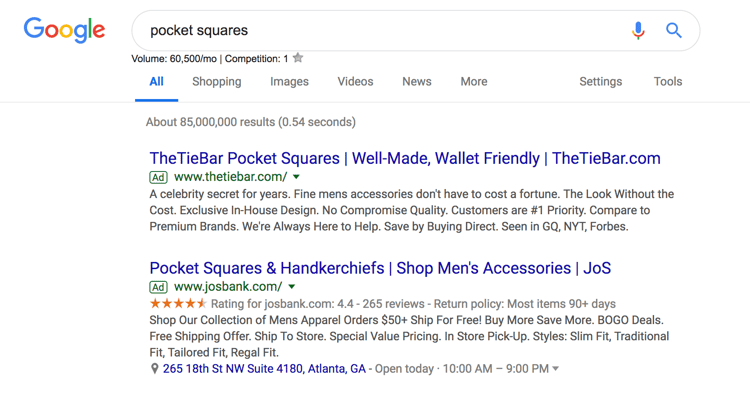
Search ads are text ads that are displayed on Google results pages. As an example, a search for “pocket squares” returns sponsored results, or ads, like these:
google ads search ads

The benefit of search ads is that you’re displaying your ad in the place where most searchers look for information first — on Google. And Google shows your ad in the same format as other results (except for denoting it as an “Ad”) so users are accustomed to seeing and clicking on results.

Responsive Search Ads

Responsive search ads allow you to enter multiple versions of headlines and ad copy (15 and four variations, respectively) for Google to select the best performers to display to users. With traditional ads, create one static version of your ad, using the same headline and description each time. Responsive ads allow for a dynamic ad that is auto-tested until you arrive at the version that is best suited for your target audience — for Google, that means until you get the most clicks.

Display Ads

Google has a network of websites in various industries and with an array of audiences that opt in to display Google Ads, known as the Google Display Network. The benefit to the website owner is that they’re paid per click or impression on the ads. The benefit to advertisers is that they can get their content in front of audiences that are aligned with their personas. These are typically image ads that draw users attention away from the content on the webpage.

google ads display adSource

Additional options for Display Ads include shopping campaigns and app campaigns, which are displayed on search engine results pages.

Video Ads

Video ads are displayed before or after (and sometimes in the middle of) YouTube videos. Remember, YouTube is a search engine, too. The right keywords will place you in front of a video, disrupting the user’s behavior just enough to grab their attention.

Location

When you first set up your Google Ad, you’ll select a geographical area where your ad will be shown. If you have a storefront, this should be in a reasonable radius around your physical location. If you have an ecommerce store and a physical product, your location should be set in the places where you ship. If you provide a service or product that is accessible worldwide, then the sky’s the limit.

Your location settings will play a role in placement. For instance, if you own a yoga studio in San Francisco, someone in New York that enters “yoga studio” will not see your result, no matter your AdRank. That’s because Google’s main objective is to display the most relevant results to searchers, even when you’re paying.

Keywords

Keyword research is just as important for paid ads as it is for organic search. Your keywords need to match searcher intent as much as possible. That’s because Google matches your ad with search queries based on the keywords you selected. Each ad group that you create within your campaign will target a small set of keywords (one to five keywords is optimal) and Google will display your ad based on those selections.

Match Types

Match Types give you a little wiggle room when it comes to your keyword selections — they tell Google whether you want to match a search query exactly or if your ad should be shown to anyone with a search query that’s semi-related. There are four match types to choose from:

  • Broad Match is the default setting that uses any word within your keyword phrase in any order. For example, “goat yoga in Oakland” will match “goat yoga” or “yoga Oakland.”
  • Modified Broad Match allows you to lock in certain words within a keyword phrase by denoting them with a “+” sign. Your matches will include that locked-in word at the very least. For example, “+goats yoga in Oakland” could yield “goats,” “goats like food,” or “goats and yoga.”
  • Phrase Match will match with queries that include your keyword phrase in the exact order but may include additional words before or after it. For example, “goat yoga” can yield “spotted goat yoga” or “goat yoga with puppies.”
  • Exact Match maintains your keyword phrase as it is written in the exact order. For example, “goat yoga” will not show up if someone types “goats yoga” or “goat yoga class.”

If you’re just starting out and don’t know exactly how your persona will be searching, move from a broad match to a more narrow approach so you can test which queries yield the best results. However, since your ad will be ranking for many queries (some unrelated) you should keep a close eye on your ads and modify them as you can gain new information.

Headline and Description

Your ad copy can be the difference between a click on your ad and a click on your competitor’s ad. It’s important that your ad copy matches the searcher’s intent, is aligned with your target keywords, and addresses the personas pain point with a clear solution.

To illustrate what we mean, let’s review an example.

google ads copy

A search for “baby swim lessons” yielded this result. The copy is concise and uses the limited space wisely to convey their message and connect with their target audience.

The Swim Revolution knew to put the keyword in their headline so we instantly know that this ad matches what we’re looking for. The description tells us why this is the best option for swim lessons because it addresses the concerns of their persona — a parent looking to enroll their baby in a swim class.

They use words like “skills,” “fun,” “confidence,” and “comfort in the water” to ease our nerves about putting a baby in a pool and to prove to us that we will get what we want out of this class — an infant that can swim.

This kind of ad copy will get you clicks, but conversions will result from carrying this level of intention into your landing page copy.

Ad Extensions

If you’re running Google Ads, you should be using Ad Extensions for two reasons: they’re free, and they give users additional information and another reason to interact with your ad. These extensions fall within one of these five categories:

  • Sitelink Extensions extend your add — helping you stand out — and provide additional links to your site that offer users more enticing reasons to click.

    google ads sitelink extensions

  • Call Extensions allow you to incorporate your phone number in your ad so users have an additional (and instant) way to reach out to you. If you have a customer service team that is ready to engage and convert your audience, then include your phone number.

    google ads call extensions

  • Location Extensions include your location and phone number within your ad so Google can offer searchers a map to easily find you. This option is great for businesses with a storefront and it works well for the search query “…near me.”

    google ads location extensions

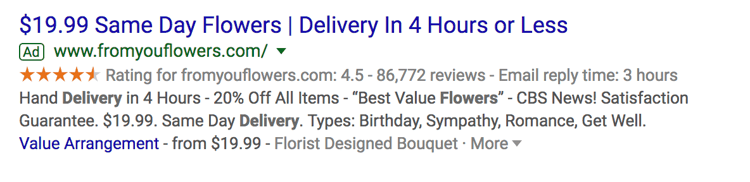
  • Offer Extensions work if you’re running a current promotion. It can entice users to click your ad over others if they see that your options are discounted compared to your competitors.
    google ads offer extensions

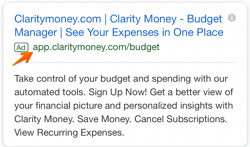
  • App Extensions provide a link to an app download for mobile users. This reduces the friction from having to perform a new search to find and download the app in an AppStore.
    google ads app extensions

Google Ads Retargeting

Retargeting, a.k.a. remarketing, in Google Ads is a way to advertise to users who have previously interacted with you onlin
e but have not yet converted. Tracking cookies will follow users around the web and target these users with your ads. Remarketing is effective since prospects need to see your marketing at least seven times before they become a customer. 

How to Set Up Your Google Ads

Setting up your paid campaigns on Google is relatively easy (and quick), mostly because the platform takes you through the setup and provides helpful hints along the way. Once you visit the Google Ads site and click “Start Now,” you’ll be taken through a series of steps to get your ads up and running. If you have your ad copy and/or images created, set up should take you no more than 10 minutes.

What may be less obvious are all the additional things you need to do to make sure your ads are optimally set up and easily trackable. Let’s cover these together. These are the steps you’ll take once your ads are submitted for review.

Link Google Analytics

You likely have Google Analytics set up on your website so you can track traffic, conversions, goals, and any unique metrics. You also need to link your Analytics account to Google Ads. Linking these accounts will make tracking, analyzing, and reporting between channels and campaigns much easier because you can view these events in one place.

Add UTM Codes

Urchin Tracking Module (UTM) codes are used by Google to track any activity associated with a specific link. You’ve probably seen them before — it’s the part of a URL that follows a question mark (“?”). UTM codes will tell you which offer or ad led to a conversion so you can track the most effective parts of your campaign. UTM codes make it easier to optimize your Google Ads since you know exactly what’s working.

The trick, though, is to add your UTM codes at the campaign level when you set up your Google Ads so you don’t have to do so manually for each ad URL. Otherwise, you can add them manually with Google’s UTM builder.

Set Up Conversion Tracking

Conversion tracking tells you exactly how many customers or leads you’ve acquired from your ad campaigns. It’s not mandatory to set up but, without it, you’ll be guessing the ROI of your ads. Conversion tracking allows you to track sales (or other activities) on your website, app installs, or calls from your ads.

Manage and organize your ads with our free Google Ads Kit and Templates.

Integrate Your Google Ads With Your CRM

There is something to be said about keeping all of your data in one place where you can track, analyze, and report on it. You already use your CRM to track contact data and lead flows. Integrating Google Ads with your CRM gives you the ability to track which ad campaigns are working for your audience so you can continue marketing to them with offers that are relevant.

Google Ads Bidding Strategies

Once you’ve set up your ad campaigns and have tracking in place, it’s time to start bidding. Remember, your ability to rank in Google Ads depends on how you bid. While your bid amount will depend on your budget and goals, there are a few strategies and bid settings you should be aware of when launching your paid campaign.

Automated vs. Manual Bidding

You have two options when it comes to bidding on your keywords — automated and manual. Here’s how they work:

  • Automated Bidding puts Google in the driver’s seat and allows the platform to adjust your bid based on your competitors. You can still set a maximum budget, and Google will work within a range to give you the best chance at winning the bid within those constraints.
  • Manual Bidding let’s you set the bid amounts for your ad groups and keywords, giving you the chance to reduce spending on low-performing ads.

Bidding on Branded Search Terms

Branded terms are those with your company or unique product name in them, like “HubSpot CRM.” There is much debate on whether to bid on your branded terms or not. On one side of the debate, bidding on terms that will likely yield organic results could be seen as a waste of money.

On the other side, bidding on these terms gives you domain over these search results pages and helps you convert prospects that are further along the flywheel. For instance, if I’ve been doing research on live chat tools and am heavily considering HubSpot’s Live Chat, then a simple search for “HubSpot live chat software” will yield exactly the result I’m looking for without the effort of scrolling.

The other argument in favor of bidding on your branded terms is that competitors may bid on them if you don’t, thereby taking up valuable real estate that should belong to you.

Cost Per Acquisition (CPA)

If the idea of spending money to convert prospects into leads makes you uneasy, then you can set a CPA instead and only pay when a user converts into a customer. While this bidding strategy could cost more, you can take comfort in knowing that you only pay when you acquire a paying customer. This strategy makes it easy to track and justify your ad spend.

Additional Resources to Optimize Your Google Ads

Your ad copy and headline is not the only component that will make your paid campaign successful. Getting a user to click is only the beginning … they should arrive on a landing page that’s optimized for conversion and then be taken to a Thank You page that tells them what to do next.

If you want your Google Ads to produce qualified leads and customers, then check out these additional resources and use them as guidelines as you set up your Google Ads campaign.

Start Your Campaign

Given its reach and authority, Google Ads should be a part of your paid strategy. Use the tips we covered to get started, and remember to refine and iterate as you go. There’s no such thing as a Google Ads campaign that doesn’t work — there are only ones that need a bit more work. Using the strategy and information provided above, you have what you need to create a successful Google Ad campaign that drives clicks and converts leads.
New Call-to-action

Originally published Sep 27, 2019 1:29:00 PM, updated April 27 2020

Topics:

Google Ads

Don’t forget to share this post!

Source

Understanding Managed IT Services The Definitive Guide

What are Managed Services?

Managed IT Services are the practice of augmenting or replacing management of business functions by a third-party contractor. In the last 10+ years, managed services have grown exponentially, particularly within the IT industry. Here, managed services often include the management of technologies such as core network, telephony and data center and, in the case of legacy managed services, usually consist of core IT maintenance responsibilities like break/fix and patch management.

What are Managed Service Providers?

A Managed Service Provider (MSP) is a company that owns and remotely manages a technology or service, and allows the use of said technology or service to any customer through a subscription.

The Growth of the Managed Services Market

MSPs are growing by leaps and bounds. According to Gartner, in 2017, the managed services industry has grown by 2.7% so far. Markets and Markets on the other hand, predicts that the Managed IT sector growth will hit a whopping $257.84 Billion by 2022. With a consistently growing demand for managed services, solutions providers are heavily investing in their infrastructure to ensure cutting-edge technologies and quality services to customers.

Top 5 Reasons to Use Managed IT Services

While managed services are not a one-size-fits-all solution, they do offer a clear-cut solution to a number of significant business challenges faced by organizations of all shapes and sizes, including:

managed it services

  1. High Hardware Costs: Technology architectures are incredibly expensive to buy, with no guarantees they won’t be obsolete within two years.
  2. Increasingly Specialized Technologies: Traditionally, companies could hire a handful of IT staff to build, manage, and troubleshoot problems across the entire IT enterprise. Now, in order to ensure high performance and availability, IT teams are built for each IT function (ex. data center, security, etc.).
  3. Cost of Qualified Personnel: IT personnel are in high demand… and they don’t come cheap.
  4. Scarcity of Qualified Personnel: Even if you do have an IT team, do you have enough? Are the people you do have completely up to their ears with maintenance?
  5. Opportunity Cost of Constant Maintenance: If unencumbered by maintenance, members of your IT team could focus on business enhancing projects such as updating your CRM or developing new lead generation analytics, etc.

Top Complaints About Managed Services

Managed Service Providers offer a convenient and affordable way to help businesses run smoothly. Yet, in an effort to maximize profits, while reducing their own resource investment, many MSPs have taken some shortcuts:

  1. Inflexible programs: Some service providers create rigid program specifications, at the customers expense. Flexibility is sometimes why the customer turned to Managed Services in the first place.
  2. Low Touch Customer Service: With stringent communication channels, some MSPs can automate away access to human experts.

Are All MSPs The Same?

Similar to the car industry, there is an MSP for every type of consumer. With different brands, technologies, sizes, performance requirements, there will always be options. Ultimately, choosing the right MSP comes down to the types of services you want and the scope of your project.
However, keep in mind that there are three general types of MSPs: Traditional, Advanced and NextGen depending on what level of engagement you are looking for.

Traditional Managed Services

As the go-to reactive service model, Traditional Managed services can easily help with break/fix support such as network interruptions or failures.

Incident & Problem Management: This is the core framework for restoring normal service as quickly as possible. Please note that Traditional MSPs usually do not include more time-consuming services like root cause analysis, which is critical to determine why things went wrong in the first place. Root Cause Analysis is part of most NextGen Managed Service offerings.

System Administration: System Administration is the complete management and optimization of a customer’s designated technology infrastructure. When employed correctly, System Administration can allow IT staff to focus on key strategic areas within their organization.

Patch Management: Comprehensive planning and execution of updates to software to ensure patches are tested, scheduled and rolled-out in a timely manner, without adversely impacting users.

Advanced Managed Services

Beyond Traditional Managed Services, Advanced Managed Services offer proactive services to anticipate problems before they occur and keep your network from going down in the first place.

Enhanced Monitoring: Enhanced Monitoring is all about identifying potential issues before they escalate into full-blown incidents. Most of the time an appliance is inserted into the network to enable the system to actively listen and report status 24 x 7 x 365.

Service Management: Service Management provides a robust reporting, notification and communication platform to ensure real-time visibility into your covered systems and detailed lifecycle tracking of each incident or service ticket.

NextGen Managed Services

Driven by demand for more customizable programs, better customer service and robust relationships with their MSPs, NextGen Managed Services are the natural evolution of the managed service industry.

Rather than marketing and selling a predefined set of packages, NextGen MSPs seek to understand each client, gain insight on business goals and performance indicators, resources, and of course, core technologies. Only then can they construct a package for that individual client. NextGen Managed Services may include:

NEXT GEN MANAGED SERVICES INFOGRAPHICHigh-Touch Consultative Services: With High-Touch Consultative Services come a more engaged human-to-human partnership. NextGen MSPs offer a range of industry experts who can seamlessly blend themselves into your team. By working hand-in-hand with your own staff, NextGen MSPs gain a clear, common understanding of your business goals, strategies and resources to define optimal standard operating procedures.

Client Success Advocate: The Client Success Advocate (CSA) is a fundamental role in every NextGen MSP. The CSA is ultimately responsible for MSP-Client success. The CSA fully engages with the Client’s IT and business teams to ensure ongoing communications and a collaborative workflow.

Enterprise Lifecycle Management (Lifecycle): A Lifecycle Program is how your NextGen MSP makes your technology roadmap come to life. Essentially, a Lifecycle program helps you understand new and existing technologies and platforms, and how / when they can best serve your
organization. Ultimately, it’s about enabling your business through technology.

Enterprise Adoption Management: Adoption Management is the process of making sure that your organization is getting the most of the technologies you’ve invested in. Whether it is training your staff on the capabilities of a new Contact Center solution, ensuring best practices, or monitoring and reporting, Adoption Management makes sure you are getting the most out of your resources.

Enterprise Security Audit: With an ever-growing number of threats, enterprise security is paramount. Security Audit allows an industry expert to take a holistic view of your security infrastructure. If there are any lapses or organizational blind spots, the audit can identify risks and outline necessary steps to remediate.

A True MSP Partner

There are many MSPs out there offering a variety of services, to be consumed in a variety of ways. Many are genuine Value Added Partners. Some are mere service vendors with whom your relationship goes as far as your check does every month. So how do you distinguish a true partner from a vendor?

An ideal managed IT services partner is one who gives you sound advice, challenges you, offers honest critique even at their own detriment. An ideal partner is one who is transparent in all their dealings with you and, most importantly, treats your sensitive issues, shutdowns or hiccups affecting your business, as their own.

At VOX, we believe that through creating committed partnerships, engaging in our communities and empowering individuals to have a stake in the process, we create a collaborative prosperity that positively affects people, businesses and the world.

For more information about Managed Services, please get in touch with VOX Network Solutions today.

Source

How Much Do Managed IT Services Cost in 2020

Previous Next

  • Managed IT Cost 2019

The process of hiring or changing IT providers can be a difficult one, with a lot of unknowns related to prices and services.  At Capital Network Solutions (CNS), one of the first questions we invariably receive from potential customers is:

How much does a managed IT services plan cost and what does it cover?

There is no simple answer to this question.  As with buying a car, there are many variables and add-ons to consider when pricing IT plans.  In this article, we will shed some light on a murky situation by looking at the various costs and services that come with outsourcing your IT department.

At CNS, we have 30 years of experience providing managed IT services and security solutions to businesses throughout the Sacramento area and across the western United States.  We have a unique insight into industry-standard IT costs, as well as the services and support you should expect to receive for your money.

What are “Managed IT Services”?

Most small and medium-sized businesses lack the resources to staff their own IT departments.  At the same time, putting your entire business environment in the hands of a single employee with limited skills and extensive legacy knowledge also presents a dicey situation.

Essentially an outsourced IT department, a managed service provider takes responsibility for your online environment.  Instead of paying out-of-pocket for a break/fix service every time something goes wrong, a managed IT services provider monitors your system comprehensively and deals with problems proactively.

Different tiers of services, support and software get supplied for a monthly fee, maximizing uptime and productivity while allowing you to focus on your core business goals.  Not only does a managed IT services plan provide a comprehensive IT solution that mitigates risks of internal and external threats, but the flat monthly fees also make it easier to budget for IT-related costs.

However, every business has slightly different needs, which is why there are different types of managed IT subscription plans on the market, usually with customization options to ensure an ideal fit for your organization.

Contact CNS to Learn More

What questions should you ask before hiring a managed service provider?

When it comes to managed IT support, one size does not fit all.  The goal should not be to cram your organization into a glass slipper, but rather to find a managed services plan that makes the most sense for your business needs.

Here are some questions that every business should ask itself before signing up for a managed IT services plan:

  1. How many people do you employ?
  2. Do you have dedicated IT personnel on staff?
  3. Does the business have an on-premises server and how much data is in use?
  4. Do you handle sensitive data or need to meet any regulatory compliance requirements (e.g., PCI, HIPAA or SOC)?
  5. Would you prefer to pay a flat monthly amount for an all-you-can-eat plan, or would you prefer a lower monthly fee with unpredictable charges?

The answers to these questions will help determine which type of managed IT subscription plans, if any, works best for your business.

You should also insist on transparency from any managed service provider that you consider.  For example, here are some questions you should ask your potential managed service provider:

  1. Do they have a local office?
  2. Will they provide onsite and offsite support?
  3. Do they offer multiple types of plans with customization options, or is it one-size-fits-all?
  4. Did they outline your prices and services in full in a service level agreement?
  5. Do they provide 24/7 help desk support?

If you want reliable and affordable IT security and support for your Sacramento business, call CNS at (916) 366-6566.

What managed IT plan works best for your business?

Most managed IT services plans fall into one of two buckets: partially managed or fully managed.

Think of it as the difference between an a la carte menu and an all-you-can-eat buffet.

Partially Managed = A La Carte Support

Managed IT Cost

  • Generally intended for medium-sized to large businesses with some dedicated IT personnel on staff.
  • This type of plan usually gets priced per device.
  • There is a lower monthly minimum charge, but under this type of plan, you pay an additional hourly rate for help desk and onsite support.
  • Because support is a billable charge, help desk calls usually need to be approved by an authorized gatekeeper. Every call to the help desk becomes a mini “business decision,” which prevents problems from getting fixed and elongates downtime.

Fully Managed = All-You-Can-Eat Support

  • Generally intended for small to medium-sized businesses with no dedicated IT personnel on staff.
  • This type of plan usually gets priced per end user.
  • There is typically a higher monthly minimum charge, but under this type of plan, you get unlimited 24X7 help desk and onsite support for a flat rate.
  • Because support is free, any of your employees can call the help desk at any time to have their issue resolved, which severely minimizes downtime.

What maintenance services get included in managed IT plans?

Of course, not every managed service provider perfectly fits this two-tier mold.  For example, some providers may include unlimited help desk support while charging an hourly rate for onsite support.

In general, though, there is one main difference between the a la carte costs of most partially managed plans and the all-you-can-eat fees of most fully managed plans. That difference is the price of help desk support.

Both types of plans tend to include these services:

  • Managed workstations and servers
  • System administration
  • User and device administration
  • Windows security patching
  • Antivirus subscription and monitoring
  • Around-the-clock server and network monitoring
  • Data protection, including onsite and offsite backup

While businesses on partially managed plans pay by the hour for support, an all-you-can-eat plan includes free help desk support for the following issues:

  • Workstation hardware issues
  • Workstation slowness
  • Application issues
  • Network or internet service issues
  • Software upgrades and patching
  • Installation of desktop printers and scanners, monitors, external drives and other USB devices
  • Onsite support
  • Unlimited 24/7 help desk support calls

What other IT factors affect pricing?

In addition to everything listed above, some services may require an additional charge, even for businesses on a fully managed IT services plan.  These include such servi
ces as:

  • New hardware and software installations
  • Work on a personal computing system
  • Moving employees’ computers
  • Reassigning computers to new or other employees
  • Installation of network-enabled printers
  • Upgrade or installation of major line-of-business applications
  • Installation of new servers, networking devices and wireless access points
  • Advanced endpoint and network security
  • Annual security audits

How does the cost of outsourcing IT services compare to the cost of hiring an in-house “IT guy”?

Most small and medium-sized businesses cannot justify the cost of hiring an IT professional to maintain their network security and provide help desk support.  Full-time IT professionals usually make $40,000 to $60,000 per year, with an additional 10 percent going toward payroll taxes and benefits.

By contrast, the average all-you-can-eat managed IT services plan costs less than $30,000 a year.

For that money, you get a fully staffed and trained IT department.

Additionally, when your business goes through a significant upgrade or inevitably stumbles upon an unsolvable problem, you will incur additional costs by contracting with an outside IT services provider.

In other words, subscribing to a managed IT services plan ultimately reduces out-of-pocket expenses, expands security and support and cuts out the middlemen.

What is involved in the initial setup process?

At Capital Network Solutions, these are the first things we do when a new client signs up for one of our managed IT services plans:

  • Install CNS management software
  • Install antivirus software
  • Set up and configure data backup hardware
  • Perform basic site assessment and needs analysis
  • Perform information gathering and documentation

Call Capital Network Solutions at (916) 366-6566 to set up a free consultation.  Whether you sign up for one of our managed IT services plans or not, we can answer your questions and help guide you through the process.

By Daniel Barnes|2020-03-19T09:49:06-07:00March 1st, 2020|IT Support and Managed Services|Comments Off on How Much Do Managed IT Services Cost in 2020?

Source

Understanding Managed Services

The buzzword relating to IT Support is “Managed Services”, and every day more and more businesses are jumping on the bandwagon. But what does managed services actually mean and how can you tell if an IT Support company is not just using the word as a marketing tool, but is in fact only offering “flat rate” services packaged as “managed services”?

As a definition, Managed Services allows a business to offload IT operations to a service provider, known as a Managed Services Provider. The managed service provider assumes an ongoing responsibility for 24-hour monitoring, managing and/or problem resolution for the IT systems within a business.

A Brief History of Managed Services

The following is a summarized history of managed services to give you some background relating to how these services have developed. This history pertains specifically to companies who service small network systems.

It all started with break-fix services

Understanding Managed Services - Minneapolis, St Paul, Edina

The Break Fix Mentality

The companies who have helped service small networks in the past have been hamstrung by the lack of tools to help with the problem. The networks they service developed as simple systems, usually built by a self taught network amateur-turned-pro. Maintenance was break-fix only, meaning when something broke, the company called and they came running to fix it… hopefully.

As time went on, the best of the support people developed procedures and programs to periodically come on-site to do a system review of logs and user information looking for hints of issues before they became big problems. In some cases an elaborate checklist was used to record disk usage, processor usage, etc.

The problem of course, was that the support people could only see what was happening on that particular day. If something happened later, they would never know about it … unless the customer called.

Backup problems and other errors continued to occur

Additionally, the only professional test of the backup system was on the visit, which frequently resulted in days or more of missed backups. The system was prone to other human errors when the on-site technician, trying to be accommodating, would take care of the “end user” symptoms and would not have time to address the “real issues”. This created a constant battle for the tech as they tried to convince customers that they were only causing themselves more dangerous problems down the road by not being proactive.

Managed Services began with Fortune 500 companies and their huge networks

Understanding Managed Services - Minneapolis, St Paul, Edina

At the same time, the hardware and software vendors were adding new and better ways for the systems to signal problems as early as possible. Simple Network Management Protocol had been developing since the early 90’s and was being applied to PC’s. The first systems that could watch these tools and turn all the data into usable information were complex to manage, were geared only to large networks, and were prohibitively expensive for small business.

In 2005, systems started to mature that allowed smaller companies to take advantage of the same features and benefits as the large companies. This technology started the Managed Services movement.

Finally, Managed Services was available for small to medium sized businesses

Understanding Managed Services - Minneapolis, St Paul, Edina

The Managed Services software that is in place today allows providers to work towards two major goals:

  1. Everything on your network that will result in a user symptom or risk will send an alert before or when it happens, and the Managed Service Provider will know about it.
  2. Every alert they get is something important and needs to be addressed.

The more closely a Managed Service provider can get to these two goals, the more perfectly they can achieve a truly managed service and the more they can get away from “everything being an emergency” situation.

Why the hype with Managed Services?

Just like larger companies, small businesses need technology to operate efficiently and to compete effectively. But as reliance on IT grows, the resources needed to support this increasingly complex IT environment may not. In many small businesses, IT resources are limited and can be quickly overwhelmed.

If you fall behind in keeping up with things such as backups, patches and security, the odds greatly increase that you’ll face an IT outage or another problem down the road that will negatively impact your business. For instance, if your Email server, customer relationship management system, financial application or network goes down, you will likely face substantial productivity and revenue losses as a result.

Managed Services vs. The Break-Fix Mentality

Managed services are also a philosophical change in the way that a business deals with its technology. Instead of following the old-school tradition of break-fix (literally meaning wait until the server, desktops or other critical networking devices fail, then scramble to fix them), a business operating with a managed service focuses on the prevention of these issues before they disrupt employees, management and/or clients.

If you fall behind in keeping up with things such as backups, patches and security, the odds greatly increase that you’ll face an IT outage or another problem down the road that will negatively impact your business. For instance, if your Email server, customer relationship management system, financial application or network goes down, you will likely face substantial productivity and revenue losses as a result.

Why Break-fix is no longer good enough for your business

A Break-fix maintenance service fixes problems as they crop up. This means that something needs to go wrong before you receive any service, resulting in an inevitable reduction in IT system performance while you wait for the problem to be fixed.

Today, no business can really afford the risk and uncertainty of relying on a “Break-fix maintenance service” because your business is too dependent on having a reliable IT system. Furthermore, having separate suppliers responsible for different parts of the system puts you in the difficult position of trying to decide who should be delivering the service you require. You simply do not have time for this.

Do Managed Services Cost More Than Traditional Break-Fix Services?

Understanding Managed Services - Minneapolis, St Paul, Edina

Actually no! Surprisingly most managed services cost less than traditional break-fix services, especially when including the true cost of downtime. Remote monitoring, remote maintenance and the prevention of major issues allow a managed services provider to be more efficient than a similar break-fix company who is constantly rolling a truck to visit customer sites. Therefore the managed service company can offer a “better” service without charging more.

Why are so many IT Firms now promoting Managed Services?

Because it puts the IT Support Company on the same page as the business they are serving. With traditional break-fix services, the only way for an IT Support company to make money is if something goes wrong — which to us as always was a double-edged sword. If we do our job too well, we’re out of business, which happens to about 80% of all small IT Firms — they just don’t make it.

How are Managed Services priced?

Managed services provider
s usually price their services on a flat-rate monthly basis. Depending on the services included in the program offered, pricing is usually based on the number of devices, with different packages priced at different levels. Some providers offer on-site customer support as an extra fee.

Basic services often start with a monitoring service, which notifies the ”you” of problems, which you resolve on your own. At the upper end of the spectrum, service providers offer fully managed services that cover everything from alerts through problem resolution. (Learn more about Managed Services Costs)

The Real Benefits Of Managed Services

Put in simple terms – one of the biggest benefits of Managed Services is discovering and fixing problems before they can negatively affect your business.

A well maintained, proactively serviced computer network will always run better than the alternative. With proactive network monitoring, patch management, and desktop optimization performed on a regular basis, you will notice a tremendous difference in operations… and you will reap the benefits of preventing fires, rather than fighting them.

Reduced costs: Businesses are also able to control and reduce their overall operating costs with the flat-fee billing model. Cost-effective access to enterprise-level support is a reality

24-hour monitoring: Because the Managed Services provider also manages all of your vendor relationships, issues with internet slowness/outages, printers, phones, cell phones, websites are dealt with directly with the vendor by the Managed Service provider. As a result of this “always-eyes-on” network monitoring 24 hours per day, businesses experience an additional level of comfort and security.

6 Additional Benefits Of Managed Services:

  1. Increased operational efficiency
  2. Reduced operating costs
  3. Cost-effective access to enterprise-level support
  4. Minimized downtime
  5. Allows the focus to be on running the business, and not the technology
  6. Peace of mind from knowing that the network is monitored 24/7/365

Small IT companies come and go quickly – and so do the Techs

If you’ve been in business for longer then 5 years, you’ve probably hired more then one IT support company — you’ve maybe hired many. You know the frustrations of having a new technician working with your network. The question becomes “Is your technician a trusted advisor” or just a guy trying to fix your computer problems? (Find out more about finding and hiring a TRUSTED ADVISOR)

So adding another monthly fee wasn’t exactly what you were looking for …?

We can clearly understand and relate to that mode of thinking. In this day and age it feels like every company we deal with is trying to figure out a way to squeeze more money out of us — especially on a monthly basis. IT support services is not immune to this change in business climate.

But that being said, Managed Services is not just a short lived fad, or a way for IT companies to fatten their wallets. Managed Services is a way for businesses to eliminate problems before they ever occur, manage their IT budgets better, and create a solid long-term partnership with an IT firm that is protecting one of their most important assets… their data.

Understanding Managed Services - Minneapolis, St Paul, Edina

Monthly Bill or Managed Services (?)

The Real Benefits Of Managed Services

Put in simple terms – one of the biggest benefits of Managed Services is discovering and fixing problems before they can negatively affect your business.

A well maintained, proactively serviced computer network will always run better than the alternative. With proactive network monitoring, patch management, and desktop optimization performed on a regular basis, you will notice a tremendous difference in operations… and you will reap the benefits of preventing fires, rather than fighting them.

Beware of inferior imitations like “remote dial-in”

Understanding Managed Services - Minneapolis, St Paul, Edina

Managed Service Imitations

Providing true Managed Services requires a substantial investment in both technology as well as expert staff to operate the service. Some companies offering “Managed Services” are merely “dialing-in” to fix problems on your network and are not providing any “preventative maintenance” at all. This service is merely a soup-up version of the “break-fix” mentality, by utilizing an internet connection to access your network to fix issues.

This type of “remote dial-in” service and the company offering it, doesn’t actually monitor your system, is not able to tell you where the system is vulnerable and is not able to fix problems before they negatively impact you system’s performance. Remotely “dialing-in” to a network is nothing more than “Break-fix” without a site visit.

Which type of maintenance do you currently have?

If you answer “no” to any of the following questions, you are utilizing a break-fix methodology to maintain your network, and may benefit from a managed service methodology without costing you more.

  1. Do you find out immediately if your data back-up fails to run?
  2. Do you know which equipment on your network is aging and might need replacing in the next 6 months?
  3. Do you know if your server and all of your desktops have the latest anti-virus updates installed and are functioning correctly?
  4. Do you know if the latest security patches have been installed on your network?
  5. Do you know who the heaviest internet users are, and whether they are downloading large files which can slow down the network, or accessing innappropriate web sites?
  6. Do you know which PCs are running out of memory, affecting user performance?
  7. Do you have one number to call for all of your technology service requirements?
  8. Do you only hear from your computer guys “after” things break?

Does your network feel like it’s running slower than it should?

Understanding Managed Services - Minneapolis, St Paul, Edina

Slow network?

Would you like to know if you are ready for managed services, cloud computing, or virtualization? Imagine IT offers a FREE network evaluation!

Our expert technicians will review your network and determine whether your infrastructure will support these new technologies. They’ll also discover any bottlenecks preventing your network from running at peak performance. After the analysis, a written report will tell you what steps you can take to improve your network’s performance.

Source

Skip to content