If you’ve ever worked with a computer before — and who hasn’t? — then you already know a relationship with them is tumultuous. When everything is in working order, the experience is great. But when there are technical difficulties, things can get frustrating and sometimes even overbearing. Even something that seems simple, like a freeze or hang-up, can indicate serious problems, which means fixing them can be trying. It makes sense, then, that an entire industry has arisen behind troubleshooting and technical support. But believe it or not, third-party help is often not necessary. A lot of the common computer problems you might run into can be fixed easily, by you.
Here are the top 15 most common computer problems that can really get under your skin! TLDR? Watch this video on the top 10 common computer problems if you’re running short on time!
Top 10 Common Computer Problems That Get Under Your Skin
The “Blue Screen of Death” is a Microsoft Windows-related STOP error. Usually, it indicates a serious problem, most likely hardware- or driver-related.
It’s often accompanied by an error code that you can reference to find out what happened. In fact, many places offer a list of these error codes for you to look up.
2. Missing DLL Files
Another standard system issue — again, with Windows-based operating systems — is a DLL error. This means a DLL file is either missing or corrupt. Files ending with “.DLL” are dynamic link library files.
They hold many codes, procedures, and instructions for programs. They exist to tell the OS how to deal with certain apps. Several programs can also open them at once, improving memory conversion.
These are necessary system files, and when they’re missing or corrupt, bad things happen. This is unfortunate, and common because there are so many of them.
3. Applications Running Slowly
When applications slow down or hang, it could be due to any number of causes. But the most common relates to processing power and memory.
Computer memory — or random access memory — is used to store data temporarily while programs are running. The recommended amount for Windows users is 2GB or more, but a higher number is ideal. In fact, the more memory you have, the more programs you can run concurrently.
RAM doesn’t necessarily speed up a computer, but it can make applications and programs run better. So, yes, it’s commonly associated with performance and speed.
4. Malware
Malware is a type of software that can damage or disable computers and related systems. It has to be installed on a computer before it can cause problems. However, this can happen much more quickly than you think.
For example, just downloading a file from a website could result in malware on your computer. Once opened, it can damage files, and it can even slow down your computer by using up valuable resources.
5. Internet or Network Connectivity Issues
Internet or network connectivity issues can stem from many problems. First, there could be something wrong with your ISP, or internet service provider. Then, there are DNS servers you must connect to, which can also encounter issues. Finally, there’s your local hardware, which includes your router, computer and network software.
Luckily, Windows has a troubleshooting tool that can help identify network connection issues.
6. Hard Drive Failure
A hard drive failure can lead to serious problems. The good news is that hard drives are easily replaceable. The bad news is that the data stored on said hard drive can become corrupt or lost forever.
This isn’t a big deal if you’re talking about program files that can be easily recovered. But when it comes to personal documents, photos, and important data it’s a huge problem. This is all data you can’t easily duplicate.
It’s recommended that you keep backups of your most important files. A hard drive can fail at any time, and it can happen with both old and new drives. Worse yet, failure rates differ depending on the type, capacity, and brand of a drive.
Translation: You never know when a hard drive failure will happen, so preparation is essential.
What Will Scientists Discover Next?
Science news delivered weekly!
7. Frozen Screen
During a severe failure — usually related to hardware — a computer can freeze or lock up. But this can also happen due to software problems, too, so never rule it out.
Most of the time, you can remedy this by opening the Windows task manager and force-closing the problematic application. Other times, the computer will lock up completely, and the only way to fix it is to reboot the machine.
8. Strange Noises
Computers are never silent. At any given time, multiple functions take place that can cause noise. Mechanical hard drives and optical disk drives, for instance, make a distinct noise when powering up and when they’re in use. Cooling fans can also make noise as they spin. Graphics cards or GPUS also have a fan that turns as they heat up.
Many of these components can make strange noises as they fail or begin to age.
9. Overheating
As power flows through the parts inside a computer are used, they heat up. It’s natural. This includes the CPU, hard drives, graphics cards, the power supply, external and internal drives and even the motherboard.
Some of the components can operate fine under a little warmth. When the heat inside a computer grows too high, it can cause serious failures, and it can even damage components. That’s exactly why a processor has its own cooling fan. The same applies to a graphics card or power supply. These components need to stay within a reasonable temperature range.
You never want components to overheat.
10. Applications Won’t Install
There are many reasons why an application might not install on your computer. The most likely of which is that your computer and its software are not compatible with said application.
There are minimum system requirements to run everything from a simple program to a hardware-intensive game. If your computer does not meet these needs, you can experience a slowdown, and sometimes the app won’t even run.
Other issues that can prevent installation are hardware failures, storage space, and missing files. Missing files can also be system files like .DLLs and .NET framework content.
11. Computer Suddenly Shuts Off or Restarts
There’s nothing worse than your computer restarting in the middle of a video game or your work. In addition to having to wait for the computer to boot back up, you might lose any progress you’ve made in the meantime. Sudden reboots or shutdowns can have a number of different hardware or software causes. If you’re running a Windows operating system, an automatic Windows Update could be the culprit. These updates are supposed to warn you before they reboot but if you don’t see the notification, they could catch you unaware.
If you’re playing a new video game and the computer shuts off, it could be a problem with your power supply — specifically, it might not have enough power to keep the computer running under that load.
12. Peripherals Stop Working
It’s hard to use your computer if your peripherals suddenly stop working or aren’t functioning correctly. Even if you know some of the keyboard shortcuts, most modern computers aren’t designed to be used without a mouse. This, again, could be hardware or software problems. The peripherals themselves could fail, preventing them from communicating with the computer. The USB ports can also fail, which interrupts the communication between the keyboard and mouse, and the computer.
On the software side, if the drivers fail the hardware might be working fine but the computer has no idea what to do with that information.
13. Not Using All It’s RAM
You can have 16 gigabytes of RAM on your computer, but if the computer isn’t set up correctly it might only be utilizing a fraction of that processing power. If you’re only using part of your computer’s RAM, your games and programs will run slower — or not at all.
RAM issues can have a lot of causes. If one or more of the RAM sticks isn’t seated correctly, it won’t function. If the computer is programmed to only use a fraction of the available of the ram, regardless of how many sticks you install.
14. Crashes Before Loading Operating System
If your computer starts to boot up before giving you an “Error Loading Operating System” message or just looping back through the restart process, you might start freaking out. Don’t panic. This computer problem can happen because of fresh operating system installation, or a problem caused by power failures, system crashes, or incorrect restarts. You’ll see this error because when your computer boots up, it starts the motherboard up first, then checks the hard drives, and if there isn’t an issue with those, it will boot up the computer. If there are any issues, you’ll get the error message, and have some troubleshooting to do.
15. Monitor Not Showing Images
The computer is on — at least, according to the lights on the case — but you’re not seeing any images on the monitor. This is another issue that could have a lot of different causes. The first thing you should check is your video cables that run between the monitor and the computer. If something has come loose, that would prevent your screens from working. Other issues might include graphics card failure, driver issues, or problems with the graphics ports on the computer.
How Do You Fix These Common Computer Problems?
Just knowing these common computer problems exist is not enough. You must also understand what to do when you encounter one of these setbacks.
For example, how do you remove malware once it’s on your computer? How do you prevent overheating, and if it happens, how do you cool your computer back down?
Part two of this guide is available now! In it we’ll explain exactly how you can start fixing computer problems today!
Agile infrastructure server management that accelerates response time, value, and quality of service.
Overview
Introduction
Innovations
Innovations
Products_Solutions
Portfolio
Case_Study
Case Study
Accelerate service delivery with server management software
Buy server management resources that deliver new levels of automation, simplicity, and security—freeing resources to focus on revenue-generating activities. Infrastructure complexity and increasing security threats slow down responses to ever-evolving business needs. Success means meeting business needs while lowering the relative cost of “keeping the lights on.”
+ show more
Innovations
NEW LEVELS OF AUTOMATION, SIMPLICITY, AND SECURITY
Simplify your management tasks while increasing your agility with HPE server management solutions.
NEW LEVELS OF AUTOMATION, SIMPLICITY, AND SECURITY
Simplify your management tasks while increasing your agility with HPE server management solutions.
Deploy faster
Simplify operations
Increase productivity
End to End Security
Deploy faster
Deploy faster
Software-defined intelligence enables automated provisioning with repeatable templates that ensure high reliability, consistency, and control — leading to lower operating expenses.
Learn more about HPE OneView
Simplify operations
Simplify operations
Transform how infrastructure is managed and supported by adding simplified, AI-driven operations to your hybrid cloud.
HPE OneView extends HPE storage and compute portfolio integration
December 2, 2019 You can now provision HPE Primera 630, 650, 670 storage base modules in minutes versus days with expanded support from HPE OneView. OneView is the foundation of today’s software-defined infrastructure, helping deploy infrastructure faster, simplify lifecycle operations, and increase productivity.
What’s New
HPE OneView extends HPE storage and compute portfolio integration
December 2, 2019 You can now provision HPE Primera 630, 650, 670 storage base modules in minutes versus days with expanded support from HPE OneView. OneView is the foundation of today’s software-defined infrastructure, helping deploy infrastructure faster, simplify lifecycle operations, and increase productivity.
April 2, 2019
HPE Integrated Lights-Out 5 brings together the latest innovations in security and performance
November 15, 2018
HPE delivers cloud-based AI-driven operations for HPE ProLiant, Apollo and Synergy servers
June 1, 2018
Unified server, storage, and networking management
July 11, 2017
Gen10 secure server management
February 21, 2018
New server system-restore feature
October 24, 2017
Global dashboard updates
June 4, 2018
HPE simplifies infrastructure management with announcement of HPE OneView 4.1
January 4, 2018
Server infrastructure security solutions
February 1, 2018
HPE delivers industry-leading security and recovery capabilities in its ProLiant Gen10 portfolio
With a keen focus on simplifying management tasks while increasing agility, HPE server management can help you deploy resources faster, simplify lifecycle operations, and increase productivity.
Infrastructure management
Transform servers, storage, and networking into software-defined infrastructure to eliminate complex manual processes, spur IT collaboration, and increase the speed and flexibility of IT service delivery.
Optimize performance and predict and prevent problems by adding AI-driven operations that combine cloud-based machine learning with performance monitoring.
Transform servers, storage, and networking into software-defined infrastructure to eliminate complex manual processes, spur IT collaboration, and increase the speed and flexibility of IT service delivery.
Optimize performance and predict and prevent problems by adding AI-driven operations that combine cloud-based machine learning with performance monitoring.
Supplement your HPE OneView and HPE iLO management solutions with these essential and powerful server management tools to increase administrator productivity.
Conduct systematic and organized server updates via Service Pack for HPE ProLiant (SPP) or Smart Update Manager.
Utility toolsets
Use PowerShell scripting tools to perform configuration tasks on HPE servers based on PowerShell syntax and scripting models. Perform HPE ProLiant server configurations at scale with this toolkit of Windows and Linux scripting utilities.
iLO RESTful API
Simplify programmatic computing and standardize server interactions with the new HPE ProLiant Gen9 and Gen10 API in conformance with Redfish 1.0.
Scripting tool that leverages the iLO RESTful API for secure, remote server configurations at scale.
Active Health System Viewer
Easily read your active health system logs, get actionable insight into the health of your server, and speed problem resolution.
Carousel
Featured case study
REDUCING GENOME-ANALYSIS WORKLOAD TIME TO SECONDS
The HudsonAlpha Institute for Biotechnology conducts data-intensive genome research with demanding infrastructure requirements — critical for supporting the intensive collaboration and analysis that are central to scientific breakthroughs.
Challenge
With hundreds of researchers, educators, and entrepreneurs on campus at HudsonAlpha Institute for Biotechnology, IT resources were pushed to the limit.
Solution
HudsonAlpha used HPE OneView to speed the time to usable data, enhance self-service capabilities, and enable its developers to automate operations and provision new cloud environments rapidly.
“Immediately it provided an increase in speed. We’re able to bring all the needs of our 34 companies and 200 researchers together and use our resources in the most efficient manner possible.”
Jim Hudson, Co-founder and Chairman, HudsonAlpha Institute for Biotechnology
Result
With HPE Synergy, HudsonAlpha is able to balance cost and performance requirements and enable a dynamic, flexible, cost-effective infrastructure, resulting in higher staff productivity, more efficient IT operations, and a five-year ROI of 247%.
Infrastructure Management Software
HPE OneView
Integrated systems
HPE Synergy
Hyperconverged Systems
HPE SimpliVity
Load more tiles
Load # more
HOW WE’RE HELPING
Newsroom
Newsroom
HCI Solutions for expanding remote workforce initiatives in wake of COVID-19
MAY 7, 2020 HPE SimpliVity delivers 50 percent lower cost per virtual desktop while HPE Nimble Storage dHCI is now available for VDI as a service through HPE GreenLake.
Press Release
Press Release
Warriors Community Foundation and HPE donate $250,000 to schools
The Warriors Community Foundation and HPE gave $250,000 to the Oakland and San Francisco Unified School Districts to aid in COVID-19 relief efforts.
Newsroom
Newsroom
One Scientist’s Journey to Accelerate Drug Discovery for COVID-19
Chronicling the research to fight COVID-19, using HPC technologies, with scientist Dr. Jerome Baudry of the University of Alabama in Huntsville (UAH)
Discover
Discover
HPE Discover Virtual Experience Starting June 23
We’re here to help. Register now and get everything you need to address your challenges today and transform for the future.
Enterprise.nxt
Enterprise.nxt
Nine steps to the new normal
Coronavirus demands an immediate and a longer-term crisis management plan that readies the company to succeed in a changed world. See this nine-step guide.
Enterprise.nxt
Enterprise.nxt
Security checklist for working at home
There are, perhaps, as many work-at-home computing configurations as there are workers, so security is hard. Check out these guidelines to follow.
Enterprise.nxt
Enterprise.nxt
Telemedicine reduces healthcare workloads and increases access
New technologies that go beyond the expected boundaries of the current healthcare system look to become the new standard of care.
Enterprise.nxt
Enterprise.nxt
Using sound technologies to improve the world
Need a reason to say “Oh, cool”? Scientists are doing innovative research that can improve the quality of life. Here are six examples to brighten your day.
Newsroom
Newsroom
HPE opens its patents to fight COVID-19
HPE signed the Open COVID Pledge, granting free access to all of its patented technologies.Organizations are now free to use HPE technologies to combat COVID-19.
Newsroom
Newsroom
HPE CEO: As long as hope remains, we can make it through this
We are starting to see light at the end of the tunnel. However, this situation will not end overnight, and we all need to remain steadfast in our resolve.
1,2,3 Based on HPE Nimble Storage’s installed base
Problems are only opportunities in work clothes. – Henry Kaiser (American industrialist)
Having good, strong problem solving skills can make a huge difference to your career.
Problems are at the center of what many people do at work every day. Whether you’re solving a problem for a client (internal or external), supporting those who are solving problems, or discovering new problems to solve, the problems you face can be large or small, simple or complex, and easy or difficult.
A fundamental part of every manager’s role is finding ways to solve them. So, being a confident problem solver is really important to your success. Much of that confidence comes from having a good process to use when approaching a problem. With one, you can solve problems quickly and effectively. Without one, your solutions may be ineffective, or you’ll get stuck and do nothing, with sometimes painful consequences.
There are four basic steps in solving a problem:
Defining the problem.
Generating alternatives.
Evaluating and selecting alternatives.
Implementing solutions.
Steps 2 to 4 of this process are covered in depth in other areas of Mind Tools. For these, see our sections on Creativity for step 2 (generating alternatives); Decision Making for step 3 (evaluating and selecting alternatives); and Project Management for step 4 (implementing solutions).
The articles in this section of Mind Tools therefore focus on helping you make a success of the first of these steps – defining the problem. A very significant part of this involves making sense of the complex situation in which the problem occurs, so that you can pinpoint exactly what the problem is. Many of the tools in this section help you do just that. We look at these, and then review some useful, well-established problem-solving frameworks.
Defining the Problem
The key to a good problem definition is ensuring that you deal with the real problem – not its symptoms. For example, if performance in your department is substandard, you might think the problem is with the individuals submitting work. However, if you look a bit deeper, the real issue might be a lack of training, or an unreasonable workload.
Tools like 5 Whys , Appreciation and Root Cause Analysis help you ask the right questions, and work through the layers of a problem to uncover what’s really going on.
At this stage, it’s also important to ensure that you look at the issue from a variety of perspectives. If you commit yourself too early, you can end up with a problem statement that’s really a solution instead. For example, consider this problem statement: “We have to find a way of disciplining of people who do substandard work.” This doesn’t allow you the opportunity of discovering the real reasons for under-performance. The CATWOE checklist provides a powerful reminder to look at many elements that may contribute to the problem, and to expand your thinking around it.
Understanding Complexity
When your problem is simple, the solution is usually obvious, and you don’t need to follow the four steps we outlined earlier. So it follows that when you’re taking this more formal approach, your problem is likely to be complex and difficult to understand, because there’s a web of interrelated issues.
The good news is that there are numerous tools you can use to make sense of this tangled mess! Many of these help you create a clear visual representation of the situation, so that you can better understand what’s going on.
Affinity Diagrams are great for organizing many different pieces of information into common themes, and for discovering relationships between these.
Another popular tool is the Cause-and-Effect Diagram . To generate viable solutions, you must have a solid understanding of what’s causing the problem. Using our example of substandard work, Cause-and-Effect diagrams would highlight that a lack of training could contribute to the problem, and they could also highlight possible causes such as work overload and problems with technology.
When your problem occurs within a business process, creating a Flow Chart , Swim Lane Diagram or a Systems Diagram will help you see how various activities and inputs fit together. This will often help you identify a missing element or bottleneck that’s causing your problem.
Quite often, what may seem to be a single problem turns out to be a whole series of problems. Going back to our example, substandard work could be caused by insufficient skills, but excessive workloads could also be contributing, as could excessively short lead times and poor motivation. The Drill Down technique will help you split your problem into smaller parts, each of which can then be solved appropriately.
Problem-Solving Processes
The four-step approach to solving problems that we mentioned at the beginning of this article will serve you well in many situations. However, for a more comprehensive process, you can use Simplex, Appreciative Inquiry or Soft Systems Methodology (SSM). These provide detailed steps that you can use to solve a problem effectively.
Simplex involves an eight-stage process: problem finding, fact finding, defining the problem, idea finding, selecting and evaluating, planning, selling the idea, and acting. These steps build upon the basic process described earlier, and they create a cycle of problem finding and solving that will continually improve your organization.
Appreciative Inquiry takes a uniquely positive approach by helping you solve problems by examining what’s working well in the areas surrounding them.
Soft Systems Methodology is designed to help you understand complex problems so that you can start the process of solving them. It uses four stages to help you uncover more details about what’s creating the problem, and then define actions that will improve the situation.
Key Points
Using established tools and techniques will help you improve your approach to solving the problems that your team and your organization face. You’ll be more successful at solving problems and, because of this, more successful at what you do. What’s more, you’ll begin to build a reputation as someone who can handle tough situations, in a wise and positive way.
Server management, an essential activity for data center administrators, is a challenging topic. This is because the term server management can be used to refer to managing physical server hardware, virtual machines or many types of application servers and database servers. All of these needs to be managed – constantly.
Adding complication, there are many types of server management tools and server management services that can help administrators to keep servers of all types working properly. The best server monitoring software applications provide system management application capabilities that serve an array of different use-cases. Let’s look at server management in-depth.
Understanding Server Management
At its core, server management is about having control or access to a physical, virtual or application server in order to perform different types of administrative or maintenance operations. Server management also involves server monitoring and visibility into how a given server is operating to help improve and optimize performance.
Server Management Basics
Regardless of the type of server that is being managed, there are a number of basic fundamentals.
Access. In order to manage a server, a server management tool, server management service or server management software needs to be able to access the server it is trying to manage.
Updates. Among the most basic server management functions is the ability to help start and install software or firmware updates.
Setup. The ability to setup new software, add-ons or functionality is often a core feature of server management.Monitoring. Providing the capability to monitor different types of servers for status, performance and anomaly detection.
Optimization. Some server management tools and services will also provide optimization capabilities to improve server efficiency and overall operations.
Capacity planning. A more advanced feature is some cases is capacity planning which provides a forecast of server utilization, helping administrators to plan for when additional resources will be required.
Alerting. The ability to alert an administrator, via email, SMS, slack or some other messaging system to different errors and incidents is another helpful component of server management.
Server Management Services
Server management services help administrators to offload the direct responsibility for managing certain attributes of a given server. Depending on the type of server, there are different types of services that can be offered.
For hardware, server management can involve a fully managed service, where the service provider is responsible for the physical and software management of the server.
For web and application servers, server management at a hosting provider or in the cloud involves the management and maintenance of the core server software. It can often also include security as well as backup services for stability and overall resilience.
Server management services can also help organizations to identify the best server applications and perform server software comparisons.
Why Should you Use Server Management Services?
There are a number of different reasons why you should consider using server management services. The best server monitoring software is only as good as the skill of the person using the software. And when some server management is shifted to a service – that is dedicated to managing servers professionally – there are multiple benefits to be had.
Among the benefits of server management services:
Skills and Experience. Finding the right staff with the required skills and experience for different server management tasks can be challenge.
Operational Costs. Many server management services are subscription based with a monthly or yearly operational cost that may well be more cost effective than ramping up an internal capability.
Scale. Managing servers at large scale can often require monitoring and management at scale as well, which is something that a server management service can provide.
Support. On call support with guaranteed response times is often a core benefit offered by the best server management services.
Server Management and Monitoring Tools
There is no shortage of different server management and monitoring tools that organizations can choose from. Depending on the use case, and the type of server or server application the organization is looking to monitor there are varying critical attributes that should be considered.
Critical Attributes for Server Management
Coverage
Identify what types of servers and applications that will be managed.
Make sure the tool or service covers the server you need to manage
User Interface
Basic server administration can be done via a simple terminal.
Some tools provide advance visualization capabilities that can make it easier to manage
Alerting
The ability to set performance or other thresholds that can generate alerts.
Consider different alerting options, including email, SMS and slack
Support
Server management can be complicated, having support is often critical to success.
A “backlink” is one of the most used words in the world of search engine optimization (SEO).
Many bloggers who have only recently started a blog or a website often struggle to understand what the term “backlink” means.
In this post, I hope to offer you an understanding of what backlinks are, why they are essential to SEO, and why they are important for your online success. You’ll also learn how to analyze the backlinks of your competitors, and how to acquire them for your site.
Let’s get started…
Backlinks are incoming links to a webpage.
When a webpage links to any other page, it’s called a backlink. In the past, backlinks were the major metric for the ranking of a webpage. A page with a lot of backlinks tended to rank higher on all major search engines, including Google. This is still true to a large extent.
Here is a glossary of common terms related to backlinks that you should know:
Link Juice: When a webpage links to any of your articles or your website’s homepage, it passes “link juice”. This link juice helps with the ranking of the article, and also improves the domain authority. As a blogger, you can stop passing link juice by using a no-follow tag.
No-Follow Link: When a website links to another website, but the link has a no-follow tag, that link does not pass link juice. No-follow links are not useful concerning the ranking of a page as they do not contribute anything. In general, a webmaster uses the no-follow tag when he/she is linking out to an unreliable site.
Do-Follow Link: By default, all the links that you add to a blog post are do-follow links and these pass link juice.
Linking Root Domains: This refers to the number of backlinks coming into your website from a unique domain. Even if a website has linked to your website ten times, it will only be considered as one linked root domain.
Low-Quality Links: Low-quality links are links that come from harvested sites, automated sites, spam sites, or even porn sites. Such links do far more harm than good. This is one reason you should be careful when buying backlinks.
Internal Links: Links that are going from one page to another within the same domain are called internal links. The process itself is referred to as internal linking or interlinking.
Anchor Text: Text that is used for hyperlinks is called anchor text. Anchor text backlinks work great when you are trying to rank for particular keywords.
Page Contents
Advantages of backlinks in SEO:
Before I talk about the advantages of backlinks, you need to know that much has changed concerning backlinks in the past couple of years.
There was a time when even low-quality links helped in ranking a site. But ever since Google rolled out its Penguin algorithm, the whole landscape of backlinking has changed.
It is important to have backlinks from quality sites, and those backlinks should be contextual. If, for example, you have a site about fish, and you are creating links from other niche sites about monkeys, these links will be of no use. Your goal should be to get links from authoritative and relevant sites.
Now let’s take a look at why it is important for you to create backlinks to your site:
1. Improves Organic Ranking
Backlinks help in getting better search engine rankings.
Important note: “SERP” means search engine results page. This screenshot is merely reflecting what people see in Google.
If your content is getting links from other sites, that content will naturally start to rank higher in the search results. If it isn’t, then you need to get proactive and build them.
Your goal should be to create links to individual posts/pages along with those leading to your homepage.
2. Faster Indexing
Search engine bots discover new webpages by following backlinks from existing webpages. Only when they’ve discovered your site can they crawl your site effectively.
It will be more difficult for search engine bots to find your site if you do not have any backlinks. Especially for a new website, it is important to get backlinks as they help in the faster discovery and indexing of your site.
3. Referral Traffic
One of the major benefits of backlinks is that they help get referral traffic. Basically, a person who is reading a post may click on links in the post to find out more about the topic at hand.
Since people click on links voluntarily, they’re usually more targeted and are less likely to leave the page fast (aka a low bounce rate).
Usually, referral traffic is targeted and has a low bounce rate.
How to start getting backlinks:
So now you understand what the term “backlink” means as it relates to SEO and why they’re important. Let’s now learn a few simple techniques for acquiring new backlinks:
One important fact that you need to keep in mind about backlink SEO is that it is not the number of backlinks which matters, but rather the quality of backlinks.
If you are using some paid services to get links to your site, you are likely going to be penalized by Google Penguin’s algorithm.
So here’s the question:
What are some of the ways to get quality backlinks for your blog?
If you want people to link to you, you need to give them a reason. And the best reason is an awesome article.
If your content is helpful and enjoyable, people will be happy to link to it.
How do you create an awesome article?
Here are some tips to get you started:
Solve the problem. Most people read content because they’re looking for a solution. Make sure you articulate the exact problem and teach them how to fix it.
Make your content easy to read. Write it in short, simple sentences. Make the article look less chunky by adding formatting, headings, images and other multimedia.
Have a unique angle. There’s so much content on the Internet today. How will your article stand out?
Build authority into the article. People want to learn from people with authority on that topic. If you’re not one, you can always interview and quote experts.
Over the years, we’ve published plenty of articles on this blog that will help you to create great articles in no time:
Once you’ve published your awesome post, it’s time to send some outreach emails. A good group of people to reach out to are those who have published articles on the same topic. Since they’ve written on that topic before, there is a higher probability that they’ll be interested in seeing your post.
To find these people, simply enter the topic of your article (remember to try variations!) into Google. Collect the list of articles that appear in the SERPs.
Enter the topic into Content Analyzer, do some filtering (like “English-only”) and export the list.
Important note: Such articles are based on proper research and practical examples.
2. Start guest blogging
Guest blogging is a strategy where you write a post for other people’s blogs, instead of your own.
How does this work in terms of link building?
In a nutshell: in exchange for a free article, the blog owner will usually allow 1-2 links back to your site within the post.
One big challenge with guest blogging is finding sites to guest blog for. To increase your chances of being accepted, you can look for sites that are already accepting guest posts. These sites typically have a page calling for contributors, like a “Write For Us” or “Contribute” page. To find these sites, you can use Google’s advanced search operators.
Some search operators you can use:
[your_topic] “write for us”
[your_topic] “become an author”
[your_topic] “guest post”
[your_topic] “guest article”
[your_topic] inurl:contribute
From there, simply follow the instructions and submit a pitch.
Another route you can take is to look for guest blogging opportunities in Ahrefs’Content Explorer.
The reason is this: if a website has written about a topic before, they clearly have an interest in it. Thus, they may be willing to accept a guest post about that topic, even if they don’t have a “write for us” page.
To begin, enter any word/phrase in your niche.
Check the “one article per domain” box to get a list of unique domains you can potentially write for. You can also add a few more filters to narrow the list so you can pitch blogs you’re comfortable writing for.
Some of these sites may not have an obvious “Write for us” page. Nevertheless, most blogs will accept a guest post if your pitch or topic is good enough.
One way to find good topics to pitch is to note common themes or topics that are already popular on their blog.
Most blogs showcase their best articles on their site.
Here is a video that helps you understand more about finding opportunities:
3. Replicate your competitors’ backlinks
Your site may be new, but your competitors aren’t. This means two things:
They’ve likely gotten plenty of backlinks
They’re done some link building of their own (so they can rank better)
You can use this to your advantage. Find out how they’ve been acquiring their links, and replicate them.
To do this, you’ll have to use a tool in Ahrefs called Link Intersect. This handy tool tells you who’s linking to multiple competitors, but not to you.
In the below screenshot, you can see there are about 48,000 domains that are linking to my closest competitors. What I’ll do is to analyze the results and figure out why they linked to my competitors, but not to me.
Add your competitors to the tool, and click “Show link opportunities”.
Then, I’ll send an email and see if I can get those links! I will share the email outreach technique in the future articles. You can subscribe to our newsletter to stay get notified when we publish the guide.
4. Broken link building
The Web is constantly evolving. Pages change, move or get deleted all the time. Broken links are links to pages that no longer exist.
Nobody likes that. Webmasters and searchers hate broken links because they contribute to poor user experience.
But, they still exist because webmasters are busy. It takes a lot of effort to continuously rid your site of broken links.
This strategy takes advantage of that. The concept is simple:
You find a broken link
You recreate the dead content
You reach out to people linking to that dead content and ask them to link to your recreated version.
The most important part of this strategy is finding the right “broken” content to recreate and pitch. To do this, you’ll need a tool that allows you to analyze backlinks.
Enter the domain of an authoritative, competing site into Ahrefs’ Site Explorer. Then, go to the Best by links report, and filter by “HTTP 404 not found”.
As you can see, the 2nd page of this screenshot is dead, but previously had 113 dofollow backlinks linking to it. That’s a great opportunity!
The Wayback Machine tells me it used to be a post about the differences among metaphors, similes, and analogies.
Now all you have to do is to recreate this content and tell all 113 people to link to you instead.
5. Submit to web directories
Submitting your blog to web directories is another easy way to get backlinks.
With that said, this method is not very popular these days because finding a legal web directory is not easy. You must especially avoid those web directories that ask you to create a backlink to their website to get your website into their directory.
Also important: If you are using any automatic direct submission tactics, stop doing so right away. Automatic website submissions will cause your blog to appear as spam, and it can cost you a lot in terms of your domain authority or even the complete removal of your blog from search engines.
I hope this article will help you understand the basics of backlinks in SEO, and why you should start working on getting backlinks for your blog.
Do you currently work on getting backlinks for your blog? Tell us about your experiences in the comments section below.
Here are a few hand-picked guides for you to read next:
If you find the information in this post useful, please share it with your friends and colleagues on Facebook, Twitter, and LinkedIn!
A “backlink” is created when another website links to yours. This why some people refer to them as “external backlinks” or “inbound links”. Search engines like Google consider backlinks to be “votes” for a page. In many studies, the quantity of backlinks a page has correlates with higher organic search engine rankings.
7 Backlink Quality Indicators
Not all links are created equally and that’s why it’s critical that you know what a good backlink look like. Here are some guidelines to follow:
1. Relevance
Your #1 link building objective should be to get links on websites that are relevant to yours.
But don’t take my word for it. Here’s what a former member of Google’s search quality team, Andre Weyher, said back in 2012:
Not only this but take PR for example, getting a link from a high PR page used to always be valuable, today it’s more the relevance of the site’s theme in regards to yours, relevance is the new PR. – Andre Weyher
This quote is stating the obvious:
Your link acquisition efforts should begin with the most relevant opportunities.
But there’s a problem with this approach:
Getting 100% exact relevancy for every single link is unrealistic.
That’s why I develop The Relevancy Pyramid framework for prioritizing your link opportunities.
The Relevancy Pyramid
Here’s a visual representation:
The idea is quite simple.
There is a limited supply of 100% relevant link opportunities. However, as you broaden your research, there will be many more opportunities to go after.
The key is prioritize opportunities at the top of the pyramid (since they’re the most relevant) and work your way down the pyramid (towards less relevant opportunities).
2. Authority
The stronger the site, the better the results.
Since Google doesn’t update PageRank anymore, you have to rely on third party metrics.
None of these third party tools are perfect, but they will do the job.
I recommend you analyze opportunities using all available options.
The best link analysis tools are:
3. Link Quality
Third party metrics such as Domain Rating (Ahrefs), Trust Flow (Majestic), and Domain Authority (Moz) can all be manipulated.
So, although a website can appear to be “authoritative” on the surface, it be outright dangerous when you dig deeper.
That’s why you must examine the link profile of your opportunities.
All the tools I mentioned above will do the job.
Use these same standards I’ve outlined in this section to determine whether your link opportunity’s link profile is high-quality or not.
4. Traffic
If you approach link acquisition with the intention of driving traffic to your website, it changes your entire mindset.
Your goal should be to get links on website with real traffic.
This doesn’t mean you’ll get loads of referral traffic, but it’s a good standard to have.
Since you will never know the exact traffic data of a site without getting in their analytics, you will need to use SEMRush or Ahrefs.
5. Editorial Standards
Why are diamonds valuable? Because they’re difficult to get. That’s how you need to approach your link building. The harder it is to land a backlink, the more valuable it probably is.
On the other hand:
The easier a backlink is to get, the less valuable it is.
Focus on getting links on websites that have editorial standards.
6. Outbound Link Quality
Websites with strong editorial guidelines will likely only link out to quality resources. You want your link to “live” around other quality outbound links.
Examine every prospective website and ask:
What are they linking out to?
Are the outbound links relevant?
Are the outbound links going to respected, trusted sites?
Do the outbound links look natural or do they look like paid links?
7. Indexation
This is by far the most obvious point, but the target website needs to be indexed in Google. If the site isn’t indexed, then your links will be worthless.
Just go to Google and search “site:example.com”. If they don’t show up, avoid the website.
You now know what a squeaky clean link profile looks like.
But now let me show you the links you need to avoid.
How to EARN Backlinks
Many people doing SEO confuse earning links with building links.
These are two different concepts.
To EARN, means that you DESERVE links.
Have you ever taken a second to think about why your website even deserves links?
I’ve realized that there is only one way to EARN links…
You must become obsessed with pleasing your users.
As of late, I have become consumed with the overwhelming ambition to please my users.
After hours of thought, I’ve realized that effective SEO starts with the user in mind.
You have to be user-centric.
If you please the user, you will please Google.
I used to spend so much of my time trying to figure out how to “trick” or manipulate Google.
I can’t get that time back, but I have learned an important lesson:
To build a real business, you must focus on pleasing the user.
All the time. On a consistent basis.
Understand that:
Happy users ARE your marketing.
Happy users will EARN you links.
Happy users will SHARE your content on social media.
Happy users will RETURN to your website.
Your SEO campaign will transform when you put your users first.
Let me show you how to earn links by being user-centric:
1. You Have to Become User-Centric
Let’s face it:
If users don’t like your website, then Google won’t either.
Your focus shouldn’t be on manipulating algorithms.
Your focus should be “what can I do right now to help my prospective customers or readers?”
There isn’t a single website online that can’t improve User Experience (UX).
There is always room to help more and give more.
A website that puts 100% effort into pleasing the user, will earn links.
You need to remember how Google interprets a backlink.
It is a vote. Some of these “votes” are better than others.
Think of it this way:
The U.S. just went through an election cycle.
Candidates from the Republicans and Democrats are battling to earn their party’s nomination.
When you cut through all the media noise there is a powerful marketing technique at play:
Endorsements.
Whenever a candidate gets an endorsement from a well-known figure in the party, it is a huge deal.
A single endorsement can get enormous amounts of news coverage.
Here are two examples:
Google Trends After Sarah Palin Endorsed Donald Trump
Google Trends After Glenn Beck Endorsed Ted Cruz
Look at those spikes immediately following endorsements.
Think of links as endorsements for your website.
What does your site/blog have to deserve a big endorsement?
Small endorsements are fine and will compound overtime.
But getting an endorsement from a well-known site in your industry is way more powerful.
The only way to get such endorsements (links), you need to give tremendous value for the user.
2. Your Content Must Please the User
You know how competitive content marketing is in the entrepreneur, SEO, and marketing industries.
Bloggers are pumping out incredible pieces of content.
Sometimes these content pieces are more than 10,000 words.
Others times, hundreds of hours are investing doing research and finding data.
This is the standard in these industries.
Yet, this isn’t the standard in every industry.
Should it be?
Maybe.
But it’s not.
There isn’t a single formula for creating content that pleases a user.
That’s why it can be dangerous immersing yourself in the industries above.
It narrows your view.
You start to think that “good” content has to be 1,800 words or more.
The truth is:
“Good” content comes in all shapes and sizes.
There are no laws for creating great content.
I do not believe that every piece of content you create needs to rank on the first page of Google.
Yes, most of your content should focus on a single keyword.
But, don’t let the search engine determine what types of content you want to produce.
There are times when you need to solve a micro problem in your content.
This micro problem may only get 10 searches a month in Google.
WHO CARES.
As long as you have the intention of helping someone, it will improve the value of your website.
There isn’t a problem too big or too small.
SEOs get wrapped up in data, but forget about the user.
Who cares if Google is telling you that a particular keyword only gets 10 searches a month.
For all I care, that is an opportunity to help approximately 10 people.
You want to know what’s funny?
When I created the article “How to Index Backlinks 100% of the Time”, there wasn’t any search volume.
I didn’t care that it didn’t have search volume at the time.
I just knew it was a problem because I was the one struggling with it!
I spent a few hours created that content and it’s driven 11,000 pageviews from Organic Search this year alone:
The moral of the story is that your content needs to help people reach a goal or solve a problem.
It doesn’t always need to be monumental.
Creating something that makes someone laugh is solving a problem.
Showing someone how to sharpen a pencil is solving a problem.
What are their problems and what can you do to help them?
After you figure that out, then you need to make sure that…
3. Your Content Stand Outs
Creating rehashed garbage won’t get you anywhere. It won’t help you in Google and it won’t help your business grow.
The successful businesses we see in the world are innovative.
They don’t think about how to copy their competitors.
They think about what they can do that’s different and unique.
Take a look at the pages ranking in Google for your target keyword.
Think: “What can I do that’s different than these 10 pages?”
Here are the common characteristics/quality holes you want to look for:
Outdated Content
Creating updated content is the single biggest way to be different.
Time is the enemy of many blogs.
Not all content will become outdated if it’s evergreen.
But, it depends on the industry.
For example, the SEO industry changes at a rapid pace.
Marketing in general is always changing and there are always new mediums emerging.
Content gets outdated.
When you find outdated content, there’s opportunity.
The most obvious plan of attack is to create an updated piece of content, but that’s not all:
You must create an updated piece of content that blows the other one out of the water.
Don’t play nice when it comes to helping the user.
It is a competition to see who can help the user more.
You need to win.
Lack of Depth
Sometimes it’s mind boggling why some pages even rank on the first page of Google.
Many times, these pages are ranking because their site has so much authority.
If a page is ranking because of its site authority, it’s an opportunity for you.
Pages that rank in this fashion will likely have “thin” content. You can dominate them by creating content with more depth. Not just a little more depth. Create massive depth in your content.
Like I said above, don’t let it be a competition.
Your content should be so good that your competitors don’t even attempt to beat it.
Lack of Data or Research
Some content ranking on the first page of Google is great, but lacks data and research.
If you identify pages like this, you can overwhelm them with data and research.
Leverage trusted data sources in your industry.
If there isn’t lots of data available on hand, then create your own case studies.
These case studies will give you unique data that will make your content stand out.
Lack of Personality
Some content on the first page of Google will put you to sleep. The content has a “corporate”, impersonal tone.
Content becomes “corporate” when the company loses sight of the user.
They become out of touch.
Great content and copywriting is suppose to be simple and personal.
Beating corporate speak is my goal with Gotch SEO.
When I see content that’s ranking well (without personality), I know I will smash them.
I do my best to speak to YOU.
I want YOU to know that I’m helping YOU.
YOU are what matters.
YOU are the reason why I even produce content.
Use “YOU” in your content.
Speak to your reader.
You aren’t writing for an audience.
You are writing for a single individual.
Do me a favor:
I want you to “LOL” next time you see a page ranking with “corporate”, impersonal content.
Why?
Because it’s your job to push them off the first page of Google by being personal and caring more about your users.
Lack of Readability & Visual Appeal
I’m sure you have seen it:
unbearable big blocks of text
no headings
no images
white font on a black backgrounds
distracting designs
As I mentioned above, there are pages that rank because of their website’s authority.
Some of these pages will have essay-like content that gives me college flashbacks.
To beat them, create content that:
is readable (use bullet points, lists, etc.)
is easy to scan (use descriptive headings)
uses beautiful visuals.(use images to break up long content)
has black font on a white background (it’s easier to read/a proven copywriting principle)
doesn’t have distracting design elements. (your content is the most important element on the page. Don’t let your design take away from.)
4. You Must Be Willing to Do What Others Won’t
You have likely noticed a trend in this article already. Great content marketing AND ranking pages in Google requires enormous amounts of effort. You have to be willing to do what others won’t.
The good news is that most people are lazy.
It’s hard to sit down and write every single day.
It’s hard to think outside of the box.
It’s hard not to get distracted.
But that’s what it takes if you want to create content that produces results.
You aren’t always going to get it right, but the more you produce, the better chance you have to succeed.
Produce. Produce. Produce.
And when you finish producing, start producing more.
5. You Must Be Creative
Being creative is hard, but everyone struggles with coming up with unique ideas.
Many of your ideas will likely suck, but it doesn’t matter. You only need a few good ideas to stick to start seeing growth.
Creative content will attract high authority links.
At the same time, don’t feel like you need to always reinvent the wheel.
Use tools like Buzzsumo and the first page of Google to see what content has attracted the most links.
You can then use the same idea, but create something completely unique and better.
Keep in mind:
This is still creativity!
The only difference is that you aren’t coming up with ideas out of thin are.
Instead, you are using ideas that are already validated. This will increase your content’s chances of success.
6. You Need to Be Unique
I can’t stand rehashed information. I see it so often across all verticals and it’s painful to see.
Rehashed content won’t earn you links.
If all you can think of are rehashed ideas, then don’t publish at all.
It’s better to publish one super unique piece of content than it is to produce rehashed garbage.
Make it unique.
Be creative and be different.
Bloggers link to content that is innovative, unique, and super valuable.
7. You Must Outperform Others
As I explained in a previous step, you need to beat your competitors.
There are likely a few competitors in your industry that are producing stellar content.
You need to outperform them.
They are the benchmark.
Analyze their content and do your best to understand why it performs well.
Ask:
WHY do they get so many social shares?
WHY do they get so many blog comments?
What makes them different from the thousands of other bloggers in your industry?
Understanding why they are successful will help you develop a plan to beat them.
Remember:
The goal isn’t to beat them in a slimy or unethical way.
The goal is to beat them by giving MORE value.
That needs to be your goal no matter how hard it may be.
8. You Have to Be Consistent
Instead of trying to be perfect, you need to be consistent.
You should try to produce at least some content everyday.
Will it always be a masterpiece?
No.
It’s the ACT of producing content is what’s actually valuable. That’s because your efforts will compound overtime.
It’s about putting hard work day-in and day-out.
You can look at Derek’s blog and see that he only publishes 1-2 times a month.
Does that mean he’s chillen’ the rest of the month?
NO.
He’s working on other parts of his business that will bring value to his readers. It doesn’t matter how often you publish. It matters that you are producing value on a daily basis.
The more you produce, the better you will become.
Your thoughts will crystallize.
It’s obvious when someone worked super hard to produce a piece of content. That’s because the more effort you put into a piece of content, the better it will be.
The better content is, the more links you will attract.
But you HAVE to be consistent.
Consistency isn’t some God-given talent. It’s about organization and planning.
That’s why you should consider using an editorial calendar.
Editorial calendar help end decision fatigue. You will wake up and know what needs to get done without having to think about it.
You want your content production to be on auto-pilot.
Here are resources for creating an editorial calendar:
To earn links, you need to build relationships. Your blog can’t be an island in the middle of the ocean. You need build connections and relationships.
These relationships will lead to links. You won’t even have to ask for a link most of the time.
Just the act of establishing relationships with top bloggers will often lead to links.
That is, as long as your content is valuable and unique.
When trying to build relationships, you need to always focus on what YOU can do for the person.
Do you remember what I said about being user-centric?
The same principle applies when trying to build relationships. You should be thinking about how you can help the prospect. Not how you can get more out of them.
Give, give, and give more. Then, you will receive.
Think about it:
Why would anyone want to link to your blog after getting a cold email request? I know I wouldn’t.
To get your blog and name “out there” you need to use repetition.
That means your name needs to visible on many fronts.
Start with a well-thought-out comment on their blog. Then follow that up with a Tweet or response to a Tweet of theirs. Then send them a non-committal email.
Repeat this cycle over and over until it’s obvious that they know your name.
Once you have gone through this effort, THEN ask them how you can help them in one way or another.
How can you give them value? Why should they link to your content?
Does your content deserve links from a top blog? Is it THAT good?
You will always have a biased answer.
That’s why you should seek outside opinions. ASK top bloggers what they think about your content.
(Asking bloggers “what they think” about your content is a great way to get exposure).
10. You Need to Build an Email List
That’s right.
One of the best ways to earn links is to have an email list. That’s because you can email your list whenever you publish a new blog post. The people on your list are receptive to you and like what you are doing.
Many of these same subscribers also have blogs of their own.
It is much more likely that a loyal subscriber will link to your content than it happening at random.
I’m sure you have seen this happen:
A top blogger publishes a new blog post and BAM:
They have countless social shares and comments within hours.
How does this happen?
It’s because they promote their content to their list! Having an email list is a true asset for your business. You have complete control of your email list.
It isn’t affected by algorithm changes.
It isn’t affected by policy changes.
It’s yours and it’s the ultimate asset.
Growing an email list should be a priority for EVERY business.
Pro Tip: It’s important to note that your email list is only valuable if your emails actually reach your subscriber’s inbox. Otherwise, they won’t be opened. Fortunately, free tools like MailGenius help make sure your emails get delivered (and opened) instead of landing in the spam folder.
11. You Need to Promote Your Content
Yes, to EARN links, people must see your content.
Invisible content doesn’t get links, no matter how good it is.
Content promotion is a topic I’ll be explaining in future posts because it’s comprehensive.
But here’s a simple technique you can use:
Similar Content Outreach
This is one of my favorite tactics. Here’s how to do it:
The most important element of this strategy is to have a great piece of content. It needs to be much better than the other relevant piece of content they are linking to.
To find prospects use Buzzsumo or look at the first page of Google for your target keyword.
Take the top 10 results and run them through Ahrefs or Majestic.
Also:
Make sure you avoid cold outreach. I haven’t gone too deep into outreach here, but make sure you warm your prospects up before hitting them with a pitch.
Trust me:
Only a micro percentage of people will link to your blog after getting a cold email request.
They may not change links, but they might link to your resource in a future article. If they don’t link, then they will likely share the content piece on social.
Also, remember to share your content on your owned media assets such as Facebook, Twitter, etc. It’s important to engage with the audience you already have because it can lead to natural links.
Bonus: What About Guest Posting?
I’m a big fan of guest posting, but it’s not a way to EARN links for your website.
The reason is because you are the one responsible for placing the link back to your site.
That isn’t earned.
In essence, YOU are deciding that your website or content is worth linking to.
EARNED means that you created a great piece of content, promoted it, and someone linked to it by free will.
Like I said, there is nothing wrong with guest posting for:
brand building
traffic generation
link building
But as far as being an EARNED backlink, it is not.
Problem solving is the act of defining a problem; determining the cause of the problem; identifying, prioritizing, and selecting alternatives for a solution; and implementing a solution.
In order to effectively manage and run a successful organization, leadership must guide their employees and develop problem-solving techniques. Finding a suitable solution for issues can be accomplished by following the basic four-step problem-solving process and methodology outlined below.
Step
Characteristics
1. Define the problem
Differentiate fact from opinion
Specify underlying causes
Consult each faction involved for information
State the problem specifically
Identify what standard or expectation is violated
Determine in which process the problem lies
Avoid trying to solve the problem without data
2. Generate alternative solutions
Postpone evaluating alternatives initially
Include all involved individuals in the generating of alternatives
Specify alternatives consistent with organizational goals
Specify short- and long-term alternatives
Brainstorm on others’ ideas
Seek alternatives that may solve the problem
3. Evaluate and select an alternative
Evaluate alternatives relative to a target standard
Evaluate all alternatives without bias
Evaluate alternatives relative to established goals
Evaluate both proven and possible outcomes
State the selected alternative explicitly
4. Implement and follow up on the solution
Plan and implement a pilot test of the chosen alternative
Gather feedback from all affected parties
Seek acceptance or consensus by all those affected
Establish ongoing measures and monitoring
Evaluate long-term results based on final solution
1. Define the problem
Diagnose the situation so that your focus is on the problem, not just its symptoms. Helpful problem-solving techniques include using flowcharts to identify the expected steps of a process and cause-and-effect diagrams to define and analyze root causes.
The sections below help explain key problem-solving steps. These steps support the involvement of interested parties, the use of factual information, comparison of expectations to reality, and a focus on root causes of a problem. You should begin by:
Reviewing and documenting how processes currently work (i.e., who does what, with what information, using what tools, communicating with what organizations and individuals, in what time frame, using what format).
Evaluating the possible impact of new tools and revised policies in the development of your “what should be” model.
2. Generate alternative solutions
Postpone the selection of one solution until several problem-solving alternatives have been proposed. Considering multiple alternatives can significantly enhance the value of your ideal solution. Once you have decided on the “what should be” model, this target standard becomes the basis for developing a road map for investigating alternatives. Brainstorming and team problem-solving techniques are both useful tools in this stage of problem solving.
Many alternative solutions to the problem should be generated before final evaluation. A common mistake in problem solving is that alternatives are evaluated as they are proposed, so the first acceptable solution is chosen, even if it’s not the best fit. If we focus on trying to get the results we want, we miss the potential for learning something new that will allow for real improvement in the problem-solving process.
3. Evaluate and select an alternative
Skilled problem solvers use a series of considerations when selecting the best alternative. They consider the extent to which:
A particular alternative will solve the problem without causing other unanticipated problems.
All the individuals involved will accept the alternative.
Implementation of the alternative is likely.
The alternative fits within the organizational constraints.
4. Implement and follow up on the solution
Leaders may be called upon to direct others to implement the solution, “sell” the solution, or facilitate the implementation with the help of others. Involving others in the implementation is an effective way to gain buy-in and support and minimize resistance to subsequent changes.
Regardless of how the solution is rolled out, feedback channels should be built into the implementation. This allows for continuous monitoring and testing of actual events against expectations. Problem solving, and the techniques used to gain clarity, are most effective if the solution remains in place and is updated to respond to future changes.
One Good Idea: Some Sage Advice (Quality Progress) The person with the problem just wants it to go away quickly, and the problem-solvers also want to resolve it in as little time as possible because they have other responsibilities. Whatever the urgency, effective problem-solvers have the self-discipline to develop a complete description of the problem.
Weathering The Storm (Quality Progress) Even in the most contentious circumstances, this approach describes how to sustain customer-supplier relationships during high-stakes problem solving situations to actually enhance customer-supplier relationships.
The Right Questions (Quality Progress) All problem solving begins with a problem description. Make the most of problem solving by asking effective questions.
Solving the Problem (Quality Progress) Brush up on your problem-solving skills and address the primary issues with these seven methods.
Case Studies
Refreshing Louisville Metro’s Problem-Solving System (Journal for Quality and Participation) Organization-wide transformation can be tricky, especially when it comes to sustaining any progress made over time. In Louisville Metro, a government organization based in Kentucky, many strategies were used to enact and sustain meaningful transformation.
Webcasts
Making the Connection In this exclusive QP webcast, Jack ReVelle, ASQ Fellow and author, shares how quality tools can be combined to create a powerful problem-solving force.
If you want to get your business or idea online but don’t know where to start, Website Builder makes it simple to create a modern, professional site with no technical knowledge required.
Take the guesswork out of building a better business with InSight.
Get help launching your website with data-driven suggestions and tailored action plans powered by GoDaddy InSight™ — the smart tech system on a mission to support your business. From social media presence to email marketing, and everything in between, InSight provides constant advice on what you can do next to keep improving.
Build anticipation with this dreamlike, animated, one-page template that tells visitors to check back soon.
Imagery features the work of multiple photographers.
Happy Fox
Vivid colors and oversized headlines inject personality into your brand, while a simple layout and email sign-up ignite interaction.
Imagery features the work of multiple photographers.
Factory
Create a bold first impression with this template featuring oversized images, bold typography and dynamic hover effects.
Imagery features the work of multiple photographers.
Make a Website With a Built-In Store
Build the ultimate online shopping experience.
Got products to sell? Online Store has you covered. Create a sleek-looking online store, sell on marketplaces like Amazon and Etsy, track inventory in one place, choose from flexible shipping and payment options, even let customers book appointments online. Whether you sell products, services or digital content, GoDaddy Online Store has everything you need to successfully sell online. Features available with paid plans.
Website Builder includes a suite of tools that gets your company found on Google and beyond. From Search Engine Optimization to Email Marketing and managing your social media presence, our marketing and SEO tools help your business cut through the noise and stand out to your customers. SEO features available with paid plans.
Create your site for free today. Pick a plan later.
Whether you just need a free site that looks great or you’re ready for more business-building capabilities, we have a plan for you. Whatever you choose, you’re on your way to a brilliant website.
By creating a website, you are creating an online presence. This allows you to connect with people that you might not otherwise be able to reach. Whether you’re making a basic website with contact information for your small business or medical practice, creating a landing page for your freelance work, a multi-page experience for your wedding photography business or you just want a place to blog about your thoughts on food, having a website will give you a dynamic advantage.
What is GoDaddy Website Builder?
GoDaddy Website Builder is an online editing and publishing tool that helps you create a website, regardless of your technical skill level. Just create an account, pick a design and use the built-in editor to add your own images and text. You can make your website as simple or complex as you’d like. Need to sell your stuff online? No problem. You can add a full online store complete with product listings, coupons, shopping cart, shipping and multiple payment options.
Can I connect my social media and website?
GoDaddy Website Builder can act as your hub, the place where your friends and contacts can see your posts, photos, videos and more. With the option to link to your Facebook, Twitter, Instagram, Pinterest, LinkedIn and YouTube on your website, your visitors can be everywhere you are on the web. Being able to cover multiple platforms gives you the opportunity to reach more people, while creating appropriate content for each of your socials (like posting all of your photos on Instagram, and tweeting about your most recent business venture on Twitter). By centrally locating all the links in one place – your new website – you are giving your website visitors a seamless experience. Linking to your social media in your website gives you an advantage in communicating with your visitors; the more they can connect with you and do so in the forum that’s most comfortable to them, the more they’ll engage with your site, and thus you or your business.
Are SEO (Search Engine Optimization) tools included with Website Builder?
Select Website Builder plans come with built-in SEO tools to help your website show up in search engines like Google. In Website Builder, you’ll find the SEO Wizard, a step-by-step guide that provides suggestions on how to optimize each page of your website by adding relevant keywords and descriptions.
How can I keep my website secure and safe for my customers?
In all Website Builder plans any data transmitted from your site will be encrypted using a SSL (Secure Sockets Layer) certificate. Your SSL will establish an encrypted link between your web server and the browser of the person visiting your site. This means that all data will be kept private; which is important if you want visitors to your site to be safe. If you want to sell products or services in your store, you will want to have a SSL since it protects credit card and bank numbers from being intercepted by hackers.
What’s included in the Free Website option?
Free Website allows you to sign-up for a permanent, no-cost website, no credit card required. You can build and publish your website with unlimited pages and content, and you also get social media, email marketing, one-time appointments, SSL and much more. Oh, and you also get all the same 24/7 support that you do with any other GoDaddy plan.
Is Free Website really free?
Yes! You will never be charged for our Free Website plan. If you choose to upgrade to a paid plan with premium features, just pick the one that best suits your needs. See Website Builder plans and pricing for more info.
Can I customize my website?
Absolutely. You have the option to customize your website based on your business needs. You can add site content wherever you’d like in a variety of sections; from multiple site pages, to scrollable sections that you can add to each of those pages, to a gallery of images, menus and price lists, and YouTube or Vimeo videos. Each section in your website is customizable as well, from the name of the page, to your website’s navigation bar. You’ll also have the ability to change text colors, styles and font. It’s important to make a responsive website that is mobile and desktop friendly. With Website Builder you’ll be able to choose tablet and desktop layouts to give your visitors the experience you want them to have.
What is GoDaddy InSight?
GoDaddy InSight is a technology system that provides tailored recommendations gleaned from insights across more than a million GoDaddy customers in different locations and industries. InSight is designed to help you improve your online presence by providing you with performance metrics and advice on how to improve them. GoDaddy InSight powers a central dashboard where you’ll find your:
GoDaddy InSight Score, which is an assessment of how you’re doing across your website, social media and marketing activities.
GoDaddy InSight Metrics, which offer details about your website activity, and social sites including Google, Facebook and Instagram. Plus, the ability to respond to reviews from one place.
GoDaddy InSight Action Plans, which give recommendations on what to do next to improve your online performance.
How about a shopping cart?
You can make a website that lets you sell products and services if you have the Ecommerce plan. You’ll have an online store that will allow you to add products and services, set up different types of payment methods, and even specific types of shipping. Your store will be integrated into your website as a page. You can add featured products for your visitors to scroll through, make quick purchases using PayPal and Apple Pay and promote your store/products through coupons. You can also use the same type of email marketing that is included in the Premium plan to send email communications to your subscribers and customers about sales on your website, coupon offers and online events. Establishing a strong online presence can boost your sales.
What if I want to move from a Free Website to one of the paid plans later?
You can absolutely do that. If you want to upgrade to a paid plan to get some of the features you want, then you can switch at any time through the My Products option in your account or with the help of a GoDaddy Guide. Once you upgrade your site will have all the same customizations and work that you’ve already put in place, just with the added features. See Website Builder plans and pricing for more info.
Can I connect a custom domain to my Free Website?
No. All websites created with the Free Website plan will have a url like “www.yoursitenamehere.godaddysites.com.” If you want to connect a custom domain to your site, you will need to upgrade to a paid plan.
Does the Free Website plan come with Online Store features?
With the Free Website plan you can set up your store at no cost, and you don’t need to pay any extra. Once you’re ready to take orders you’ll need to upgrade to the Ecommerce plan.
Third-party logos and marks are registered trademarks of their respective owners. All rights reserved.
* The Free Website service is a free version of the Websites + Marketing service and will renew on a monthly basis without charging you. Not all features available in the Websites + Marketing service are included in the Free Website service. Should you choose to add additional Websites + Marketing features or services to your Free Website service it will convert to a paid plan which will automatically renew at the then-current renewal price with no further action from you, until cancelled. You may cancel the automatic renewal of the free service or the converted paid plan at any time by visiting your account and turning off the auto-renewal feature (“cancel renewal”), or by contacting customer service. If you choose to cancel Free Website service, any content or data you have entered into the service will only be retained for 60 days from the date of cancellation for customers with billing addresses in non-GDPR countries or 30 days from the date of cancellation for customers with billing addresses in GDPR countries. In addition, GoDaddy reserves the right to deactivate a site if it is inactive for over a year, which means the site has had no traffic and/or no customer logins, or at GoDaddy’s sole discretion. Customer support may be limited for this Free Service and may be modified at GoDaddy’s sole discretion at any time.
GoDaddy reserves the right to cancel, suspend or modify part of this entire offer at any time without notice, for any reason in its sole discretion. This service cannot be resold, transferred or combined with any other offer. Your use of this service is subject to the GoDaddy Universal Terms of Service, GoDaddy Privacy Policy, and any other applicable agreements. Third-party logos and marks are registered trademarks of their respective owners. All rights reserved.
It is pertinent to note that there a couple of managed services out there in the market. Some of them offer the best IT services while others simply do not. Therefore, locating the right person or team to handle your IT infrastructure is certainly one task that is far from easy, however, if you are smart enough to follow the following steps, you should be on the way to selecting just about the right IT team to work with. This team should be able to guarantee you of you security as well as all round productivity all day long.
• Experience is vital
There appears to be new IT companies popping up every other day. Without a doubt, one shouldn’t expect all of these companies to be at the same level in terms of quality of service delivery per time. As far as managing your IT infrastructure is concerned as well as ensuring the security of your business data, you just cannot entrust such responsibility to just about anyone. It is vital that you ensure that you are engaging the right service provider for IT consultation that has shown a long term record as far as easing the stress of IT management from the company is concerned.
• Have they handles work of your size?
As far as IT support is concerned, size is a very vital factor. Regardless of if you are operating a small business or one of global scale, it is vital that you make choice of a managed services provider that has prior experience working with a company of your size with great success . It is pertinent to note that the challenges faced by corporations vary greatly from the challenges faced by the smaller firms. This therefore makes it imperative for you to engage the services of a firm that possesses a proven track record as far as handling the IT support requirement of your company is concerned.
• Do they offer all day long monitoring?
You should as a matter of importance ensure that there is someone on hand to properly monitor the network while also being ready to respond in the event that something goes negative. For any firm offering on demand IT support, any firm that does not offer 24/7 monitoring should not even be considered at all. More often than not, the best managed service providers make available a guaranteed emergency response time. This is with a view to help you in any situation where urgent help is required.
• Annual contracts may not be ideal
Regardless of if you are seeking to engage someone for Web Design alone or outright IT support services, it is important that you have it at the back of your mind that annual contracts are a no go area. The reason for this is that your needs technologically speaking today may not be the same within the next 4 months. Hence it is not wise for you to be tied up in a contract for that long with your managed services provider regardless of the IT services they provide.
• Price is vital
It is worthy of note that pricing should not be your core focus when negotiating for a managed services provider, it is however still a very important factor to consider. Your business won’t certainly be profiting from a situation where you are paying more for managed services than it should ordinarily do. This is why you should be on the lookout for a provider that offers on demand services so that you are able to track your expenditure.
Whether you are looking to engage the firm for your web design job or just for IT consultation, each and every one of these steps is bound to take you on the right path to finding the right IT partner.
There are businesses that assist businesses to increase their own productivity through offering business solutions to all of them. This support helps to have a significant growth in their respective fields. They offer development of the actual custom application. The consumers of these remedy providing companies get a scalable, robust, and innovative and managed IT services. Services they provide can be obtained at cost-effective costs.
Their workers are proficient in both specialized and domain parts and also the processes these people apply are usually matured and so are of global regular. The client’s experiences managed services and also a sophisticated service of application development. The particular functionalities involved are of good quality and at once are tight on budget.
The services provided by the companies are
1. Development regarding custom program
2. Website Design and web hosting
3. Digital Marketing – SEO, SEM, SMM, Email Marketing, etc…..
4. Mobile device application
What IT Support and Digital Marketing Companies Do!
These companies utilize the best obtainable technology to own latest enterprise solutions. The particular solutions also assist in enhancing the relationship from a company and it is customers and as a result increase the revenue.
The service for database integration is created in such a way that it supports the client’s business strategies. They provide conclusions to end IT issues for just about any type of requirement by a company. The remedies they provide powerfully build and also focused on delivering the best results for the customers.
The staffs of those solution offering companies have a very good understanding of the different processes and strategies of a business. All the team members of the remedy providing publication rack experts in this field. The technique they follow relating to project management can not be beaten by competitor.
There are experts in the IT service provider companies who use latest engineering and fresh techniques to provide a better answer. The frameworks have also got enhanced and the processes are of in-house high quality. The options they provide are usually long lasting and of superior quality. From a Digital Marketing and web design aspect they usually provide excellent solutions.
For more details please visit IT Support The Woodlands TX
To contact an IT provider click here >>>>> IT Company
Ready to contact a Web design Company click here >>>>> Web Design
Looking for a SEO company click here >>>>> SEO Service
Every business, whether small or big, needs effective IT services and systems to increase productivity. Whether it is through hiring in-house information technology experts or maximizing the benefits of outsourcing technical support, strong and reliable IT services enable companies to stay competitive. As such, it is a must for companies to stay updated on the latest tech trends and focus on continuously updating their existing computer systems.
Clients prefer working with businesses capable of keeping up with trends in technology. Being highly aware of the importance of IT support services, particularly the big and small changes in its structure, along with its costs and demands, portray a sense of dedication and reliability while assuring more streamlined operations.
IT services and systems span a wide array of problem-solving and innovative resources. Every carefully engineered and high-tech apparatus leaves a significant ripple effect on how a business’ services and internal functions are executed. The list below enumerates the benefits of IT support services and scenarios where information technology is interwoven with all the big and small decisions of growing a company.
1. Effective Data Management from an IT Company
Businesses carry important data such as employees’ salary, income, and HR details. For this reason, data storage and management are very crucial for any kind of business and it is also a great example of why IT support is important. The inclusion of competent IT services in data management enforces deeper assessment of business needs and careful scrutiny of the company’s data landscape.
An efficient back-up system for all important files and software helps boost a business’ security against data breach attempts. Hiring a team of highly skilled and knowledgeable IT personnel to manage and secure a company’s valuable data goes hand-in-hand with the creation of an effective data management strategy.
When this happens, confidential records are effectively kept safe from hacking and any other attempt to leak valuable company and employee information.
2. Improve Decision Making
Good business decisions are based on solid market research. The process is possible through video conferences, reviewing public comments on social media, industry forums and online survey feedback. These processes are factors that contribute to better business decisions and goal-setting.
There are also digital marketing tools such as Microsoft CRM Dynamics and Google Analytics that enable companies to track progress and development. On a larger scale, IT software enhances existing strategies by presenting more precise and advanced alternatives to how core objectives can be achieved.
3. Solve Complex Problems
Executing advanced and precise solutions to complex problems involving the internal systems that keep a business running is another concrete example of importance of IT support.
IT services and systems provide businesses the tools needed to obtain improved hardware such as high memory storage, faster processors, and high-quality displays. Combined with smarter applications like mind-mapping software, collaborative systems, and an automated process for making work more streamlined and organized, help industries research and collate data easily, analyze information, and plan scalability.
The result is the generation of more viable solutions to complex business dilemmas.
4. Safety from Viruses and Other Compromising Software
Your IT support services assure the security of your computer systems from a variety of viruses and other online threats. The role of your IT department is to set a combination of standard antivirus management to extensively protect your devices. Keeping your computer systems updated and well-monitored effectively keeps your business from falling prey to the risks of digital data access and operations.
To give you a better idea as to why is technical support important for maintaining a strong defensive wall against destructive computer viruses, several companies in the past have fallen prey to viruses and malware and ransomware attacks. These companies include Dropbox, Pitney Bowes, Capital One, and Asco. Their business websites, along with the security of their end-users were significantly compromised by the unexpected security breach.
When you commit time and resources in enhancing your IT systems and empowering your tech support team, it saves time and money while assuring you of long-term protection.
5. Comprehensive Monitoring from an IT Company
It is important to monitor the performance and progress of a business’ internal operations and customer reach efforts at every stage. Among the best ways that IT can help execute a more refined supervision of a business’ core operations include improving quality control, facilities planning and logistics for companies with manufacturing sites, and internal auditing.
Comprehensive monitoring through the aid of a competent IT system is also a must for companies offering online services to customers. This is to prevent their services as well as the security of their customers from being jeopardized.
6. Organize Company Manpower and Human Resource Management
Paper-based documents are simply no longer efficient and practical, considering there are more hi-tech and more manageable substitutes for record-keeping. An information system can be developed specifically for a business’ unique structure and employment procedures and provide another concrete exhibition of why IT support is important for startups and steadily growing businesses.
A great example is the creation of a portal that only in-house employees can access. The portal contains information about their employment status. This information may range from their job description and employment contract, to their contact information and the periodic progress of their individual performances. Moreover, a human resource information system helps determine between resources and job openings that are still open from those that have already been fulfilled.
7. Enhanced Online Marketing Strategies
Marketing strategies can be amplified by information systems in terms of facilitating more accurate market research and accumulating valuable data. This includes finding target audiences, discovering their unique needs and demands, and building a promotional campaign that entices people to buy.
Likewise, there are algorithms designed to continuously measure online business transactions and customer purchasing behavior on a daily basis. When planning and deciding on new strategies to equip a business’ goals, marketing mix subsystems is a business function of IT that presents programs for assisting the decision making process on the following: introducing new products, allocating prices, promoting products and services, distributing and keeping track of sales.
8. Improved Customer Support
Through IT support services, customers can be assisted from multiple communication channels and it gives end-users more choices for how they can reach a business. Whether it’s through telephone, email, social media messaging, live chat or even SMS, these channels make customers reach your business conveniently. Hence, employing IT services to boost customer satisfaction is a great way for businesses to understand customer behavior.
Applying technology in customer support systems can also be in the form of using the benefits of outsourcing IT support. Startups have a limited workforce that as their services and audience reach continue to expand, it becomes a challenge to keep up with the increasing volume of queries and customer concerns. But with a reliable IT system, hiring remote staff to supplement the business’ existing team of support representatives is possible.
IT support services are essential for any kind of business, whether it is a startup or an established company. It is crucial to not only maintain systems but to also excel through consistent upgrades that can guarantee the optimum level of operations for your business.
9. Propel Better Branding
The last but not the least of examples that describe why technical support is important is the influence that it has over improving branding strategies. When branding is paired with information services and systems, it is not limited to enhancing existing marketing strategies alone or helping form a new advertising approach. Branding can be further augmented by IT through maximizing the originality of a business’ lineup of products and services.
Developing apps and systems to drive higher customer engagement or boost satisfaction rates, as well as to gain an edge over competitors, effectively enhance a business’ marketability, purpose and overall impact.
Providing an app or software to customers that make services more accessible and convenient consequently drives higher authority on what businesses can offer.
What are some key pointers when executing IT systems for business purposes?
Injecting the importance and advantages of IT in a business’ internal and external operations is an undeniably major change. It entails necessary cost adjustments and workforce preparation; otherwise the entire company will fail to adjust to the demands of the technology that it plans to employ.
Employees must also be properly oriented and given sufficient training in order to be highly familiar with the software or system. Allocate a budget that will cover for the equipment, installation, and additional manpower required to avoid any delays in updating the business’ system and workflow.
Conclusion
Why is IT support important in a business?
To sum it all up, information technology covers a broad range of services and industries. Without it, it would be impossible for businesses and the society to progress, expand their network, and attain success. From simple processes such as data input and keeping records, to implementing complex operations and keeping customers satisfied and protected, advanced systems encompass what traditionally arranged work setups can do.
If you ever find your business in need of an urgent IT system upgrade, you can always avail the tailor-made IT assistance and expertise offered by Precise Business Solutions. PBS is a leading brand in developing platforms and automated processes that can enhance your business’ customer support, marketing strategies, internal operations, and long-term stability.
Manage Cookie Consent
To provide the best experiences, we use technologies like cookies to store and/or access device information. Consenting to these technologies will allow us to process data such as browsing behavior or unique IDs on this site. Not consenting or withdrawing consent, may adversely affect certain features and functions.
Functional
Always active
The technical storage or access is strictly necessary for the legitimate purpose of enabling the use of a specific service explicitly requested by the subscriber or user, or for the sole purpose of carrying out the transmission of a communication over an electronic communications network.
Preferences
The technical storage or access is necessary for the legitimate purpose of storing preferences that are not requested by the subscriber or user.
Statistics
The technical storage or access that is used exclusively for statistical purposes.The technical storage or access that is used exclusively for anonymous statistical purposes. Without a subpoena, voluntary compliance on the part of your Internet Service Provider, or additional records from a third party, information stored or retrieved for this purpose alone cannot usually be used to identify you.
Marketing
The technical storage or access is required to create user profiles to send advertising, or to track the user on a website or across several websites for similar marketing purposes.



![Top 15 Common Computer Problems That Get Under Your Skin [Part 1]](https://schooledbyscience.com/wp-content/plugins/wp-youtube-lyte/lyteThumbs.php?origThumbUrl=httpsi.ytimg.comviXWzBwatzheo0.jpg)


![Top 15 Common Computer Problems That Get Under Your Skin [Part 1]](https://precisebusiness.net/wp-content/uploads/2020/10/CC0ComputerProblemsMeme.png.png)
![Top 15 Common Computer Problems That Get Under Your Skin [Part 1]](https://precisebusiness.net/wp-content/uploads/2020/10/New-Subscribe-Banner-1.png.png)


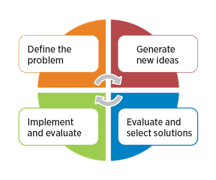

 Watch Video
