Make your website with Shopify


Make your website with Shopify – Shopify { if (props && props.hasConsentedAll) { loadGtm(); loadTealium(); } } cmp().updateOnChangeCallback(onConsentChanged); onConsentChanged(cmp()); } else { setTimeout(waitForCmpApi, 50); } }; if (activeConsentNotice) { waitForCmpApi(); } else { loadGtm(); loadTealium(); } ]]>

Build your dream business for $1/month

Start your free trial, then enjoy 3 months of Shopify for $1/month when you sign up for a monthly Basic or Starter plan.

  • Sign up for a free trial
  • Select a monthly Basic or Starter plan
  • $1/month pricing will be applied at checkout
  • Add products, launch your store, and start selling!

Start a free trial and enjoy 3 months of Shopify for $1/month on select plans. Sign up now

Opens in a new windowOpens an external siteOpens an external site in a new window

All the tools, apps, integrations and themes you need to get started

Try Shopify free for 3 days, no credit card required. By entering your email, you agree to receive marketing emails from Shopify.

Get started with ShopifyGet started with Shopify

Do even more with Shopify apps

Add features and functionality to your online store. From dropshipping to social media marketing, the Shopify App Store has over 6,000 apps to help you start, manage, and grow your business.

Your website, your way

Host your entire website on Shopify. You have complete control over the look and feel. From its layout, to content and colors. Choose from templates and themes in the Shopify theme store, or build it from scratch with full access to the HTML and CSS of your store.

Expand your reach

All Shopify websites include social media integration, such as Pinterest, Instagram, Facebook, Twitter, and Tumblr, and integrations with marketplaces such as Google, eBay and Walmart.

“We started with a simple site on Shopify ten years ago and have been able to expand since then. The customer service is friendly, simple and accessible for small businesses that want to grow.”

Jose Urrutia, Founder | La Portegna

FAQs

  • A website builder is a platform that allows you to set up a website with ease. Websites are built on platforms like Shopify. You can add images, graphics, copy, and other pieces of content to build a website. Shopify specializes in commerce, allowing you to also buy and sell products with a secure checkout.

  • Shopify is an excellent website builder to use. With drag-and-drop functionality, you can easily customize your website. No coding skills are required. Shopify specializes in commerce so there are a multitude of features such as a secure checkout, a point of sale system, and unlimited products to help you grow your brick-and-mortar or online store with ease. Shopify has over 6,000 apps, countless tools, themes, and various free features that allow you to maximize your website’s potential.

  • You can use tools, Chrome extensions, and apps found in search engines to determine which website builder was used for a particular website. Currently, there are millions of websites built using Shopify.

  • Shopify offers a multitude of features for small businesses, such as free apps, tools, and features that allow small businesses to get their businesses up-and-running on a tighter budget. As you scale your business, Shopify scales with you offering the services and features you need to meet your complex needs. On Shopify, you can keep your business small and manageable or grow your business to an enterprise level and still get the support you need as you grow.

  • You can build a website without a website builder by hiring a developer to build a custom website. You can hire a Shopify Expert that specializes in building websites to help you create a unique website. Enterprise businesses typically hire developers to build custom websites, though this option is less common for small businesses. Still, even with a custom website, you can use Shopify so you can access amazing features like a secure checkout, advanced reporting, and many other amazing features.

  • Shopify is a popular website builder for ecommerce. Shopify’s online store builder allows you to safely and securely run financial transactions on your website. Shopify also offers SEO features that allow websites built on Shopify to rank in search engines. There are numerous sales channels so you can sell your products on platforms outside of Shopify as well with ease. You can add an unlimited number of products to your website. Shopify also includes the cost of hosting in your monthly subscription so you can count on a reliable uptime.

  • Shopify’s website creator uses a simple drag-and-drop functionality that allows you to easily customize and build your website. Anyone can build a website on Shopify without needing any additional skills.

  • Shopify includes website hosting, domain registration and unlimited bandwidth and storage on all plans.


Source

Choose Shopify over Wix


Choose Shopify over Wix – Shopify { if (props && props.hasConsentedAll) { loadGtm(); loadTealium(); } } cmp().updateOnChangeCallback(onConsentChanged); onConsentChanged(cmp()); } else { setTimeout(waitForCmpApi, 50); } }; if (activeConsentNotice) { waitForCmpApi(); } else { loadGtm(); loadTealium(); } ]]>

Build your dream business for $1/month

Start your free trial, then enjoy 3 months of Shopify for $1/month when you sign up for a monthly Basic or Starter plan.

  • Sign up for a free trial
  • Select a monthly Basic or Starter plan
  • $1/month pricing will be applied at checkout
  • Add products, launch your store, and start selling!

Start a free trial and enjoy 3 months of Shopify for $1/month on select plans. Sign up now

Opens in a new windowOpens an external siteOpens an external site in a new window

See why merchants prefer Shopify to Wix

Try Shopify free for 3 days, no credit card required. By entering your email, you agree to receive marketing emails from Shopify.

Get started with ShopifyGet started with Shopify

Sell everywhere

Sell online with your ecommerce store, online marketplaces, social media, and in-person with Shopify point of sale.

Let customers pay their way

Accept credit cards, local payment methods, and accelerated checkouts with Shopify Payments, or choose from over 100 third-party payment gateways.

Simplified shipping

Fulfill one or multiple orders with a single click and give your customers negotiated shipping rates with Shopify Shipping.

Why Choose Shopify vs Wix

Feature Comparison Table between Shopify and Wix

All themes are mobile responsive Yes No
App store with hundreds of apps Yes Yes
Detailed sales reporting with Shopify Advanced No
International payment methods Yes Yes
Blog CMS capabilities Yes Yes
Drag and drop store builder Yes Yes
Free slogan maker Yes No
Terms and conditions generator Yes No
Gift card capability Yes No
Mobile app access to online store Yes Yes
Business loans Yes Yes
Custom online store Yes Yes
Reliable hosting Yes Yes
Custom domain name Yes Yes
Secure payment gateways over 100 over 50
Fraud analysis Yes Yes
Product limits Unlimited up to 5,000
International customer support In 21 Languages in 9 Languages

“Shopify is 100% the best platform for ecommerce. We have loved our experience with Shopify and will never leave.”

Scotty Arellano | Raging Mammoth

FAQs

  • Shopify is a great choice particularly when chosen as an ecommerce platform. On Shopify, you can sell a limitless number of products in over 130 currencies around the world, in up to five languages. Compared to Wix, Shopify allows more power and control to start and scale your business.

  • When comparing Wix vs Shopify pricing, Wix is the more affordable option in terms of dollars. However, when comparing the overall value by price, Shopify offers ecommerce businesses more features, integrations, and benefits making Shopify the better deal. Shopify has price plans starting at $5.00 USD/month, though most new businesses start with the Basic plan at $29.00 USD/month when paying yearly.

  • Wix specializes in websites for small businesses like bloggers while Shopify specializes in ecommerce and retail. On Shopify, you’ll find features to make running a business easier, whereas on Wix the features are catered to building a simple website. Shopify is best suited for businesses that intend to grow over time. Many big brands and to- tier singers, actors, and influencers use Shopify to power their businesses.

  • Shopify gives its users more control over their business and more power to scale it up. Unlike Wix, Shopify allows you to change your website theme without needing to start over. Shopify also has a more robust app marketplace than Wix, allowing you to integrate your store with an endless supply of features specifically for ecommerce and retail. On Shopify, you can sell in over 130 currencies to create a truly global brand. You can view both online and offline sales in one place using Shopify, unlike Wix. Shopify also offers a more detailed sales reporting dashboard to help you analyze your business’ performance.

  • Shopify specializes in ecommerce website building. Wix is a website builder that has an ecommerce component. Shopify has specialized ecommerce features, themes, apps, and more making Shopify better for ecommerce than Wix.

  • For only $9.00 USD/month, you can add the Shopify Buy Button to any Wix website. This Buy Button gives you full Shopify functionality on any website. To learn more: visit Shopify Buy Button


Source

8 Best Website Builders – 2023

Creating a modern, engaging, and beautiful website has never been easier – you just need to decide which method works best for you. The “traditional” self-hosted method is a great budget-friendly option, and it gives you a lot more control over your website’s performance. However, it’s a more involved process, as you’ll have to dive into the technical side of your website to connect everything. 

If you’d rather keep things simple (and I can’t say I blame you!), then you can follow the hosted method with a website builder. This method is slightly more expensive, but you won’t have to worry about the technical side of your website. Not only that, but you’ll usually be able to get your website up and running in an hour. 

Step 1: Find the Right Website Builder for Your Needs

Not every website builder is created equal, and some perform better in certain areas than others. From great e-commerce and marketing features that are perfect for small businesses, to design-focused builders with 100s of beautiful templates. The best choice for you will depend on your unique needs.

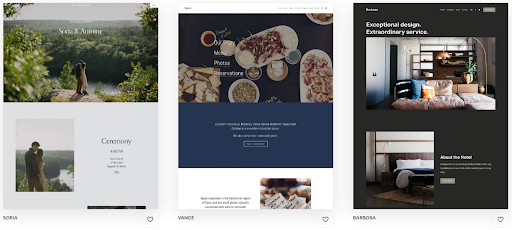
unnamed (2)unnamed (2)Squarespace powers beautiful websites with great functionality

These aren’t the only website builders out there, though, and I recommend that you thoroughly research your options before handing over your credit card details. Most website builders offer a free forever plan, a free trial, or a money-back guarantee that lets you try them out with zero risk. 

Most importantly, make sure you check each website builder’s pricing plan and included features before you make a decision. Picking a website builder outside of your budget, or one that’s within your budget but doesn’t have the features you or your business really need, can leave you frustrated later on. 

Step 2: Choose and Customize a Template

To start designing your website, you’ll need to choose a template. These are pre-made website designs that set the overall layout and style of your website that you can customize to fit your vision. Make sure you take a look at the template demo before you make your choice, as this’ll help you get a feel for what’s right for your website. 

Bear in mind that how much you can customize a template depends on the website builder. Almost every website builder will allow you to change colors, images, text formatting, and fonts, as well as let you set different fonts and styles for different headers and paragraphs. You’ll also be able to add new pages, and some website builders even have template-specific page types for you to use. 

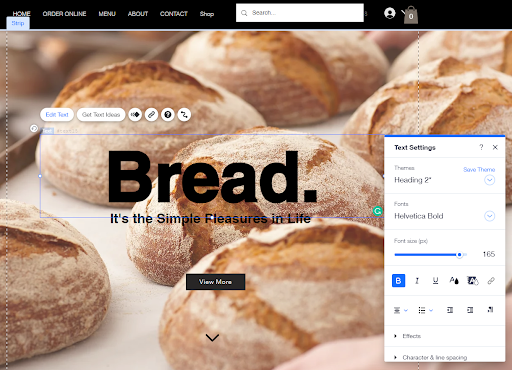
blog 2blog 2Wix’s drag-and-drop editor is a pleasure to use, too

Some builders allow you to fully customize any template. You’ll be able to change the layout of every page, as well as connect apps that add even more options. This will let you build a truly unique website, but having complete freedom can sometimes feel overwhelming.

Other website builders have a fixed layout based on the template you chose. This can feel a little limiting if you have a specific design in mind. However, by using unique and modern templates that are all thoughtfully designed, you’ll still be able to build a stunning, tailored website even within these restrictions.

Step 3: Register a Domain Name and Publish Your Site

Finally, you’ll need to choose a domain name. If you’re on a free website builder plan you’ll have to use a subdomain (for example, myname.site.com/myfancywebsite). Some builders offer a free domain name for a year if you sign up for an annual plan, however, you’ll have to pay extra to renew your domain name every year after that.

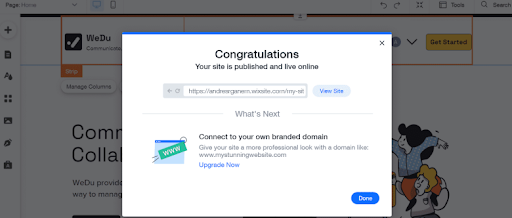
blog 3blog 3I wouldn’t recommend using a subdomain for a professional website

It’s worth noting, though, that you’re not required to purchase your domain name through your website builder. Don’t get me wrong, doing so makes life easier – your website builder will handle the registration and setup of your domain name if you purchase it through them. Just make sure to double-check the small print on whether you can transfer your domain name if you cancel your plan, as all website builders will let you do this. 

Purchasing your domain name with a domain registrar means you’ll usually get a better deal, plus you’ll have no restrictions on transferring your domain if you move to a different website builder. It’s more technically involved, but any good website builder will have a guide to walk you through the process. 

Before you hit Publish, make sure you take a look at your website in preview mode. Trust me, it’s remarkably common to think you’ve added everything to your website only to remember you’ve forgotten to fill out a box the second you click Publish. Checking out the preview means you can catch those small details before your first few visitors do. 

Once you’re happy with your website, click Publish, and you’re good to go. Congratulations, your website is now live! 

Take Your Website to the Next Level

In today’s market, it’s not enough to publish your website and hope it gets seen by your target audience. There are plenty of methods you can use to increase your website’s visibility. Here’s how you can attract more visitors to your website: 

  • Optimize your website for search engines. You can use built-in SEO tools that help your website appear higher in search results. Don’t worry if you don’t know the first thing about search engine optimization, either – these tools come with extensive, beginner-friendly guides.
  • Use email marketing. Email marketing is a great way for businesses to attract new customers and retain existing ones. Look out for free email marketing tools that integrate seamlessly with your website.
  • Start a blog. Blogging is a vital part of any modern marketing strategy. Your written content will improve your site’s search engine rankings and establish your authority as a leader within your industry. Most website builders will come with blogging functionality built in, making it easy to share your thoughts with your customers.
  • Design a logo. A custom logo shows you’re serious about your website and your business. Fortunately, you don’t have to break the bank to get one. There are AI logo designers included in some builder plans that generate fantastic designs.


Source

Skip to content