Creating a modern, engaging, and beautiful website has never been easier – you just need to decide which method works best for you. The “traditional” self-hosted method is a great budget-friendly option, and it gives you a lot more control over your website’s performance. However, it’s a more involved process, as you’ll have to dive into the technical side of your website to connect everything.
If you’d rather keep things simple (and I can’t say I blame you!), then you can follow the hosted method with a website builder. This method is slightly more expensive, but you won’t have to worry about the technical side of your website. Not only that, but you’ll usually be able to get your website up and running in an hour.
Not every website builder is created equal, and some perform better in certain areas than others. From great e-commerce and marketing features that are perfect for small businesses, to design-focused builders with 100s of beautiful templates. The best choice for you will depend on your unique needs.
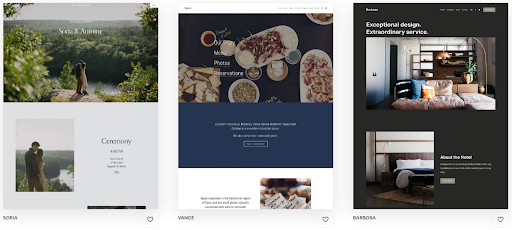 Squarespace powers beautiful websites with great functionality
These aren’t the only website builders out there, though, and I recommend that you thoroughly research your options before handing over your credit card details. Most website builders offer a free forever plan, a free trial, or a money-back guarantee that lets you try them out with zero risk.
Most importantly, make sure you check each website builder’s pricing plan and included features before you make a decision. Picking a website builder outside of your budget, or one that’s within your budget but doesn’t have the features you or your business really need, can leave you frustrated later on.
To start designing your website, you’ll need to choose a template. These are pre-made website designs that set the overall layout and style of your website that you can customize to fit your vision. Make sure you take a look at the template demo before you make your choice, as this’ll help you get a feel for what’s right for your website.
Bear in mind that how much you can customize a template depends on the website builder. Almost every website builder will allow you to change colors, images, text formatting, and fonts, as well as let you set different fonts and styles for different headers and paragraphs. You’ll also be able to add new pages, and some website builders even have template-specific page types for you to use.
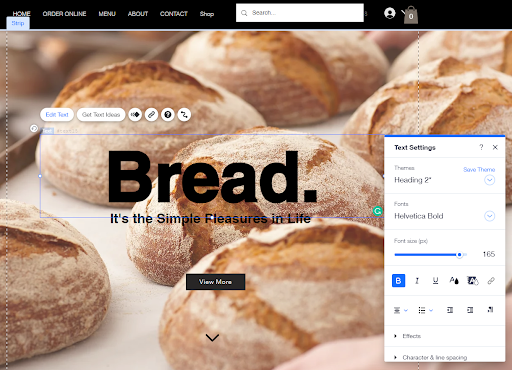 Wix’s drag-and-drop editor is a pleasure to use, too
Some builders allow you to fully customize any template. You’ll be able to change the layout of every page, as well as connect apps that add even more options. This will let you build a truly unique website, but having complete freedom can sometimes feel overwhelming.
Other website builders have a fixed layout based on the template you chose. This can feel a little limiting if you have a specific design in mind. However, by using unique and modern templates that are all thoughtfully designed, you’ll still be able to build a stunning, tailored website even within these restrictions.
Finally, you’ll need to choose a domain name. If you’re on a free website builder plan you’ll have to use a subdomain (for example, myname.site.com/myfancywebsite). Some builders offer a free domain name for a year if you sign up for an annual plan, however, you’ll have to pay extra to renew your domain name every year after that.
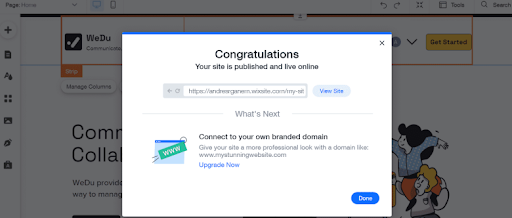 I wouldn’t recommend using a subdomain for a professional website
It’s worth noting, though, that you’re not required to purchase your domain name through your website builder. Don’t get me wrong, doing so makes life easier – your website builder will handle the registration and setup of your domain name if you purchase it through them. Just make sure to double-check the small print on whether you can transfer your domain name if you cancel your plan, as all website builders will let you do this.
Purchasing your domain name with a domain registrar means you’ll usually get a better deal, plus you’ll have no restrictions on transferring your domain if you move to a different website builder. It’s more technically involved, but any good website builder will have a guide to walk you through the process.
Before you hit Publish, make sure you take a look at your website in preview mode. Trust me, it’s remarkably common to think you’ve added everything to your website only to remember you’ve forgotten to fill out a box the second you click Publish. Checking out the preview means you can catch those small details before your first few visitors do.
Once you’re happy with your website, click Publish, and you’re good to go. Congratulations, your website is now live!
In today’s market, it’s not enough to publish your website and hope it gets seen by your target audience. There are plenty of methods you can use to increase your website’s visibility. Here’s how you can attract more visitors to your website: